ML revenue forecast.
Calibrated against 8999 apps in this category.
Confidence band
±15%
High — many comparable apps with verified data
At a glance
Earns 23.21× more than the category median (155/mo).
Ranks #62 of 8,999 in Auto & Vehicles (top 0.7% by revenue).
Launched Oct 09, 2013 · last updated Dec 14, 2019.
What the app looks like
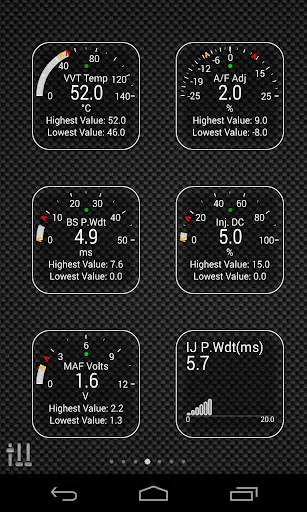
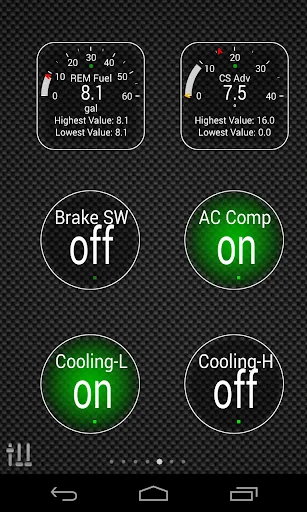
Live screenshots from the Play Store, captured by our snapshot worker. Tap any image to enlarge.
Advanced EX for NISSAN's revenue trajectory
Forecast revenue from snapshot history. Last 1 months.
Where Advanced EX for NISSAN sits in Auto & Vehicles
Revenue distribution of 8999 comparable apps. Advanced EX for NISSAN highlighted.
Advanced EX for NISSAN vs comparable apps
Revenue trajectory side-by-side. Bold = Advanced EX for NISSAN, ghosted = peers.
App spec
Version
2.0
Last update
Dec 14, 2019
Launched
Oct 09, 2013
Price
$5.99
Monetization
Paid
What Advanced EX for NISSAN actually does (from store listing)
Monitor specific NISSAN parameters in real-time, including engine advanced sensor data by adding this plugin to Torque Pro.
Advanced EX is a plugin for Torque Pro, extending the PID/Sensor list with more than 10 specific parameters from NISSAN vehicles, including:
* VVT Oil Temperature (*)
* Base Fuel Injection Pulse Width
* Fuel Injector Pulse Width / Duty Cycle
* Mass Air Flow (*)
* MAF Volts (*)
* EVAP Purge Duty
* A/F Ratio Adjustment
* Camshaft Advance Angle (*)
* Cruise Contr…
Monitor specific NISSAN parameters in real-time, including engine advanced sensor data by adding this plugin to Torque Pro.
Advanced EX is a plugin for Torque Pro, extending the PID/Sensor list with more than 10 specific parameters from NISSAN vehicles, including:
* VVT Oil Temperature (*)
* Base Fuel Injection Pulse Width
* Fuel Injector Pulse Width / Duty Cycle
* Mass Air Flow (*)
* MAF Volts (*)
* EVAP Purge Duty
* A/F Ratio Adjustment
* Camshaft Advance Angle (*)
* Cruise Control Speed (*)
* Cooling Fan Activation
* A/C Compressor Activation
* Idle Controller / Brake Switch
Sensors marked with (*) are not available on all cars, as it depends on special engine/parts.
*PLEASE NOTE* that other NISSAN models/engines may be supported, but the plugin was tested only on the following models/engines equipped with DiagOnCan (CANBUS ONLY):
For more information about NISSAN engines, visit http://en.wikipedia.org/wiki/List_of_NISSAN_engines
Advanced EX requires the latest version of Torque Pro installed in order to function. This is *NOT* a standalone application and will *NOT* work without Torque Pro.
Plugin Installation
-------------------------
1) After purchasing the plugin on Google Play, make sure that you see the plugin listed on your Android device installed applications list.
2) Launch Torque Pro and click on the "Advanced EX" icon
3) Select the appropriate engine type and return to Torque Pro main screen
4) Go to Torque Pro "Settings"
5) Make sure that you can see the plugin listed also on Torque Pro by clicking "Settings" > "Plugins"> "Installed Plugins".
6) Scroll down to "Manage extra PIDs/Sensors"
7) Usually this screen will not display any entries, unless you have added any pre-defined or custom PIDs in the past.
8) From the menu, choose "Add predefined set"
9) If your license is validated on Google Play you should see an entry for your engine. You may see predefined sets for other engine types, so make sure you pick the right one. If you don't see anything, probably you have an installation problem or validation error on Google Play. In this case, go back and repeat the installation procedure.
10) After clicking on the entry from the previous step, you should see several entries added to the Extra PIDs/Sensors list.
Note: Some sensors will be calculated real-time based on others. Make sure that you keep all sensors to avoid calculation errors.
Adding Displays
------------------------
1) After adding the additional sensors, go to the Realtime Information/Dashboard.
2) Press the menu key and then click on "Add Display"
3) Select the appropriate display type
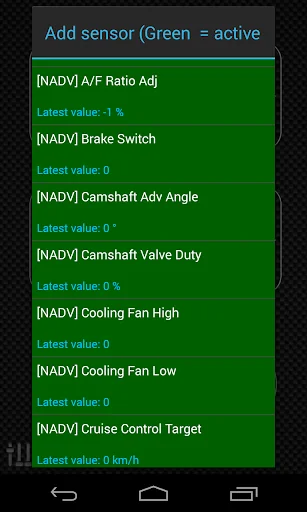
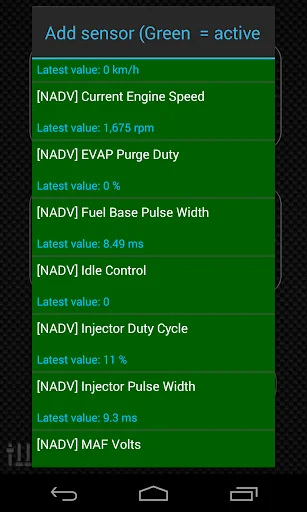
4) Select the appropriate sensor from the list. Sensors provided by Advanced EX begins with "[NADV]" and should be listed right after the time sensors in the top of the list.
More features/parameters will be added in further releases. If you have comments and/or suggestions please just let me know.
Comparable Android apps
The five apps in Auto & Vehicles with the closest revenue to Advanced EX for NISSAN. Click any to see its detail page.
Each forecast combines App Store rating, ratings count, monetisation model, pricing tier, IAP signals and ad-supported flag.
The base estimate is then multiplied by a per-category scaling factor learned from apps with founder-verified MRR.
Every number on this page comes from public APIs and bumetric's own snapshot history.
Full methodology covers input variables, accuracy bands per category and how we treat apps without comparable anchors.
See also the live data on Advanced EX for NISSAN's tracker page for current rating, reviews and snapshot timeline.
Building something similar? Get a free AI audit with $-revenue forecasts for every recommendation.

 Off-road Tripmeter 4x4
 Advanced EX for FIAT
 Advanced EX for HYUNDAI
 KMV: Ganhe Cashback em Postos
 Torque Plugin for PROTON full