What BlackBerry Hub+ Calendar actually does (from store listing)
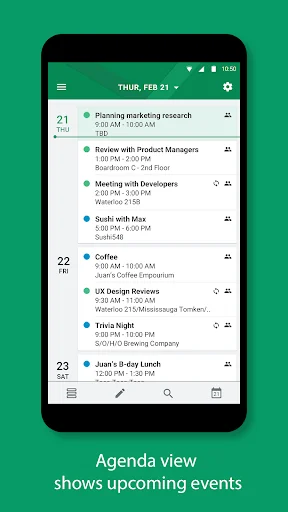
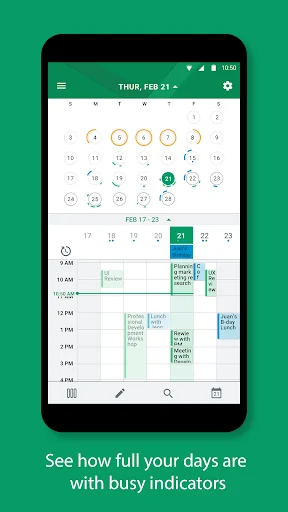
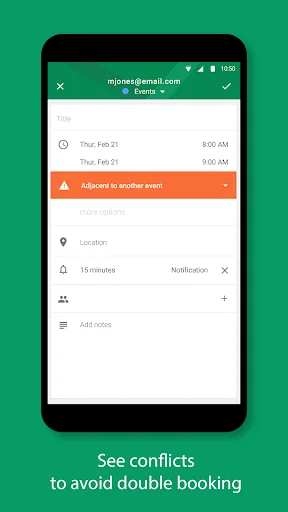
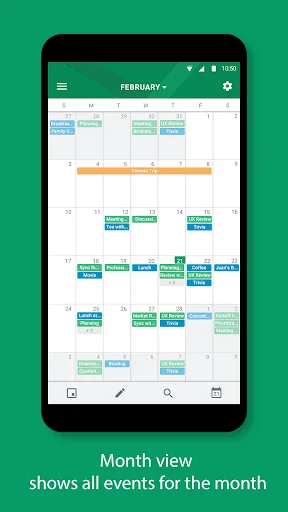
BlackBerry® Hub+ Calendar allows you to schedule appointments and create events with ease. Use the Agenda, Day, Week, or Month view to quickly glance at your events. The BlackBerry Hub+ Calendar lets you view and respond to meeting invitations directly from the BlackBerry® Hub+ Inbox. You can also call into meetings directly from your event reminder with just one tap.
Major Features:
• Sync work and personal accounts for a truly integrated experience. Supports Google Calendar, Outlook.com, O…
BlackBerry® Hub+ Calendar allows you to schedule appointments and create events with ease. Use the Agenda, Day, Week, or Month view to quickly glance at your events. The BlackBerry Hub+ Calendar lets you view and respond to meeting invitations directly from the BlackBerry® Hub+ Inbox. You can also call into meetings directly from your event reminder with just one tap.
Major Features:
• Sync work and personal accounts for a truly integrated experience. Supports Google Calendar, Outlook.com, Office 365, Microsoft Exchange ActiveSync, and subscribed calendars, amongst others
• Forward and respond to meeting invitations from BlackBerry Hub+ Calendar or Inbox quickly
• Meeting mode automatically silences your audible notifications during meetings
• Manage multiple calendars, and search for calendar events by subject, location, or participants
• Agenda view widget lets you see your schedule from your home screen at a glance
• Dark theme option gives your BlackBerry Hub+ Calendar a fresh new look and feel
• Fully supports Android Enterprise deployment and, when allowed by your administrator, supports unifying your personal and work calendars while maintaining strict data storage separation
BlackBerry Hub+ Calendar requires the BlackBerry® Hub+ Services app to deliver a consistent experience across all BlackBerry® applications, and to manage your subscriptions
Enjoy BlackBerry Hub+ Calendar for free on your BlackBerry® device!
If you don't have a BlackBerry device:
• Enjoy full functionality of the app for 30 days
• After 30 days, use the app with full functionality and some ads
• Purchase a monthly subscription to enjoy BlackBerry Hub+ Calendar without ads. This grants you access to all the BlackBerry Hub+ apps, including Inbox, Contacts, Notes, Tasks, and Launcher
• Enterprise Customers, please visit: http://web.blackberry.com/enterprise/contact-us
For support, visit docs.blackberry.com/en/apps-for-android/calendar/
Comparable Android apps
The five apps in Productivity with the closest revenue to BlackBerry Hub+ Calendar. Click any to see its detail page.
Each forecast combines App Store rating, ratings count, monetisation model, pricing tier, IAP signals and ad-supported flag.
The base estimate is then multiplied by a per-category scaling factor learned from apps with founder-verified MRR.
Every number on this page comes from public APIs and bumetric's own snapshot history.
Full methodology covers input variables, accuracy bands per category and how we treat apps without comparable anchors.
See also the live data on BlackBerry Hub+ Calendar's tracker page for current rating, reviews and snapshot timeline.
Building something similar? Get a free AI audit with $-revenue forecasts for every recommendation.

 Bits Watch Face
 Track - Email Tracking
 VisiMarks: Bookmark Manager
 Indore 311
 Type Droid (1000+ symbols)