What Email Templates actually does (from App Store listing)
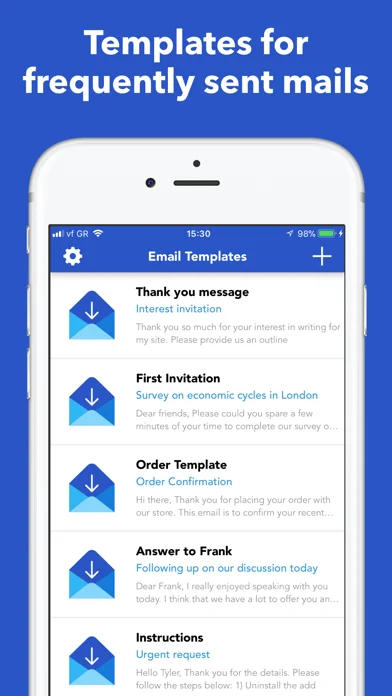
Create email templates for frequently sent emails
Features:
• Save subject, message and email addresses
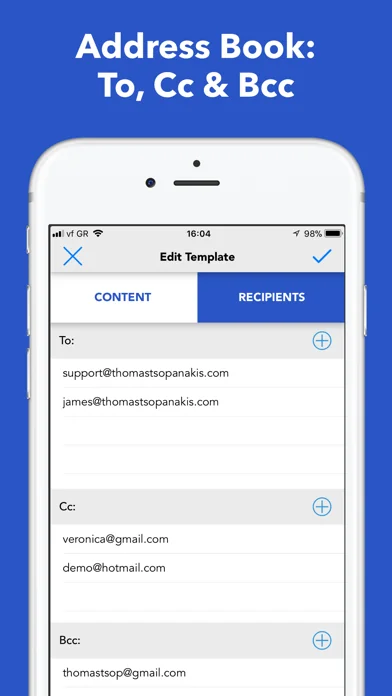
• Use multiple addresses (To, Cc & Bcc)
• Edit, reorder and delete templates
• Use a template in zero time
• Email yourself in a couple of seconds
• Create as many templates as you want
• Duplicate a template
• Mails are sent from within app, from the built-in mail composer
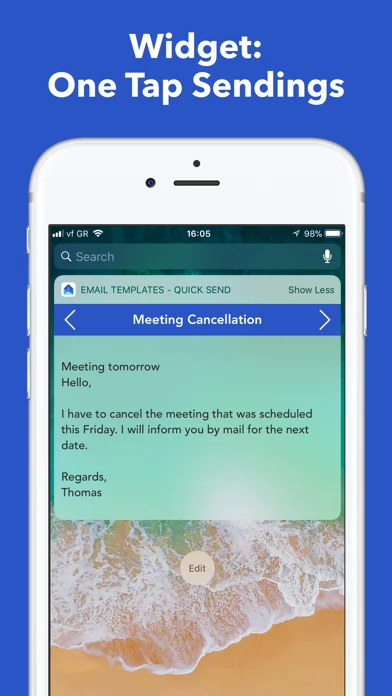
WIDGET ON TODAY OF NOTIFICATION CENTER
• See the templates you have created right on the notifications center
• Send an…
Features: • Save subject, message and email addresses • Use multiple addresses (To, Cc & Bcc) • Edit, reorder and delete templates • Use a template in zero time • Email yourself in a couple of seconds • Create as many templates as you want • Duplicate a template • Mails are sent from within app, from the built-in mail composer
WIDGET ON TODAY OF NOTIFICATION CENTER • See the templates you have created right on the notifications center • Send an email with one tap. Use your mail templates from the widget. • Easily navigate through all your templates.
iCLOUD SYNC Synchronise automatically your templates between your iOS devices, signed-in with the same iCloud account. You don’t have to do any setup!!! Stay organised from all your devices.
CONTACTS MANAGEMENT • Set To, Cc & Bcc email addresses • Type manually email addresses • Import addresses from your device’s Address Book (Integration with native Contacts app) • Automatically detect and remove duplicated addresses from templates’ recipients
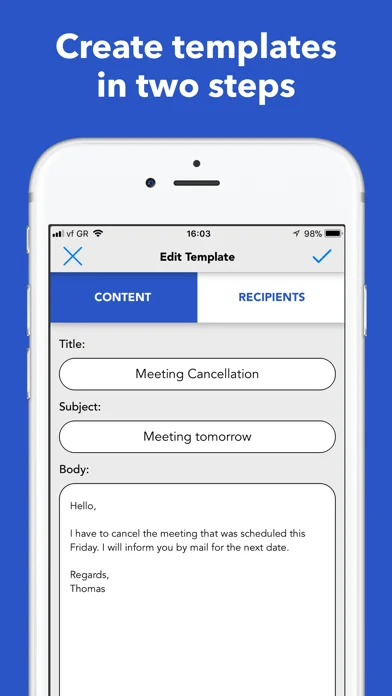
CREATE TEMPLATES IN TWO, EASY STEPS 1. Add the content message: Title, Subject and Body 2. Add contacts (To, Cc & Bcc) to send to
The most FUNCTIONAL, SIMPLE and EFFECTIVE mail templates!!!
——————————————
LOVED BY USERS
Brilliant Idea This app is exactly what evey business needs for quick response to all clients.
Exactly what I was looking for!! Thanks for developing this App! This is exactly what I was looking for. My day was consumed sending emails while on the go via my iPhone. This app saves me so much time-- the only problem is what will I do with all that free time? Great app!
Clean and simple 5 I looked at all the apps for email templates and this one I found to be the most useful. Very simple gets straight to the point. There aren't 100 million buttons that you have to push just to write a simple email template. Extremely user-friendly inconvenience too!
Made my life so much easier This app has helped make my email distribution much more efficient. I am thankful to the developer. Very intuitive! Keep it coming.
Comparable iOS apps
The five apps in Social Networking with the closest revenue to Email Templates. Click any to see its detail page.
Each forecast combines App Store rating, ratings count, monetisation model, pricing tier, IAP signals and ad-supported flag.
The base estimate is then multiplied by a per-category scaling factor learned from apps with founder-verified MRR.
Every number on this page comes from public APIs and bumetric's own snapshot history.
Full methodology covers input variables, accuracy bands per category and how we treat apps without comparable anchors.
See also the live data on Email Templates's tracker page for current rating, reviews and snapshot timeline.
Building something similar? Get a free AI audit with $-revenue forecasts for every recommendation.


 Couplier
 Tophy - Match,Chat,Dating
 BeReal. Deine Freunde in echt.
 Unifi: Home of the Unifi Card
 The Breakfast App