What Ezhuthani - Tamil Keyboard actually does (from store listing)
Ezhuthani 2 - Tamil Soft Keyboard
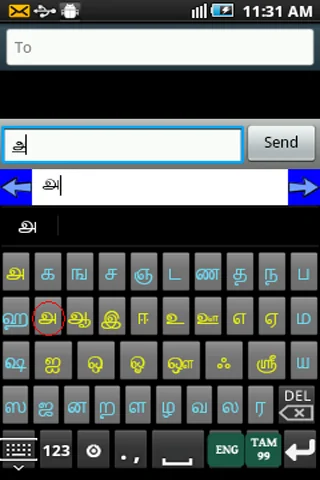
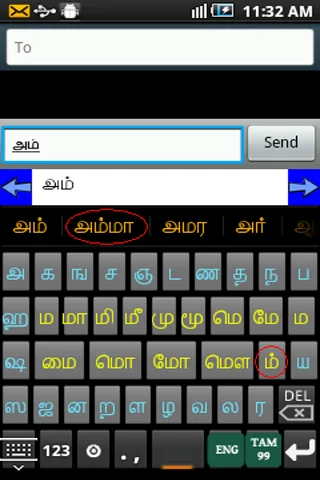
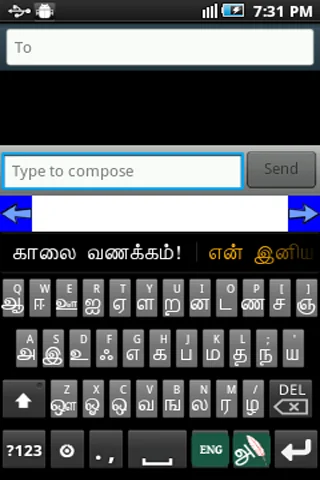
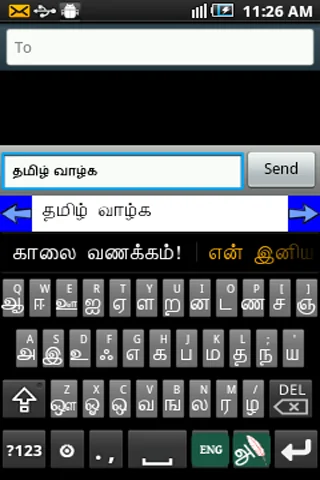
Ezhuthani Version 2 is a unique keyboard for naive users with Tamil99 and Ezhuthani Keyboard Layouts with full fledged Tamil Suggestion Keywords support with Tamil Reply Message Templates.
We will definitely add more features and more keyboard layouts in the future based on your feedback and encouragements. We tested on major Android phones and Tabs ( version 2.3 and above, for Previous Versions you can use the Ezhuthani 1.0.9 or older versions ). Use t…
Ezhuthani Version 2 is a unique keyboard for naive users with Tamil99 and Ezhuthani Keyboard Layouts with full fledged Tamil Suggestion Keywords support with Tamil Reply Message Templates.
We will definitely add more features and more keyboard layouts in the future based on your feedback and encouragements. We tested on major Android phones and Tabs ( version 2.3 and above, for Previous Versions you can use the Ezhuthani 1.0.9 or older versions ). Use the keyboard layout the way you want, and leave your comment with changes and features you want in it.
How to Enable Ezhuthani (Tamil Keyboard) on your Mobile
Android Version 2.0 and above
Settings - Locale and Text - Select Ezhuthani (Tamil Keyboard).
Long press in a text box and select input method and then select Ezhuthani (Tamil Keyboard).
Android Version 3.0 and above
Settings - Language and input - Configure input methods - Enable Ezhuthani (Tamil Keyboard) - Go Back - Current input method - Select Ezhuthani (Tamil Keyboard)
Android Version 4.0 and above
Settings - Language and input - Enable Ezhuthani(Tamil Keyboard) - Select Default - Select Ezhuthani(Tamil Keyboard)
Other Steps to ensure working of Ezhuthani :-
After installation, you can verify the Ezhuthani Installation, Open “Settings” and go to “Language and Keyboard” - you can see the Ezhuthani Keyboard on listing.
To Make Input method as Ezhuthani Tamil Keyboard. Theoretically, you can use with any textbox ( SMS, Search or wherever the textinput requires), You can find a keyboard icon at top left of title bar, please click on that.
Choose an input method such as "Ezhuthani Keyboard." Your Android Mobile will now use this method.
You can find Ezhuthani Tamil Keyboard Controls to type Tamil, Enjoy!
Mary Martin Team dedicated this product to the Tamil Community as a Free Android App. Please use and enjoy!
Mary Martin Team!
Comparable Android apps
The five apps in Productivity with the closest revenue to Ezhuthani - Tamil Keyboard. Click any to see its detail page.
Each forecast combines App Store rating, ratings count, monetisation model, pricing tier, IAP signals and ad-supported flag.
The base estimate is then multiplied by a per-category scaling factor learned from apps with founder-verified MRR.
Every number on this page comes from public APIs and bumetric's own snapshot history.
Full methodology covers input variables, accuracy bands per category and how we treat apps without comparable anchors.
See also the live data on Ezhuthani - Tamil Keyboard's tracker page for current rating, reviews and snapshot timeline.
Building something similar? Get a free AI audit with $-revenue forecasts for every recommendation.


 PDF Converter by IonaWorks
 All Documents Viewer
 Danke! App
 Password Manager: Safe
 Fone Wallet - AI, NFTs, DePIN