How much does Handwriting to Text PenToPrint earn?
Android app
from Serendi LTD
· Productivity
ML forecast★ 4.2 · 25KFree
~990/mo
ML revenue forecast.
Calibrated against 35236 apps in this category.
Confidence band
±15%
High — many comparable apps with verified data
At a glance
Earns 6.55× more than the category median (151/mo).
Ranks #1,778 of 35,236 in Productivity (top 5.0% by revenue).
Launched Jul 15, 2018 · last updated Feb 26, 2026.
What the app looks like
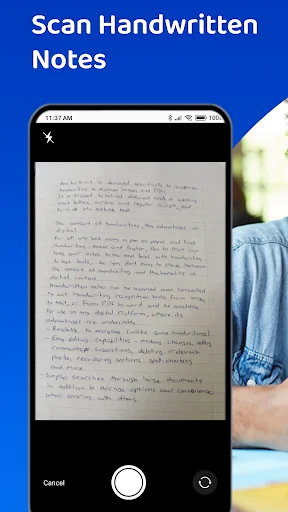
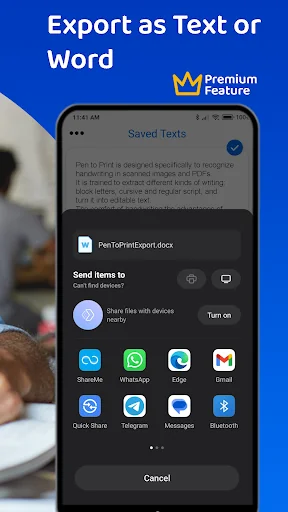
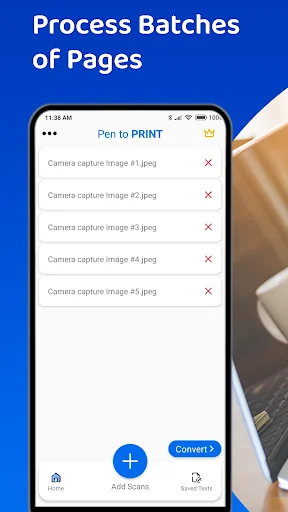
Live screenshots from the Play Store, captured by our snapshot worker. Tap any image to enlarge.
Handwriting to Text PenToPrint's revenue trajectory
Forecast revenue from snapshot history. Last 1 months.
Where Handwriting to Text PenToPrint sits in Productivity
Revenue distribution of 35236 comparable apps. Handwriting to Text PenToPrint highlighted.
Handwriting to Text PenToPrint vs comparable apps
Revenue trajectory side-by-side. Bold = Handwriting to Text PenToPrint, ghosted = peers.
App spec
Version
2.16.0
Last update
Feb 26, 2026
Launched
Jul 15, 2018
Price
Free
Monetization
Free
What Handwriting to Text PenToPrint actually does (from store listing)
If handwritten notes are part of your workflow but digitizing them is slow and frustrating, Pen to Print is exactly what you need. Built for precise handwriting to text and image to text conversion, it uses advanced handwriting OCR to digitize your notes and turn them into editable, searchable documents you can export to Word or as text to any app you use.
While other scanners struggle with handwriting, Pen to Print excels as a dedicated handwriting to text app and highly capable cursive read…
If handwritten notes are part of your workflow but digitizing them is slow and frustrating, Pen to Print is exactly what you need. Built for precise handwriting to text and image to text conversion, it uses advanced handwriting OCR to digitize your notes and turn them into editable, searchable documents you can export to Word or as text to any app you use.
While other scanners struggle with handwriting, Pen to Print excels as a dedicated handwriting to text app and highly capable cursive reader, accurately handling even messy handwriting and illegible scripts. The AI handwriting OCR engine is trained to decipher complex scribbles and digitize script from image to text that other tools simply cannot read.
How to Convert Handwriting to Text:
1. Scan: Use the app to take a photo of your handwritten notes or upload an existing image.
2. Convert Image to Text: Our handwriting OCR engine identifies the characters, and converts the handwriting to text.
3. Review & Edit: Use the editable interface to decipher any unique shorthand and verify the transcription.
4. Export: Save your results as a Word doc, TXT, or export to your cloud storage or other apps.
Key Benefits of Pen to Print:
Convert Handwriting to Editable Text:
Scan and convert any handwriting to text. Once you digitize, you can edit content directly, correct errors, and format the extracted text to fit your workflow.
Seamless Export and Sharing:
Move your converted notes exactly where you need them. Easily export your recognized text as a Word document or TXT file. Pen to Print supports smooth image to text export for maximum flexibility.
Searchable Digital Archive:
Create a long-term, searchable digital archive of your handwritten material. By converting your notes into digital text, you can quickly locate information and organize your files.
Who is it for? Pen to Print is the essential tool for:
- Students capturing and digitizing lecture notes and assignments into Word for easier study.
- Teachers converting and grading handwritten student work quickly.
- Genealogists and researchers transcribing historical documents and old family letters from handwriting to text
- Business teams digitizing meeting notes and brainstorms into searchable action items.
- Writers converting handwritten drafts and notebooks from scanned image to text making it into editable content.
- Individuals looking to decipher cursive or messy handwriting.
Why Choose Pen to Print?
Pen to Print provides a fast, accurate, and intuitive way to convert, digitize, and transcribe handwritten notes using advanced handwriting OCR. If you need a reliable handwriting to text and image to text tool that turns any scribble, note, or document into editable, searchable, and easily exportable digital text, Pen to Print delivers the complete solution.
For more information, handwriting to text services and online handwriting OCR tools, visit our website at https://www.pen-to-print.com
Download Pen to Print today, transform your handwriting to text and turn your notes into a powerful digital asset!
Comparable Android apps
The five apps in Productivity with the closest revenue to Handwriting to Text PenToPrint. Click any to see its detail page.
Each forecast combines App Store rating, ratings count, monetisation model, pricing tier, IAP signals and ad-supported flag.
The base estimate is then multiplied by a per-category scaling factor learned from apps with founder-verified MRR.
Every number on this page comes from public APIs and bumetric's own snapshot history.
Full methodology covers input variables, accuracy bands per category and how we treat apps without comparable anchors.
See also the live data on Handwriting to Text PenToPrint's tracker page for current rating, reviews and snapshot timeline.
Building something similar? Get a free AI audit with $-revenue forecasts for every recommendation.



 Jass artificial intelligent
 Event Manager: Party Planner
 Pearltrees
 Do It Now: RPG To Do List
 Music Alarm Clock - Alarmus