ML revenue forecast.
Calibrated against 36598 apps in this category.
Confidence band
±15%
High — many comparable apps with verified data
At a glance
Earns 11.44× more than the category median (154/mo).
Ranks #624 of 36,598 in Finance (top 1.7% by revenue).
Launched Jan 20, 2019 · last updated Jan 19, 2026.
What the app looks like
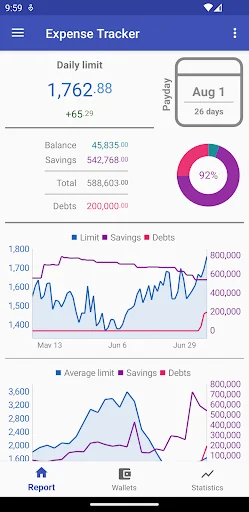
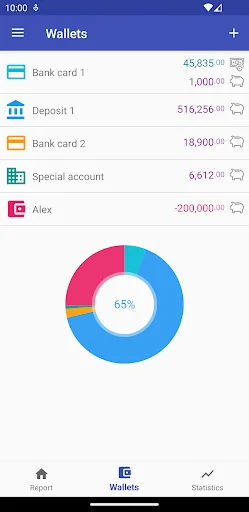
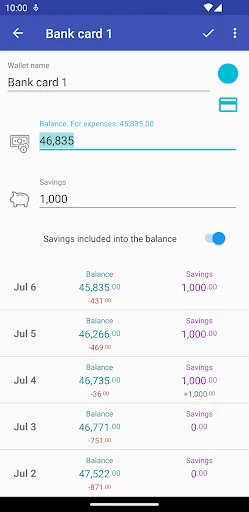
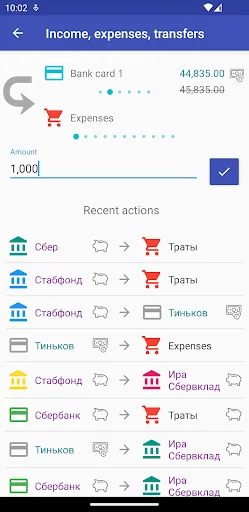
Live screenshots from the Play Store, captured by our snapshot worker. Tap any image to enlarge.
How much can I spend? Premium's revenue trajectory
Forecast revenue from snapshot history. Last 1 months.
Where How much can I spend? Premium sits in Finance
Revenue distribution of 36598 comparable apps. How much can I spend? Premium highlighted.
How much can I spend? Premium vs comparable apps
Revenue trajectory side-by-side. Bold = How much can I spend? Premium, ghosted = peers.
App spec
Version
3.2.1
Last update
Jan 19, 2026
Launched
Jan 20, 2019
Price
$2.99
Monetization
Paid
What How much can I spend? Premium actually does (from store listing)
Due to Google’s restrictions on purchasing this application, all functional limitations in the free version of the app have been temporarily lifted: https://play.google.com/store/apps/details?id=pravbeseda.spendcontrol
<b>About the app</b>
This app does not require you to enter every expense into the corresponding category. It does not answer the question "What was the money spent on?" The app’s goal is to tell you how much you can spend within your current budget.
<b>Who might need it<…
Due to Google’s restrictions on purchasing this application, all functional limitations in the free version of the app have been temporarily lifted: https://play.google.com/store/apps/details?id=pravbeseda.spendcontrol
About the app
This app does not require you to enter every expense into the corresponding category. It does not answer the question "What was the money spent on?" The app’s goal is to tell you how much you can spend within your current budget.
Who might need it
This app will help you if:
- you don’t always have enough money until your next paycheck
- you want to know if you can afford a certain purchase and how it will affect your family budget
- you struggle to save money for specific goals
How it works
Robert Kiyosaki rightly noted that “expenses tend to rise with income.” Therefore, it’s important to take control of your cash flow.
The app is very simple. You indicate how much money you have and when your next payday is. The app divides your total amount of money by the number of days until payday, resulting in your current daily spending limit.
As your balance decreases, the limit goes down. When a new calendar day begins, the limit is recalculated because payday is now closer. Once a day (or more often), adjust your balance and analyze the result. A drop in the limit for several consecutive days is a warning sign that you’re living beyond your means.
Some of your funds can be marked as “Savings” — they will be tracked separately and won’t affect the calculation of your daily spending limit.
App features
- Only one currency is used. If you want to track funds kept in a different currency, you’ll need to convert them to the app’s main currency yourself.
- Amounts are rounded to whole numbers — fractional parts don’t matter for the main goal of the app and only complicate your financial picture.
- The app fundamentally does not read your SMS or spy on you in any other way. Only the funds you enter are taken into account.
- No ads in the app.
Money-back guarantee: I will refund your money if the app disappoints you.
You can contact the developer at kalugaman@gmail.com. I will be happy to answer your questions and carefully consider your suggestions.
Comparable Android apps
The five apps in Finance with the closest revenue to How much can I spend? Premium. Click any to see its detail page.
Each forecast combines App Store rating, ratings count, monetisation model, pricing tier, IAP signals and ad-supported flag.
The base estimate is then multiplied by a per-category scaling factor learned from apps with founder-verified MRR.
Every number on this page comes from public APIs and bumetric's own snapshot history.
Full methodology covers input variables, accuracy bands per category and how we treat apps without comparable anchors.
See also the live data on How much can I spend? Premium's tracker page for current rating, reviews and snapshot timeline.
Building something similar? Get a free AI audit with $-revenue forecasts for every recommendation.


 BIDV SmartBanking
 Serve
Serve
 Navy Federal Credit Union
 MobilePay
 My Air