What Malayalam Keyboard for Android actually does (from store listing)
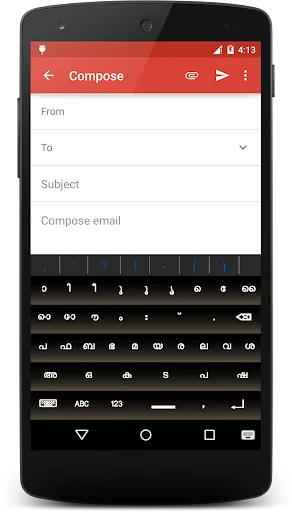
Malayalam Keyboard for Android™ is a simple and fast Malayalam input tool for Android devices. By setting the default input method in your android device,this tool can be used in any application for typing Malayalam.
Features:
--------------------------
1) A unique layout with 31 keys for typing Malayalam.
2) Easy to learn layout - Malayalam letter keys are arranged in alphabetical order
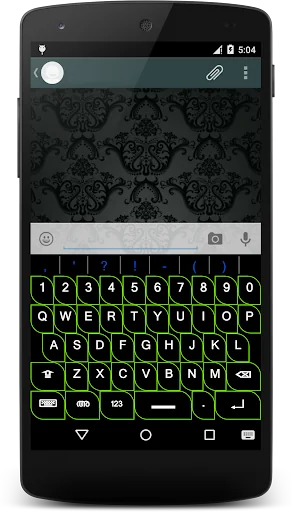
3) Quick switch to qwerty and symbol keypad
4) Fully customizable symbol and Emoji Layout with built …
Malayalam Keyboard for Android™ is a simple and fast Malayalam input tool for Android devices. By setting the default input method in your android device,this tool can be used in any application for typing Malayalam.
Features:
--------------------------
1) A unique layout with 31 keys for typing Malayalam.
2) Easy to learn layout - Malayalam letter keys are arranged in alphabetical order
3) Quick switch to qwerty and symbol keypad
4) Fully customizable symbol and Emoji Layout with built in layout Editor.
5) Unicode Character Map Support
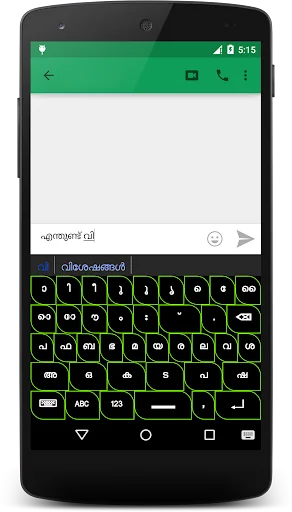
6) Subject-wise word prediction feature - create word prediction list from websites and text files
7) Easily input koottaksharam with single tap using the scrollable koottaksharam list above the keyboard(turn off prediction).
8)Automatic Word learning feature.
9) Can also be used in devices with Android version which did not support proper Malayalam rendering.
10) Real-time Malayalam spell checker facility.
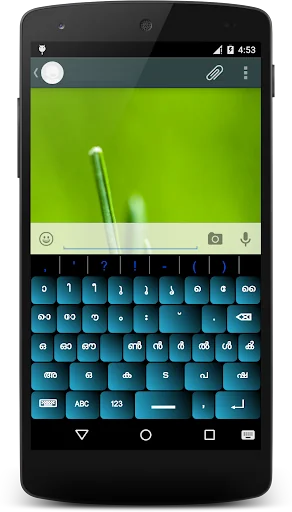
11) 7 keyboard themes with character color,size change option
Usage:
--------------
1) Keys in Second last row are for selection only (Eg: On pressing 'അ' in second last row, letters അ to ഐ - will displayed in third row of keypad- second last rows 'ക' key is used for input ക to ഞ from third row and so on)
2) Use 'ABC' key to launch the qwerty keypad.
3) Use '123' key to get the number and symbol keys.
4)Long Press Enter Key to launch Supplementary symbol keypad
5) For setting Malayalam Keyboard for Android™ as your default keyboard- Open Settings-> Language and input ->Select Malayalam Keyboard for Android as your default keyboard.
6) For adding new word to prediction database just tap on the specified word(first word in the list) displayed above the keypad.
7) Use the keyboard key(bottom left) to close the keypad or Long press on it to change default input method.
Notes:
----------------
Enter characters in unicode encoding format.
1)For writing കോ [ko] use this order ക +ോ , for writing കൈ= ക+ൈ
2)For writing koottaksharam use chandrakkala for joining characters. Eg : ക്ഷ = ക+്+ഷ
---------------------------
Send feedback and suggestions to patternlogics@gmail.com
Comparable Android apps
The five apps in Tools with the closest revenue to Malayalam Keyboard for Android. Click any to see its detail page.
Each forecast combines App Store rating, ratings count, monetisation model, pricing tier, IAP signals and ad-supported flag.
The base estimate is then multiplied by a per-category scaling factor learned from apps with founder-verified MRR.
Every number on this page comes from public APIs and bumetric's own snapshot history.
Full methodology covers input variables, accuracy bands per category and how we treat apps without comparable anchors.
See also the live data on Malayalam Keyboard for Android's tracker page for current rating, reviews and snapshot timeline.
Building something similar? Get a free AI audit with $-revenue forecasts for every recommendation.


 VPN Malaysia Unlimited KL VPN
 EDGE MASK
 Army Knife for Android
 Data traffic amount checker
 Microphone-Voice Amplifier