What Matrix Calculator (Matrices) actually does (from store listing)
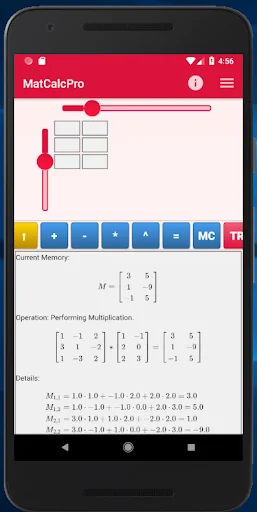
MatCalc is a simple matrix calculator. It has an easy and elegant matrix input and makes precise and analytic algebraic calculations
With MatCalc you can make all basic operations between matrices including:
addition, multiplication, exponentiation,
inversion,
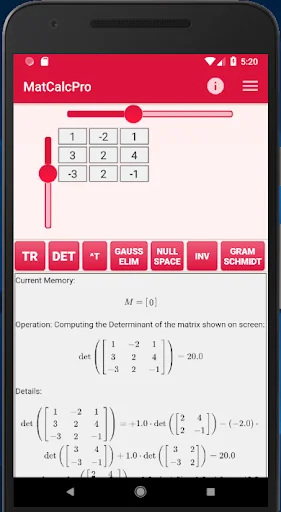
determinant computation/calculator
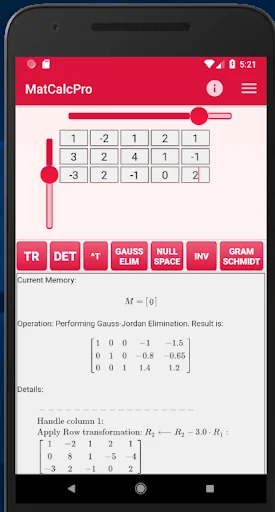
Gauss - Jordan Elimination calculator
Gram - Schmidt normalization
Null space computation
Characteristic polynomial computation
Eigenvalues computation
Eigenvectors computation
e.t.c.
Perfec…
MatCalc is a simple matrix calculator. It has an easy and elegant matrix input and makes precise and analytic algebraic calculations
With MatCalc you can make all basic operations between matrices including:
addition, multiplication, exponentiation,
inversion,
determinant computation/calculator
Gauss - Jordan Elimination calculator
Gram - Schmidt normalization
Null space computation
Characteristic polynomial computation
Eigenvalues computation
Eigenvectors computation
e.t.c.
Perfect for students that study linear algebra or matrices!
MataCalc calculator uses fractions to make precise computations.
Besides the actual result, the calculator provides details for all performed computations.
You can set the matrix dimensions using the scrollbars and then you can input the matrix elements by typing in each cell (the cells become active/inactive once you move the respective scrollbar). You can move to another cell either by pressing the NEXT key on the soft keyboard, or by tapping the desired cell. You don't have to enter zero values. Just leave the respective cell empty.
After you have entered the entries of the desired matrix, you can press one of the available buttons (described below) to perform an operation on the given matrix, or store the given matrix in memory and give a second matrix to perform an operation between the two matrices. Note, that GOLD buttons have an effect on the actual contents of the given matrix, the BLUE buttons change the contents of the matrix stored in memory, while RED buttons perform computations on the given matrix and show the result on screen (below the buttons).
This calculator app contains ads. Sometimes (if you press a button to perform an operation) an ad will appear. If you don't want to see the ad, or you don't want to click on that ad, you can simply close it (e.g. by pressing the back button) and see the result of the desired operation on screen. If you don't want to see ads, please consider upgrading to the Pro version of the calculator.
#matrix #matrices #eigenvalues #gauss #calculator
Comparable Android apps
The five apps in Education with the closest revenue to Matrix Calculator (Matrices). Click any to see its detail page.
Each forecast combines App Store rating, ratings count, monetisation model, pricing tier, IAP signals and ad-supported flag.
The base estimate is then multiplied by a per-category scaling factor learned from apps with founder-verified MRR.
Every number on this page comes from public APIs and bumetric's own snapshot history.
Full methodology covers input variables, accuracy bands per category and how we treat apps without comparable anchors.
See also the live data on Matrix Calculator (Matrices)'s tracker page for current rating, reviews and snapshot timeline.
Building something similar? Get a free AI audit with $-revenue forecasts for every recommendation.



 ПДД Кыргызстан знаки и экзамен
 PictoDroid Lite
 Pascal Programming
 manav mangal SMART SCHOOL
 Life in the UK Test 2026 Prep