What Soundstorm for Hue actually does (from store listing)
Get your party started using your Philips Hue lights. Watch your lights pulse and flash to your favorite songs.*
*Hue Bridge or Hue Bridge Pro required
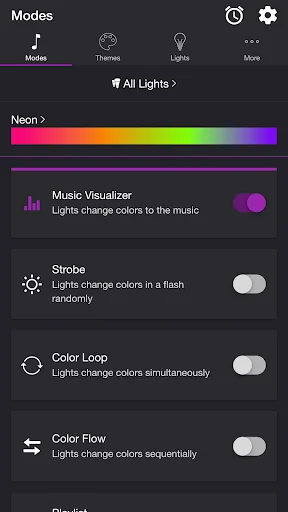
MODES
• Music Visualizer — Lights change colors to the music (Microphone access required)
• Strobe — Lights change colors in a flash randomly
• Color Loop — Lights change colors simultaneously
• Color Flow — Lights change colors sequentially
• Playlist — Each mode plays for a random duration
THEMES
Choose from one of the predef…
Get your party started using your Philips Hue lights. Watch your lights pulse and flash to your favorite songs.*
*Hue Bridge or Hue Bridge Pro required
MODES
• Music Visualizer — Lights change colors to the music (Microphone access required)
• Strobe — Lights change colors in a flash randomly
• Color Loop — Lights change colors simultaneously
• Color Flow — Lights change colors sequentially
• Playlist — Each mode plays for a random duration
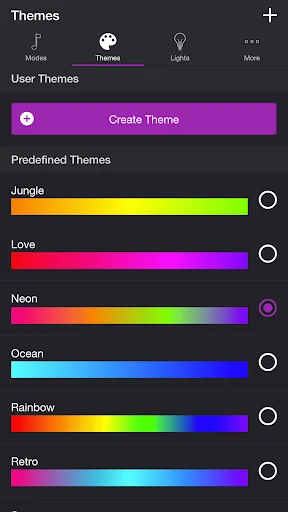
THEMES
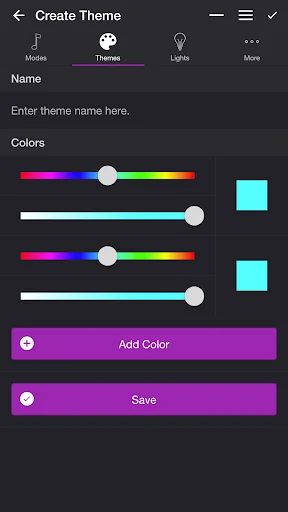
Choose from one of the predefined themes or create your own on the Themes tab. Each mode uses the colors in the selected theme. To edit a user theme in the list, swipe the item to the left and tap the pencil icon. You can reorder colors for the Color Loop mode.
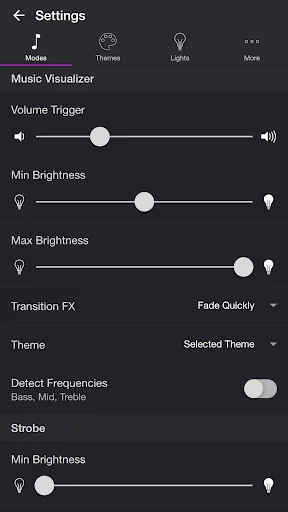
SETTINGS
Music Visualizer
• Change volume trigger for light effects
• Change minimum brightness of lights when inactive
• Change maximum brightness of light effects
• Change transition effects: Random, Pulse, Fade Quickly, Fade Slowly
• Change theme
• Toggle detect frequencies (Bass, Mid, Treble)
Strobe
• Change minimum brightness of lights when inactive
• Change maximum brightness of light effects
• Change theme
Color Loop, Color Flow
• Change brightness of lights
• Change color or light sequence: In Order, Reverse Order, Random Order
• Change transition effects: Random, Pulse, Fade Quickly, Fade Slowly
• Change transition timeout
• Change theme
Playlist
• Change sequence: In Order, Reverse Order, Random Order
• Change order
• Toggle modes
• Change duration range for each mode
General
• Change default end state: Revert, Off
• Change sleep end state: Revert, Off
• Select mode to automatically start when app opens
• Choose time to automatically stop selected mode
LIGHTS / GROUPS
Select one or more lights for your light show on the Lights tab. Choose a group that you set up using the Philips Hue app, or create a new zone in the Soundstorm for Hue app. To edit a room or zone in the list, swipe the item to the left and tap the pencil icon. You can reorder lights for the Color Flow mode. When you add, remove, or change lights, pull down the list to refresh.
ADDITIONAL FEATURES
• Sleep Timer — Choose the state of your lights after the timer ends with the Sleep End State setting.
Please contact me at support@soundstorm.scottdodson.dev if you experience any issues. I'd love to hear your thoughts and appreciate you taking the time to rate and review the app. I want to continue to improve Soundstorm for Hue and create a great experience for you and future users. Thank you! —Scott
Comparable Android apps
The five apps in Entertainment with the closest revenue to Soundstorm for Hue. Click any to see its detail page.
Each forecast combines App Store rating, ratings count, monetisation model, pricing tier, IAP signals and ad-supported flag.
The base estimate is then multiplied by a per-category scaling factor learned from apps with founder-verified MRR.
Every number on this page comes from public APIs and bumetric's own snapshot history.
Full methodology covers input variables, accuracy bands per category and how we treat apps without comparable anchors.
See also the live data on Soundstorm for Hue's tracker page for current rating, reviews and snapshot timeline.
Building something similar? Get a free AI audit with $-revenue forecasts for every recommendation.


 DStv
DStv
 CANAL+, Live and catch-up TV
 Hat Monkey by Chris Haughton
 Paramount+
 FxGuru: Movie FX Director