ML revenue forecast.
Calibrated against 36598 apps in this category.
Confidence band
±15%
High — many comparable apps with verified data
At a glance
Earns 9.09× more than the category median (154/mo).
Ranks #839 of 36,598 in Finance (top 2.3% by revenue).
Launched May 06, 2026 · last updated Oct 11, 2025.
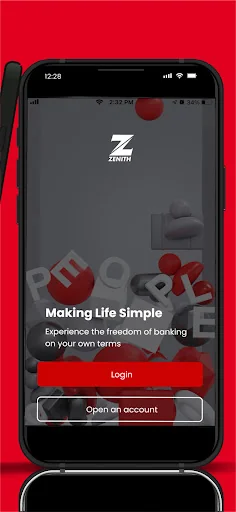
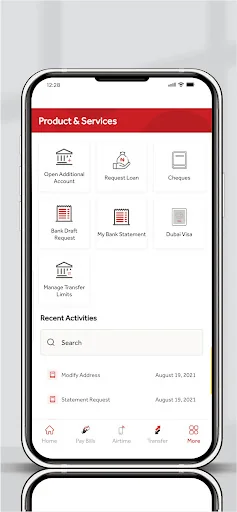
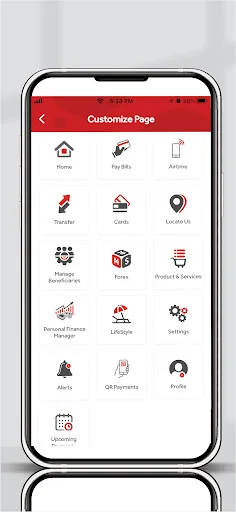
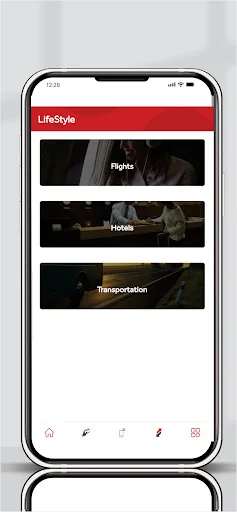
What the app looks like
Live screenshots from the Play Store, captured by our snapshot worker. Tap any image to enlarge.
Zenith Bank Mobile App's revenue trajectory
Forecast revenue from snapshot history. Last 1 months.
Where Zenith Bank Mobile App sits in Finance
Revenue distribution of 36598 comparable apps. Zenith Bank Mobile App highlighted.
Zenith Bank Mobile App vs comparable apps
Revenue trajectory side-by-side. Bold = Zenith Bank Mobile App, ghosted = peers.
App spec
Version
2.16.30
Last update
Oct 11, 2025
Launched
May 06, 2026
Price
Free
Monetization
Free
What Zenith Bank Mobile App actually does (from store listing)
Make your life experiences simpler and stay in control with Zenith Mobile Banking app.
Manage your finances; make card settlements, transfer funds and make payments using QR (Quick Response codes).
How do I Register?
To register, simply download the app and select any of the three (3) registration options
1. With Hardware Token
a) Enter Account number and Continue
b) Click Hardware Token
c) Enter the Token from the device and Token PIN
• Create and confirm Password (six digit…
Make your life experiences simpler and stay in control with Zenith Mobile Banking app.
Manage your finances; make card settlements, transfer funds and make payments using QR (Quick Response codes).
How do I Register?
To register, simply download the app and select any of the three (3) registration options
1. With Hardware Token
a) Enter Account number and Continue
b) Click Hardware Token
c) Enter the Token from the device and Token PIN
• Create and confirm Password (six digits)
• Create and confirm Mobile PIN (four digits)
• Click on Submit (Operation Successful)
d) The user is required to enter Account Number and Password to log on.
2. With Card
a) Enters Account Number and Continue
b) Select Card
c) Enter the Last Six Digits of the Card and Card Pin
• Create and Confirm Password (six digits)
• Create and Confirm Mobile PIN (four digits)
• Clicks on Submit (Operation Successful)
d) The user is required to enter Account Number and Password to log on to the App.
3. Branch Activation
Note:
• Registration is one time
• To Add New Device, user should simply login with Account Number and Password, System will prompt for Device Registration.
• Customer can authorize with Token or Card Details.
• Users can add up to 3 Devices.
Some features of Zenith Mobile Banking are:
a) Overview: view all accounts (current, savings, fixed deposit, Domiciliary etc.)
• Account balance
• Account History
• Search
b) Transfers
• Transfer History
• Own Account Transfer
• Zenith account Transfer
• Other Banks Transfer
• Foreign Transfer
• Open Account for Beneficiary
c) Data Bundles
d) Airtime Recharge
e) Bills payment
• Zenith Billers
• Quickteller Merchants
f) QR Payments
g) Scheduled Payments
• Transfers
• Airtime Payment
• Bills Payment
h) Cards
• Card Settlement
• Activate / Deactivate Card
• Card Dispense Manager
i) Cheques
• Request Cheque Book
• Confirm Cheque
• Stop Cheque
• Verify Cheque Status
• Bank Draft
j) Travel and Leisure
• Travelstart
• Dubai Visa
k) Bank Services
• My Bank Statement
l) Message *These are messages sent to the customer by the bank*
m) Settings
• Manage Beneficiaries
• Customize eaZylinks
• Change Authorization
• Change Password
• Change PIN
• Reset PIN
• Transfer Limits
• Hide Account
• Show Account
• My Devices
• My BVN
• Update KYC
n) Zenith Near Me
o) Sign Out
Comparable Android apps
The five apps in Finance with the closest revenue to Zenith Bank Mobile App. Click any to see its detail page.
Each forecast combines App Store rating, ratings count, monetisation model, pricing tier, IAP signals and ad-supported flag.
The base estimate is then multiplied by a per-category scaling factor learned from apps with founder-verified MRR.
Every number on this page comes from public APIs and bumetric's own snapshot history.
Full methodology covers input variables, accuracy bands per category and how we treat apps without comparable anchors.
See also the live data on Zenith Bank Mobile App's tracker page for current rating, reviews and snapshot timeline.
Building something similar? Get a free AI audit with $-revenue forecasts for every recommendation.


 Fifth Third: 53 Mobile Banking
 Uzum Bank onlayn. O'zbekiston
 POSB digibank
 CareCredit Mobile
 카카오뱅크
카카오뱅크