
 55
55

BU Score
Solid

Fiber Optic Color Code



✍️ BU Analytics Review
“
Fiber Optic Color Code is an iOS app from Grant Thompson in the Utilities category, currently rated 4.6★ across 61 ratings. Initial signal reads as mixed reviews — supporters praise core features while critics cite stability/value gaps.
Our BU Score puts it at 55 — Solid (established niche player). For a Utilities app, that means established niche player.
Track changes month-over-month in the Performance section below — live snapshot history and revenue forecast included.
📊 Performance Tracking LIVE
Loading…
Rating
—
Reviews
—
Forecast Revenue / mo
—
Snapshots tracked
0
since first record
Range:
💰 Forecast Revenue / mo
MODELRevenue forecast computed from BU's 234 trigger model on each snapshot. Calibrated against ground-truth from 58 verified-revenue apps.
🔬Forecast Breakdown — Why This Estimate?Top 5 of 5 triggers
Our ML model uses 200+ signals from public data. These are the most influential for this app:
| Paid app ($2.99)METRIC | +$2,800 | |
| Excellent rating (4.6★)METRIC | +$2,200 | |
| Mature app (8y old)METRIC | +$1,500 | |
| Multilingual (16 languages)METRIC | +$1,500 | |
| Pre-traction phase (61 ratings)METRIC | −$300 |
METRIC = structural app data · REVIEW = mined from user reviews · ✓ VERIFIED = Stripe-verified anchor (TrustMRR)
📈 Reviews Growth
LIVECumulative review count from first BU snapshot. Each point = a tracked update.
💚Sentiment Over Time↑ green = positive · ↓ red = negative
Jul 25
Sep 25
Dec 25
⭐ Rating Trend
LIVEAverage rating evolution. Updates with each new review batch.
🗓️ Snapshot Timeline
HISTORYEach bar shows a tracked update and the metric delta from the previous snapshot.
App Specs
🔐 Own this app? Claim & verify MRR →💾 3 MB🔞 4+📱 iOS 16.6+🔖 v8.09.03🔄 updated 2y ago🌐 CS, NL, EN, FR, DE +11📂 Utilities💰 Paid🚀 Launched 2018 (8y old)
📝 About this app
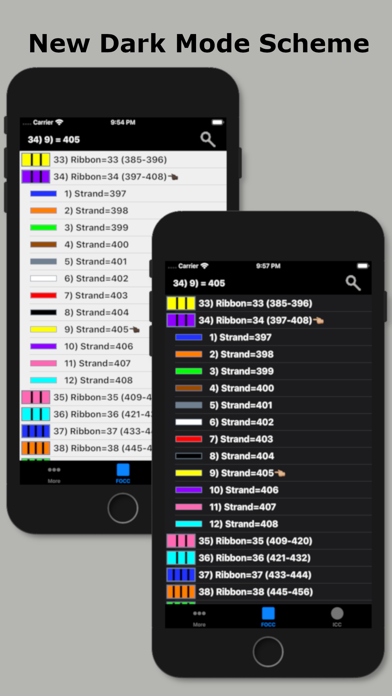
Fiber Optic Color Code is a searchable expanding chart of fiber strands that translates the color code of Loose Tube, Ribbon and other high count fiber optic cables.
~Feature highlights:
customizable cables from 12F to 6912F, custom color codes, customizable fiber # searches, searchable cable count (with reverse cable count) and color code drill down.
This app shall be used only as a handy secondary reference tool as we know there are mistakes made in the field and incorrect records that always need to be taken into account. Use of a tone source as a primary identifier will always be more accurate.
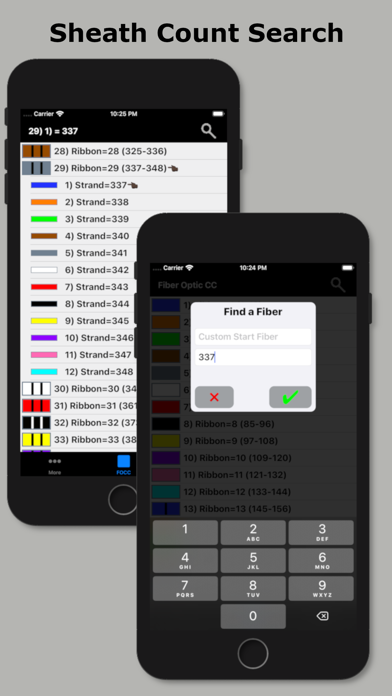
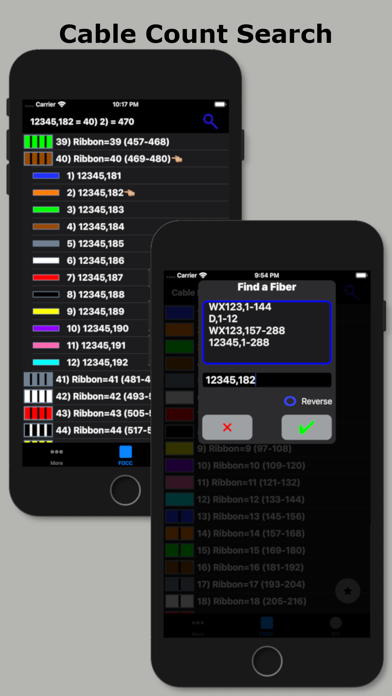
Locate fibers with or without cable counts. Simply enter a strand # without a cable count or enter the 'Cable,Fiber' if you're using a complex cable count (app auto detects if there's a count or not). The app will then auto expand and place index pointers at your found fibers locations.
~To configure High Density cables (RILT#1-5 positions) to include Ribbon in loose tube, Spår/slotted core or yarn bundled cable :
1) Select the round cable type configuration button at the bottom right of the main screen.
2) Select any of the last 5 items in the list labeled as RILT#1-5.
3) Select the bottom left "More" tab.
4) Select "Set RILT" and configure
RILT#1-5 maximum configuration of any combination (not to exceed 6912F):
Super Tubes: 1-24max
Ribbons: 1-144max
Fibers: 1-48max
~Create customized color codes:
1) Select the bottom left "More" tab.
2) Then select 'Set Color Code' from the 'More Menu'.
3) Scroll down to the very bottom of the populated color code list and select 'Custom Setup'.
4) At the next screen that appears; click the 'Start here' button, then select a color code position you'd like to edit from the list.
5) Edit the list name.
6) Start with tube colors then edit super & fiber colors (starting with tube colors will pre-populate super and fiber colors)
7) Then click the green check button on the fibers screen after reviewing your selections to save.
~Input Cable Count screen
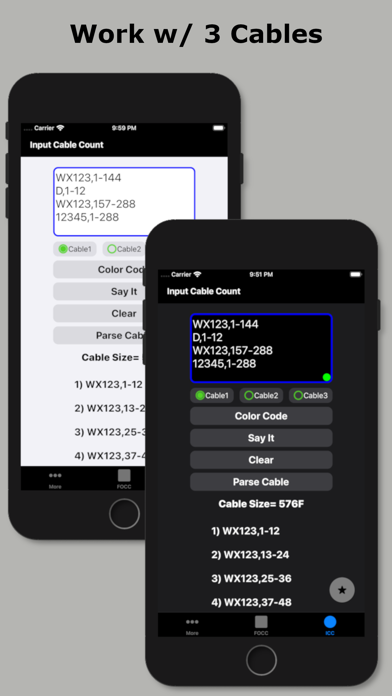
While not necessary to use in the app. You can enter a full complex cable count that can be split into a cable type sub-unit configuration of your choice (2, 4, 6, 8, 12, 14, 16, 18, 24, 32, 36, 48, RILT #1-5).
~Smart Save
Saving a cable count by a cable position turns the Search Button Icon and related cable count text box borders to a distinguishable color for keeping track of which cable cable is being currently used within the app.
1) Select the round Cable Type button
2) Enter cable count
3) Optionally select a position to save count to
4) Click the "Color Code" button
Cable1 = Blue
Cable2 = Orange
Cable3 = Green
Custom Start Fiber (Without a cable count) = Red
Unsaved cable count or Start fiber is #1 = Gray
Smart Save radio button color key:
green = vacant
black = existing count stored
red = existing count to be overwritten
blue = saved successfully
To remove a previously saved cable count. Select the position to be deleted and long click the Clear button.
~Cable Count Input validation dot:
Provides the user with a simple way to know if the cable count entered is valid for the color code chart. It will turn red if missing a cable name, missing a comma, the low fiber range is greater than the high fiber range, or the sum of the whole cable count is greater than the chosen cable type.
~Double Space Auto Punctuation:
Easily enter a cable count using the apps built in double space auto-punctuation feature by:
1) Enter cable name followed by 2 spaces (app automatically places a comma)
2) Enter the low fiber followed by 2 spaces (app automatically places a dash)
3) Enter the high fiber followed by 2 spaces (app automatically drops down for next line of count)
~Feature highlights:
customizable cables from 12F to 6912F, custom color codes, customizable fiber # searches, searchable cable count (with reverse cable count) and color code drill down.
This app shall be used only as a handy secondary reference tool as we know there are mistakes made in the field and incorrect records that always need to be taken into account. Use of a tone source as a primary identifier will always be more accurate.
Locate fibers with or without cable counts. Simply enter a strand # without a cable count or enter the 'Cable,Fiber' if you're using a complex cable count (app auto detects if there's a count or not). The app will then auto expand and place index pointers at your found fibers locations.
~To configure High Density cables (RILT#1-5 positions) to include Ribbon in loose tube, Spår/slotted core or yarn bundled cable :
1) Select the round cable type configuration button at the bottom right of the main screen.
2) Select any of the last 5 items in the list labeled as RILT#1-5.
3) Select the bottom left "More" tab.
4) Select "Set RILT" and configure
RILT#1-5 maximum configuration of any combination (not to exceed 6912F):
Super Tubes: 1-24max
Ribbons: 1-144max
Fibers: 1-48max
~Create customized color codes:
1) Select the bottom left "More" tab.
2) Then select 'Set Color Code' from the 'More Menu'.
3) Scroll down to the very bottom of the populated color code list and select 'Custom Setup'.
4) At the next screen that appears; click the 'Start here' button, then select a color code position you'd like to edit from the list.
5) Edit the list name.
6) Start with tube colors then edit super & fiber colors (starting with tube colors will pre-populate super and fiber colors)
7) Then click the green check button on the fibers screen after reviewing your selections to save.
~Input Cable Count screen
While not necessary to use in the app. You can enter a full complex cable count that can be split into a cable type sub-unit configuration of your choice (2, 4, 6, 8, 12, 14, 16, 18, 24, 32, 36, 48, RILT #1-5).
~Smart Save
Saving a cable count by a cable position turns the Search Button Icon and related cable count text box borders to a distinguishable color for keeping track of which cable cable is being currently used within the app.
1) Select the round Cable Type button
2) Enter cable count
3) Optionally select a position to save count to
4) Click the "Color Code" button
Cable1 = Blue
Cable2 = Orange
Cable3 = Green
Custom Start Fiber (Without a cable count) = Red
Unsaved cable count or Start fiber is #1 = Gray
Smart Save radio button color key:
green = vacant
black = existing count stored
red = existing count to be overwritten
blue = saved successfully
To remove a previously saved cable count. Select the position to be deleted and long click the Clear button.
~Cable Count Input validation dot:
Provides the user with a simple way to know if the cable count entered is valid for the color code chart. It will turn red if missing a cable name, missing a comma, the low fiber range is greater than the high fiber range, or the sum of the whole cable count is greater than the chosen cable type.
~Double Space Auto Punctuation:
Easily enter a cable count using the apps built in double space auto-punctuation feature by:
1) Enter cable name followed by 2 spaces (app automatically places a comma)
2) Enter the low fiber followed by 2 spaces (app automatically places a dash)
3) Enter the high fiber followed by 2 spaces (app automatically drops down for next line of count)
🆕 What's New · v8.09.03
Thanks for choosing the Fiber Optic Color Code app! This update includes a couple of user requests to the straight fiber sheath count search screen.
First is X=Y:
The x=y update allows a user to set a custom straight sheath count if they might only know only one of the fibers identity. So say you know fiber 36 is identified as 55.
Above the Custom Start Fiber is a X=Y option. Clicking the option will open up 2 inputs. The first input is the X input where you enter the physical Fiber #. In the above scenario you enter the 35. The second input is the Y input. Here you'll enter the ID of 55.
Doing the above enters a starting fiber of 20 into the app.
2nd part update "Update Ranges (##-##)":
When entering a custom start fiber this option updates the the numbers inside the parentheses ( ) to reflect the custom fibers id'd within for quick glancing.
You the user will need to enable the "Update Ranges (##-##)" option from within the app settings located in the More tab on the bottom navigation bar
3rd part of update "Reverse" lookup:
When a custom start fiber is entered there is now a option to search by physical sheath count. So entering a custom start fiber of 20 and reverse searching for physical sheath fiber of 2 results in displaying the second fiber in the sheath id'd as 21.
Thanks again!
GT
First is X=Y:
The x=y update allows a user to set a custom straight sheath count if they might only know only one of the fibers identity. So say you know fiber 36 is identified as 55.
Above the Custom Start Fiber is a X=Y option. Clicking the option will open up 2 inputs. The first input is the X input where you enter the physical Fiber #. In the above scenario you enter the 35. The second input is the Y input. Here you'll enter the ID of 55.
Doing the above enters a starting fiber of 20 into the app.
2nd part update "Update Ranges (##-##)":
When entering a custom start fiber this option updates the the numbers inside the parentheses ( ) to reflect the custom fibers id'd within for quick glancing.
You the user will need to enable the "Update Ranges (##-##)" option from within the app settings located in the More tab on the bottom navigation bar
3rd part of update "Reverse" lookup:
When a custom start fiber is entered there is now a option to search by physical sheath count. So entering a custom start fiber of 20 and reverse searching for physical sheath fiber of 2 results in displaying the second fiber in the sheath id'd as 21.
Thanks again!
GT
Profile & Insights
Everything we know — and don't — about this app and its company.
Identification
- App name
- Fiber Optic Color Code
- Developer
- Grant Thompson
- Bundle ID
- com.ghthome.Fiber-Optic-Color-Code
- App Store URL
- Open in App Store
- Category
- Utilities
- Content rating
- 4+
- Languages
- CS, NL, EN, FR, DE, EL, IT, NB, PL, PT, RO, SK, SL, ES, SV, TH
Company
- Website
- Not found
- Tagline
- Today
- Description
- Find apps and games for iPhone, iPad, Mac, and more on the App Store.
- Founded
- Not found
- HQ / Address
- Not found
- Employees
- Not found
- Logo
- OG image
Revenue
- Verified revenue / mo
- Not found
- AI revenue estimate / mo
- Not found
- AI annual estimate
- Not found
- ML model estimate / mo
- $86/mo
- Top-grossing rank
- Outside top 100 in US Utilities
- All-time revenue
- Not found
- Pricing
- Not found
Founder
- Name
- Not found
- X / Twitter
- Not found
- Not found
- GitHub
- Not found
- X followers
- Not found
- Public statements
- Not found
Funding
- Total raised
- Not found
- Last round
- Not found
- Investors
- Not found
- Crunchbase
- Not found
- AngelList
- Not found
Press & Links
- Articles found
- Not found
- Listed on
- Not found
- Blog
- https://apps.apple.com/us/app/letterloop-group-newsletters/id6468623700
- Press / News
- Not found
Contacts & Socials
- Socials
- Not found
- Not found
- Phone
- Not found
- Contact page
- Not found
- About page
- https://apps.apple.com/us/iphone/story/id1895870717
📈Ratings growth61 ratings+6000% lifetimeShow 3-year history estimate ▾
Tracked (8 weeks) Pre-tracking estimate (37 weeks) · model-based, ±5% noise · anchored to release date and current value
🌍Geographic ReachNot ranked
This app is currently outside the top 100 grossing in all 9 countries we monitor (US, UK, DE, FR, JP, CA, AU, BR, IN). Niche or new apps often launch this way — popularity rankings appear once daily revenue clears the regional threshold.
Profile is built from iTunes Lookup + developer site scrape + ML revenue model. Empty fields show "Not found" — additional sources (Crunchbase, X, IndieHackers, Acquire.com) coming.