


 56
56

BU Score
Solid
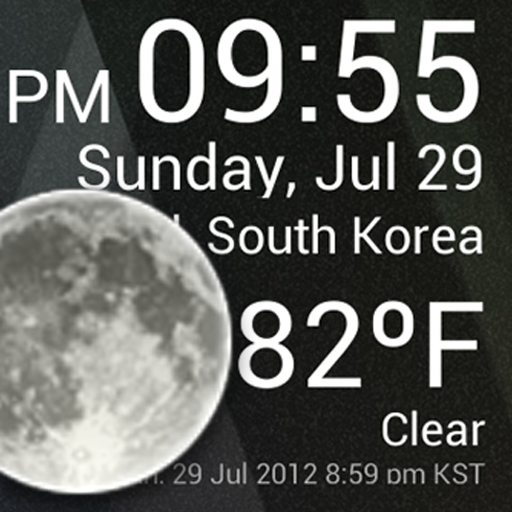
Weather Clock Widget



✍️ bumetric analysis
“
Weather Clock Widget is an Android app from CORE TECHNOLOGY in the Weather category, currently rated 3.0★ across 11,516 ratings. Initial signal reads as mostly critical sentiment so far: users flag rough edges and unmet expectations.
Our BU Score puts it at 56: Solid (established niche player). For a Weather app, that means established niche player.
Track changes month-over-month in the Performance section below: live snapshot history and revenue forecast included.
📊 Performance Tracking LIVE
Loading…
Rating
—
Reviews
—
Forecast Revenue / mo
—
Snapshots tracked
0
since first record
Range:
💰 Forecast Revenue / mo
MODELRevenue forecast computed from BU's 234 trigger model on each snapshot. Calibrated against ground-truth from 58 verified-revenue apps.
🔬Forecast Breakdown — Why This Estimate?Top 4 of 4 triggers
Our ML model uses 200+ signals from public data. These are the most influential for this app:
| Mid install base (11,516 ratings)METRIC | +$5,500 | |
| Below-average rating (3.0★)METRIC | −$1,500 | |
| Mature app (13y old)METRIC | +$1,500 | |
| Ad-supported / freemiumMETRIC | +$600 |
METRIC = structural app data · REVIEW = mined from user reviews · ✓ VERIFIED = Stripe-verified anchor (TrustMRR)
📈 Reviews Growth
LIVECumulative review count from first BU snapshot. Each point = a tracked update.
⭐ Rating Trend
LIVEAverage rating evolution. Updates with each new review batch.
🗓️ Snapshot Timeline
HISTORYEach bar shows a tracked update and the metric delta from the previous snapshot.
App Specs
🔐 Own this app? Claim & verify MRR →🔖 v1.9.8.3-30🔄 updated 7y ago📂 Weather💰 Free📺 Ad-supported💎 IAP $0.99 per item🚀 Launched 2012 (13y old)
📝 About this app
Check the Current Time and Weather Condition.
Simple and fast
Application uses less battery power.
Weather Clock Widget is a replacement lock screen clock widget for Android 4.2+.
To add the widget to your Android 4.2 device's lock screen, simply swipe to the left-most page of your lock screen and touch the "+" icon. Then, select "Weather Clock Widget" to customize and add the widget. You can make this the primary lock screen widget, replacing the default clock, by first touching-and-holding it and then dragging it horizontally to the very rightmost position.
**Before running the application configuration is required.
SETTING: Settings->Location services->GPS satellites enable
To add a widget to a Home screen, follow these steps:
1. Touch and hold any empty section of a Home screen.
2. Touch Widgets.
3. Touch and hold a widget. You’ll see images of each Home screen.
4. Slide the widget to the Home screen image you prefer, then lift your finger.
or Home->Application Menu->Widget
https://support.google.com/nexus/answer/2781850?hl=en
Forecast On/Off: Touch the Weather Image
Simple and fast
Application uses less battery power.
Weather Clock Widget is a replacement lock screen clock widget for Android 4.2+.
To add the widget to your Android 4.2 device's lock screen, simply swipe to the left-most page of your lock screen and touch the "+" icon. Then, select "Weather Clock Widget" to customize and add the widget. You can make this the primary lock screen widget, replacing the default clock, by first touching-and-holding it and then dragging it horizontally to the very rightmost position.
**Before running the application configuration is required.
SETTING: Settings->Location services->GPS satellites enable
To add a widget to a Home screen, follow these steps:
1. Touch and hold any empty section of a Home screen.
2. Touch Widgets.
3. Touch and hold a widget. You’ll see images of each Home screen.
4. Slide the widget to the Home screen image you prefer, then lift your finger.
or Home->Application Menu->Widget
https://support.google.com/nexus/answer/2781850?hl=en
Forecast On/Off: Touch the Weather Image
Profile & Insights
Everything we know — and don't — about this app and its company.
Identification
- App name
- Weather Clock Widget
- Developer
- CORE TECHNOLOGY
- Bundle ID
- kr.co.core.technology.clock.widget.free
- App Store URL
- Open in App Store
- Category
- Weather
- Content rating
- Not found
- Languages
- Not found
Company
- Website
- www.core-technology.co.kr
- Tagline
- Not found
- Description
- Not found
- Founded
- Not found
- HQ / Address
- Not found
- Employees
- Not found
- Logo
- Not found
Revenue
- Verified revenue / mo
- Not found
- AI revenue estimate / mo
- Not found
- AI annual estimate
- Not found
- ML model estimate / mo
- $1.2K/mo
- Top-grossing rank
- Not found
- All-time revenue
- Not found
- Pricing
- $0.99 per item
Founder
- Name
- Not found
- X / Twitter
- Not found
- Not found
- GitHub
- Not found
- X followers
- Not found
- Public statements
- Not found
Funding
- Total raised
- Not found
- Last round
- Not found
- Investors
- Not found
- Crunchbase
- Not found
- AngelList
- Not found
Press & Links
- Articles found
- Not found
- Listed on
- Not found
- Blog
- Not found
- Press / News
- Not found
Contacts & Socials
- Socials
- Not found
- Not found
- Phone
- Not found
- Contact page
- Not found
- About page
- Not found
📈Ratings growth11,516 ratings+21% lifetimeShow 3-year history estimate ▾
Tracked (1 weeks) Pre-tracking estimate (37 weeks) · model-based, ±5% noise · anchored to release date and current value
Profile is built from iTunes Lookup + developer site scrape + ML revenue model. Empty fields show "Not found" — additional sources (Crunchbase, X, IndieHackers, Acquire.com) coming.




Full revenue analysis
Read the article-style breakdown for Weather Clock Widget: category rank, percentile, growth signal, comparable apps, and how the forecast is calibrated against verified-MRR anchors in this niche.