69
BU Score
Solid
Flow Speed Control Pro
✍️ BU Analytics Review
“
Flow Speed Control Pro is an iOS app from INTERACTIVE UNIVERSE CREATIVE SOFTWARES EIRELI in the Photo & Video category, currently rated 4.7★ across 250 ratings. Initial signal reads as largely positive sentiment, users highlighting consistency and feature depth.
Our BU Score puts it at 69 — Solid (established niche player). For a Photo & Video app, that means established niche player.
Track changes month-over-month in the Performance section below — live snapshot history and revenue forecast included.
📊 Performance Tracking LIVE
Loading…
Rating
—
Reviews
—
Forecast Revenue / mo
—
Snapshots tracked
0
since first record
Range:
💰 Forecast Revenue / mo
MODELRevenue forecast computed from BU's 234 trigger model on each snapshot. Calibrated against ground-truth from 58 verified-revenue apps.
🔬Forecast Breakdown — Why This Estimate?Top 12 of 12 triggers
Our ML model uses 200+ signals from public data. These are the most influential for this app:
| Paid app ($0.00)METRIC | +$2,800 | |
| Excellent rating (4.7★)METRIC | +$2,200 | |
| worth every pennyREVIEW | +$2,000 | |
| bugsREVIEW | −$1,800 | |
| 5 starREVIEW | +$1,800 | |
| excellent appREVIEW | +$1,500 | |
| Mature app (10y old)METRIC | +$1,500 | |
| Multilingual (33 languages)METRIC | +$1,500 | |
| highly recommendREVIEW | +$1,400 | |
| slowREVIEW | −$1,200 | |
| too expensiveREVIEW | −$1,000 | |
| Early-stage install base (250 ratings)METRIC | +$400 |
METRIC = structural app data · REVIEW = mined from user reviews · ✓ VERIFIED = Stripe-verified anchor (TrustMRR)
📈 Reviews Growth
LIVECumulative review count from first BU snapshot. Each point = a tracked update.
⭐ Rating Trend
LIVEAverage rating evolution. Updates with each new review batch.
🗓️ Snapshot Timeline
HISTORYEach bar shows a tracked update and the metric delta from the previous snapshot.
App Specs
🔐 Own this app? Claim & verify MRR →💾 88 MB🔞 4+📱 iOS 10.0+🔖 v2.17🔄 updated 7y ago🌐 AR, CA, HR, CS, DA +28📂 Photo & Video💰 Paid🚀 Launched 2015 (10y old)
📝 About this app
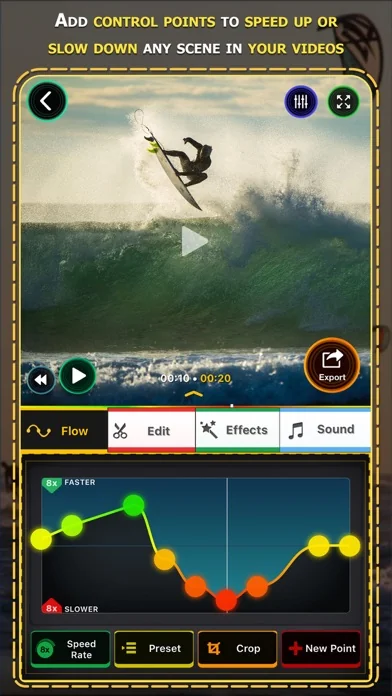
Take control of the speed of your videos. Flow let you manipulate time and give you new perspectives on your recorded moments. You can gradually speed up or slow down segments of your videos creating impressive effects.
Flow is intuitive and super easy to use, just add and move the control points up and down so that the video can go gradually faster or slower than its natural speed.
FEATURES
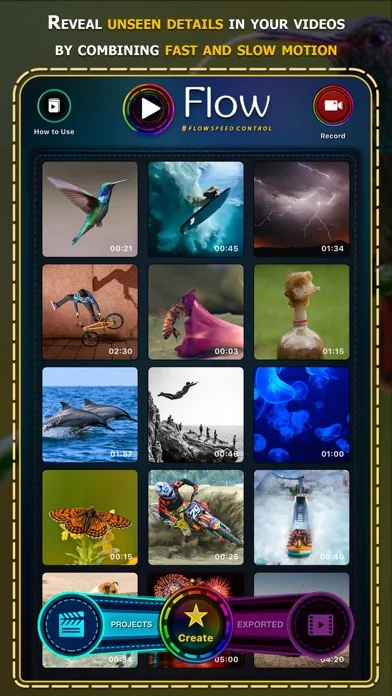
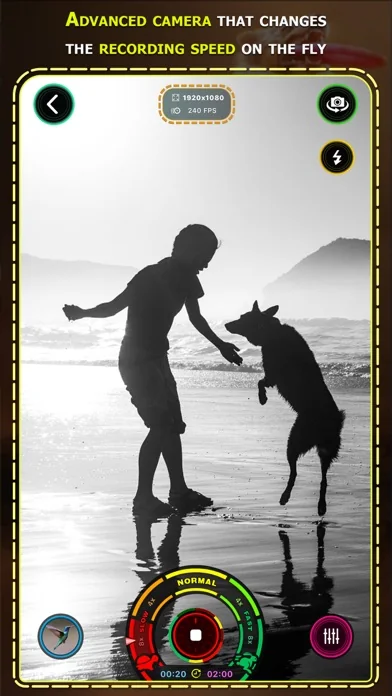
• Capture amazing moments combining different speeds on-the-fly and perfect it later with innovative time remapping options.
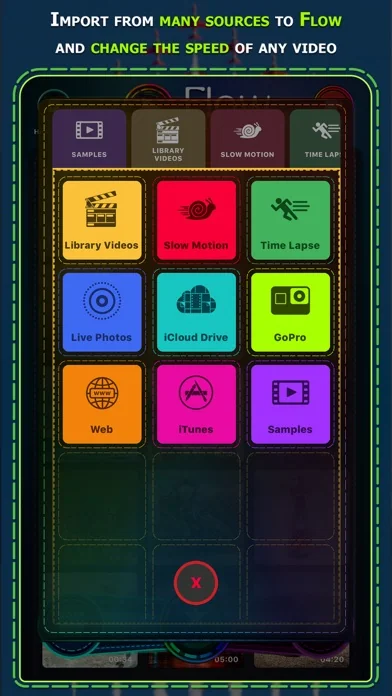
• Edit the speed of videos recorded with any type of camera, there are many ways to import your videos, including directly from your GoPro or using iTunes, iCloud Drive and many others.
• Flow can gradually slow down or speed up any videos up to 24x, combine different speeds adding as many speed control points as you need.
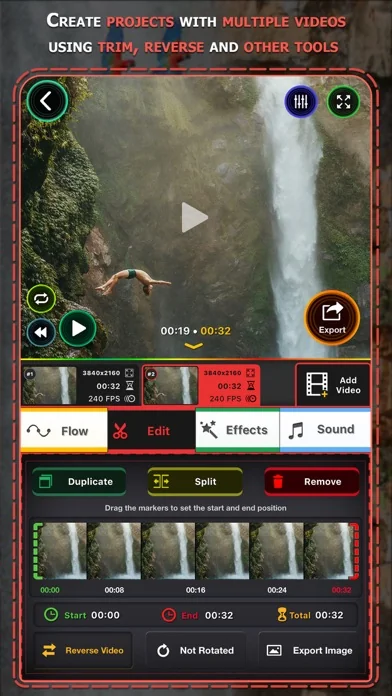
• Create elaborated projects with one or multiple videos and customize each element with a different settings.
• There are many tools available for editing such as trimming, cropping, rotating and others.
• Flow supports recording, importing and exporting videos in ultra-high definition "4K".
• You can even edit professional slow motion videos recorded up to 1000fps.
• Instant project preview, watch your production without any waiting time.
• Videos created with Flow will play exact same way on every device, perfect for sharing.
• Stylize your videos with professional color controls and more than 40 unique filter effects.
• The audio of the video will match the video speed, creating a cool effect on voices and other sounds.
• Publish directly to social media such as Facebook, Instagram, YouTube and others.
• Have fun playing in videos in reverse and sharing with your friends.
• Rotate videos you recorded in the wrong orientation.
• Save the best scenes of your videos as images.
• Crop videos to square format.
• Flow includes a handy extension to edit videos directly from Photos app.
• Use your Apple Watch as a remote control when recording with Flow.
Have any questions? Contact us at contact@flowspeedcontrol.com
For more information, visit https://www.flowspeedcontrol.com
Follow us on social media @flowspeedcontrol
Flow is intuitive and super easy to use, just add and move the control points up and down so that the video can go gradually faster or slower than its natural speed.
FEATURES
• Capture amazing moments combining different speeds on-the-fly and perfect it later with innovative time remapping options.
• Edit the speed of videos recorded with any type of camera, there are many ways to import your videos, including directly from your GoPro or using iTunes, iCloud Drive and many others.
• Flow can gradually slow down or speed up any videos up to 24x, combine different speeds adding as many speed control points as you need.
• Create elaborated projects with one or multiple videos and customize each element with a different settings.
• There are many tools available for editing such as trimming, cropping, rotating and others.
• Flow supports recording, importing and exporting videos in ultra-high definition "4K".
• You can even edit professional slow motion videos recorded up to 1000fps.
• Instant project preview, watch your production without any waiting time.
• Videos created with Flow will play exact same way on every device, perfect for sharing.
• Stylize your videos with professional color controls and more than 40 unique filter effects.
• The audio of the video will match the video speed, creating a cool effect on voices and other sounds.
• Publish directly to social media such as Facebook, Instagram, YouTube and others.
• Have fun playing in videos in reverse and sharing with your friends.
• Rotate videos you recorded in the wrong orientation.
• Save the best scenes of your videos as images.
• Crop videos to square format.
• Flow includes a handy extension to edit videos directly from Photos app.
• Use your Apple Watch as a remote control when recording with Flow.
Have any questions? Contact us at contact@flowspeedcontrol.com
For more information, visit https://www.flowspeedcontrol.com
Follow us on social media @flowspeedcontrol
🆕 What's New · v2.17
This is a major update for Flow Speed Control! Check out these new amazing features:
• #flowspeedcontrol now uses Metal, the newest Apple rendering engine, to playback and export your videos, that means Flow is much faster and more stable than ever. If you have a older iOS device you will be able to export high definition videos without issues now.
• Create slo-mo and fast-speed "Live Photos" using few seconds from any video you have recorded.
• Major visual redesign using beautiful colors and many new controls. Flow now works in landscape mode and fully supports iPhone X and iPad Pro in all orientations.
• Import is improved with support for Live Photos, iCloud Drive, iTunes, Web and much more. Including connecting to your GoPro and editing directly with Flow.
• Create elaborated projects with multiple videos, each with their individual speed controls, color effects and other adjustments.
• Perfect video colors with the new contrast, brightness and saturation controls. We also included more video effects to stylize your videos.
• Duplicate and split video parts to create complex scenes with precise control.
• Increase your skills using the new Flow tutorial lessons we designed for you.
• Advanced export format settings, control for the resolution, frame rate, quality and much more.
• Audio and video content can be added from other apps via Drag and Drop.
Our team has spent a lot of time working on this, to bring these great features for you. Support Flow to become even better, by spreading the word and writing a nice review for us at the App Store.
Find us at www.flowspeedcontrol.com or on social medias @flowspeedcontrol
Thank you and ENJOY!
• #flowspeedcontrol now uses Metal, the newest Apple rendering engine, to playback and export your videos, that means Flow is much faster and more stable than ever. If you have a older iOS device you will be able to export high definition videos without issues now.
• Create slo-mo and fast-speed "Live Photos" using few seconds from any video you have recorded.
• Major visual redesign using beautiful colors and many new controls. Flow now works in landscape mode and fully supports iPhone X and iPad Pro in all orientations.
• Import is improved with support for Live Photos, iCloud Drive, iTunes, Web and much more. Including connecting to your GoPro and editing directly with Flow.
• Create elaborated projects with multiple videos, each with their individual speed controls, color effects and other adjustments.
• Perfect video colors with the new contrast, brightness and saturation controls. We also included more video effects to stylize your videos.
• Duplicate and split video parts to create complex scenes with precise control.
• Increase your skills using the new Flow tutorial lessons we designed for you.
• Advanced export format settings, control for the resolution, frame rate, quality and much more.
• Audio and video content can be added from other apps via Drag and Drop.
Our team has spent a lot of time working on this, to bring these great features for you. Support Flow to become even better, by spreading the word and writing a nice review for us at the App Store.
Find us at www.flowspeedcontrol.com or on social medias @flowspeedcontrol
Thank you and ENJOY!
Profile & Insights
Everything we know — and don't — about this app and its company.
Identification
- App name
- Flow Speed Control Pro
- Developer
- INTERACTIVE UNIVERSE CREATIVE SOFTWARES EIRELI
- Bundle ID
- net.interactiveuniverse.FlowPro
- App Store URL
- Open in App Store
- Category
- Photo & Video
- Content rating
- 4+
- Languages
- AR, CA, HR, CS, DA, NL, EN, FI, FR, DE, EL, HE, HI, HU, ID, IT, JA, KO, MS, NB, PL, PT, RO, RU, ZH, SK, ES, SV, TH, ZH, TR, UK, VI
Company
- Website
- Not found
- Tagline
- Flow Speed Control is the best camera and video speed editor app for iOS. Get inspired by the App Preview and the gorgeous screenshots to find out what you can create with this ingenious tool.
- Description
- Flow Speed Control is a camera and video speed editor app. Manipulate the flow of time of any video to make it slower or faster than it's natural speed.
- Founded
- Not found
- HQ / Address
- Not found
- Employees
- Not found
- Logo
- OG image
Revenue
- Verified revenue / mo
- Not found
- AI revenue estimate / mo
- Not found
- AI annual estimate
- Not found
- ML model estimate / mo
- $15.6K/mo
- Top-grossing rank
- Outside top 100 in US Photo & Video
- All-time revenue
- Not found
- Pricing
- Not found
Founder
- Name
- Not found
- X / Twitter
- https://www.twitter.com/flowspeededitor
- Not found
- GitHub
- Not found
- X followers
- Not found
- Public statements
- Not found
Funding
- Total raised
- Not found
- Last round
- Not found
- Investors
- Not found
- Crunchbase
- Not found
- AngelList
- Not found
Press & Links
- Articles found
- Not found
- Listed on
- Not found
- Blog
- Not found
- Press / News
- Not found
Contacts & Socials
- Socials
- facebook · instagram · twitter · youtube
- Not found
- Phone
- Not found
- Contact page
- Not found
- About page
- https://www.flowspeedcontrol.com/about-flow-speed-control/
📈Ratings growth250 ratings+525% lifetimeShow 3-year history estimate ▾
Tracked (58 weeks) Pre-tracking estimate (37 weeks) · model-based, ±5% noise · anchored to release date and current value
🌍Geographic ReachNot ranked
This app is currently outside the top 100 grossing in all 9 countries we monitor (US, UK, DE, FR, JP, CA, AU, BR, IN). Niche or new apps often launch this way — popularity rankings appear once daily revenue clears the regional threshold.
💰Pricing History$0.00 → $9.99 (+0%)
Profile is built from iTunes Lookup + developer site scrape + ML revenue model. Empty fields show "Not found" — additional sources (Crunchbase, X, IndieHackers, Acquire.com) coming.
More by INTERACTIVE UNIVERSE CREATIVE SOFTWARES EIRELI
View all →More Photo & Video
YouTube
★ 4.7 · 47,130,049 reviews
★ 4.7 · 29,023,044 reviews
Snapchat: Chatte mit Freunden
★ 4.5 · 5,772,278 reviews
Canva: KI-Foto- & Video-Editor
★ 4.9 · 3,343,015 reviews
Twitch: Live Streaming
★ 4.7 · 2,700,069 reviews
InShot - AI Video Editor
★ 4.8 · 2,426,316 reviews
PicCollage: KI Foto Collage
★ 4.8 · 1,808,632 reviews
FaceApp: Gesichtsbearbeitung
★ 4.7 · 1,750,154 reviews
Browse BU Analytics
📚 All 55,000+ Books
🜍 Alchemy & Hermeticism
🔮 Magic & Ritual
🌙 Witchcraft & Paganism
⭐ Astrology & Cosmology
🃏 Divination & Tarot
📜 Photo & Video
✡️ Kabbalah & Jewish Mysticism
🕉️ Mysticism & Contemplation
🕊️ Theosophy & Anthroposophy
🏛️ Freemasonry & Secret Societies
👻 Spiritualism & Afterlife
📖 Sacred Texts & Gnosticism
👁️ Supernatural & Occult Fiction
🧘 Spiritual Development
📚 Esoteric History & Biography
Info
About BU Analytics