47
BU Score
Emerging
Task Office: to-do, calendar
✍️ bumetric analysis
“
Task Office: to-do, calendar is an iOS app from DK CONSULTING, TOV in the Productivity category, currently rated 3.7★ across 69 ratings. Initial signal reads as mixed reviews: supporters praise core features while critics cite stability and value gaps.
Our BU Score puts it at 47: Emerging (early traction worth watching). For a Productivity app, that means early traction worth watching.
Track changes month-over-month in the Performance section below: live snapshot history and revenue forecast included.
📊 Performance Tracking LIVE
Loading…
Rating
—
Reviews
—
Forecast Revenue / mo
—
Snapshots tracked
0
since first record
Range:
💰 Forecast Revenue / mo
MODELRevenue forecast computed from BU's 234 trigger model on each snapshot. Calibrated against ground-truth from 58 verified-revenue apps.
🔬Forecast Breakdown — Why This Estimate?Top 4 of 4 triggers
Our ML model uses 200+ signals from public data. These are the most influential for this app:
| Paid app ($0.00)METRIC | +$2,800 | |
| Mature app (10y old)METRIC | +$1,500 | |
| Multilingual (15 languages)METRIC | +$1,500 | |
| Pre-traction phase (69 ratings)METRIC | −$300 |
METRIC = structural app data · REVIEW = mined from user reviews · ✓ VERIFIED = Stripe-verified anchor (TrustMRR)
📈 Reviews Growth
LIVECumulative review count from first BU snapshot. Each point = a tracked update.
⭐ Rating Trend
LIVEAverage rating evolution. Updates with each new review batch.
🗓️ Snapshot Timeline
HISTORYEach bar shows a tracked update and the metric delta from the previous snapshot.
App Specs
🔐 Own this app? Claim & verify MRR →💾 85 MB🔞 4+📱 iOS 12.0+🔖 v11.0🔄 updated 2y ago🌐 NL, EN, FR, DE, IT +10📂 Productivity💰 Paid🚀 Launched 2015 (10y old)
📝 About this app
Task Office is the best of ever existing GTD, to do lists, projects and contacts management apps. Designed to make business planning, scheduling and getting things done more efficient, Task Office makes your plans clear and achievable. Manage both simple and complex projects, to do lists without any difficulties and focus on the final result. Manage your contacts and relationships, schedule your time and succeed.
Planning & Performing
• Start scheduling each new day on Home screen. Here you will find your current projects and to dos: a timeline with tasks you have planned for today and outline of upcoming tasks. Home screen allows you to focus only on current tasks, planned for today, and not to get lost in plenty of other planned tasks. You can plan your day directly from Home screen creating new tasks, projects, contacts and companies
Quick & Easy navigation
• Reach any project, task, to do list or contact in seconds. Task Office is designed in a way that will allow you to navigate within app screens just in one tap
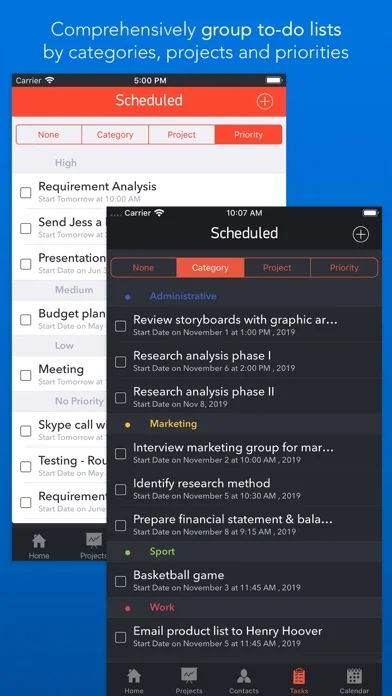
• Organize your tasks by categories, projects or priorities and make a logic order of all your plans
Detailed GTD
• Add all important details to get things done: choose tasks category, status, priority and set dates
• Assign tasks to people by choosing a person from all existing contacts
• Add locations to each task and project
• Make all your information categorized – assign special categories for easy filtering and browsing through tasks and projects
Comprehensive GTD Tab
• All tasks are organized according to GTD methodology (by D. Allen)
• Add tasks of different types:
- ToDo – tasks with duration of several days
- Appointment – assign task duration accurate to minutes
- Email/Call – short task for making calls or sending emails to any user
Alerts
• Use double alert and let the program remind you what is next to be done
Tracking project progress
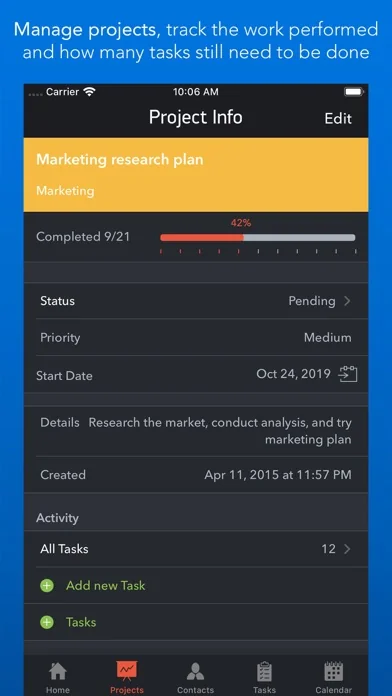
• Track the progress of your projects and to do lists by viewing the pipeline: view the percentage of work performed and how many tasks still need to be done
• Check out everyone who is involved in project: view the list of contacts involved in the project
Managing your team
• Create new contacts and companies; add all the important information about your contact or company. Either you can import existing contact from your device Address Book
• Send e-mails directly from Contacts Screen
• Group your contacts creating your Private Lists, so that you can easily monitor their productivity and track task implementation. Save each Private list and refer back to easily
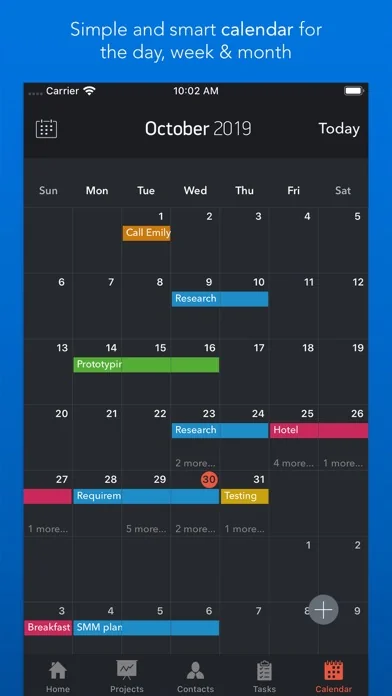
Visualized Calendar
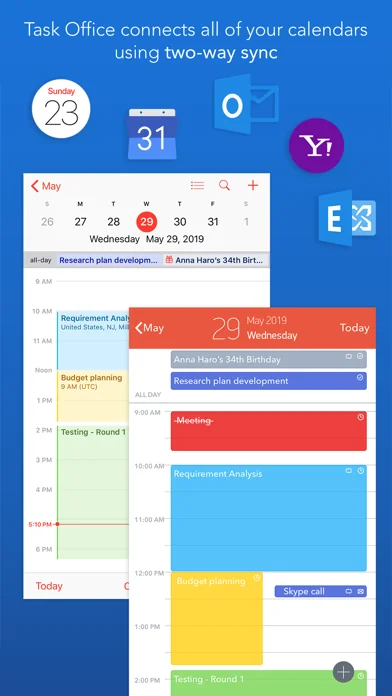
• Task Office calendar allows you to focus on what is important in your timeline. See your planed To Dos, Appointments, Emails/Calls to get things done in time
• View calendar by day, week or month
• Add tasks directly to the Calendar by Tap&Hold
• Change tasks duration or Start and Due Dates simply Drag&Drop
Calendar Syncing
• Task Office syncs with Calendars (iCloud, Google Calendar, Exchange, Yahoo, Outlook) and you will not miss anything checking out due dates
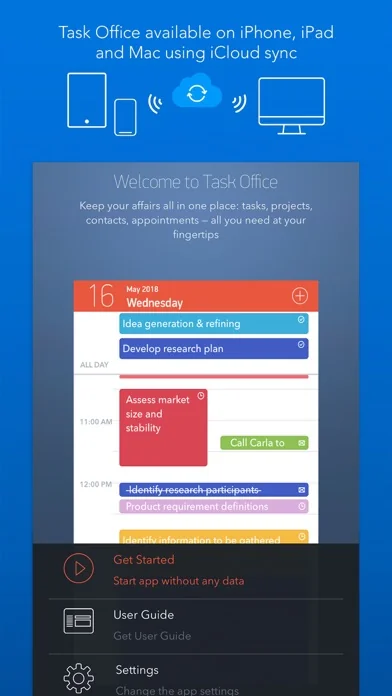
iCloud Sync
• Sync your information – tasks, projects, contacts, etc. – between your devices
Repeating tasks
• Add repeated tasks, choosing recurrences frequency
Set goals and achieve them. Become a part of Task Office team today!
Planning & Performing
• Start scheduling each new day on Home screen. Here you will find your current projects and to dos: a timeline with tasks you have planned for today and outline of upcoming tasks. Home screen allows you to focus only on current tasks, planned for today, and not to get lost in plenty of other planned tasks. You can plan your day directly from Home screen creating new tasks, projects, contacts and companies
Quick & Easy navigation
• Reach any project, task, to do list or contact in seconds. Task Office is designed in a way that will allow you to navigate within app screens just in one tap
• Organize your tasks by categories, projects or priorities and make a logic order of all your plans
Detailed GTD
• Add all important details to get things done: choose tasks category, status, priority and set dates
• Assign tasks to people by choosing a person from all existing contacts
• Add locations to each task and project
• Make all your information categorized – assign special categories for easy filtering and browsing through tasks and projects
Comprehensive GTD Tab
• All tasks are organized according to GTD methodology (by D. Allen)
• Add tasks of different types:
- ToDo – tasks with duration of several days
- Appointment – assign task duration accurate to minutes
- Email/Call – short task for making calls or sending emails to any user
Alerts
• Use double alert and let the program remind you what is next to be done
Tracking project progress
• Track the progress of your projects and to do lists by viewing the pipeline: view the percentage of work performed and how many tasks still need to be done
• Check out everyone who is involved in project: view the list of contacts involved in the project
Managing your team
• Create new contacts and companies; add all the important information about your contact or company. Either you can import existing contact from your device Address Book
• Send e-mails directly from Contacts Screen
• Group your contacts creating your Private Lists, so that you can easily monitor their productivity and track task implementation. Save each Private list and refer back to easily
Visualized Calendar
• Task Office calendar allows you to focus on what is important in your timeline. See your planed To Dos, Appointments, Emails/Calls to get things done in time
• View calendar by day, week or month
• Add tasks directly to the Calendar by Tap&Hold
• Change tasks duration or Start and Due Dates simply Drag&Drop
Calendar Syncing
• Task Office syncs with Calendars (iCloud, Google Calendar, Exchange, Yahoo, Outlook) and you will not miss anything checking out due dates
iCloud Sync
• Sync your information – tasks, projects, contacts, etc. – between your devices
Repeating tasks
• Add repeated tasks, choosing recurrences frequency
Set goals and achieve them. Become a part of Task Office team today!
🆕 What's New · v11.0
Task Office version 11.0 squashes bugs and makes some performance and stability improvement:
• Fixed an issue which occurred when purchasing the app.
Profile & Insights
Everything we know — and don't — about this app and its company.
Identification
- App name
- Task Office: to-do, calendar
- Developer
- DK CONSULTING, TOV
- Bundle ID
- com.dk-consulting.daytime-ipad
- App Store URL
- Open in App Store
- Category
- Productivity
- Content rating
- 4+
- Languages
- NL, EN, FR, DE, IT, JA, KO, MS, NB, PT, ZH, ES, SV, ZH, UK
Company
- Website
- www.dk-consulting.app
- Tagline
- If your work revolves around Gantt charts, managing simple and complex projects, planning your time this is a cost-effective, full-featured solution for your Mac, iPhone and iPad
- Description
- DK Consulting apps are project management and personal scheduling applications exclusively for macOS and iOS.
- Founded
- Not found
- HQ / Address
- Not found
- Employees
- Not found
- Logo
- OG image
Revenue
- Verified revenue / mo
- Not found
- AI revenue estimate / mo
- Not found
- AI annual estimate
- Not found
- ML model estimate / mo
- $86/mo
- Top-grossing rank
- Outside top 100 in US Productivity
- All-time revenue
- Not found
- Pricing
- Not found
Founder
- Name
- Not found
- X / Twitter
- https://twitter.com/ConsultingDk
- Not found
- GitHub
- Not found
- X followers
- Not found
- Public statements
- Not found
Funding
- Total raised
- Not found
- Last round
- Not found
- Investors
- Not found
- Crunchbase
- Not found
- AngelList
- Not found
Press & Links
- Articles found
- Not found
- Listed on
- Not found
- Blog
- https://www.dk-consulting.app/blog
- Press / News
- Not found
Contacts & Socials
- Socials
- facebook · twitter · youtube
- Not found
- Phone
- Not found
- Contact page
- https://www.dk-consulting.app/support
- About page
- Not found
⭐Recent App Store Reviews24 latest · avg 2.42★ · 16.7% 5★ · 45.8% 1★
5★4 (17%)
4★4 (17%)
3★1 (4%)
2★4 (17%)
1★11 (46%)
+0 ratings/week
Praise: great ×5 best ×3 love ×2 perfect ×2 awesome ×1Complaints: refund ×4
Top positive
★★★★★ Perfect for me
Still learning
Thx…
★★★★★ Excellent
I tried very apps to get organized and this is the best but it'll be better to have sub task it'll be required.
Hi again I really need this features as soon as possible please!
1.Need to Select start day of the week on calendar
…
Top negative
★☆☆☆☆ Does not show multiple months of calendars you get only a one month view.
Ended up with over 6 months of overdue items.…
★☆☆☆☆ Don’t do it!
Loaded this app and created my second project, and every previous event on my calendar became one of 522 open tasks! Great concept but this is insane. Not worth $20!…
📈Ratings growth69 ratings+6800% lifetimeShow 3-year history estimate ▾
Tracked (26 weeks) Pre-tracking estimate (37 weeks) · model-based, ±5% noise · anchored to release date and current value
🌍Geographic ReachNot ranked
This app is currently outside the top 100 grossing in all 9 countries we monitor (US, UK, DE, FR, JP, CA, AU, BR, IN). Niche or new apps often launch this way — popularity rankings appear once daily revenue clears the regional threshold.
Profile is built from iTunes Lookup + developer site scrape + ML revenue model. Empty fields show "Not found" — additional sources (Crunchbase, X, IndieHackers, Acquire.com) coming.
Full revenue analysis
Read the article-style breakdown for Task Office: to-do, calendar: category rank, percentile, growth signal, comparable apps, and how the forecast is calibrated against verified-MRR anchors in this niche.