57
BU Score
Solid
Camera1 - Black & White Camera
✍️ BU Analytics Review
“
Camera1 - Black & White Camera is an iOS app from Sebastien Ardon in the Photo & Video category, currently rated 4.7★ across 125 ratings. Initial signal reads as mixed reviews — supporters praise core features while critics cite stability/value gaps.
Our BU Score puts it at 57 — Solid (established niche player). For a Photo & Video app, that means established niche player.
Track changes month-over-month in the Performance section below — live snapshot history and revenue forecast included.
creator
📊 Performance Tracking LIVE
Loading…
Rating
—
Reviews
—
Forecast Revenue / mo
—
Snapshots tracked
0
since first record
Range:
💰 Forecast Revenue / mo
MODELRevenue forecast computed from BU's 234 trigger model on each snapshot. Calibrated against ground-truth from 58 verified-revenue apps.
🔬Forecast Breakdown — Why This Estimate?Top 5 of 5 triggers
Our ML model uses 200+ signals from public data. These are the most influential for this app:
| Paid app ($0.00)METRIC | +$2,800 | |
| Excellent rating (4.7★)METRIC | +$2,200 | |
| Mature app (10y old)METRIC | +$1,500 | |
| slowREVIEW | −$1,200 | |
| Early-stage install base (125 ratings)METRIC | +$400 |
METRIC = structural app data · REVIEW = mined from user reviews · ✓ VERIFIED = Stripe-verified anchor (TrustMRR)
📈 Reviews Growth
LIVECumulative review count from first BU snapshot. Each point = a tracked update.
💚Sentiment Over Time↑ green = positive · ↓ red = negative
Jun 24
Jan 25
Mar 25
Sep 25
Jan 26
⭐ Rating Trend
LIVEAverage rating evolution. Updates with each new review batch.
🗓️ Snapshot Timeline
HISTORYEach bar shows a tracked update and the metric delta from the previous snapshot.
App Specs
🔐 Own this app? Claim & verify MRR →💾 26 MB🔞 4+📱 iOS 15.0+🔖 v2.11.0🔄 updated 1mo ago🌐 EN, FR, JA📂 Photo & Video💰 Free🚀 Launched 2015 (10y old)
📝 About this app
Camera1 is the dedicated Black & White manual camera for iPhone. No colour, no compromise — just pure monochrome photography with full creative control.
DEVELOP YOUR CREATIVITY
Learn to "see" in Black & White through Camera1 unique simultaneous contrast and exposure adjustments. Explore the infinite black and white image possibilities in real-time, such as high-key/low-key right in the viewfinder, before taking the shot. Use the Zen mode to focus all your creative attention on the picture, and not the camera or technique.
TAKE CONTROL
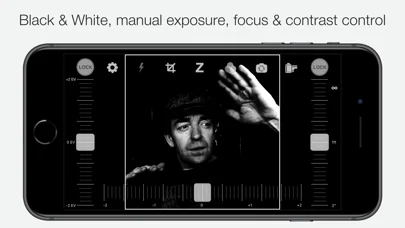
Take control of the camera, with manual overrides of exposure and focus. Super easy access to focus lock using the manual focusing slider, for ultra-fast shooting - as the camera won’t need to re-focus between shots.
PROFESSIONAL OUTPUT
Camera1 takes full advantage of your camera hardware and saves in a variety of different file formats, including JPEG, TIFF, RAW & ProRAW / DNG, allowing for maximum editing flexibility in applications like Photoshop and Lightroom later in your workflow. Advanced iOS image processing such as Deep Fusion and Smart HDR is used on supported devices.
Live histograms, flash, grid views and a range of manual controls allow you to get the perfect shot, every time.
Features
• Black & white photography only: commit to Black and White at shooting time.
• High-quality image processing engine. Take full advantage of your device camera hardware.
• Manual focus (with magnification of the center focusing area), focus lock, spot focus, auto-focus
• Manual exposure compensation, or use Auto exposure
• Live histogram, when adjusting exposure, optional over-exposure warning indicator (zebras)
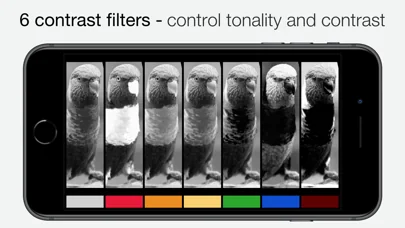
• 6 contrast/color filters for Black & White: red, orange, yellow, green, blue, infrared (simulated)
• Manual contrast control
• High-resolution capture (48MP) (*)
• Support for multi-lens devices - standard, telephoto and ultra wide-angle (*)
• ProRAW, RAW, JPEG, HEIC, TIFF file formats. DNG files contain colour information, allowing later editing. A full-resolution JPEG, processed to Black and White by Camera1 is saved alongside the DNG file, to the camera roll
• Support for iOS Deep Fusion and Smart HDR (*)
• Tap on the picture to take the shot
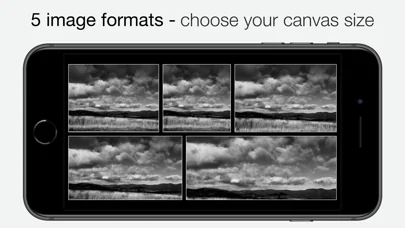
• 5 crop formats: 3:2, 4:3 (native), 1:1, 16:9, 2.35:1 (panorama)
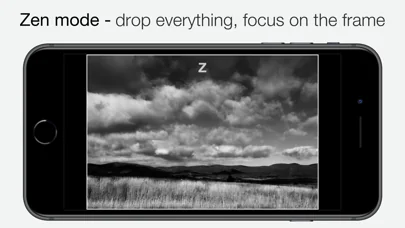
• Zen mode: all controls disappear, leaving only the viewfinder on the screen for the ultimate picture-taking experience
• 3 flash modes: On, Off, Torch
• 2 framing grid types: Rule of Thirds and Golden Triangles
• Live view of all controls above
• iOS Widget - quickly launch the app from your lock or home screen
• Camera Control: use hardware camera control to launch Camera1, or to take shots (iPhone 16 Pro & Pro Max)
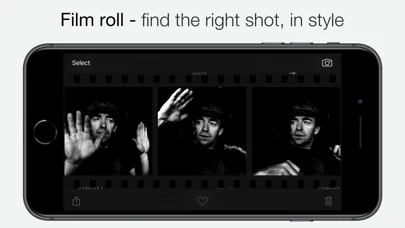
• Black and White camera roll, image viewer at full resolution
"The most brilliant Camera App in recent years" -- Keisuke Takahashi
"I like the results-a bit like film (Tri-X) with a slight grain pattern. Lots of latitude" -- Eric Mencher @emencher
Don't forget to tag your pictures with #camera1app !
Privacy-first
• Camera1 does not embed any tracking / third-party SDKs
(*) Compatibility Notes
Camera1 features depend on the capabilities of your iOS device:
• High-resolution (48MP) capture: iPhone 14 Pro and later Pro models
• ProRAW capture: iPhone 12 Pro and later Pro models
• RAW capture: iPhone 6S and later, iPad Pro
• Smart HDR & Deep Fusion: iPhone 11 and later
• Multi-lens support (standard, telephoto, ultra wide): devices with multiple rear cameras
• Ultra Wide lens may not support RAW or manual focus/exposure on some devices
DEVELOP YOUR CREATIVITY
Learn to "see" in Black & White through Camera1 unique simultaneous contrast and exposure adjustments. Explore the infinite black and white image possibilities in real-time, such as high-key/low-key right in the viewfinder, before taking the shot. Use the Zen mode to focus all your creative attention on the picture, and not the camera or technique.
TAKE CONTROL
Take control of the camera, with manual overrides of exposure and focus. Super easy access to focus lock using the manual focusing slider, for ultra-fast shooting - as the camera won’t need to re-focus between shots.
PROFESSIONAL OUTPUT
Camera1 takes full advantage of your camera hardware and saves in a variety of different file formats, including JPEG, TIFF, RAW & ProRAW / DNG, allowing for maximum editing flexibility in applications like Photoshop and Lightroom later in your workflow. Advanced iOS image processing such as Deep Fusion and Smart HDR is used on supported devices.
Live histograms, flash, grid views and a range of manual controls allow you to get the perfect shot, every time.
Features
• Black & white photography only: commit to Black and White at shooting time.
• High-quality image processing engine. Take full advantage of your device camera hardware.
• Manual focus (with magnification of the center focusing area), focus lock, spot focus, auto-focus
• Manual exposure compensation, or use Auto exposure
• Live histogram, when adjusting exposure, optional over-exposure warning indicator (zebras)
• 6 contrast/color filters for Black & White: red, orange, yellow, green, blue, infrared (simulated)
• Manual contrast control
• High-resolution capture (48MP) (*)
• Support for multi-lens devices - standard, telephoto and ultra wide-angle (*)
• ProRAW, RAW, JPEG, HEIC, TIFF file formats. DNG files contain colour information, allowing later editing. A full-resolution JPEG, processed to Black and White by Camera1 is saved alongside the DNG file, to the camera roll
• Support for iOS Deep Fusion and Smart HDR (*)
• Tap on the picture to take the shot
• 5 crop formats: 3:2, 4:3 (native), 1:1, 16:9, 2.35:1 (panorama)
• Zen mode: all controls disappear, leaving only the viewfinder on the screen for the ultimate picture-taking experience
• 3 flash modes: On, Off, Torch
• 2 framing grid types: Rule of Thirds and Golden Triangles
• Live view of all controls above
• iOS Widget - quickly launch the app from your lock or home screen
• Camera Control: use hardware camera control to launch Camera1, or to take shots (iPhone 16 Pro & Pro Max)
• Black and White camera roll, image viewer at full resolution
"The most brilliant Camera App in recent years" -- Keisuke Takahashi
"I like the results-a bit like film (Tri-X) with a slight grain pattern. Lots of latitude" -- Eric Mencher @emencher
Don't forget to tag your pictures with #camera1app !
Privacy-first
• Camera1 does not embed any tracking / third-party SDKs
(*) Compatibility Notes
Camera1 features depend on the capabilities of your iOS device:
• High-resolution (48MP) capture: iPhone 14 Pro and later Pro models
• ProRAW capture: iPhone 12 Pro and later Pro models
• RAW capture: iPhone 6S and later, iPad Pro
• Smart HDR & Deep Fusion: iPhone 11 and later
• Multi-lens support (standard, telephoto, ultra wide): devices with multiple rear cameras
• Ultra Wide lens may not support RAW or manual focus/exposure on some devices
🆕 What's New · v2.11.0
This release improves compatibility with iOS 26 and iPhone 17 & Pro models, with support for lockscreen launch and support for iPhone 16 and later Pro camera controls. Fix an issue preventing from capturing TIFF and high-resolution (48MP) files in some cases. Camera roll UI improvements.
Introducing support for high resolution capture (48MP) on supported devices, a new lock screen widget, fixes a few bugs and adds some performance improvements.
If you enjoy Camera1, please consider writing a review on the App Store every time you upgrade the app. Positive reviews improve our ranking and help new users learn about the app so we greatly appreciate them.
If you have feedback or a question about the app, email us at feedback@camera1.app and we'll get back to you.
---
Camera1 v2.11.0
- Improved compatility with iOS 26 and iPhone 17 models
- Bug Fixes and Performance improvements
Camera1 v2.10.0
- Fix capture resolution not restored in some cases
- Add setting to disable shutter sound if possible
Camera1 v2.9.1
- Fix widget display issue
Camera1 v2.9.0
- Support iOS 18 lockscreen widget, and Camera Control button on iPhone 16 Pros
Camera1 v2.8.2
- Support iOS 17 zero shutter lag, responsive capture. Minor bug fixes.
Camera1 v2.8.1
- Minor bug fix related to HEIF / JPEG file format selection
Camera1 v2.8.0
- support for high-resolution capture (48MP) on supported devices, lock screen widget, bug fixes
Camera1 v2.7.0
- iOS widget
Camera1 v2.6.2
- Fix several issues related to settings restoration
Camera1 v2.6.1
- Fix issue with front / back camera switching on some device models
Camera1 v2.6.0
- ProRAW, deep fusion and Smart HDR on supported devices. Improved camera roll experience.
Camera1 v2.5.2
- Fix an issue with switching between front and back cameras
Camera1 v2.5.1
- Fix an issue with image display when using image formats
Camera1 v2.5.0
- Overexposure warning (zebras)
- Fix RAW image sharing from camera roll
- Bug fixes and performance improvements
Camera1 v2.3.4
- Add lens selector menu, available on multi-lens devices
- Fix RAW file sharing/export from withing the app
Camera1 v2.2.3
- Support for ultrawide-angle lens
Camera1 v2.2.2
- iOS 13 compatibility update
- Fix camera settings restoration
Camera1 v2.2.0
- iPhone X compatibility update
- New setting option to disable auto-exposure lock when using exposure compensation
Camera1 v2.1.2
- Device compatibility update
Camera1 v2.1.1
- Fixes an issue with some settings preservation
Camera1 v2.1.0
- Image orientation bug on specific devices / crop ratio configurations
- Minor bug fixes and performance improvements
- New app icon
Camera1 v2.0.0
- Add support for telephoto lens capture on dual-lens systems (e.g. iPhone 7+)
- RAW + JPEG image capture (RAW contains color information, JPEG processed by Camera1)
- TIFF image capture
- New "golden triangle" grid
- Improved focus aid
- Bug fixes and performance improvement
Camera1 v1.5.1
- Bug fixes and performance improvements
Camera1 v1.5.0
- Color contrast filters for BW
- Spot auto-exposure: drag auto buttons in picture for spot exposure or focus
- Frame and grid display
- Bug fixes and performance improvements
Introducing support for high resolution capture (48MP) on supported devices, a new lock screen widget, fixes a few bugs and adds some performance improvements.
If you enjoy Camera1, please consider writing a review on the App Store every time you upgrade the app. Positive reviews improve our ranking and help new users learn about the app so we greatly appreciate them.
If you have feedback or a question about the app, email us at feedback@camera1.app and we'll get back to you.
---
Camera1 v2.11.0
- Improved compatility with iOS 26 and iPhone 17 models
- Bug Fixes and Performance improvements
Camera1 v2.10.0
- Fix capture resolution not restored in some cases
- Add setting to disable shutter sound if possible
Camera1 v2.9.1
- Fix widget display issue
Camera1 v2.9.0
- Support iOS 18 lockscreen widget, and Camera Control button on iPhone 16 Pros
Camera1 v2.8.2
- Support iOS 17 zero shutter lag, responsive capture. Minor bug fixes.
Camera1 v2.8.1
- Minor bug fix related to HEIF / JPEG file format selection
Camera1 v2.8.0
- support for high-resolution capture (48MP) on supported devices, lock screen widget, bug fixes
Camera1 v2.7.0
- iOS widget
Camera1 v2.6.2
- Fix several issues related to settings restoration
Camera1 v2.6.1
- Fix issue with front / back camera switching on some device models
Camera1 v2.6.0
- ProRAW, deep fusion and Smart HDR on supported devices. Improved camera roll experience.
Camera1 v2.5.2
- Fix an issue with switching between front and back cameras
Camera1 v2.5.1
- Fix an issue with image display when using image formats
Camera1 v2.5.0
- Overexposure warning (zebras)
- Fix RAW image sharing from camera roll
- Bug fixes and performance improvements
Camera1 v2.3.4
- Add lens selector menu, available on multi-lens devices
- Fix RAW file sharing/export from withing the app
Camera1 v2.2.3
- Support for ultrawide-angle lens
Camera1 v2.2.2
- iOS 13 compatibility update
- Fix camera settings restoration
Camera1 v2.2.0
- iPhone X compatibility update
- New setting option to disable auto-exposure lock when using exposure compensation
Camera1 v2.1.2
- Device compatibility update
Camera1 v2.1.1
- Fixes an issue with some settings preservation
Camera1 v2.1.0
- Image orientation bug on specific devices / crop ratio configurations
- Minor bug fixes and performance improvements
- New app icon
Camera1 v2.0.0
- Add support for telephoto lens capture on dual-lens systems (e.g. iPhone 7+)
- RAW + JPEG image capture (RAW contains color information, JPEG processed by Camera1)
- TIFF image capture
- New "golden triangle" grid
- Improved focus aid
- Bug fixes and performance improvement
Camera1 v1.5.1
- Bug fixes and performance improvements
Camera1 v1.5.0
- Color contrast filters for BW
- Spot auto-exposure: drag auto buttons in picture for spot exposure or focus
- Frame and grid display
- Bug fixes and performance improvements
Profile & Insights
Everything we know — and don't — about this app and its company.
Identification
- App name
- Camera1 - Black & White Camera
- Developer
- Sebastien Ardon
- Bundle ID
- au.com.sgasoftware.camera1
- App Store URL
- Open in App Store
- Category
- Photo & Video
- Content rating
- 4+
- Languages
- EN, FR, JA
Company
- Website
- www.camera1.app
- Tagline
- Camera1
- Description
- Whether you’re an experienced photographer of a beginner, Camera1 will help you see in Black and White like no other tool.
- Founded
- Not found
- HQ / Address
- Not found
- Employees
- Not found
- Logo
- Not found
Revenue
- Verified revenue / mo
- Not found
- AI revenue estimate / mo
- Not found
- AI annual estimate
- Not found
- ML model estimate / mo
- $3.7K/mo
- Top-grossing rank
- Outside top 100 in US Photo & Video
- All-time revenue
- Not found
- Pricing
- Not found
Founder
- Name
- Not found
- X / Twitter
- Not found
- Not found
- GitHub
- Not found
- X followers
- Not found
- Public statements
- Not found
Funding
- Total raised
- Not found
- Last round
- Not found
- Investors
- Not found
- Crunchbase
- Not found
- AngelList
- Not found
Press & Links
- Articles found
- Not found
- Listed on
- Not found
- Blog
- Not found
- Press / News
- Not found
Contacts & Socials
- Socials
- contact@camera1.app
- Phone
- Not found
- Contact page
- Not found
- About page
- Not found
📈Ratings growth125 ratings+12400% lifetimeShow 3-year history estimate ▾
Tracked (17 weeks) Pre-tracking estimate (37 weeks) · model-based, ±5% noise · anchored to release date and current value
🌍Geographic ReachNot ranked
This app is currently outside the top 100 grossing in all 9 countries we monitor (US, UK, DE, FR, JP, CA, AU, BR, IN). Niche or new apps often launch this way — popularity rankings appear once daily revenue clears the regional threshold.
Profile is built from iTunes Lookup + developer site scrape + ML revenue model. Empty fields show "Not found" — additional sources (Crunchbase, X, IndieHackers, Acquire.com) coming.
More Photo & Video
YouTube
★ 4.7 · 47,130,049 reviews
★ 4.7 · 29,023,044 reviews
Snapchat: Chatte mit Freunden
★ 4.5 · 5,772,278 reviews
Canva: KI-Foto- & Video-Editor
★ 4.9 · 3,343,015 reviews
Twitch: Live Streaming
★ 4.7 · 2,700,069 reviews
InShot - AI Video Editor
★ 4.8 · 2,426,316 reviews
PicCollage: KI Foto Collage
★ 4.8 · 1,808,632 reviews
FaceApp: Gesichtsbearbeitung
★ 4.7 · 1,750,154 reviews
Browse BU Analytics
📚 All 55,000+ Books
🜍 Alchemy & Hermeticism
🔮 Magic & Ritual
🌙 Witchcraft & Paganism
⭐ Astrology & Cosmology
🃏 Divination & Tarot
📜 Photo & Video
✡️ Kabbalah & Jewish Mysticism
🕉️ Mysticism & Contemplation
🕊️ Theosophy & Anthroposophy
🏛️ Freemasonry & Secret Societies
👻 Spiritualism & Afterlife
📖 Sacred Texts & Gnosticism
👁️ Supernatural & Occult Fiction
🧘 Spiritual Development
📚 Esoteric History & Biography
Info
About BU Analytics