74
BU Score
Strong
spacedesk - USB Display for PC
✍️ BU Analytics Review
“
spacedesk - USB Display for PC is an iOS app from datronicsoft Technology GmbH in the Productivity category, currently rated 4.7★ across 1,887 ratings. Initial signal reads as mixed reviews — supporters praise core features while critics cite stability/value gaps.
Our BU Score puts it at 74 — Strong (healthy traction). For a Productivity app, that means healthy traction.
Track changes month-over-month in the Performance section below — live snapshot history and revenue forecast included.
creator
📊 Performance Tracking LIVE
Loading…
Rating
—
Reviews
—
Forecast Revenue / mo
—
Snapshots tracked
0
since first record
Range:
💰 Forecast Revenue / mo
MODELRevenue forecast computed from BU's 234 trigger model on each snapshot. Calibrated against ground-truth from 58 verified-revenue apps.
🔬Forecast Breakdown — Why This Estimate?Top 7 of 7 triggers
Our ML model uses 200+ signals from public data. These are the most influential for this app:
| Excellent rating (4.7★)METRIC | +$2,200 | |
| 5 starREVIEW | +$1,800 | |
| Low install base (1,887 ratings)METRIC | +$1,500 | |
| Mature app (8y old)METRIC | +$1,500 | |
| highly recommendREVIEW | +$1,400 | |
| slowREVIEW | −$1,200 | |
| Ad-supported / freemiumMETRIC | +$600 |
METRIC = structural app data · REVIEW = mined from user reviews · ✓ VERIFIED = Stripe-verified anchor (TrustMRR)
📈 Reviews Growth
LIVECumulative review count from first BU snapshot. Each point = a tracked update.
💚Sentiment Over Time↑ green = positive · ↓ red = negative
May 25
Jun 25
Jul 25
Aug 25
Sep 25
Oct 25
Nov 25
Dec 25
Jan 26
Feb 26
Mar 26
Apr 26
⭐ Rating Trend
LIVEAverage rating evolution. Updates with each new review batch.
🗓️ Snapshot Timeline
HISTORYEach bar shows a tracked update and the metric delta from the previous snapshot.
App Specs
🔐 Own this app? Claim & verify MRR →💾 17 MB🔞 4+📱 iOS 9.3+🔖 v2.1.4🔄 updated 4d ago🌐 EN, DE, ZH, ZH📂 Productivity💰 Paid🚀 Launched 2018 (8y old)
📝 About this app
Windows computer desktop extension, mirroring and remoting tool for WiFi, USB or LAN. Supports applications like:
- Screen Cast (to television, tablet or smart phone)
- Desktop Remoting Viewer (over USB and Local Area Network)
- Drawing Tablet (drawing and painting with digitizer pen)
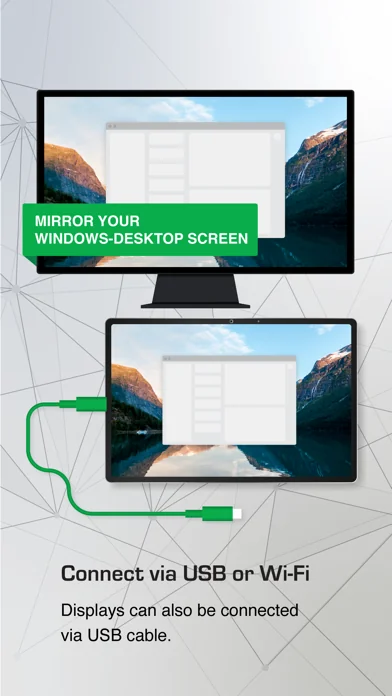
- Wireless Display Monitor (similar to Miracast, RDP, AirPlay and Sidecar)
- USB Display Monitor (similar to DisplayLink)
- Remote Access (over USB link, WiFi and LAN)
- Remote Control (wireless and wired)
- Screen Streaming (including audio)
- Screen Mirroring (over the air and via cable)
- Screen Cloning
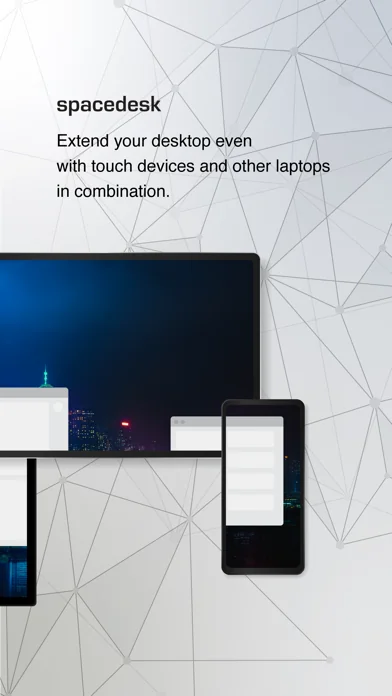
- Extension Screen
- Windows Desktop Workspace Extension
- Windows Desktop Duplication (clone)
- Windows Desktop Streaming
- Personal Computer Desktop Presenter
- Virtual Monitor for Desktop PC
- Second Display On The Go
- TV, mobile or tablet screen as Side by Side Display
- Alternative to Miracast, AirPlay and Sidecar
- Portable Multimonitor Screen for Travel
- Access main computer from mobile device
- Software KVM-Switch (Keyboard Video Mouse)
- Software Display Hub
- Software Display Switch
- Projector Screen Viewer
- Input Console
- Input Terminal
- Tablet Input Device
- Windows Graphics Tablet App
- Windows Tablet as sketchbook for drawing artwork
- Creative Video Wall App
- Video Wall w. Any Angle Rotation
Instruction manual, documentation and detailed setup:
https://manual.spacedesk.net
Quick Guide:
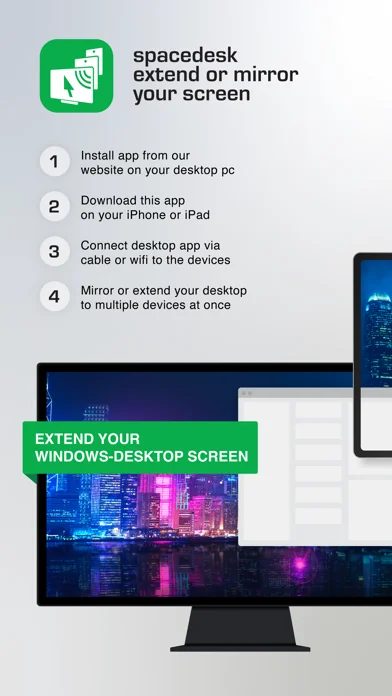
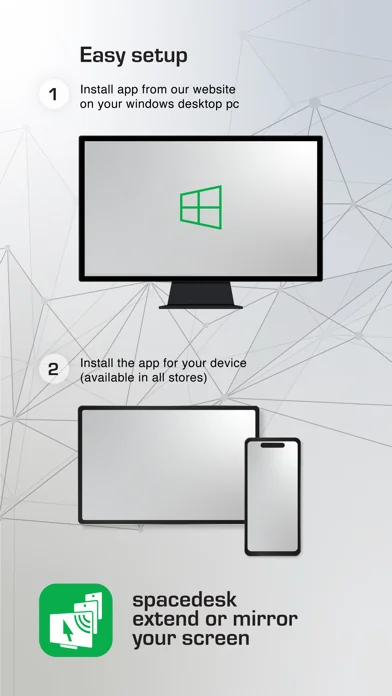
1. Install spacedesk DRIVER software for Windows Primary PC.
Download from: https://www.spacedesk.net
2. Install this spacedesk Viewer app for iOS.
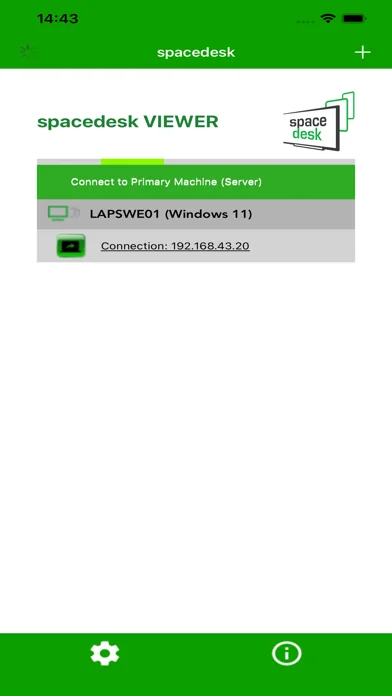
3. Open this spacedesk Viewer app and connect to Windows Primary PC.
Connection: USB or LAN (Local Area Network).
LAN: Driver and Viewer must be on the same network
- via Mobile Hotspot
Note: Does NOT need internet connection!
The Windows Primary Machine running spacedesk Driver...
...supports Windows 11, Windows 10 or Windows 8.1. Apple Macs are not supported.
Dual monitor and multi monitor configurations are supported.
Needs spacedesk drivers installed. Download: https://www.spacedesk.net
The Secondary Machine or Device (iOS network display client)...
...is an iPad, iPhone or device running the spacedesk iOS app.
The wireless and wired cable connection...
...connects Windows Primary Machine to Secondary Machine or Device over USB, LAN (Local Area Network e.g. Ethernet) and/or WLAN (Wireless Local Area Network).
Local Area Network connection can be wired or over WiFi. TCP/IP network protocol is required.
More information on:
https://www.spacedesk.net
Instruction Manual: https://manual.spacedesk.net/
Support Forum: https://forum.spacedesk.net/
Facebook: https://www.facebook.com/pages/spacedesk/330909083726073
Youtube: https://www.youtube.com/watch?v=YkWZSwBD-XY
— LIGHTNING FAST —
To achieve unparalleled performance and display quality with zero lag, use cable connection over USB or Local Area Network. Try to circumvent WiFi and network routers. E.g. configure Windows PC or iOS device as WiFi Access Point (Hotspot) and connect directly before connecting spacedesk. Please check chapter "Performance Tuning" in the instruction manual: https://manual.spacedesk.net
— REMOTE CONTROL INPUT AND OUTPUT PERIPHERAL ACCESSORIES —
- Touchscreen (multitouch and single touch
- Touchpad
- Mouse Pointer Control
- Keyboard
- Pressure Sensitive Stylus Pen
- Audio Speaker
— SETTINGS AND OPTIONS —
- Landscape View
- Portrait View
— SYSTEM SUPPORT —
Supported are iOS versions 11.x+ (including MacOS on Apple Silicon Chips) and PCs with Windows 11, Windows 10 and Windows 8.1. Apple Macs are not supported.
- Screen Cast (to television, tablet or smart phone)
- Desktop Remoting Viewer (over USB and Local Area Network)
- Drawing Tablet (drawing and painting with digitizer pen)
- Wireless Display Monitor (similar to Miracast, RDP, AirPlay and Sidecar)
- USB Display Monitor (similar to DisplayLink)
- Remote Access (over USB link, WiFi and LAN)
- Remote Control (wireless and wired)
- Screen Streaming (including audio)
- Screen Mirroring (over the air and via cable)
- Screen Cloning
- Extension Screen
- Windows Desktop Workspace Extension
- Windows Desktop Duplication (clone)
- Windows Desktop Streaming
- Personal Computer Desktop Presenter
- Virtual Monitor for Desktop PC
- Second Display On The Go
- TV, mobile or tablet screen as Side by Side Display
- Alternative to Miracast, AirPlay and Sidecar
- Portable Multimonitor Screen for Travel
- Access main computer from mobile device
- Software KVM-Switch (Keyboard Video Mouse)
- Software Display Hub
- Software Display Switch
- Projector Screen Viewer
- Input Console
- Input Terminal
- Tablet Input Device
- Windows Graphics Tablet App
- Windows Tablet as sketchbook for drawing artwork
- Creative Video Wall App
- Video Wall w. Any Angle Rotation
Instruction manual, documentation and detailed setup:
https://manual.spacedesk.net
Quick Guide:
1. Install spacedesk DRIVER software for Windows Primary PC.
Download from: https://www.spacedesk.net
2. Install this spacedesk Viewer app for iOS.
3. Open this spacedesk Viewer app and connect to Windows Primary PC.
Connection: USB or LAN (Local Area Network).
LAN: Driver and Viewer must be on the same network
- via Mobile Hotspot
Note: Does NOT need internet connection!
The Windows Primary Machine running spacedesk Driver...
...supports Windows 11, Windows 10 or Windows 8.1. Apple Macs are not supported.
Dual monitor and multi monitor configurations are supported.
Needs spacedesk drivers installed. Download: https://www.spacedesk.net
The Secondary Machine or Device (iOS network display client)...
...is an iPad, iPhone or device running the spacedesk iOS app.
The wireless and wired cable connection...
...connects Windows Primary Machine to Secondary Machine or Device over USB, LAN (Local Area Network e.g. Ethernet) and/or WLAN (Wireless Local Area Network).
Local Area Network connection can be wired or over WiFi. TCP/IP network protocol is required.
More information on:
https://www.spacedesk.net
Instruction Manual: https://manual.spacedesk.net/
Support Forum: https://forum.spacedesk.net/
Facebook: https://www.facebook.com/pages/spacedesk/330909083726073
Youtube: https://www.youtube.com/watch?v=YkWZSwBD-XY
— LIGHTNING FAST —
To achieve unparalleled performance and display quality with zero lag, use cable connection over USB or Local Area Network. Try to circumvent WiFi and network routers. E.g. configure Windows PC or iOS device as WiFi Access Point (Hotspot) and connect directly before connecting spacedesk. Please check chapter "Performance Tuning" in the instruction manual: https://manual.spacedesk.net
— REMOTE CONTROL INPUT AND OUTPUT PERIPHERAL ACCESSORIES —
- Touchscreen (multitouch and single touch
- Touchpad
- Mouse Pointer Control
- Keyboard
- Pressure Sensitive Stylus Pen
- Audio Speaker
— SETTINGS AND OPTIONS —
- Landscape View
- Portrait View
— SYSTEM SUPPORT —
Supported are iOS versions 11.x+ (including MacOS on Apple Silicon Chips) and PCs with Windows 11, Windows 10 and Windows 8.1. Apple Macs are not supported.
🆕 What's New · v2.1.4
*Several bugfixes
Profile & Insights
Everything we know — and don't — about this app and its company.
Identification
- App name
- spacedesk - USB Display for PC
- Developer
- datronicsoft Technology GmbH
- Bundle ID
- com.datronicsoft.spacedeskApp
- App Store URL
- Open in App Store
- Category
- Productivity
- Content rating
- 4+
- Languages
- EN, DE, ZH, ZH
Company
- Website
- www.spacedesk.net
- Tagline
- home EN
- Description
- Not found
- Founded
- Not found
- HQ / Address
- Not found
- Employees
- Not found
- Logo
- Not found
Revenue
- Verified revenue / mo
- Not found
- AI revenue estimate / mo
- Not found
- AI annual estimate
- Not found
- ML model estimate / mo
- $11.6K/mo
- Top-grossing rank
- Outside top 100 in US Productivity
- All-time revenue
- Not found
- Pricing
- Not found
Founder
- Name
- Not found
- X / Twitter
- Not found
- Not found
- GitHub
- Not found
- X followers
- Not found
- Public statements
- Not found
Funding
- Total raised
- Not found
- Last round
- Not found
- Investors
- Not found
- Crunchbase
- Not found
- AngelList
- Not found
Press & Links
- Articles found
- Not found
- Listed on
- Not found
- Blog
- Not found
- Press / News
- Not found
Contacts & Socials
- Socials
- facebook · instagram · youtube
- Not found
- Phone
- Not found
- Contact page
- https://www.spacedesk.net/support-forum/
- About page
- Not found
⭐Recent App Store Reviews49 latest · avg 4.18★ · 63.3% 5★ · 8.2% 1★
5★31 (63%)
4★8 (16%)
3★2 (4%)
2★4 (8%)
1★4 (8%)
+7 ratings/week
Praise: great ×12 best ×6 love ×6 amazing ×3 recommend ×3Complaints: worst ×2 subscription ×2 crash ×1 bug ×1
Top positive
★★★★★ Wonderful tool
Makes it all easy…
★★★★★ Best appp ever used
I love this app makes screen sharing experience user friendly and simple…
Top negative
★☆☆☆☆ Why doesn’t it support Mac?
Many people need to extend their Mac screen through it as well.…
★☆☆☆☆ Worst damn app
Doesn’t work at all, what a waste of time…
📈Ratings growth1,887 ratings+46% lifetimeShow 3-year history estimate ▾
Tracked (57 weeks) Pre-tracking estimate (34 weeks) · model-based, ±5% noise · anchored to release date and current value
🌍Geographic ReachNot ranked
This app is currently outside the top 100 grossing in all 9 countries we monitor (US, UK, DE, FR, JP, CA, AU, BR, IN). Niche or new apps often launch this way — popularity rankings appear once daily revenue clears the regional threshold.
Profile is built from iTunes Lookup + developer site scrape + ML revenue model. Empty fields show "Not found" — additional sources (Crunchbase, X, IndieHackers, Acquire.com) coming.
More by datronicsoft Technology GmbH
View all →More Productivity
Microsoft Outlook
★ 4.8 · 8,891,395 reviews
Google Drive – online backup
★ 4.8 · 7,526,498 reviews
ChatGPT
★ 4.8 · 7,136,919 reviews
Yahoo Mail – Alles im Blick
★ 4.7 · 4,623,459 reviews
HP
★ 4.6 · 4,011,497 reviews
Google Docs
★ 4.8 · 3,078,214 reviews
Microsoft Word
★ 4.7 · 2,843,856 reviews
Gmail – E-Mail von Google
★ 4.7 · 2,406,337 reviews
Browse BU Analytics
📚 All 55,000+ Books
🜍 Alchemy & Hermeticism
🔮 Magic & Ritual
🌙 Witchcraft & Paganism
⭐ Astrology & Cosmology
🃏 Divination & Tarot
📜 Productivity
✡️ Kabbalah & Jewish Mysticism
🕉️ Mysticism & Contemplation
🕊️ Theosophy & Anthroposophy
🏛️ Freemasonry & Secret Societies
👻 Spiritualism & Afterlife
📖 Sacred Texts & Gnosticism
👁️ Supernatural & Occult Fiction
🧘 Spiritual Development
📚 Esoteric History & Biography
Info
About BU Analytics