



 57
57

BU Score
Solid

Histo!



✍️ bumetric analysis
“
Histo! is an iOS app from John Ash in the Education category, currently rated 5.0★ across 29 ratings. Initial signal reads as largely positive sentiment, users highlighting consistency and feature depth.
Our BU Score puts it at 57: Solid (established niche player). For a Education app, that means established niche player.
Track changes month-over-month in the Performance section below: live snapshot history and revenue forecast included.
📊 Performance Tracking LIVE
Loading…
Rating
—
Reviews
—
Forecast Revenue / mo
—
Snapshots tracked
0
since first record
Range:
💰 Forecast Revenue / mo
MODELRevenue forecast computed from BU's 234 trigger model on each snapshot. Calibrated against ground-truth from 58 verified-revenue apps.
🔬Forecast Breakdown — Why This Estimate?Top 5 of 5 triggers
Our ML model uses 200+ signals from public data. These are the most influential for this app:
| Paid app ($9.99)METRIC | +$2,800 | |
| Excellent rating (5.0★)METRIC | +$2,200 | |
| Established app (6y old)METRIC | +$800 | |
| Single-language (English only)METRIC | −$400 | |
| Pre-traction phase (29 ratings)METRIC | −$300 |
METRIC = structural app data · REVIEW = mined from user reviews · ✓ VERIFIED = Stripe-verified anchor (TrustMRR)
📈 Reviews Growth
LIVECumulative review count from first BU snapshot. Each point = a tracked update.
⭐ Rating Trend
LIVEAverage rating evolution. Updates with each new review batch.
🗓️ Snapshot Timeline
HISTORYEach bar shows a tracked update and the metric delta from the previous snapshot.
App Specs
🔐 Own this app? Claim & verify MRR →💾 456 MB🔞 12+📱 iOS 13.0+🔖 v1.4.03🔄 updated 1y ago🌐 EN📂 Education💰 Paid🚀 Launched 2019 (6y old)
📝 About this app
Histo! helps you learn histology and test your knowledge. It is the favorite study aid of medical and dental students in histology courses at the University of Utah.
The App currently contains 2179 identification slides, based on 547 photomicrographic images. It is organized into 19 Main Topics and 148 Subtopics.
It does not require an internet connection.
NAVIGATION
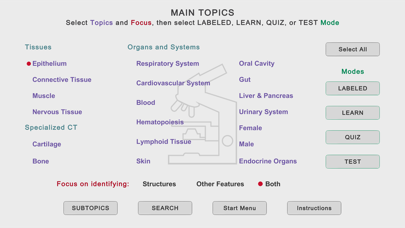
•Three navigation menus are provided, one to choose among the Main Topics, a second to select Subtopics of the Main Topics, and a Search feature to find slides using 675 keywords. These meus allow you focus your study as broadly or narrowly as desired.
•Once slides are displayed, a one-finger left or right swipe moves forward or backward by one slide, a two-finger swipe jumps 10 slides.
LABELED SLIDE MODE
•This mode presents 92 micrographs that cover the Main Topics. Important structural features are named, and short explanations are given. These micrographs provide an efficient way for anyone new to a topic to quickly learn the identifications and spatial relationships of the microanatomy that are key for identifying tissues and organs.
•The labels can be turned on and off by tapping, allowing immediate self-testing while learning.
LEARN, QUIZ, and TEST (LQT) MODES
•These modes are based on 2087 questions and answers related to 455 micrographs.
•In the Learn mode, each slide displays a question, the answer, and a short explanation. The slides are presented in a logical order that helps you learn the material.
•In the Quiz mode, only the question is shown, and the order of presentation is randomized. You can tap to see the answer and explanation. A Quiz persists until the user deletes it.
•In the Test mode, you tap to display the built-in keyboard to answer the question, then grade your response. Results for each Main Topic are shown when you have finished a Test.
STRUCTURES AND ADDITIONAL FEATURES
•Histo! addresses both microanatomy and functional histology. About 70% of the LQT slides ask for identification of structures, the remainder are related to other features of these structures, such as functions, molecular components, or diseases.
•From the Main Topic menu, you choose whether to review structures or other features, or both.
MARKING AND UNMARKING SLIDES
•Slides in any mode may be marked for later review. This happens automatically when you miss a question in the Test mode, and by tapping a button in the Label, Learn, or Quiz modes.
•Whenever you return to the Start screen, either during a session or later after exiting, you are offered the chance to review slides marked in any of the four modes. Buttons to review marked slides are also present on the Main and Subtopics menus.
•Slides that have been marked can be unmarked during a review by scoring the question as completely correct in the Test mode or tapping a button in the Learn or Quiz modes.
SHOWING SPECIFIC SLIDES
•Identifiers for slides viewed in the Labeled, Learn or Quiz modes can be recorded and then distributed via electronic documents. Anyone importing these identifiers can view the slides in the Learn mode.
•Students can ask for help with a structural or functional question related to a specific slide and instructors can present preselected examples to an individual or group.
The App currently contains 2179 identification slides, based on 547 photomicrographic images. It is organized into 19 Main Topics and 148 Subtopics.
It does not require an internet connection.
NAVIGATION
•Three navigation menus are provided, one to choose among the Main Topics, a second to select Subtopics of the Main Topics, and a Search feature to find slides using 675 keywords. These meus allow you focus your study as broadly or narrowly as desired.
•Once slides are displayed, a one-finger left or right swipe moves forward or backward by one slide, a two-finger swipe jumps 10 slides.
LABELED SLIDE MODE
•This mode presents 92 micrographs that cover the Main Topics. Important structural features are named, and short explanations are given. These micrographs provide an efficient way for anyone new to a topic to quickly learn the identifications and spatial relationships of the microanatomy that are key for identifying tissues and organs.
•The labels can be turned on and off by tapping, allowing immediate self-testing while learning.
LEARN, QUIZ, and TEST (LQT) MODES
•These modes are based on 2087 questions and answers related to 455 micrographs.
•In the Learn mode, each slide displays a question, the answer, and a short explanation. The slides are presented in a logical order that helps you learn the material.
•In the Quiz mode, only the question is shown, and the order of presentation is randomized. You can tap to see the answer and explanation. A Quiz persists until the user deletes it.
•In the Test mode, you tap to display the built-in keyboard to answer the question, then grade your response. Results for each Main Topic are shown when you have finished a Test.
STRUCTURES AND ADDITIONAL FEATURES
•Histo! addresses both microanatomy and functional histology. About 70% of the LQT slides ask for identification of structures, the remainder are related to other features of these structures, such as functions, molecular components, or diseases.
•From the Main Topic menu, you choose whether to review structures or other features, or both.
MARKING AND UNMARKING SLIDES
•Slides in any mode may be marked for later review. This happens automatically when you miss a question in the Test mode, and by tapping a button in the Label, Learn, or Quiz modes.
•Whenever you return to the Start screen, either during a session or later after exiting, you are offered the chance to review slides marked in any of the four modes. Buttons to review marked slides are also present on the Main and Subtopics menus.
•Slides that have been marked can be unmarked during a review by scoring the question as completely correct in the Test mode or tapping a button in the Learn or Quiz modes.
SHOWING SPECIFIC SLIDES
•Identifiers for slides viewed in the Labeled, Learn or Quiz modes can be recorded and then distributed via electronic documents. Anyone importing these identifiers can view the slides in the Learn mode.
•Students can ask for help with a structural or functional question related to a specific slide and instructors can present preselected examples to an individual or group.
🆕 What's New · v1.4.03
•The explanation text for the Label, Learn, and Quiz modes on iPads is now presented in a popup window controlled by a button, rather than being squeezed into a small window at the bottom right.
•All Subtopics are now displayed in two scrollable windows on the Subtopic Menu. This replaces the single window of Main topics that required tapping to expand and contract the list of items.
•The Search Menu has been reorganized and simplified.
•The process for identifying and displaying specific slides has been simplified.
•All Subtopics are now displayed in two scrollable windows on the Subtopic Menu. This replaces the single window of Main topics that required tapping to expand and contract the list of items.
•The Search Menu has been reorganized and simplified.
•The process for identifying and displaying specific slides has been simplified.
Profile & Insights
Everything we know — and don't — about this app and its company.
Identification
- App name
- Histo!
- Developer
- John Ash
- Bundle ID
- com.learnhisto.histo
- App Store URL
- Open in App Store
- Category
- Education
- Content rating
- 12+
- Languages
- EN
Company
- Website
- learnhisto.com
- Tagline
- Not found
- Description
- Not found
- Founded
- Not found
- HQ / Address
- Not found
- Employees
- Not found
- Logo
- Not found
Revenue
- Verified revenue / mo
- Not found
- AI revenue estimate / mo
- Not found
- AI annual estimate
- Not found
- ML model estimate / mo
- $86/mo
- Top-grossing rank
- Outside top 99 in US Education
- All-time revenue
- Not found
- Pricing
- Not found
Founder
- Name
- Not found
- X / Twitter
- Not found
- Not found
- GitHub
- Not found
- X followers
- Not found
- Public statements
- Not found
Funding
- Total raised
- Not found
- Last round
- Not found
- Investors
- Not found
- Crunchbase
- Not found
- AngelList
- Not found
Press & Links
- Articles found
- Not found
- Listed on
- Not found
- Blog
- Not found
- Press / News
- Not found
Contacts & Socials
- Socials
- Not found
- Not found
- Phone
- Not found
- Contact page
- Not found
- About page
- Not found
📈Ratings growth29 ratings+2800% lifetimeShow 3-year history estimate ▾
Tracked (14 weeks) Pre-tracking estimate (37 weeks) · model-based, ±5% noise · anchored to release date and current value
🌍Geographic ReachNot ranked
This app is currently outside the top 100 grossing in all 9 countries we monitor (US, UK, DE, FR, JP, CA, AU, BR, IN). Niche or new apps often launch this way — popularity rankings appear once daily revenue clears the regional threshold.
Profile is built from iTunes Lookup + developer site scrape + ML revenue model. Empty fields show "Not found" — additional sources (Crunchbase, X, IndieHackers, Acquire.com) coming.




Full revenue analysis
Read the article-style breakdown for Histo!: category rank, percentile, growth signal, comparable apps, and how the forecast is calibrated against verified-MRR anchors in this niche.