55
BU Score
Solid
Teleprompter Easy Prof Hornet

✍️ bumetric analysis
“
Teleprompter Easy Prof Hornet is an iOS app from Alvaro Garcia Ojea in the Productivity category, currently rated 4.3★ across 19 ratings. Initial signal reads as mixed reviews: supporters praise core features while critics cite stability and value gaps.
Our BU Score puts it at 55: Solid (established niche player). For a Productivity app, that means established niche player.
Track changes month-over-month in the Performance section below: live snapshot history and revenue forecast included.
📊 Performance Tracking LIVE
Loading…
Rating
—
Reviews
—
Forecast Revenue / mo
—
Snapshots tracked
0
since first record
Range:
💰 Forecast Revenue / mo
MODELRevenue forecast computed from BU's 234 trigger model on each snapshot. Calibrated against ground-truth from 58 verified-revenue apps.
🔬Forecast Breakdown — Why This Estimate?Top 7 of 7 triggers
Our ML model uses 200+ signals from public data. These are the most influential for this app:
| Paid app ($0.00)METRIC | +$2,800 | |
| 5 starREVIEW | +$1,800 | |
| Mature app (8y old)METRIC | +$1,500 | |
| Multilingual (12 languages)METRIC | +$1,500 | |
| slowREVIEW | −$1,200 | |
| Good rating (4.3★)METRIC | +$800 | |
| Pre-traction phase (19 ratings)METRIC | −$300 |
METRIC = structural app data · REVIEW = mined from user reviews · ✓ VERIFIED = Stripe-verified anchor (TrustMRR)
📈 Reviews Growth
LIVECumulative review count from first BU snapshot. Each point = a tracked update.
⭐ Rating Trend
LIVEAverage rating evolution. Updates with each new review batch.
🗓️ Snapshot Timeline
HISTORYEach bar shows a tracked update and the metric delta from the previous snapshot.
App Specs
🔐 Own this app? Claim & verify MRR →💾 221 MB🔞 4+📱 iOS 11.0+🔖 v5.3🔄 updated 4y ago🌐 EN, FR, DE, HI, IT +7📂 Productivity💰 Paid🚀 Launched 2017 (8y old)
📝 About this app
Perfect for Youtube videos, business or school presentations, video journalism, video production work, keynote addresses... or any kind of event! Use your teleprompter wherever you are. Used by vloggers, teachers, keynote speakers, singers, businessmen, broadcasters, students, priests...
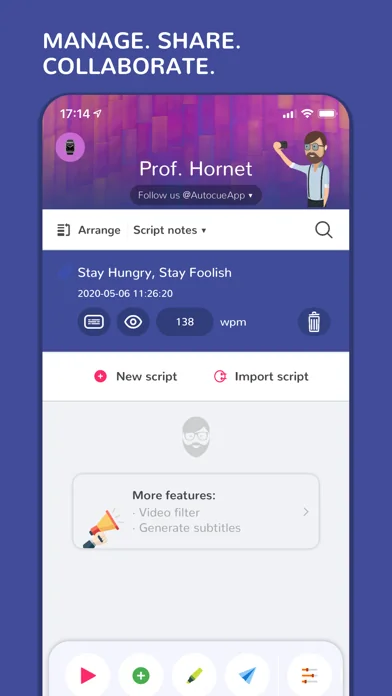
Just 3 steps to start using a top-quality autocue:
- Import your script (or create a new one in the app).
- Configure the teleprompter options.
- Press the button and start reading.
Multiple innovative features:
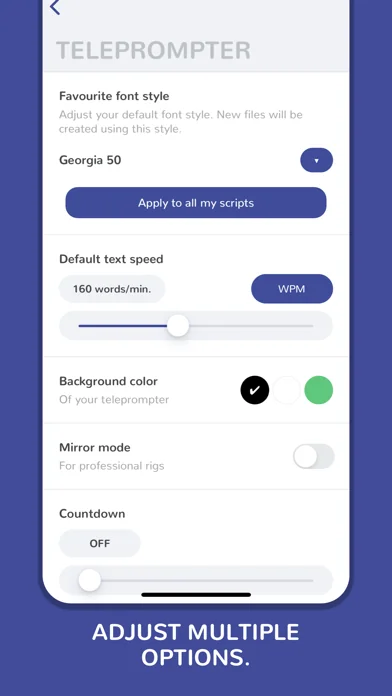
**TELEPROMPTER SETUP:
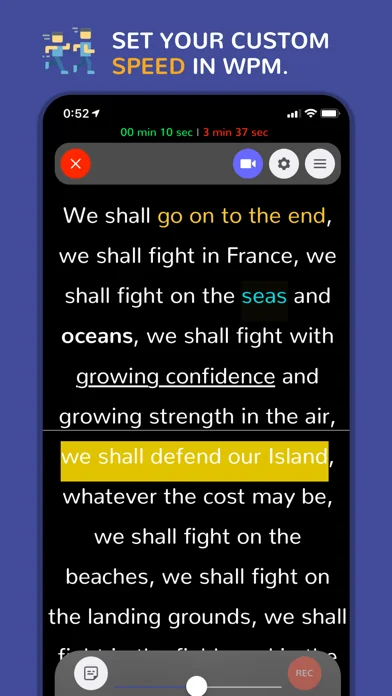
• Speed in words per minute - from 25 wpm to 300 wpm.
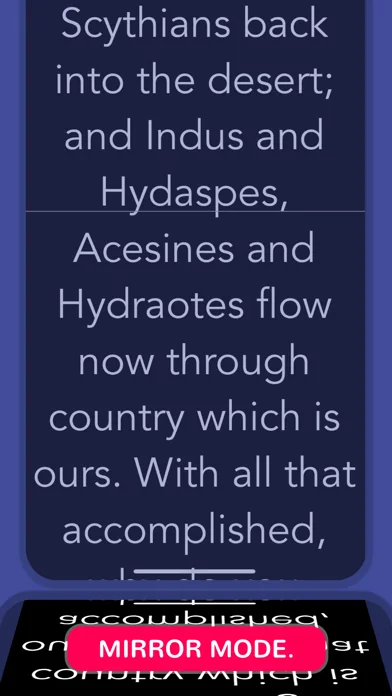
• Mirror mode - Mirror text for use with teleprompter glass rigs.
• Background color.
• Autostart timer (countdown).
• Reading guide and line indicator to help keep your place.
• Landscape and portrait mode.
• Customize your favorite font style.
**EDITOR:
• Individual script speed.
• Font family: Arial, Times New Roman, Courier, Helvetica, Verdana and many more.
• Font size: 20, 30, 40, 50, 60, 70, 80, 90, 100, 110, 130 and 150px.
• Font color: black, white and any RGB color.
• Font weight: bold / light.
• Highlight your keywords: underline, italic, strikethrough...
• Text alignment.
• Background color.
• Adjust the line spacing.
• Add notes, comments, indexes or anything you need to remember during your speech.
• Sort your scripts easily.
**IMPORT:
• Create your own scripts or import them from other apps such as Google Drive, DropBox, Spark, Gmail...
• Use the 'Open with' option that is available, for example, in iOS mail apps.
• Select your text from any app and press the 'Send to Prof. Hornet' button.
• Files accepted: .pdf, .txt, .rtf, .doc and .docx.
**OTHER FEATURES:
• Video promotion available.
• Biometrical access to protect your scripts from undesired hands.
• Estimated remaining time and elapsed time on the screen.
• Move the teleprompter up and down easily.
• Historical speeches available to train with them.
• Share your scripts with your teammates and friends.
• Customer support messaging system - Are you having issues? need help? we will help you as soon as possible.
• WhatsApp and iMessage stickers.
• Zip your files.
**TELEPROMPTER CONTROL:
• Remote keyboard.
• Remote control app.
• Apple Watch remote control app included.
• Prof. Hornet File Manager for Mac OS lets you create and edit scripts easily and send them to the app in real-time.
**LANGUAGES:
English, Spanish, Japanese, Italian, Korean, Turkish, German, Chinese, French, Hindi, Portuguese, Russian (New languages coming soon).
**VIDEO RECORDING:
If you want/need to record videos directly from your iPhone or iPad, we recommend to use the app: Prof. Hornet Teleprompter Pro.
**CHROMA-KEY:
If you want/need to record videos using a green screen, we recommend to use the app: 'Green Screen Teleprompter by Prof. Hornet'.
You are a few "touches" away from creating awesome and unique videos.
**What users say about us:
- "This is a lovely autocue app."
- "The clarity of the display while reading is fantastic."
- "The best value for money Teleprompter for iPad/iPhone in the AppStore."
- "Nice app! Nicely done and easy to use super awesome! Love this application very much!"
- "The perfect and cheapest teleprompter"
--------------------------------------
Mail: hello@autocueapp.com
Twitter: @AutocueApp
Facebook: Prof. Hornet - Autocue App
Instagram: @AutocueApp
https://www.autocueapp.com
Just 3 steps to start using a top-quality autocue:
- Import your script (or create a new one in the app).
- Configure the teleprompter options.
- Press the button and start reading.
Multiple innovative features:
**TELEPROMPTER SETUP:
• Speed in words per minute - from 25 wpm to 300 wpm.
• Mirror mode - Mirror text for use with teleprompter glass rigs.
• Background color.
• Autostart timer (countdown).
• Reading guide and line indicator to help keep your place.
• Landscape and portrait mode.
• Customize your favorite font style.
**EDITOR:
• Individual script speed.
• Font family: Arial, Times New Roman, Courier, Helvetica, Verdana and many more.
• Font size: 20, 30, 40, 50, 60, 70, 80, 90, 100, 110, 130 and 150px.
• Font color: black, white and any RGB color.
• Font weight: bold / light.
• Highlight your keywords: underline, italic, strikethrough...
• Text alignment.
• Background color.
• Adjust the line spacing.
• Add notes, comments, indexes or anything you need to remember during your speech.
• Sort your scripts easily.
**IMPORT:
• Create your own scripts or import them from other apps such as Google Drive, DropBox, Spark, Gmail...
• Use the 'Open with' option that is available, for example, in iOS mail apps.
• Select your text from any app and press the 'Send to Prof. Hornet' button.
• Files accepted: .pdf, .txt, .rtf, .doc and .docx.
**OTHER FEATURES:
• Video promotion available.
• Biometrical access to protect your scripts from undesired hands.
• Estimated remaining time and elapsed time on the screen.
• Move the teleprompter up and down easily.
• Historical speeches available to train with them.
• Share your scripts with your teammates and friends.
• Customer support messaging system - Are you having issues? need help? we will help you as soon as possible.
• WhatsApp and iMessage stickers.
• Zip your files.
**TELEPROMPTER CONTROL:
• Remote keyboard.
• Remote control app.
• Apple Watch remote control app included.
• Prof. Hornet File Manager for Mac OS lets you create and edit scripts easily and send them to the app in real-time.
**LANGUAGES:
English, Spanish, Japanese, Italian, Korean, Turkish, German, Chinese, French, Hindi, Portuguese, Russian (New languages coming soon).
**VIDEO RECORDING:
If you want/need to record videos directly from your iPhone or iPad, we recommend to use the app: Prof. Hornet Teleprompter Pro.
**CHROMA-KEY:
If you want/need to record videos using a green screen, we recommend to use the app: 'Green Screen Teleprompter by Prof. Hornet'.
You are a few "touches" away from creating awesome and unique videos.
**What users say about us:
- "This is a lovely autocue app."
- "The clarity of the display while reading is fantastic."
- "The best value for money Teleprompter for iPad/iPhone in the AppStore."
- "Nice app! Nicely done and easy to use super awesome! Love this application very much!"
- "The perfect and cheapest teleprompter"
--------------------------------------
Mail: hello@autocueapp.com
Twitter: @AutocueApp
Facebook: Prof. Hornet - Autocue App
Instagram: @AutocueApp
https://www.autocueapp.com
🆕 What's New · v5.3
- Link to Teleprompter 2.
- Performance improvements.
Profile & Insights
Everything we know — and don't — about this app and its company.
Identification
- App name
- Teleprompter Easy Prof Hornet
- Developer
- Alvaro Garcia Ojea
- Bundle ID
- com.alvarogarciaojea.EasyTeleprompter
- App Store URL
- Open in App Store
- Category
- Productivity
- Content rating
- 4+
- Languages
- EN, FR, DE, HI, IT, JA, KO, PT, RU, ES, ZH, TR
Company
- Website
- autocueapp.com
- Tagline
- Autokue App
- Description
- Discover the best professional video teleprompter app for iOS with video recording, chroma mode, speech recognition, captions, IA to track your voice, eye contact... Perfect for Youtube, TikTok, presentations... download it for free on the App Store.
- Founded
- Not found
- HQ / Address
- Not found
- Employees
- Not found
- Logo
- OG image
Revenue
- Verified revenue / mo
- Not found
- AI revenue estimate / mo
- Not found
- AI annual estimate
- Not found
- ML model estimate / mo
- $3.7K/mo
- Top-grossing rank
- Outside top 100 in US Productivity
- All-time revenue
- Not found
- Pricing
- Not found
Founder
- Name
- Not found
- X / Twitter
- https://twitter.com/algojea
- Not found
- GitHub
- Not found
- X followers
- Not found
- Public statements
- Not found
Funding
- Total raised
- Not found
- Last round
- Not found
- Investors
- Not found
- Crunchbase
- Not found
- AngelList
- Not found
Press & Links
- Articles found
- Not found
- Listed on
- Not found
- Blog
- Not found
- Press / News
- Not found
Contacts & Socials
- Socials
- facebook · instagram · twitter
- Not found
- Phone
- Not found
- Contact page
- https://autocueapp.com/contact.html
- About page
- Not found
⭐Recent App Store Reviews2 latest · avg 2.0★ · 0% 5★ · 50.0% 1★
5★0 (0%)
4★0 (0%)
3★1 (50%)
2★0 (0%)
1★1 (50%)
+0 ratings/week
Top positive
★☆☆☆☆ Frustrating !
I have purchased all three and it keeps asking me to buy the professional edition. I don’t know what else to buy. I followed all the instructions and can’t get my Scripps into the program…
★★★☆☆ Does not scroll fast enough
There's a 300 words per minute max but that must be designed for a specific font size because once you increase the font too nice comfortable size for using it at a distance it is simply too slow to use…
Top negative
★☆☆☆☆ Frustrating !
I have purchased all three and it keeps asking me to buy the professional edition. I don’t know what else to buy. I followed all the instructions and can’t get my Scripps into the program…
★★★☆☆ Does not scroll fast enough
There's a 300 words per minute max but that must be designed for a specific font size because once you increase the font too nice comfortable size for using it at a distance it is simply too slow to use…
📈Ratings growth19 ratings+1800% lifetimeShow 3-year history estimate ▾
Tracked (4 weeks) Pre-tracking estimate (37 weeks) · model-based, ±5% noise · anchored to release date and current value
🌍Geographic ReachNot ranked
This app is currently outside the top 100 grossing in all 9 countries we monitor (US, UK, DE, FR, JP, CA, AU, BR, IN). Niche or new apps often launch this way — popularity rankings appear once daily revenue clears the regional threshold.
Profile is built from iTunes Lookup + developer site scrape + ML revenue model. Empty fields show "Not found" — additional sources (Crunchbase, X, IndieHackers, Acquire.com) coming.
More by Alvaro Garcia Ojea
View all →Full revenue analysis
Read the article-style breakdown for Teleprompter Easy Prof Hornet: category rank, percentile, growth signal, comparable apps, and how the forecast is calibrated against verified-MRR anchors in this niche.