60
BU Score
Solid
Noteflow+ Digital Notebook
✍️ BU Analytics Review
“
Noteflow+ Digital Notebook is an iOS app from Qrayon, LLC in the Business category, currently rated 4.4★ across 184 ratings. Initial signal reads as mixed reviews — supporters praise core features while critics cite stability/value gaps.
Our BU Score puts it at 60 — Solid (established niche player). For a Business app, that means established niche player.
Track changes month-over-month in the Performance section below — live snapshot history and revenue forecast included.
creator
📊 Performance Tracking LIVE
Loading…
Rating
—
Reviews
—
Forecast Revenue / mo
—
Snapshots tracked
0
since first record
Range:
💰 Forecast Revenue / mo
MODELRevenue forecast computed from BU's 234 trigger model on each snapshot. Calibrated against ground-truth from 58 verified-revenue apps.
🔬Forecast Breakdown — Why This Estimate?Top 7 of 7 triggers
Our ML model uses 200+ signals from public data. These are the most influential for this app:
| Paid app ($0.00)METRIC | +$2,800 | |
| 5 starREVIEW | +$1,800 | |
| Mature app (8y old)METRIC | +$1,500 | |
| too expensiveREVIEW | −$1,000 | |
| Good rating (4.4★)METRIC | +$800 | |
| Early-stage install base (184 ratings)METRIC | +$400 | |
| Single-language (English only)METRIC | −$400 |
METRIC = structural app data · REVIEW = mined from user reviews · ✓ VERIFIED = Stripe-verified anchor (TrustMRR)
📈 Reviews Growth
LIVECumulative review count from first BU snapshot. Each point = a tracked update.
⭐ Rating Trend
LIVEAverage rating evolution. Updates with each new review batch.
🗓️ Snapshot Timeline
HISTORYEach bar shows a tracked update and the metric delta from the previous snapshot.
App Specs
🔐 Own this app? Claim & verify MRR →💾 16 MB🔞 4+📱 iOS 12.4+🔖 v3.4🔄 updated 1y ago🌐 EN📂 Business💰 Paid🚀 Launched 2017 (8y old)
📝 About this app
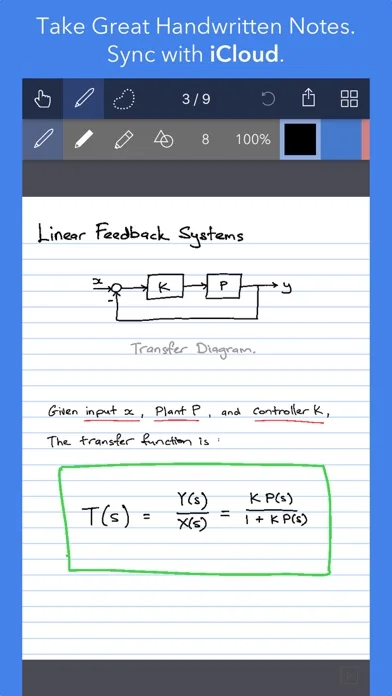
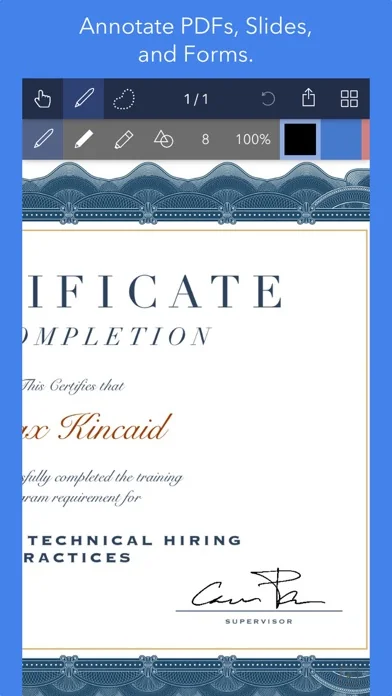
Noteflow is designed to replace pen and paper. It is a modern digital notebook that lets you get the most out of your iPad or iPhone.
Use it for taking notes, annotating PDFs, sketching and doodling, plus a whole lot more:
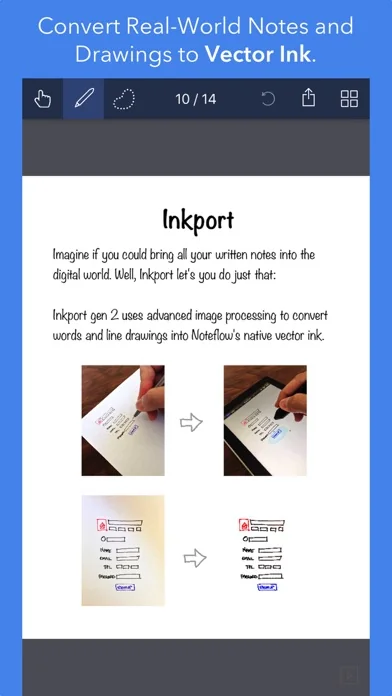
Copy and paste from the real world: Use Inkport gen 2 to snap a picture of a whiteboard or writing and convert it into Noteflow's native vector ink. No special paper needed. Then resize, re-color, or edit as if you wrote it in Noteflow.
Create layered drawings without layers: Use the highlighter tool to color and shade behind existing ink. Use Color-Select to separate and edit individual colors. It's a much more fluid and natural editing experience than with layers. Use the straight-line tool with a grid for fast and intuitive wireframes and drafting.
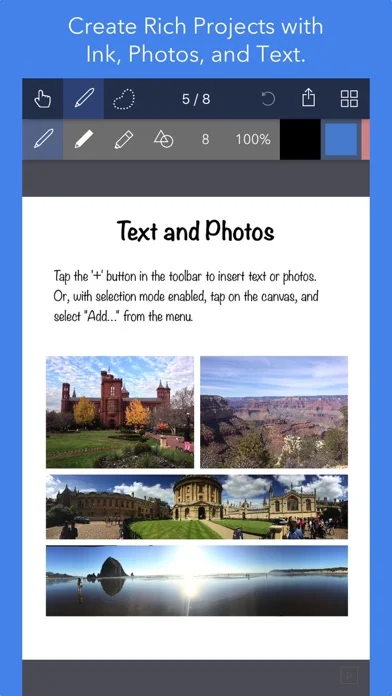
Drag-and-drop, cloud-storage, and more: Noteflow natively integrates with iOS's file system and drag-and-drop capabilities. Drop photos and text into Noteflow, and drag your drawings into other apps. Store your files locally or sync with the cloud service of your choice. Make Noteflow a seamless part of your workflow, the way you like.
SPACE FOR YOUR IDEAS TO ROAM
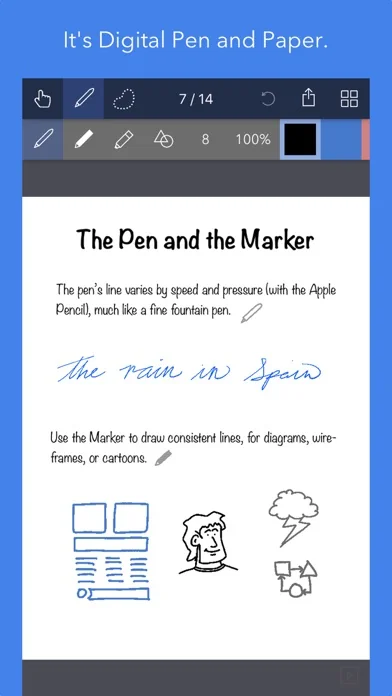
Our vision for Noteflow is simple: to be digital pen and paper.
The magic of pen and paper is in their versatility. They are useful for so many things, but particularly for the freeform capture of ideas. Noteflow expands upon this quality.
You can naturally do all the things you normally do with pen and paper: take notes in meetings or class, and jot down flashes of inspirations on the go. And you can take that to a whole new level:
One of Noteflow’s best uses is for "thinking on digital paper": quickly capture key ideas and concepts, then move and organize them on the screen.
Noteflow's vector ink engine lets you scale and edit your work without any loss of quality. Your words and drawings remain tack sharp when zoomed in, giving you a huge effective working canvas even on a single page.
There are analogues in the physical world, such as sketchnotes or everyday working on a white board, but being able to fluidly edit and move your ideas around the page is something you can only do digitally.
When you represent the ideas in your head with your own personal scribbles on the screen, it effectively becomes an extension of your mind - giving you more room to think.
We've designed every part of Noteflow to let you intuitively capture and work on your ideas the way you like. Whether it's dropping in existing information, quickly sketching concepts, or assembling polished presentations for others.
By resizing ink and zooming in, you have a huge effective canvas to work with, even on a single page.
As your ideas shape up, Noteflow has all the tools you need to tidy them up and format them to share with others.
DIGITAL TOOLS FOR A DIGITAL AGE
I hope you'll find Noteflow a useful part of your workflow, and that you'll discover new ways to do things with it that weren't easy before.
We're very proud of the work we've put into Noteflow, but we're also just seen the beginning of what's possible with powerful new digital platforms like the iPad.
Our goal is to push these platforms to their limits to craft useful tools. Tools that can help us think a little more clearly, communicate a bit more effectively, and connect with other in new and enriching ways.
Thanks for joining us on this journey!
-- The App Makers @ Qrayon.
Use it for taking notes, annotating PDFs, sketching and doodling, plus a whole lot more:
Copy and paste from the real world: Use Inkport gen 2 to snap a picture of a whiteboard or writing and convert it into Noteflow's native vector ink. No special paper needed. Then resize, re-color, or edit as if you wrote it in Noteflow.
Create layered drawings without layers: Use the highlighter tool to color and shade behind existing ink. Use Color-Select to separate and edit individual colors. It's a much more fluid and natural editing experience than with layers. Use the straight-line tool with a grid for fast and intuitive wireframes and drafting.
Drag-and-drop, cloud-storage, and more: Noteflow natively integrates with iOS's file system and drag-and-drop capabilities. Drop photos and text into Noteflow, and drag your drawings into other apps. Store your files locally or sync with the cloud service of your choice. Make Noteflow a seamless part of your workflow, the way you like.
SPACE FOR YOUR IDEAS TO ROAM
Our vision for Noteflow is simple: to be digital pen and paper.
The magic of pen and paper is in their versatility. They are useful for so many things, but particularly for the freeform capture of ideas. Noteflow expands upon this quality.
You can naturally do all the things you normally do with pen and paper: take notes in meetings or class, and jot down flashes of inspirations on the go. And you can take that to a whole new level:
One of Noteflow’s best uses is for "thinking on digital paper": quickly capture key ideas and concepts, then move and organize them on the screen.
Noteflow's vector ink engine lets you scale and edit your work without any loss of quality. Your words and drawings remain tack sharp when zoomed in, giving you a huge effective working canvas even on a single page.
There are analogues in the physical world, such as sketchnotes or everyday working on a white board, but being able to fluidly edit and move your ideas around the page is something you can only do digitally.
When you represent the ideas in your head with your own personal scribbles on the screen, it effectively becomes an extension of your mind - giving you more room to think.
We've designed every part of Noteflow to let you intuitively capture and work on your ideas the way you like. Whether it's dropping in existing information, quickly sketching concepts, or assembling polished presentations for others.
By resizing ink and zooming in, you have a huge effective canvas to work with, even on a single page.
As your ideas shape up, Noteflow has all the tools you need to tidy them up and format them to share with others.
DIGITAL TOOLS FOR A DIGITAL AGE
I hope you'll find Noteflow a useful part of your workflow, and that you'll discover new ways to do things with it that weren't easy before.
We're very proud of the work we've put into Noteflow, but we're also just seen the beginning of what's possible with powerful new digital platforms like the iPad.
Our goal is to push these platforms to their limits to craft useful tools. Tools that can help us think a little more clearly, communicate a bit more effectively, and connect with other in new and enriching ways.
Thanks for joining us on this journey!
-- The App Makers @ Qrayon.
🆕 What's New · v3.4
+ Fix image rendering issue
Profile & Insights
Everything we know — and don't — about this app and its company.
Identification
- App name
- Noteflow+ Digital Notebook
- Developer
- Qrayon, LLC
- Bundle ID
- com.qrayon.Noteflow
- App Store URL
- Open in App Store
- Category
- Business
- Content rating
- 4+
- Languages
- EN
Company
- Website
- Not found
- Tagline
- Not found
- Description
- Unleash your creativity.
- Founded
- Not found
- HQ / Address
- Not found
- Employees
- Not found
- Logo
- Not found
Revenue
- Verified revenue / mo
- Not found
- AI revenue estimate / mo
- Not found
- AI annual estimate
- Not found
- ML model estimate / mo
- $4.7K/mo
- Top-grossing rank
- Outside top 100 in US Business
- All-time revenue
- Not found
- Pricing
- Not found
Founder
- Name
- Not found
- X / Twitter
- https://twitter.com/qrayon
- Not found
- GitHub
- Not found
- X followers
- Not found
- Public statements
- Not found
Funding
- Total raised
- Not found
- Last round
- Not found
- Investors
- Not found
- Crunchbase
- Not found
- AngelList
- Not found
Press & Links
- Articles found
- Not found
- Listed on
- Not found
- Blog
- Not found
- Press / News
- Not found
Contacts & Socials
- Socials
- Not found
- Phone
- Not found
- Contact page
- Not found
- About page
- Not found
📈Ratings growth184 ratings+18300% lifetimeShow 3-year history estimate ▾
Tracked (32 weeks) Pre-tracking estimate (37 weeks) · model-based, ±5% noise · anchored to release date and current value
🌍Geographic ReachNot ranked
This app is currently outside the top 100 grossing in all 9 countries we monitor (US, UK, DE, FR, JP, CA, AU, BR, IN). Niche or new apps often launch this way — popularity rankings appear once daily revenue clears the regional threshold.
💰Pricing History$0.00 → $14.99 (+0%)
Profile is built from iTunes Lookup + developer site scrape + ML revenue model. Empty fields show "Not found" — additional sources (Crunchbase, X, IndieHackers, Acquire.com) coming.
More Business
ADP Mobile Solutions
★ 4.7 · 4,262,021 reviews
Indeed Jobs
★ 4.8 · 3,901,656 reviews
Microsoft Teams
★ 4.8 · 3,356,470 reviews
Zoom Workplace
★ 4.7 · 3,159,593 reviews
DoorDash - Dasher
★ 4.7 · 2,457,049 reviews
Duo Mobile
★ 4.9 · 2,095,068 reviews
Workday
★ 4.3 · 1,714,839 reviews
USPS Mobile®
★ 4.8 · 1,688,972 reviews
Browse BU Analytics
📚 All 55,000+ Books
🜍 Alchemy & Hermeticism
🔮 Magic & Ritual
🌙 Witchcraft & Paganism
⭐ Astrology & Cosmology
🃏 Divination & Tarot
📜 Business
✡️ Kabbalah & Jewish Mysticism
🕉️ Mysticism & Contemplation
🕊️ Theosophy & Anthroposophy
🏛️ Freemasonry & Secret Societies
👻 Spiritualism & Afterlife
📖 Sacred Texts & Gnosticism
👁️ Supernatural & Occult Fiction
🧘 Spiritual Development
📚 Esoteric History & Biography
Info
About BU Analytics