68
BU Score
Solid
ServicePlanner
✍️ BU Analytics Review
“
ServicePlanner is an iOS app from iMatt Solutions in the Productivity category, currently rated 4.7★ across 185 ratings. Initial signal reads as largely positive sentiment, users highlighting consistency and feature depth.
Our BU Score puts it at 68 — Solid (established niche player). For a Productivity app, that means established niche player.
Track changes month-over-month in the Performance section below — live snapshot history and revenue forecast included.
creator
📊 Performance Tracking LIVE
Loading…
Rating
—
Reviews
—
Forecast Revenue / mo
—
Snapshots tracked
0
since first record
Range:
💰 Forecast Revenue / mo
MODELRevenue forecast computed from BU's 234 trigger model on each snapshot. Calibrated against ground-truth from 58 verified-revenue apps.
🔬Forecast Breakdown — Why This Estimate?Top 11 of 11 triggers
Our ML model uses 200+ signals from public data. These are the most influential for this app:
| Paid app ($0.00)METRIC | +$2,800 | |
| Excellent rating (4.7★)METRIC | +$2,200 | |
| worth every pennyREVIEW | +$2,000 | |
| bugsREVIEW | −$1,800 | |
| 5 starREVIEW | +$1,800 | |
| excellent appREVIEW | +$1,500 | |
| Mature app (8y old)METRIC | +$1,500 | |
| Multilingual (17 languages)METRIC | +$1,500 | |
| highly recommendREVIEW | +$1,400 | |
| slowREVIEW | −$1,200 | |
| Early-stage install base (185 ratings)METRIC | +$400 |
METRIC = structural app data · REVIEW = mined from user reviews · ✓ VERIFIED = Stripe-verified anchor (TrustMRR)
📈 Reviews Growth
LIVECumulative review count from first BU snapshot. Each point = a tracked update.
💚Sentiment Over Time↑ green = positive · ↓ red = negative
Aug 24
Jan 25
May 25
Jun 25
Sep 25
Jan 26
⭐ Rating Trend
LIVEAverage rating evolution. Updates with each new review batch.
🗓️ Snapshot Timeline
HISTORYEach bar shows a tracked update and the metric delta from the previous snapshot.
App Specs
🔐 Own this app? Claim & verify MRR →💾 46 MB🔞 4+📱 iOS 14.0+🔖 v3.1.1🔄 updated 11mo ago🌐 BG, DA, NL, EN, FR +12📂 Productivity💰 Paid🚀 Launched 2017 (8y old)
📝 About this app
ServicePlanner is a Field Ministry and Contact Management app designed for Jehovah's Witnesses.
• Dropbox Sync - automatically backup your data and sync across multiple devices.
• Integration with Territory Helper.
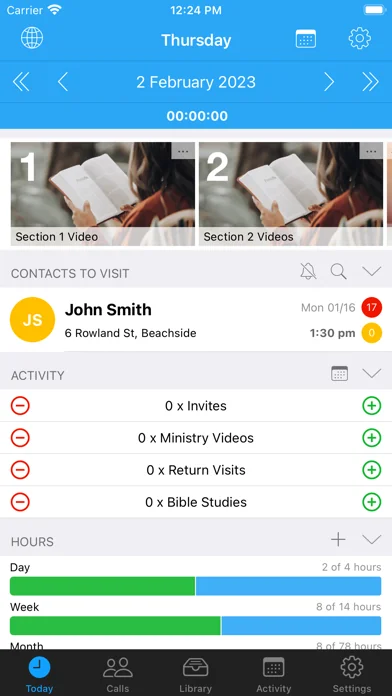
• Today Screen - quick access to the Timer, Videos, Publications, Website Browser, Activity Planner and your scheduled calls for the day.
• Timer - record your time spent in the ministry or on "other" work (LDC etc). Tap the timer bar on the Today screen or force touch the app icon.
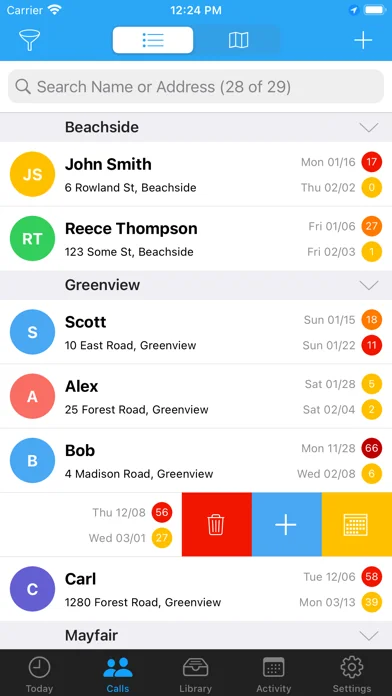
• Contact Management - centrally manage your Calls with a searchable Contact list. Colours are carefully used to indicate the Contact Type and render a heat map showing if your visits are overdue or on schedule. Swipe or long-press on a Contact to quickly reschedule or update a contact.
• Contact Visit History & Library - quickly access your call history with a list of previous visits. Colour again is used to visually indicate the Visit Type. Define your Next Visit Date and Plans. A central Library for each contact shows all of the publications you have ever placed with them.
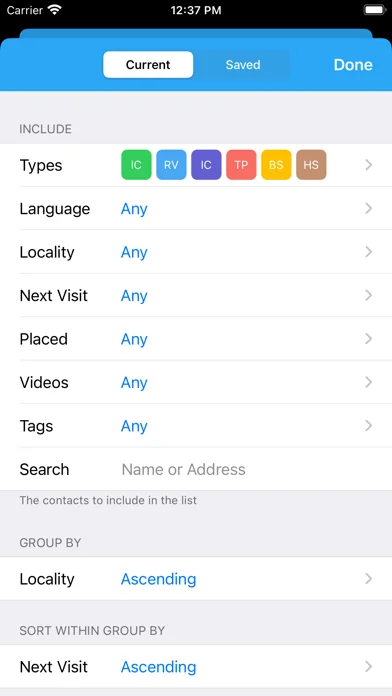
• Contact Filtering - powerful filtering allows you to define how you Group and Sort your calls. Search for Contacts using Tags, Language, Locality, Next Visit Date and more criteria.
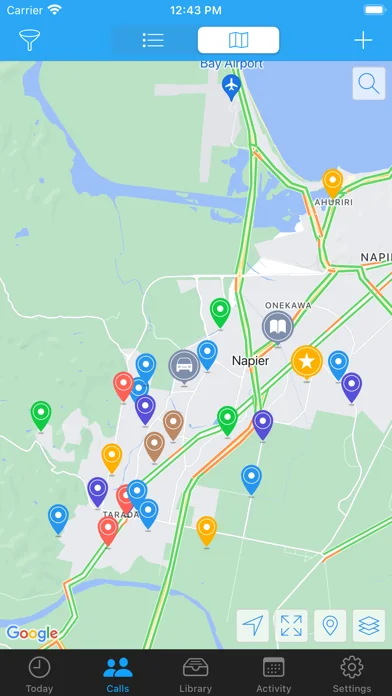
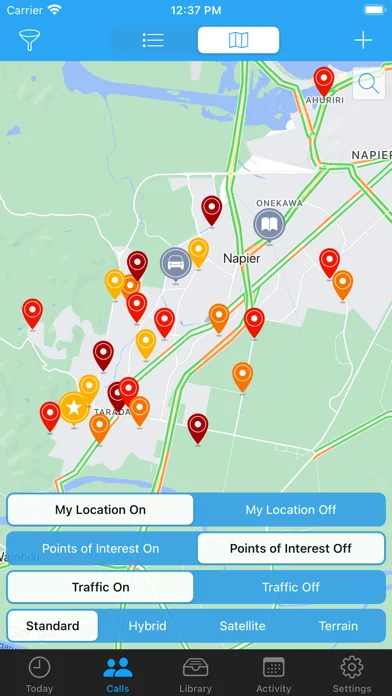
• Map View - get an overview of your Calls, search for addresses, place custom markers for the location of your Car, Territory, Kingdom Hall, your Home and more. You can tap+hold to create a new Contact straight from a map location.
• Library - centrally manage Publications and Videos. Optionally add Cover Art to make it easier to visualise items. Video locations can be downloaded for offline use, or streamed to free up storage space. Add items to your Today screen. Note that the Library is empty by default, users will need to populate it themselves.
• Websites - use the inbuilt browser to show web content. Bookmark your favourite websites. Supports Reader View with Themes. Reader View supports Chinese Pinyin, Zhuyin, Yale, Sidney Lau above Chinese characters when reading content from the official websites.
• Monthly Activity - plan your daily activity with Planned Hours vs Actual Hours. Projected Hours indicate if you are on track with your time.
• Service Year - see at a glance your hours per month and a summary of your activity for the Service Year. Projected Hours indicate if you are on target to reach your annual goal.
OR ...
* "Shared in Ministry" Mode - You can optionally switch both the Month and Annual calendars to just show a green tick when you shared in the ministry, instead of focussing on hours.
• Scheduling - define your Annual, Monthly and Daily Hour Goals. These will then be used to track your progress for the Month and Year. Apply your Daily Schedule to your Month and view the Projected Hours - so easy to see if you will get your time in or if you need to alter your schedule.
• Witnessing Partners - arrange your partners each day. Contact your witnessing partner by SMS, Phone, or messaging apps. Mark the arrangement as confirmed or not. Icons on the calendar indicate days with arranged partners. Optional integration with iOS calendars.
• Reporting - support for multiple Hour Credits and Carry-Over Minutes. Your Monthly Report can be submitted using Email, TXT, Telegram, WhatsApp, LINE, Hourglass or NW Publisher.
• "Other Hours" - log your non-ministry hours such as LDC or Branch Consultation work. Up to 5 "Other Hour" categories can be scheduled and planned alongside your Ministry Hours. Configure the category name (eg "LDC") and Reporting options in Settings.
---
And this is just the beginning!
Please check the website for details and support:
www.serviceplanner.app
Requirements: iOS 14+
Some mapping features require a connected device.
All support and documentation is provided in English.
Some cannot locate the app because they search for "Service Planner". The app is called "ServicePlanner".
• Dropbox Sync - automatically backup your data and sync across multiple devices.
• Integration with Territory Helper.
• Today Screen - quick access to the Timer, Videos, Publications, Website Browser, Activity Planner and your scheduled calls for the day.
• Timer - record your time spent in the ministry or on "other" work (LDC etc). Tap the timer bar on the Today screen or force touch the app icon.
• Contact Management - centrally manage your Calls with a searchable Contact list. Colours are carefully used to indicate the Contact Type and render a heat map showing if your visits are overdue or on schedule. Swipe or long-press on a Contact to quickly reschedule or update a contact.
• Contact Visit History & Library - quickly access your call history with a list of previous visits. Colour again is used to visually indicate the Visit Type. Define your Next Visit Date and Plans. A central Library for each contact shows all of the publications you have ever placed with them.
• Contact Filtering - powerful filtering allows you to define how you Group and Sort your calls. Search for Contacts using Tags, Language, Locality, Next Visit Date and more criteria.
• Map View - get an overview of your Calls, search for addresses, place custom markers for the location of your Car, Territory, Kingdom Hall, your Home and more. You can tap+hold to create a new Contact straight from a map location.
• Library - centrally manage Publications and Videos. Optionally add Cover Art to make it easier to visualise items. Video locations can be downloaded for offline use, or streamed to free up storage space. Add items to your Today screen. Note that the Library is empty by default, users will need to populate it themselves.
• Websites - use the inbuilt browser to show web content. Bookmark your favourite websites. Supports Reader View with Themes. Reader View supports Chinese Pinyin, Zhuyin, Yale, Sidney Lau above Chinese characters when reading content from the official websites.
• Monthly Activity - plan your daily activity with Planned Hours vs Actual Hours. Projected Hours indicate if you are on track with your time.
• Service Year - see at a glance your hours per month and a summary of your activity for the Service Year. Projected Hours indicate if you are on target to reach your annual goal.
OR ...
* "Shared in Ministry" Mode - You can optionally switch both the Month and Annual calendars to just show a green tick when you shared in the ministry, instead of focussing on hours.
• Scheduling - define your Annual, Monthly and Daily Hour Goals. These will then be used to track your progress for the Month and Year. Apply your Daily Schedule to your Month and view the Projected Hours - so easy to see if you will get your time in or if you need to alter your schedule.
• Witnessing Partners - arrange your partners each day. Contact your witnessing partner by SMS, Phone, or messaging apps. Mark the arrangement as confirmed or not. Icons on the calendar indicate days with arranged partners. Optional integration with iOS calendars.
• Reporting - support for multiple Hour Credits and Carry-Over Minutes. Your Monthly Report can be submitted using Email, TXT, Telegram, WhatsApp, LINE, Hourglass or NW Publisher.
• "Other Hours" - log your non-ministry hours such as LDC or Branch Consultation work. Up to 5 "Other Hour" categories can be scheduled and planned alongside your Ministry Hours. Configure the category name (eg "LDC") and Reporting options in Settings.
---
And this is just the beginning!
Please check the website for details and support:
www.serviceplanner.app
Requirements: iOS 14+
Some mapping features require a connected device.
All support and documentation is provided in English.
Some cannot locate the app because they search for "Service Planner". The app is called "ServicePlanner".
🆕 What's New · v3.1.1
Performance improvements and bug fixes.
Profile & Insights
Everything we know — and don't — about this app and its company.
Identification
- App name
- ServicePlanner
- Developer
- iMatt Solutions
- Bundle ID
- com.imattsolutions.serviceplanner
- App Store URL
- Open in App Store
- Category
- Productivity
- Content rating
- 4+
- Languages
- BG, DA, NL, EN, FR, DE, IT, JA, KO, NB, PT, RO, RU, ZH, ES, SV, ZH
Company
- Website
- www.serviceplanner.me
- Tagline
- Welcome to ServicePlanner
- Description
- ServicePlanner makes it easy to manage your calls and report ministry hours and activity. The focus is on planning and organising your ministry, with support for return visit scheduling, witnessing partners, workflow rules, and visibility via calendars and the Today screen. Includes automated device sync.
- Founded
- Not found
- HQ / Address
- Not found
- Employees
- Not found
- Logo
- OG image
Revenue
- Verified revenue / mo
- Not found
- AI revenue estimate / mo
- Not found
- AI annual estimate
- Not found
- ML model estimate / mo
- $21.3K/mo
- Top-grossing rank
- Outside top 100 in US Productivity
- All-time revenue
- Not found
- Pricing
- Not found
Founder
- Name
- Not found
- X / Twitter
- https://www.dropbox.com/register
- Not found
- GitHub
- Not found
- X followers
- Not found
- Public statements
- Not found
Funding
- Total raised
- Not found
- Last round
- Not found
- Investors
- Not found
- Crunchbase
- Not found
- AngelList
- Not found
Press & Links
- Articles found
- Not found
- Listed on
- Not found
- Blog
- https://serviceplanner.me/blog/
- Press / News
- Not found
Contacts & Socials
- Socials
- facebook · twitter
- feedback@serviceplanner.me
- Phone
- Not found
- Contact page
- https://serviceplanner.me/help/
- About page
- Not found
📈Ratings growth185 ratings+741% lifetimeShow 3-year history estimate ▾
Tracked (59 weeks) Pre-tracking estimate (37 weeks) · model-based, ±5% noise · anchored to release date and current value
🌍Geographic ReachNot ranked
This app is currently outside the top 100 grossing in all 9 countries we monitor (US, UK, DE, FR, JP, CA, AU, BR, IN). Niche or new apps often launch this way — popularity rankings appear once daily revenue clears the regional threshold.
Profile is built from iTunes Lookup + developer site scrape + ML revenue model. Empty fields show "Not found" — additional sources (Crunchbase, X, IndieHackers, Acquire.com) coming.
More by iMatt Solutions
View all →More Productivity
Microsoft Outlook
★ 4.8 · 8,891,395 reviews
Google Drive – online backup
★ 4.8 · 7,526,498 reviews
ChatGPT
★ 4.8 · 7,136,919 reviews
Yahoo Mail – Alles im Blick
★ 4.7 · 4,623,459 reviews
HP
★ 4.6 · 4,011,497 reviews
Google Docs
★ 4.8 · 3,078,214 reviews
Microsoft Word
★ 4.7 · 2,843,856 reviews
Gmail – E-Mail von Google
★ 4.7 · 2,406,337 reviews
Browse BU Analytics
📚 All 55,000+ Books
🜍 Alchemy & Hermeticism
🔮 Magic & Ritual
🌙 Witchcraft & Paganism
⭐ Astrology & Cosmology
🃏 Divination & Tarot
📜 Productivity
✡️ Kabbalah & Jewish Mysticism
🕉️ Mysticism & Contemplation
🕊️ Theosophy & Anthroposophy
🏛️ Freemasonry & Secret Societies
👻 Spiritualism & Afterlife
📖 Sacred Texts & Gnosticism
👁️ Supernatural & Occult Fiction
🧘 Spiritual Development
📚 Esoteric History & Biography
Info
About BU Analytics