
 49
49

BU Score
Emerging

Gimbse Kamera



✍️ BU Analytics Review
“
Gimbse Kamera is an iOS app from Christian Kappertz in the Photo & Video category, currently rated 4.0★ across 6 ratings. Initial signal reads as largely positive sentiment, users highlighting consistency and feature depth.
Our BU Score puts it at 49 — Emerging (early traction worth watching). For a Photo & Video app, that means early traction worth watching.
Track changes month-over-month in the Performance section below — live snapshot history and revenue forecast included.
creator
📊 Performance Tracking LIVE
Loading…
Rating
—
Reviews
—
Forecast Revenue / mo
—
Snapshots tracked
0
since first record
Range:
💰 Forecast Revenue / mo
MODELRevenue forecast computed from BU's 234 trigger model on each snapshot. Calibrated against ground-truth from 58 verified-revenue apps.
🔬Forecast Breakdown — Why This Estimate?Top 7 of 7 triggers
Our ML model uses 200+ signals from public data. These are the most influential for this app:
| Paid app ($0.00)METRIC | +$2,800 | |
| 5 starREVIEW | +$1,800 | |
| Mature app (8y old)METRIC | +$1,500 | |
| Multilingual (11 languages)METRIC | +$1,500 | |
| slowREVIEW | −$1,200 | |
| Good rating (4.0★)METRIC | +$800 | |
| Pre-traction phase (6 ratings)METRIC | −$300 |
METRIC = structural app data · REVIEW = mined from user reviews · ✓ VERIFIED = Stripe-verified anchor (TrustMRR)
📈 Reviews Growth
LIVECumulative review count from first BU snapshot. Each point = a tracked update.
⭐ Rating Trend
LIVEAverage rating evolution. Updates with each new review batch.
🗓️ Snapshot Timeline
HISTORYEach bar shows a tracked update and the metric delta from the previous snapshot.
App Specs
🔐 Own this app? Claim & verify MRR →💾 2 MB🔞 4+📱 iOS 13.0+🔖 v2.4.1🔄 updated 5y ago🌐 DA, NL, EN, FI, FR +6📂 Photo & Video💰 Paid🚀 Launched 2018 (8y old)
📝 About this app
Improve the presentation of real estate, cityscapes, exhibition stands, and much more with professional architectural photography! Gimbse offers the perfect alignment of your camera without complicated post-processing or additional technical equipment. How it works? Very simple: take a photo – done. The unique perspective assistant always has the recording situation in view and takes care of the detailed work in real time. So you can fully concentrate on your subject.
Also profit from the intuitively designed interface of the great and professional functions with which the Gimbse camera app makes your pictures even better.
PERSPECTIVE ASSISTANT
The Perspective Assistant ensures that your pictures are always straight, no matter from which angle they were taken. But “straight“ doesn‘t just mean that people stand upright in the picture and the horizon is really horizontal. With the help of the various modes, you can freely choose which additional perspective tools you want to use for your subject. Perspective alignment has never been so easy!
• Horizon
It automatically does what many photographers usually do by hand or with gimbals: Hold the camera straight.
• Automatic
Let the Perspective Assistant automatically select between Architecture and Horizon modes to avoid extreme distortion at the edges of the image.
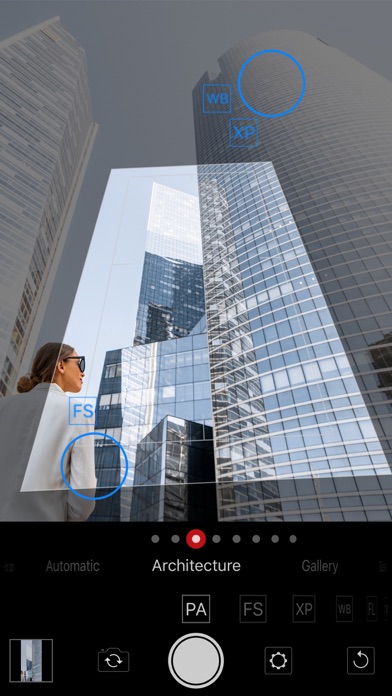
• Architecture
The mode for professional architectural photography – the perspective is automatically corrected to avoid falling lines.
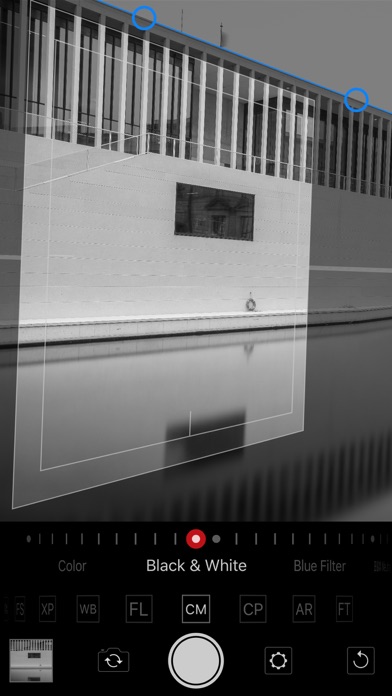
• Gallery
In Gallery mode, photograph vertical or horizontal surfaces exactly from the front, even though the situation only allows a sloping shooting angle. The magnetic axis makes alignment easy and very accurate.
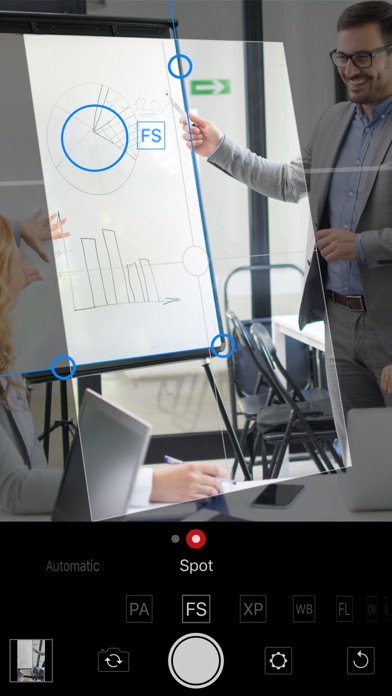
• Easel
For inclined surfaces such as flipcharts, screens or simply easels, there is also the Easel mode with the practical magnetic angle.
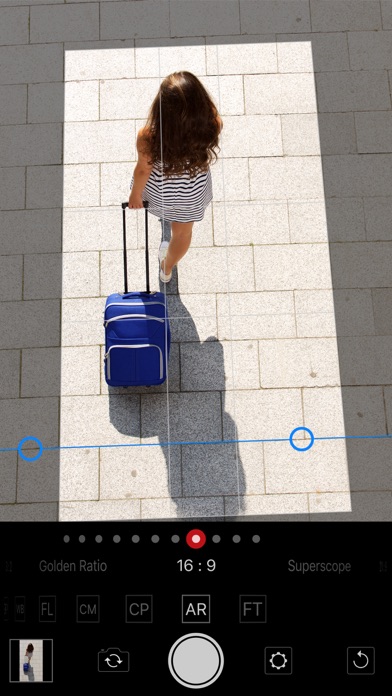
• Rectangle
With the magnetic frame, you can shoot rectangular objects of any kind as if they were taken from the front and crop them in their original proportions, (almost) regardless of the shooting angle.
• Calibrate
Also use the Calibrate mode with its magnetic axes to achieve even more precision in aligning your photos. Once performed, the calibration is always maintained.
• Deactivated
With this you can also take really skewed pictures.
FOCUS
• Automatic
• Spot
EXPOSURE
• Lights
• Automatic
• Spot
• Lock
WHITE BALANCE
• Cold
• Neutral
• Warm
• Spot
• Lock
FOCAL LENGTH
• Ultra Wide Angle (if available)
• 20 mm (if available)
• Wide Angle
• 35 mm
• 50 mm
• Telephoto Lens (if available)
• 80 mm
• 135 mm
• 200 mm
• 300 mm
COLOR MODE
• Color (in gradations)
• Black & White
• Blue Filter
• BW Neutral
• Red Filter
COMPOSITION
• Empty
• Frame
• Crosshair
• Grid
• Golden Section
• Golden Spiral
ASPECT RATIO
• Square
• 7 : 6
• 5 : 4
• 4 : 3
• DIN A Format
• 3 : 2
• Golden Section
• 16 : 9
• Superscope
• 21 : 9
• CinemaScope
FILE TYPE (iOS 13 and higher)
• L97JPEG 8 sRGB
• JPEG 8 P3
• TIFF 16 sRGB (high memory requirement!)
• TIFF 16 P3 (high memory requirement!)
With the practical reset button, you can quickly reset Gimbse at any time to be ready for the next snapshot. Configure Gimbse conveniently in the settings. You can also have a comparison image saved for each shot. This shows a before/after comparison between the captured image and the version created by Gimbse.
Discover the incredible new design options that Gimbse can offer you!
Also profit from the intuitively designed interface of the great and professional functions with which the Gimbse camera app makes your pictures even better.
PERSPECTIVE ASSISTANT
The Perspective Assistant ensures that your pictures are always straight, no matter from which angle they were taken. But “straight“ doesn‘t just mean that people stand upright in the picture and the horizon is really horizontal. With the help of the various modes, you can freely choose which additional perspective tools you want to use for your subject. Perspective alignment has never been so easy!
• Horizon
It automatically does what many photographers usually do by hand or with gimbals: Hold the camera straight.
• Automatic
Let the Perspective Assistant automatically select between Architecture and Horizon modes to avoid extreme distortion at the edges of the image.
• Architecture
The mode for professional architectural photography – the perspective is automatically corrected to avoid falling lines.
• Gallery
In Gallery mode, photograph vertical or horizontal surfaces exactly from the front, even though the situation only allows a sloping shooting angle. The magnetic axis makes alignment easy and very accurate.
• Easel
For inclined surfaces such as flipcharts, screens or simply easels, there is also the Easel mode with the practical magnetic angle.
• Rectangle
With the magnetic frame, you can shoot rectangular objects of any kind as if they were taken from the front and crop them in their original proportions, (almost) regardless of the shooting angle.
• Calibrate
Also use the Calibrate mode with its magnetic axes to achieve even more precision in aligning your photos. Once performed, the calibration is always maintained.
• Deactivated
With this you can also take really skewed pictures.
FOCUS
• Automatic
• Spot
EXPOSURE
• Lights
• Automatic
• Spot
• Lock
WHITE BALANCE
• Cold
• Neutral
• Warm
• Spot
• Lock
FOCAL LENGTH
• Ultra Wide Angle (if available)
• 20 mm (if available)
• Wide Angle
• 35 mm
• 50 mm
• Telephoto Lens (if available)
• 80 mm
• 135 mm
• 200 mm
• 300 mm
COLOR MODE
• Color (in gradations)
• Black & White
• Blue Filter
• BW Neutral
• Red Filter
COMPOSITION
• Empty
• Frame
• Crosshair
• Grid
• Golden Section
• Golden Spiral
ASPECT RATIO
• Square
• 7 : 6
• 5 : 4
• 4 : 3
• DIN A Format
• 3 : 2
• Golden Section
• 16 : 9
• Superscope
• 21 : 9
• CinemaScope
FILE TYPE (iOS 13 and higher)
• L97JPEG 8 sRGB
• JPEG 8 P3
• TIFF 16 sRGB (high memory requirement!)
• TIFF 16 P3 (high memory requirement!)
With the practical reset button, you can quickly reset Gimbse at any time to be ready for the next snapshot. Configure Gimbse conveniently in the settings. You can also have a comparison image saved for each shot. This shows a before/after comparison between the captured image and the version created by Gimbse.
Discover the incredible new design options that Gimbse can offer you!
🆕 What's New · v2.4.1
• Terms and conditions have been updated.
Profile & Insights
Everything we know — and don't — about this app and its company.
Identification
- App name
- Gimbse Kamera
- Developer
- Christian Kappertz
- Bundle ID
- com.christiankappertz.gimbse.photo
- App Store URL
- Open in App Store
- Category
- Photo & Video
- Content rating
- 4+
- Languages
- DA, NL, EN, FI, FR, DE, IT, NB, PT, ES, SV
Company
- Website
- Not found
- Tagline
- Today
- Description
- Find apps and games for iPhone, iPad, Mac, and more on the App Store.
- Founded
- Not found
- HQ / Address
- Not found
- Employees
- Not found
- Logo
- OG image
Revenue
- Verified revenue / mo
- Not found
- AI revenue estimate / mo
- Not found
- AI annual estimate
- Not found
- ML model estimate / mo
- $3.5K/mo
- Top-grossing rank
- Outside top 100 in US Photo & Video
- All-time revenue
- Not found
- Pricing
- Not found
Founder
- Name
- Not found
- X / Twitter
- Not found
- Not found
- GitHub
- Not found
- X followers
- Not found
- Public statements
- Not found
Funding
- Total raised
- Not found
- Last round
- Not found
- Investors
- Not found
- Crunchbase
- Not found
- AngelList
- Not found
Press & Links
- Articles found
- Not found
- Listed on
- Not found
- Blog
- Not found
- Press / News
- Not found
Contacts & Socials
- Socials
- Not found
- Not found
- Phone
- Not found
- Contact page
- Not found
- About page
- https://apps.apple.com/us/iphone/story/id1406503654
📈Ratings growth6 ratings+500% lifetimeShow 3-year history estimate ▾
Tracked (4 weeks) Pre-tracking estimate (37 weeks) · model-based, ±5% noise · anchored to release date and current value
🌍Geographic ReachNot ranked
This app is currently outside the top 100 grossing in all 9 countries we monitor (US, UK, DE, FR, JP, CA, AU, BR, IN). Niche or new apps often launch this way — popularity rankings appear once daily revenue clears the regional threshold.
Profile is built from iTunes Lookup + developer site scrape + ML revenue model. Empty fields show "Not found" — additional sources (Crunchbase, X, IndieHackers, Acquire.com) coming.
More Photo & Video

YouTube
★ 4.7 · 47,130,049 reviews

★ 4.7 · 29,023,044 reviews

Snapchat: Chatte mit Freunden
★ 4.5 · 5,772,278 reviews

Canva: KI-Foto- & Video-Editor
★ 4.9 · 3,343,015 reviews

Twitch: Live Streaming
★ 4.7 · 2,700,069 reviews

InShot - AI Video Editor
★ 4.8 · 2,426,316 reviews

PicCollage: KI Foto Collage
★ 4.8 · 1,808,632 reviews

FaceApp: Gesichtsbearbeitung
★ 4.7 · 1,750,154 reviews

Browse BU Analytics
📚 All 55,000+ Books
🜍 Alchemy & Hermeticism
🔮 Magic & Ritual
🌙 Witchcraft & Paganism
⭐ Astrology & Cosmology
🃏 Divination & Tarot
📜 Photo & Video
✡️ Kabbalah & Jewish Mysticism
🕉️ Mysticism & Contemplation
🕊️ Theosophy & Anthroposophy
🏛️ Freemasonry & Secret Societies
👻 Spiritualism & Afterlife
📖 Sacred Texts & Gnosticism
👁️ Supernatural & Occult Fiction
🧘 Spiritual Development
📚 Esoteric History & Biography
Info
About BU Analytics