22
BU Score
Niche
Braina - Voice Control PC
✍️ BU Analytics Review
“
Braina - Voice Control PC is an iOS app from Brainasoft in the Productivity category, currently rated 2.0★ across 3 ratings. Initial signal reads as no scraped reviews yet — judgment based on metadata only.
Our BU Score puts it at 22 — Niche (micro-niche or pre-traction stage). For a Productivity app, that means micro-niche or pre-traction stage.
Track changes month-over-month in the Performance section below — live snapshot history and revenue forecast included.
creator
📊 Performance Tracking LIVE
Loading…
Rating
—
Reviews
—
Forecast Revenue / mo
—
Snapshots tracked
0
since first record
Range:
💰 Forecast Revenue / mo
MODELRevenue forecast computed from BU's 234 trigger model on each snapshot. Calibrated against ground-truth from 58 verified-revenue apps.
🔬Forecast Breakdown — Why This Estimate?Top 5 of 5 triggers
Our ML model uses 200+ signals from public data. These are the most influential for this app:
| Paid app ($19.99)METRIC | +$2,800 | |
| Below-average rating (2.0★)METRIC | −$1,500 | |
| Mature app (8y old)METRIC | +$1,500 | |
| Single-language (English only)METRIC | −$400 | |
| Pre-traction phase (3 ratings)METRIC | −$300 |
METRIC = structural app data · REVIEW = mined from user reviews · ✓ VERIFIED = Stripe-verified anchor (TrustMRR)
📈 Reviews Growth
LIVECumulative review count from first BU snapshot. Each point = a tracked update.
⭐ Rating Trend
LIVEAverage rating evolution. Updates with each new review batch.
🗓️ Snapshot Timeline
HISTORYEach bar shows a tracked update and the metric delta from the previous snapshot.
App Specs
🔐 Own this app? Claim & verify MRR →💾 15 MB🔞 4+📱 iOS 11.0+🔖 v1.0🔄 updated 8y ago🌐 EN📂 Productivity💰 Paid🚀 Launched 2018 (8y old)
📝 About this app
Braina's iOS app allows you to speak commands in your iOS device to remote control your computer! To use voice commands you will also need to install Braina assistant for PC on your computer from this link:
https://www.brainasoft.com/braina/
Braina (Brain Artificial) is an intelligent personal assistant software for Windows PC that has both text to speech and speech to text (speech recognition) features.
What can Braina do?
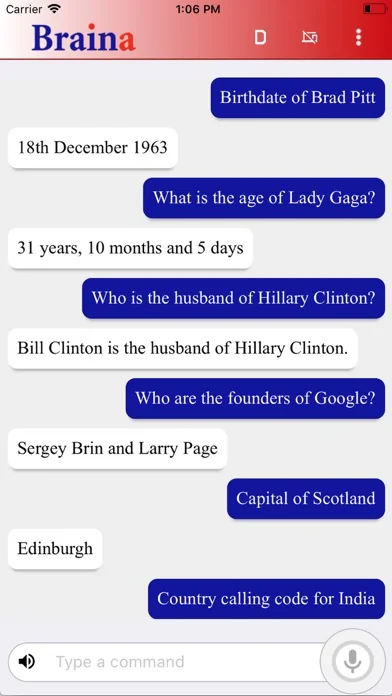
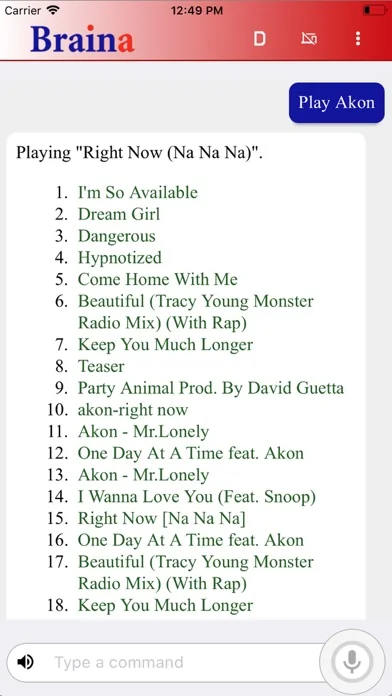
• Play Songs - No need to search songs on your computer. For example just say, Play Hips Don't Lie or Play Akon and Braina will play it for you from anywhere in your computer or even the web.
• Dictate to any Software or Website - Use speech to text feature in third party programs like Microsoft Word using Dictation mode.
• Play Videos - If you want to watch a video or movie, say Play video , for example Play video Godfather.
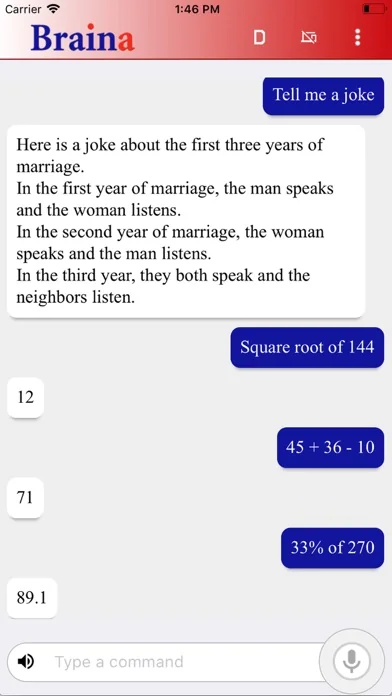
• Calculator - Do calculations by speaking. - e.g 45 plus 20 minus 10 . Braina can even help you in mathematics.
• Dictionary and Thesaurus - See definition of any word.- e.g. Define encephalon, What is intelligence?
• Open and Close any Programs - e.g. Open notepad, Close notepad
• Open and Search Files and Folders 10 times faster - e.g. Open file studynotes.txt, Search folder program
• Control Powerpoint Presentation - Say next or previous slide (in Dictation mode)
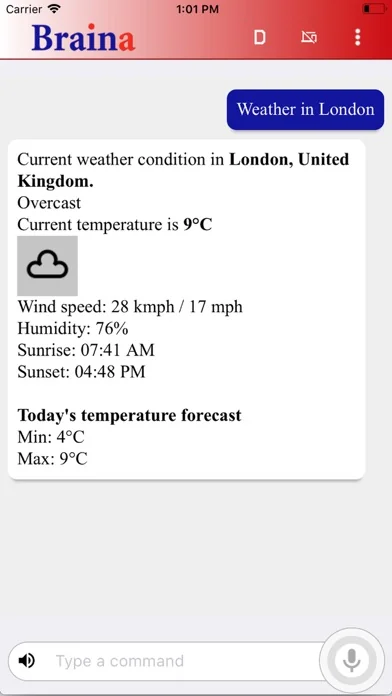
• See News and Weather Information - e.g. Weather in London , Show news about Obama
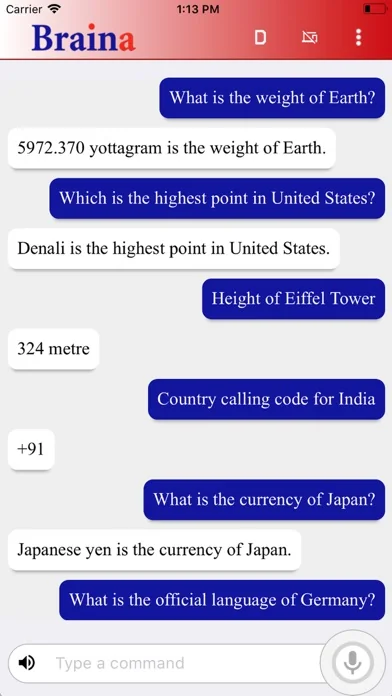
• Search Information on the Internet - e.g. Find information on Thalassemia disease, Search Real Madrid score on Google, Search for Albert Einstein on Wikipedia, Search images of cute puppies
• Set Alarms - e.g. Set alarm at 7:30 am
• Remotely Shutdown Computer
• Notes - Braina can remember notes for you. e.g. Note I have given 550 dollars to John.
and much more..
How to Connect App with PC?
1) Ensure that your PC and iOS device are connected to the same WiFi network. If you don't have a WiFi router, you can also use WiFi Hotspot facility to connect. Also make sure that Braina is running on your PC. You can download Braina for PC from here: http://www.brainasoft.com/braina/
2) Now in order to connect, you will need IP address of your PC on the WiFi network. To get IP, go to Tools menu->Settings->Speech Recognition from Braina on PC. From the "Alternate Speech to Text Option" drop-down select "Braina Smartphone App".
3) You will see a list of IP addresses. Enter the first IP address on the list in iOS App and click connect. If you get an error, then try entering the remaining IP addresses in the list one by one until you get connected. (Note: IP address will generally start with 192.168)
Important: If there are firewalls in your network, the app might not connect successfully with Braina assistant on your computer.
See Frequently Asked Questions for more information: https://www.brainasoft.com/braina/ios/faq.html
https://www.brainasoft.com/braina/
Braina (Brain Artificial) is an intelligent personal assistant software for Windows PC that has both text to speech and speech to text (speech recognition) features.
What can Braina do?
• Play Songs - No need to search songs on your computer. For example just say, Play Hips Don't Lie or Play Akon and Braina will play it for you from anywhere in your computer or even the web.
• Dictate to any Software or Website - Use speech to text feature in third party programs like Microsoft Word using Dictation mode.
• Play Videos - If you want to watch a video or movie, say Play video , for example Play video Godfather.
• Calculator - Do calculations by speaking. - e.g 45 plus 20 minus 10 . Braina can even help you in mathematics.
• Dictionary and Thesaurus - See definition of any word.- e.g. Define encephalon, What is intelligence?
• Open and Close any Programs - e.g. Open notepad, Close notepad
• Open and Search Files and Folders 10 times faster - e.g. Open file studynotes.txt, Search folder program
• Control Powerpoint Presentation - Say next or previous slide (in Dictation mode)
• See News and Weather Information - e.g. Weather in London , Show news about Obama
• Search Information on the Internet - e.g. Find information on Thalassemia disease, Search Real Madrid score on Google, Search for Albert Einstein on Wikipedia, Search images of cute puppies
• Set Alarms - e.g. Set alarm at 7:30 am
• Remotely Shutdown Computer
• Notes - Braina can remember notes for you. e.g. Note I have given 550 dollars to John.
and much more..
How to Connect App with PC?
1) Ensure that your PC and iOS device are connected to the same WiFi network. If you don't have a WiFi router, you can also use WiFi Hotspot facility to connect. Also make sure that Braina is running on your PC. You can download Braina for PC from here: http://www.brainasoft.com/braina/
2) Now in order to connect, you will need IP address of your PC on the WiFi network. To get IP, go to Tools menu->Settings->Speech Recognition from Braina on PC. From the "Alternate Speech to Text Option" drop-down select "Braina Smartphone App".
3) You will see a list of IP addresses. Enter the first IP address on the list in iOS App and click connect. If you get an error, then try entering the remaining IP addresses in the list one by one until you get connected. (Note: IP address will generally start with 192.168)
Important: If there are firewalls in your network, the app might not connect successfully with Braina assistant on your computer.
See Frequently Asked Questions for more information: https://www.brainasoft.com/braina/ios/faq.html
🆕 What's New · v1.0
This update from Apple will improve the functionality of this app. No new features are included.
Profile & Insights
Everything we know — and don't — about this app and its company.
Identification
- App name
- Braina - Voice Control PC
- Developer
- Brainasoft
- Bundle ID
- com.brainasoft.brainaapp
- App Store URL
- Open in App Store
- Category
- Productivity
- Content rating
- 4+
- Languages
- EN
Company
- Website
- www.brainasoft.com
- Tagline
- Not found
- Description
- Brainasoft is a leading AI trading (retail and wholesale) and R&D company. Our areas of interest include artificial intelligence, robotics and voice command.
- Founded
- Not found
- HQ / Address
- Not found
- Employees
- Not found
- Logo
- Not found
Revenue
- Verified revenue / mo
- Not found
- AI revenue estimate / mo
- Not found
- AI annual estimate
- Not found
- ML model estimate / mo
- $86/mo
- Top-grossing rank
- Outside top 100 in US Productivity
- All-time revenue
- Not found
- Pricing
- Not found
Founder
- Name
- Not found
- X / Twitter
- https://www.twitter.com/Brainasoft
- https://www.linkedin.com/company/brainasoft
- GitHub
- Not found
- X followers
- Not found
- Public statements
- Not found
Funding
- Total raised
- Not found
- Last round
- Not found
- Investors
- Not found
- Crunchbase
- Not found
- AngelList
- Not found
Press & Links
- Articles found
- Not found
- Listed on
- Not found
- Blog
- Not found
- Press / News
- Not found
Contacts & Socials
- Socials
- facebook · linkedin · twitter · youtube
- Not found
- Phone
- Not found
- Contact page
- https://www.brainasoft.com/contact/
- About page
- https://www.brainasoft.com/about/
📈Ratings growth3 ratings+50% lifetimeShow 3-year history estimate ▾
Tracked (1 weeks) Pre-tracking estimate (37 weeks) · model-based, ±5% noise · anchored to release date and current value
🌍Geographic ReachNot ranked
This app is currently outside the top 100 grossing in all 9 countries we monitor (US, UK, DE, FR, JP, CA, AU, BR, IN). Niche or new apps often launch this way — popularity rankings appear once daily revenue clears the regional threshold.
Profile is built from iTunes Lookup + developer site scrape + ML revenue model. Empty fields show "Not found" — additional sources (Crunchbase, X, IndieHackers, Acquire.com) coming.
More Productivity
Microsoft Outlook
★ 4.8 · 8,891,395 reviews
Google Drive – online backup
★ 4.8 · 7,526,498 reviews
ChatGPT
★ 4.8 · 7,136,919 reviews
Yahoo Mail – Alles im Blick
★ 4.7 · 4,623,459 reviews
HP
★ 4.6 · 4,011,497 reviews
Google Docs
★ 4.8 · 3,078,214 reviews
Microsoft Word
★ 4.7 · 2,843,856 reviews
Gmail – E-Mail von Google
★ 4.7 · 2,406,337 reviews
Browse BU Analytics
📚 All 55,000+ Books
🜍 Alchemy & Hermeticism
🔮 Magic & Ritual
🌙 Witchcraft & Paganism
⭐ Astrology & Cosmology
🃏 Divination & Tarot
📜 Productivity
✡️ Kabbalah & Jewish Mysticism
🕉️ Mysticism & Contemplation
🕊️ Theosophy & Anthroposophy
🏛️ Freemasonry & Secret Societies
👻 Spiritualism & Afterlife
📖 Sacred Texts & Gnosticism
👁️ Supernatural & Occult Fiction
🧘 Spiritual Development
📚 Esoteric History & Biography
Info
About BU Analytics