0
BU Score
Niche
Boger
✍️ BU Analytics Review
“
Boger is an iOS app from Michel Ramillon in the Education category, currently rated — across few ratings. Initial signal reads as no scraped reviews yet — judgment based on metadata only.
Our BU Score puts it at 0 — Niche (micro-niche or pre-traction stage). For a Education app, that means micro-niche or pre-traction stage.
Track changes month-over-month in the Performance section below — live snapshot history and revenue forecast included.
📊 Performance Tracking LIVE
Loading…
Rating
—
Reviews
—
Forecast Revenue / mo
—
Snapshots tracked
0
since first record
Range:
💰 Forecast Revenue / mo
MODELRevenue forecast computed from BU's 234 trigger model on each snapshot. Calibrated against ground-truth from 58 verified-revenue apps.
📈 Reviews Growth
LIVECumulative review count from first BU snapshot. Each point = a tracked update.
⭐ Rating Trend
LIVEAverage rating evolution. Updates with each new review batch.
🗓️ Snapshot Timeline
HISTORYEach bar shows a tracked update and the metric delta from the previous snapshot.
App Specs
🔐 Own this app? Claim & verify MRR →💾 12 MB🔞 17+📱 iOS 13.0+🔖 v1.1🔄 updated 4mo ago🌐 EN, FR, DE📂 Education💰 Paid🚀 Launched 2023 (2y old)
📝 About this app
The App offers users the capacity to repertorise symptoms using jointly CM Boger's 3 repertories: General Analysis (GA), Synoptic Key (SK) and Boger-Boenninghausen (BB). The general part of Times of remedies was appended to Boger-Boenninghausen. These repertories are in English only. Polar rubrics are available to help search for the best indicated remedy. The grades of the remedies are standardised throughout GA, SK and BB so that users can select rubrics from any of these repertories for repertorisation. The Boenninghausen's grading system with 4 levels is used. The Kent-type 3 levels grading system originally found in GA and SK has been converted to this 4 levels system.
There are 5 main pages:
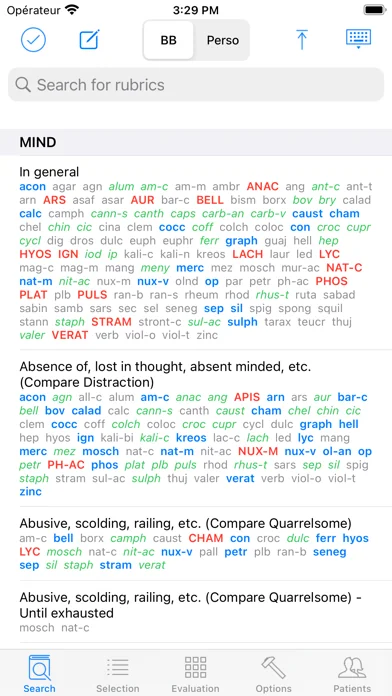
1) Search page:
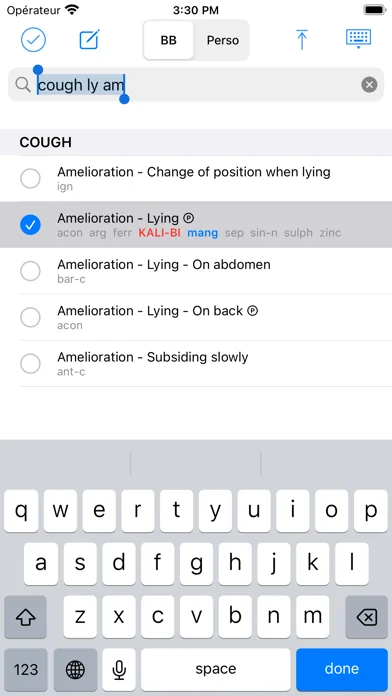
• Enter a combination of (bits of) words to reach the searched rubrics. Select them with a Touch. A minimum of 2 successive characters is required to give a correct search. The space character stands for the logical AND operator whereas the coma stands for the OR operator. OR takes priority over AND. Here is a complex example of search: foreh,occip heav,load,weight.
• Enter Edit mode to modify a rubric's name and its remedies list in the currently selected repertory. This repertory is indicated with the abbreviation GA, SK or BB in the upper title bar.
• Enter Perso where you can create your own repertories, add your own chapters and rubrics with their remedies lists. In Perso you have the possibility of setting your own polar rubrics. You can also easily copy a rubric with all its remedies from any repertory and paste it in Perso. The Perso data are saved in iCloud and are so available on your iPhone, iPad and Mac silicon.
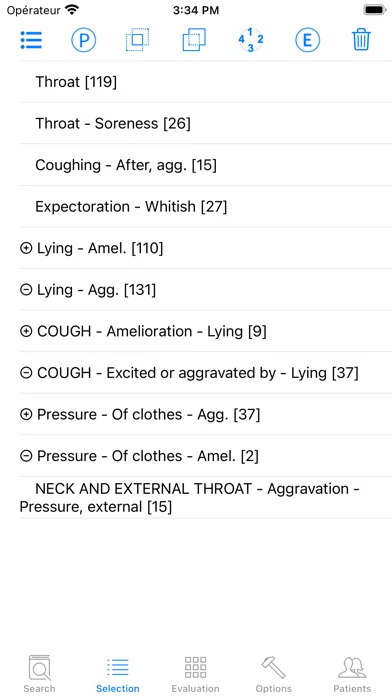
2) Selection page
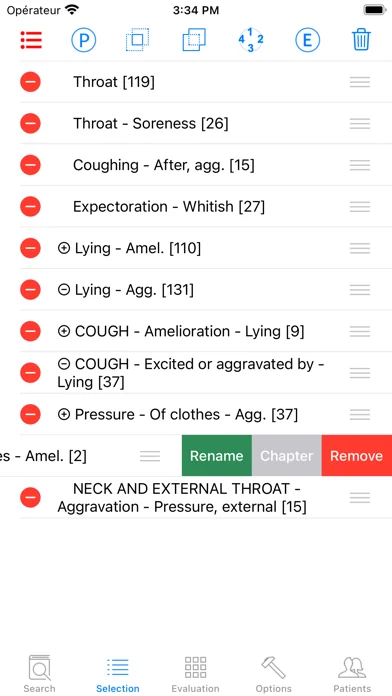
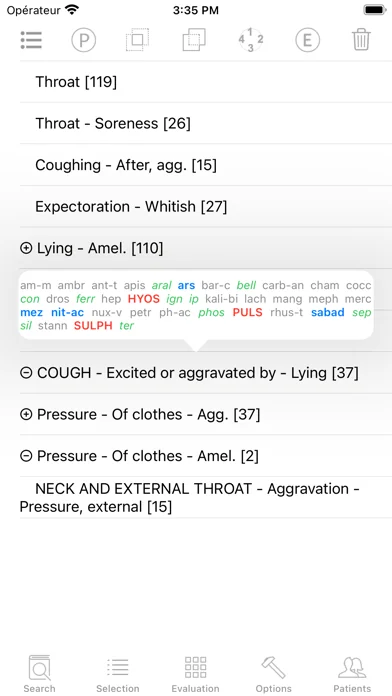
• Manage the rubrics previously selected in the Search page: eliminating rubric, combination of rubrics (union or intersection of remedies sets), modify polar status, show chapter (in case the rubric name alone is not explicit), rename rubric, reorder the list of rubrics, delete rubric.
3) Evaluation page
• Display the Evaluation grid with contraindications. Touching the Polarity header shows its maximal value in the grid. Touching a remedy header shows the complete name of the remedies and its place in the grid.
4) Options page:
• Lists of remedies: you can append or withdraw remedies. There are 4 built-in lists of remedies corresponding to the remedies found in the 3 Boger's repertories plus an extended list which contains the remedies found in all these repertories. It is possible to restore a list of remedies to its original state.
• Browse the currently selected repertory.
• Restore a repertory to its original state.
• Modify the font sizes and other parameters of the Search, Selection and Evaluation pages.
• Manage the Contraindications facility
• Manage the priorities sequence used in the Evaluation page.
• Hide the cross-references to see clearer the rubrics names. It is especially important in the Evaluation grid where the room of the first column containing the rubric's name is limited.
• Activate Visible Touch. This feature is useful when showing the use of the App to others.
• Contact us and rate the App.
5) Patients database.
• It is possible to register the patient's personnel and clinical data, to create consultations and record the list of rubrics of the current Selection page. A recorded list of rubrics can later be sent back to the Selection page for possible further modifications before being displayed in the Evaluation grid. These data are synchronised via iCloud so that you can find them on your iPhone, iPad and Mac silicon.
Using the Boger App for self-medication cannot be an alternative to the diagnosis and treatment provided by a registered Heath Care Professional. The developer of Boger disclaims all responsibility for all consequences of any person using Boger as a medical tool.
There are 5 main pages:
1) Search page:
• Enter a combination of (bits of) words to reach the searched rubrics. Select them with a Touch. A minimum of 2 successive characters is required to give a correct search. The space character stands for the logical AND operator whereas the coma stands for the OR operator. OR takes priority over AND. Here is a complex example of search: foreh,occip heav,load,weight.
• Enter Edit mode to modify a rubric's name and its remedies list in the currently selected repertory. This repertory is indicated with the abbreviation GA, SK or BB in the upper title bar.
• Enter Perso where you can create your own repertories, add your own chapters and rubrics with their remedies lists. In Perso you have the possibility of setting your own polar rubrics. You can also easily copy a rubric with all its remedies from any repertory and paste it in Perso. The Perso data are saved in iCloud and are so available on your iPhone, iPad and Mac silicon.
2) Selection page
• Manage the rubrics previously selected in the Search page: eliminating rubric, combination of rubrics (union or intersection of remedies sets), modify polar status, show chapter (in case the rubric name alone is not explicit), rename rubric, reorder the list of rubrics, delete rubric.
3) Evaluation page
• Display the Evaluation grid with contraindications. Touching the Polarity header shows its maximal value in the grid. Touching a remedy header shows the complete name of the remedies and its place in the grid.
4) Options page:
• Lists of remedies: you can append or withdraw remedies. There are 4 built-in lists of remedies corresponding to the remedies found in the 3 Boger's repertories plus an extended list which contains the remedies found in all these repertories. It is possible to restore a list of remedies to its original state.
• Browse the currently selected repertory.
• Restore a repertory to its original state.
• Modify the font sizes and other parameters of the Search, Selection and Evaluation pages.
• Manage the Contraindications facility
• Manage the priorities sequence used in the Evaluation page.
• Hide the cross-references to see clearer the rubrics names. It is especially important in the Evaluation grid where the room of the first column containing the rubric's name is limited.
• Activate Visible Touch. This feature is useful when showing the use of the App to others.
• Contact us and rate the App.
5) Patients database.
• It is possible to register the patient's personnel and clinical data, to create consultations and record the list of rubrics of the current Selection page. A recorded list of rubrics can later be sent back to the Selection page for possible further modifications before being displayed in the Evaluation grid. These data are synchronised via iCloud so that you can find them on your iPhone, iPad and Mac silicon.
Using the Boger App for self-medication cannot be an alternative to the diagnosis and treatment provided by a registered Heath Care Professional. The developer of Boger disclaims all responsibility for all consequences of any person using Boger as a medical tool.
🆕 What's New · v1.1
• The repertorisation saving system has been completely redesigned. As a result, when you send back to the Selection page a repertorisation previously recorded using the previous version 1.0 of the app, errors may appear in the display of the polarities. It is easy to record anew these incorrect repertorisations with their polarities using the Ⓟ icon (Selection page).
• On the Selection and Evaluation pages, it is now possible to separate (with a red line) in two sets rubrics and counter-rubrics (see OPTIONS > SELECTION PAGE > Split with red line). If you decide to revert to the original configuration, i.e. each polar rubric immediately followed by its counter-rubric, you will need to manually move the rubrics on the Selection page. It should be noted that each polar rubric now knows where its counter-rubric is located, regardless of the locations of either. The new Ⓟ icon allows you to:
- Clear all polar properties when the icon is touched while no rubric is selected,
- Define a new pair of polar rubrics when the icon is touched with 2 rubrics selected.
• If you long-tap a rubric on the Selection page, a pop-up window opens with the list of remedies. Tapping outside this window closes it.
• If you tap a rubric on the Evaluation page, a pop-up window opens with the list of remedies. Tapping outside this window closes it.
• On the Selection and Evaluation pages, it is now possible to separate (with a red line) in two sets rubrics and counter-rubrics (see OPTIONS > SELECTION PAGE > Split with red line). If you decide to revert to the original configuration, i.e. each polar rubric immediately followed by its counter-rubric, you will need to manually move the rubrics on the Selection page. It should be noted that each polar rubric now knows where its counter-rubric is located, regardless of the locations of either. The new Ⓟ icon allows you to:
- Clear all polar properties when the icon is touched while no rubric is selected,
- Define a new pair of polar rubrics when the icon is touched with 2 rubrics selected.
• If you long-tap a rubric on the Selection page, a pop-up window opens with the list of remedies. Tapping outside this window closes it.
• If you tap a rubric on the Evaluation page, a pop-up window opens with the list of remedies. Tapping outside this window closes it.
Profile & Insights
Everything we know — and don't — about this app and its company.
Identification
- App name
- Boger
- Developer
- Michel Ramillon
- Bundle ID
- com.homeosoft.boger
- App Store URL
- Open in App Store
- Category
- Education
- Content rating
- 17+
- Languages
- EN, FR, DE
Company
- Website
- boger.fr
- Tagline
- Boger
- Description
- Not found
- Founded
- Not found
- HQ / Address
- Not found
- Employees
- Not found
- Logo
- Not found
Revenue
- Verified revenue / mo
- Not found
- AI revenue estimate / mo
- Not found
- AI annual estimate
- Not found
- ML model estimate / mo
- $86/mo
- Top-grossing rank
- Outside top 99 in US Education
- All-time revenue
- Not found
- Pricing
- Not found
Founder
- Name
- Not found
- X / Twitter
- Not found
- Not found
- GitHub
- Not found
- X followers
- Not found
- Public statements
- Not found
Funding
- Total raised
- Not found
- Last round
- Not found
- Investors
- Not found
- Crunchbase
- Not found
- AngelList
- Not found
Press & Links
- Articles found
- Not found
- Listed on
- Not found
- Blog
- Not found
- Press / News
- Not found
Contacts & Socials
- Socials
- Not found
- //contact@boger.fr
- Phone
- Not found
- Contact page
- Not found
- About page
- Not found
🌍Geographic ReachNot ranked
This app is currently outside the top 100 grossing in all 9 countries we monitor (US, UK, DE, FR, JP, CA, AU, BR, IN). Niche or new apps often launch this way — popularity rankings appear once daily revenue clears the regional threshold.
Profile is built from iTunes Lookup + developer site scrape + ML revenue model. Empty fields show "Not found" — additional sources (Crunchbase, X, IndieHackers, Acquire.com) coming.
More by Michel Ramillon
View all →More Education
Duolingo – Sprachkurse
★ 4.7 · 5,156,487 reviews
ClassDojo
★ 4.7 · 3,861,803 reviews
Canvas by Instructure
★ 4.7 · 2,769,210 reviews
Remind: School Communication
★ 4.8 · 1,742,504 reviews
Gauth: AI Study Companion
★ 4.8 · 1,418,613 reviews
Quizlet: More than Flashcards
★ 4.8 · 1,074,494 reviews
PictureThis - Plant Identifier
★ 4.8 · 1,061,649 reviews
ABCmouse Classic
★ 4.5 · 993,689 reviews
Browse BU Analytics
📚 All 55,000+ Books
🜍 Alchemy & Hermeticism
🔮 Magic & Ritual
🌙 Witchcraft & Paganism
⭐ Astrology & Cosmology
🃏 Divination & Tarot
📜 Education
✡️ Kabbalah & Jewish Mysticism
🕉️ Mysticism & Contemplation
🕊️ Theosophy & Anthroposophy
🏛️ Freemasonry & Secret Societies
👻 Spiritualism & Afterlife
📖 Sacred Texts & Gnosticism
👁️ Supernatural & Occult Fiction
🧘 Spiritual Development
📚 Esoteric History & Biography
Info
About BU Analytics 