52
BU Score
Solid
QOTD: Read, Scan & Save Quotes
✍️ BU Analytics Review
“
QOTD: Read, Scan & Save Quotes is an iOS app from Pascal Andraos in the Food & Drink category, currently rated 4.3★ across 60 ratings. Initial signal reads as largely positive sentiment, users highlighting consistency and feature depth.
Our BU Score puts it at 52 — Solid (established niche player). For a Food & Drink app, that means established niche player.
Track changes month-over-month in the Performance section below — live snapshot history and revenue forecast included.
creator
📊 Performance Tracking LIVE
Loading…
Rating
—
Reviews
—
Forecast Revenue / mo
—
Snapshots tracked
0
since first record
Range:
💰 Forecast Revenue / mo
MODELRevenue forecast computed from BU's 234 trigger model on each snapshot. Calibrated against ground-truth from 58 verified-revenue apps.
🔬Forecast Breakdown — Why This Estimate?Top 5 of 5 triggers
Our ML model uses 200+ signals from public data. These are the most influential for this app:
| Paid app ($0.00)METRIC | +$2,800 | |
| Good rating (4.3★)METRIC | +$800 | |
| Established app (7y old)METRIC | +$800 | |
| Single-language (English only)METRIC | −$400 | |
| Pre-traction phase (60 ratings)METRIC | −$300 |
METRIC = structural app data · REVIEW = mined from user reviews · ✓ VERIFIED = Stripe-verified anchor (TrustMRR)
📈 Reviews Growth
LIVECumulative review count from first BU snapshot. Each point = a tracked update.
⭐ Rating Trend
LIVEAverage rating evolution. Updates with each new review batch.
🗓️ Snapshot Timeline
HISTORYEach bar shows a tracked update and the metric delta from the previous snapshot.
App Specs
🔐 Own this app? Claim & verify MRR →💾 51 MB🔞 4+📱 iOS 13.0+🔖 v5.1🔄 updated 4y ago🌐 EN📂 Food & Drink💰 Paid🚀 Launched 2018 (7y old)
📝 About this app
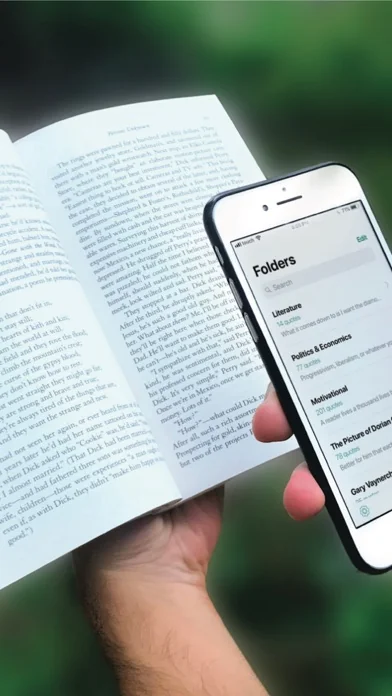
QOTD is your trusty reading sidekick that simplifies the way you capture and save your favorite book quotes.
It also lets you share them with the people that matter to you most.
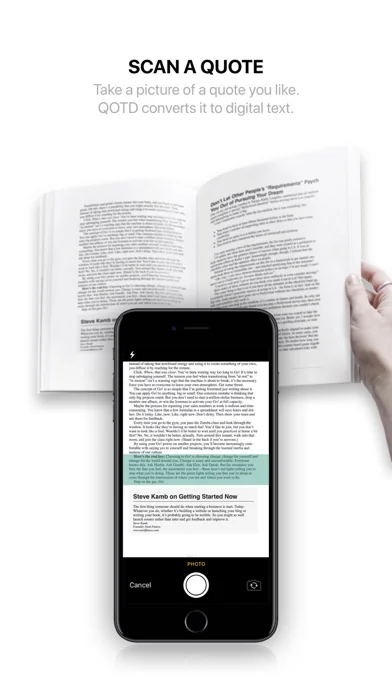
Use your device’s camera to scan interesting ideas you read in books and convert them to digital text.
The quotes you save are added to your collection and can easily be shared on social media platforms.
QOTD also regularly sends you notifications containing a random quote from your collection for your daily dose of inspiration.
LOG IT:
• Log quotes automatically by using the camera on your iPhone or iPad to take a photo of a page from a book, a print of any kind or from a screen and then cropping it to frame the desired quote.
QOTD will convert the image into digital text using image recognition technology (OCR).
• Alternatively, you can convert images of text that you upload from your photo library.
• Log quotes manually or tweak a previously saved one by typing in or editing the text field.
• Lastly, you can specify the author, source material and page number of every quote you log.
ORGANIZE IT:
• Simply create a new folder with a tap and give it a name to better organize your collection of quotes.
• Start populating your folders with quotes as you read.
• Bookmark the quotes you like most to have them saved in your Bookmarks folder.
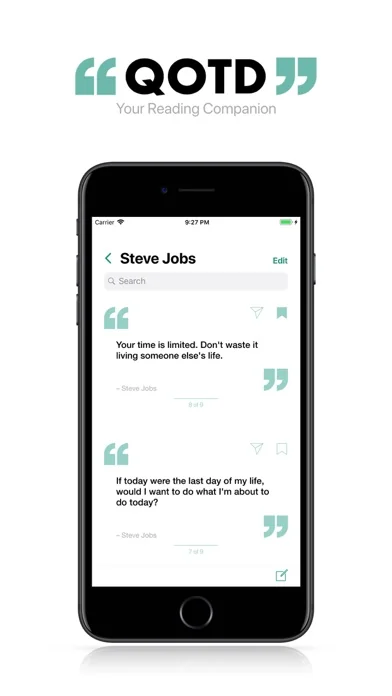
• Browse the contents of a folder by scrolling through a seamless feed of quotes.
• Look up any quote in your collection using the search bar.
• Use the swipe feature on a quote to delete it, edit it or move it to a different folder.
• Use the swipe feature on a folder to delete or rename it.
SHARE IT:
• Use the share button located at the top of each quote to easily share your quotes in one of multiple formats:
1- As text,
2- As a single image (for Facebook, WhatsApp, Instagram, Twitter and others),
3- As multiple images for longer quotes, in a format designed for social media platforms with post size restrictions such as Instagram.
GET INSPIRED:
• Receive notifications containing a random quote from your collection up to three times per day to keep you inspired.
SETTINGS:
• Enable or disable receiving all notifications or simply receiving them at specific times of the day: morning, afternoon and evening.
• Enable or disable saving the images you scan to your photo library.
• Back up and restore your collection to your Dropbox account.
Happy Reading!
It also lets you share them with the people that matter to you most.
Use your device’s camera to scan interesting ideas you read in books and convert them to digital text.
The quotes you save are added to your collection and can easily be shared on social media platforms.
QOTD also regularly sends you notifications containing a random quote from your collection for your daily dose of inspiration.
LOG IT:
• Log quotes automatically by using the camera on your iPhone or iPad to take a photo of a page from a book, a print of any kind or from a screen and then cropping it to frame the desired quote.
QOTD will convert the image into digital text using image recognition technology (OCR).
• Alternatively, you can convert images of text that you upload from your photo library.
• Log quotes manually or tweak a previously saved one by typing in or editing the text field.
• Lastly, you can specify the author, source material and page number of every quote you log.
ORGANIZE IT:
• Simply create a new folder with a tap and give it a name to better organize your collection of quotes.
• Start populating your folders with quotes as you read.
• Bookmark the quotes you like most to have them saved in your Bookmarks folder.
• Browse the contents of a folder by scrolling through a seamless feed of quotes.
• Look up any quote in your collection using the search bar.
• Use the swipe feature on a quote to delete it, edit it or move it to a different folder.
• Use the swipe feature on a folder to delete or rename it.
SHARE IT:
• Use the share button located at the top of each quote to easily share your quotes in one of multiple formats:
1- As text,
2- As a single image (for Facebook, WhatsApp, Instagram, Twitter and others),
3- As multiple images for longer quotes, in a format designed for social media platforms with post size restrictions such as Instagram.
GET INSPIRED:
• Receive notifications containing a random quote from your collection up to three times per day to keep you inspired.
SETTINGS:
• Enable or disable receiving all notifications or simply receiving them at specific times of the day: morning, afternoon and evening.
• Enable or disable saving the images you scan to your photo library.
• Back up and restore your collection to your Dropbox account.
Happy Reading!
🆕 What's New · v5.1
• Minor UI improvements.
Profile & Insights
Everything we know — and don't — about this app and its company.
Identification
- App name
- QOTD: Read, Scan & Save Quotes
- Developer
- Pascal Andraos
- Bundle ID
- com.pascalandraos.QOTD
- App Store URL
- Open in App Store
- Category
- Food & Drink
- Content rating
- 4+
- Languages
- EN
Company
- Website
- www.instagram.com
- Tagline
- Description
- Create an account or log in to Instagram - Share what you're into with the people who get you.
- Founded
- Not found
- HQ / Address
- Not found
- Employees
- Not found
- Logo
- OG image
Revenue
- Verified revenue / mo
- Not found
- AI revenue estimate / mo
- Not found
- AI annual estimate
- Not found
- ML model estimate / mo
- $86/mo
- Top-grossing rank
- Outside top 100 in US Food & Drink
- All-time revenue
- Not found
- Pricing
- Not found
Founder
- Name
- Not found
- X / Twitter
- Not found
- Not found
- GitHub
- Not found
- X followers
- Not found
- Public statements
- Not found
Funding
- Total raised
- Not found
- Last round
- Not found
- Investors
- Not found
- Crunchbase
- Not found
- AngelList
- Not found
Press & Links
- Articles found
- Not found
- Listed on
- Not found
- Blog
- Not found
- Press / News
- Not found
Contacts & Socials
- Socials
- Not found
- Not found
- Phone
- Not found
- Contact page
- Not found
- About page
- Not found
📈Ratings growth60 ratings+5900% lifetimeShow 3-year history estimate ▾
Tracked (11 weeks) Pre-tracking estimate (37 weeks) · model-based, ±5% noise · anchored to release date and current value
🌍Geographic ReachNot ranked
This app is currently outside the top 100 grossing in all 9 countries we monitor (US, UK, DE, FR, JP, CA, AU, BR, IN). Niche or new apps often launch this way — popularity rankings appear once daily revenue clears the regional threshold.
Profile is built from iTunes Lookup + developer site scrape + ML revenue model. Empty fields show "Not found" — additional sources (Crunchbase, X, IndieHackers, Acquire.com) coming.
More Food & Drink
DoorDash: Food, Grocery, More
★ 4.8 · 21,691,269 reviews
Uber Eats: Essen, Lieferdienst
★ 4.8 · 10,346,813 reviews
McDonald's
★ 4.8 · 7,675,129 reviews
Kindle
★ 4.9 · 5,609,451 reviews
Audible: Audiobooks & Podcasts
★ 4.8 · 5,507,414 reviews
Libby, die Bibliotheks-App
★ 4.7 · 4,126,898 reviews
Chick-fil-A
★ 4.9 · 3,909,638 reviews
Hoopla Digital
★ 4.8 · 1,341,327 reviews
Browse BU Analytics
📚 All 55,000+ Books
🜍 Alchemy & Hermeticism
🔮 Magic & Ritual
🌙 Witchcraft & Paganism
⭐ Astrology & Cosmology
🃏 Divination & Tarot
📜 Food & Drink
✡️ Kabbalah & Jewish Mysticism
🕉️ Mysticism & Contemplation
🕊️ Theosophy & Anthroposophy
🏛️ Freemasonry & Secret Societies
👻 Spiritualism & Afterlife
📖 Sacred Texts & Gnosticism
👁️ Supernatural & Occult Fiction
🧘 Spiritual Development
📚 Esoteric History & Biography
Info
About BU Analytics