46
BU Score
Emerging
SprachAssistent Schalter
✍️ bumetric analysis
“
SprachAssistent Schalter is an iOS app from Ton Schalke in the Education category, currently rated 4.3★ across 3 ratings. Initial signal reads as no scraped reviews yet: judgment based on metadata only.
Our BU Score puts it at 46: Emerging (early traction worth watching). For a Education app, that means early traction worth watching.
Track changes month-over-month in the Performance section below: live snapshot history and revenue forecast included.
📊 Performance Tracking LIVE
Loading…
Rating
—
Reviews
—
Forecast Revenue / mo
—
Snapshots tracked
0
since first record
Range:
💰 Forecast Revenue / mo
MODELRevenue forecast computed from BU's 234 trigger model on each snapshot. Calibrated against ground-truth from 58 verified-revenue apps.
🔬Forecast Breakdown — Why This Estimate?Top 4 of 4 triggers
Our ML model uses 200+ signals from public data. These are the most influential for this app:
| Paid app ($0.00)METRIC | +$2,800 | |
| Good rating (4.3★)METRIC | +$800 | |
| Established app (7y old)METRIC | +$800 | |
| Pre-traction phase (3 ratings)METRIC | −$300 |
METRIC = structural app data · REVIEW = mined from user reviews · ✓ VERIFIED = Stripe-verified anchor (TrustMRR)
📈 Reviews Growth
LIVECumulative review count from first BU snapshot. Each point = a tracked update.
⭐ Rating Trend
LIVEAverage rating evolution. Updates with each new review batch.
🗓️ Snapshot Timeline
HISTORYEach bar shows a tracked update and the metric delta from the previous snapshot.
App Specs
🔐 Own this app? Claim & verify MRR →💾 68 MB🔞 4+📱 iOS 12.0+🔖 v3.5.5🔄 updated 1w ago🌐 NL, EN, FR, DE📂 Education💰 Paid🚀 Launched 2019 (7y old)
📝 About this app
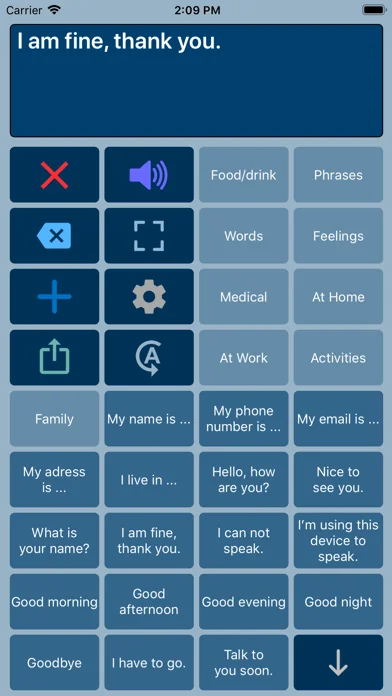
Speech Assist Switch is an AAC app for people who are speech impaired and is designed to be used with iOS Switch Control. With Switch Control people with motor difficulties can operate their iPad with a switch.
The app has special features for scanning with iOS Switch Control like the option to adjust the scanning pattern and has page up/down navigation buttons to avoid scrolling.
If you don’t need these features, the original app ‘Speech Assistant AAC’ is the better choice.
Key features
• The app is designed for the iPad.
• Easy to use and completely customizable to your needs and preferences.
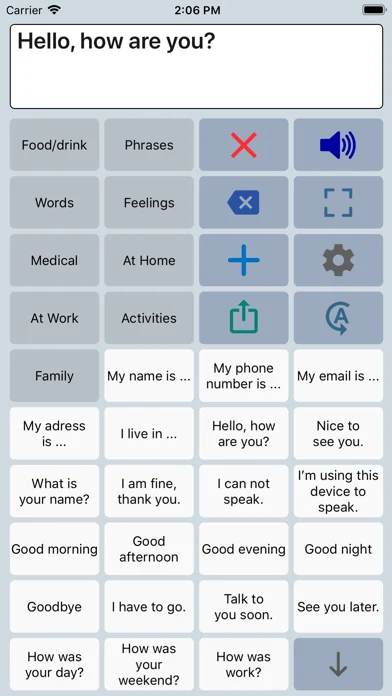
• Categories and subcategories to organize your phrases.
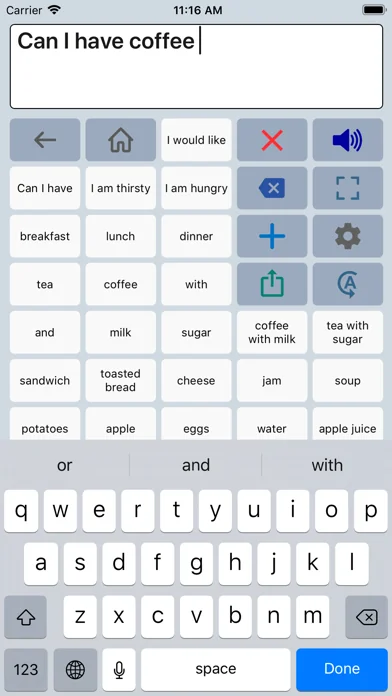
• History for quick access to previously typed phrases.
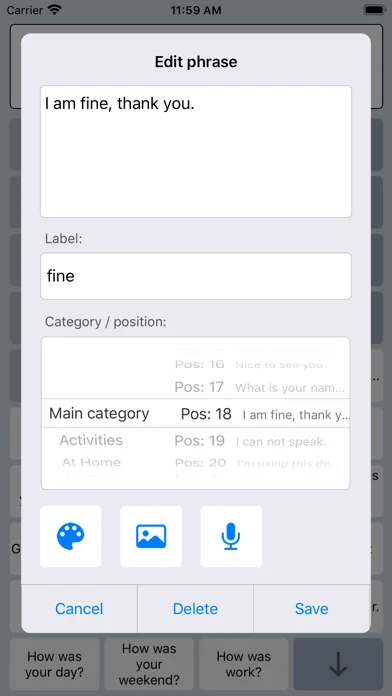
• Option to select photos from your Photo Library or Symbols on the buttons.
• Option to record speech or use one of the many iOS text-to-speech voices.
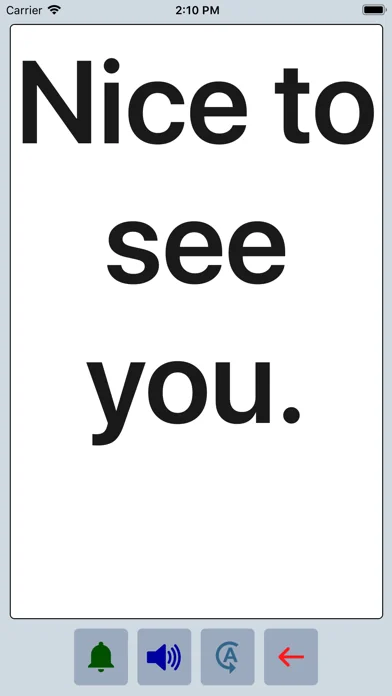
• Full screen button to show your message with a large font.
• iCloud backup and restore (also for recordings).
Special features for iOS Switch Control
• The scanning pattern can be adjusted in the settings.
• All the button are created in one large grid.
• The buttons can be made very small, in the settings you can choose from 6 to 12 buttons per row on an iPad.
• The category buttons can be placed anywhere and it is possible to create subcategories.
• Navigation through the pages can be done with page up/down buttons.
• A special optional bar for the keyboard with buttons to move the cursor a letter or word.
Scanning pattern
• When iOS Switch Control is enabled, the default scanning pattern scans row by row and then button by button.
This is not always efficient and therefore the scanning pattern can be adjusted in the settings:
• The number of rows that will be grouped during scanning.
• The number of buttons in a row that will be grouped during scanning.
Categories and phrases
• Add, change or delete your own (sub)categories and phrases.
• You can create an unlimited number of categories to organize your phrases for quick access.
• Create users with their own categories, phrases and voice for different languages, persons or situations.
• In the settings you can quickly and easily edit multiple phrases at once.
• Backup and Restore your categories and phrases to iCloud, also convenient for transferring them to another iPhone/iPad.
Fully Customizable
• The size of the buttons, the textbox and the text can be adjusted.
• The app has various color schemes and you can also create a personal color scheme.
• Change the colors of the icons on the buttons.
Full screen
• Show your message full screen with a very large font.
• Useful for communicating in a noisy environment.
• Button to rotate the text to show your message to the person opposite of you.
Speech
• Pronunciation corrections can be defined in the settings.
• The rate and pitch of the speech can be adjusted.
• Option to speak each Word or Character directly while typing.
• Optional highlighting of the spoken words.
• Pause and resume speaking by tapping the speak button (optional setting).
Other features
• Connect a bluetooth keyboard and create shortcuts for the functions Speak, Clear, Show and Attention Sound.
• Button to share your message to mail, text and social media.
• Attention sound button on Main and Full screen.
• Option to select symbols from the set of 3400 Mulberry Symbols (mulberrysymbols.org) to place on the buttons.
About the app
• This app is developed by ASoft.
• Ben Fullerton, who has Cerebral Palsy, has been a great help with the special features for iOS Switch Control.
• For feedback or questions, please contact: speechassistant@asoft.nl
Voices
• The voice can be selected in the settings of the app.
• The app uses the built-in iOS text-to-speech voices.
• There are 90 voices in 27 languages available, for instance 9 English US, 6 English UK and 4 Australian voices available.
The app has special features for scanning with iOS Switch Control like the option to adjust the scanning pattern and has page up/down navigation buttons to avoid scrolling.
If you don’t need these features, the original app ‘Speech Assistant AAC’ is the better choice.
Key features
• The app is designed for the iPad.
• Easy to use and completely customizable to your needs and preferences.
• Categories and subcategories to organize your phrases.
• History for quick access to previously typed phrases.
• Option to select photos from your Photo Library or Symbols on the buttons.
• Option to record speech or use one of the many iOS text-to-speech voices.
• Full screen button to show your message with a large font.
• iCloud backup and restore (also for recordings).
Special features for iOS Switch Control
• The scanning pattern can be adjusted in the settings.
• All the button are created in one large grid.
• The buttons can be made very small, in the settings you can choose from 6 to 12 buttons per row on an iPad.
• The category buttons can be placed anywhere and it is possible to create subcategories.
• Navigation through the pages can be done with page up/down buttons.
• A special optional bar for the keyboard with buttons to move the cursor a letter or word.
Scanning pattern
• When iOS Switch Control is enabled, the default scanning pattern scans row by row and then button by button.
This is not always efficient and therefore the scanning pattern can be adjusted in the settings:
• The number of rows that will be grouped during scanning.
• The number of buttons in a row that will be grouped during scanning.
Categories and phrases
• Add, change or delete your own (sub)categories and phrases.
• You can create an unlimited number of categories to organize your phrases for quick access.
• Create users with their own categories, phrases and voice for different languages, persons or situations.
• In the settings you can quickly and easily edit multiple phrases at once.
• Backup and Restore your categories and phrases to iCloud, also convenient for transferring them to another iPhone/iPad.
Fully Customizable
• The size of the buttons, the textbox and the text can be adjusted.
• The app has various color schemes and you can also create a personal color scheme.
• Change the colors of the icons on the buttons.
Full screen
• Show your message full screen with a very large font.
• Useful for communicating in a noisy environment.
• Button to rotate the text to show your message to the person opposite of you.
Speech
• Pronunciation corrections can be defined in the settings.
• The rate and pitch of the speech can be adjusted.
• Option to speak each Word or Character directly while typing.
• Optional highlighting of the spoken words.
• Pause and resume speaking by tapping the speak button (optional setting).
Other features
• Connect a bluetooth keyboard and create shortcuts for the functions Speak, Clear, Show and Attention Sound.
• Button to share your message to mail, text and social media.
• Attention sound button on Main and Full screen.
• Option to select symbols from the set of 3400 Mulberry Symbols (mulberrysymbols.org) to place on the buttons.
About the app
• This app is developed by ASoft.
• Ben Fullerton, who has Cerebral Palsy, has been a great help with the special features for iOS Switch Control.
• For feedback or questions, please contact: speechassistant@asoft.nl
Voices
• The voice can be selected in the settings of the app.
• The app uses the built-in iOS text-to-speech voices.
• There are 90 voices in 27 languages available, for instance 9 English US, 6 English UK and 4 Australian voices available.
🆕 What's New · v3.5.5
Minor improvements and fixes.
Profile & Insights
Everything we know — and don't — about this app and its company.
Identification
- App name
- SprachAssistent Schalter
- Developer
- Ton Schalke
- Bundle ID
- nl.asoft.speechassistantswitch
- App Store URL
- Open in App Store
- Category
- Education
- Content rating
- 4+
- Languages
- NL, EN, FR, DE
Company
- Website
- Not found
- Tagline
- Today
- Description
- Find apps and games for iPhone, iPad, Mac, and more on the App Store.
- Founded
- Not found
- HQ / Address
- Not found
- Employees
- Not found
- Logo
- OG image
Revenue
- Verified revenue / mo
- Not found
- AI revenue estimate / mo
- Not found
- AI annual estimate
- Not found
- ML model estimate / mo
- $86/mo
- Top-grossing rank
- Outside top 99 in US Education
- All-time revenue
- Not found
- Pricing
- Not found
Founder
- Name
- Not found
- X / Twitter
- Not found
- Not found
- GitHub
- Not found
- X followers
- Not found
- Public statements
- Not found
Funding
- Total raised
- Not found
- Last round
- Not found
- Investors
- Not found
- Crunchbase
- Not found
- AngelList
- Not found
Press & Links
- Articles found
- Not found
- Listed on
- Not found
- Blog
- Not found
- Press / News
- Not found
Contacts & Socials
- Socials
- Not found
- Not found
- Phone
- Not found
- Contact page
- Not found
- About page
- https://apps.apple.com/us/iphone/story/id1759426883
📈Ratings growth3 ratings+50% lifetimeShow 3-year history estimate ▾
Tracked (1 weeks) Pre-tracking estimate (37 weeks) · model-based, ±5% noise · anchored to release date and current value
🌍Geographic ReachNot ranked
This app is currently outside the top 100 grossing in all 9 countries we monitor (US, UK, DE, FR, JP, CA, AU, BR, IN). Niche or new apps often launch this way — popularity rankings appear once daily revenue clears the regional threshold.
Profile is built from iTunes Lookup + developer site scrape + ML revenue model. Empty fields show "Not found" — additional sources (Crunchbase, X, IndieHackers, Acquire.com) coming.
More by Ton Schalke
View all →Full revenue analysis
Read the article-style breakdown for SprachAssistent Schalter: category rank, percentile, growth signal, comparable apps, and how the forecast is calibrated against verified-MRR anchors in this niche.