
75
BU Score
Strong
Camo Camera
✍️ BU Analytics Review
“
Camo Camera is an iOS app from Reincubate in the Utilities category, currently rated 4.7★ across 6,083 ratings. Initial signal reads as largely positive sentiment, users highlighting consistency and feature depth.
Our BU Score puts it at 75 — Strong (healthy traction). For a Utilities app, that means healthy traction.
Track changes month-over-month in the Performance section below — live snapshot history and revenue forecast included.
creator
📊 Performance Tracking LIVE
Loading…
Rating
—
Reviews
—
Forecast Revenue / mo
—
Snapshots tracked
0
since first record
Range:
💰 Forecast Revenue / mo
MODELRevenue forecast computed from BU's 234 trigger model on each snapshot. Calibrated against ground-truth from 58 verified-revenue apps.
🔬Forecast Breakdown — Why This Estimate?Top 12 of 12 triggers
Our ML model uses 200+ signals from public data. These are the most influential for this app:
| Excellent rating (4.7★)METRIC | +$2,200 | |
| bugsREVIEW | −$1,800 | |
| 5 starREVIEW | +$1,800 | |
| excellent appREVIEW | +$1,500 | |
| Low install base (6,083 ratings)METRIC | +$1,500 | |
| Multilingual (13 languages)METRIC | +$1,500 | |
| highly recommendREVIEW | +$1,400 | |
| slowREVIEW | −$1,200 | |
| support teamREVIEW | +$900 | |
| priceyREVIEW | −$800 | |
| Established app (5y old)METRIC | +$800 | |
| Ad-supported / freemiumMETRIC | +$600 |
METRIC = structural app data · REVIEW = mined from user reviews · ✓ VERIFIED = Stripe-verified anchor (TrustMRR)
📈 Reviews Growth
LIVECumulative review count from first BU snapshot. Each point = a tracked update.
💚Sentiment Over Time↑ green = positive · ↓ red = negative
Apr 25
May 25
Jun 25
Jul 25
Aug 25
Sep 25
Oct 25
Nov 25
Dec 25
Jan 26
Feb 26
Mar 26
⭐ Rating Trend
LIVEAverage rating evolution. Updates with each new review batch.
🗓️ Snapshot Timeline
HISTORYEach bar shows a tracked update and the metric delta from the previous snapshot.
App Specs
🔐 Own this app? Claim & verify MRR →💾 88 MB🔞 4+📱 iOS 15.6+🔖 v2.4.0🔄 updated 1mo ago🌐 AR, NL, EN, FR, DE +8📂 Utilities💰 Paid🚀 Launched 2020 (5y old)
📝 About this app
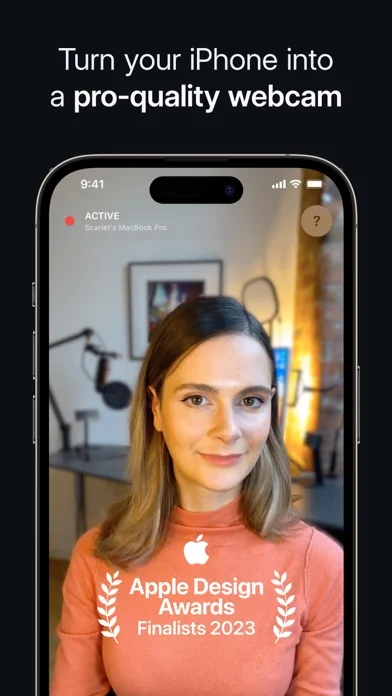
The Apple Design Awards Finalist 2023 app, Camo, uses the incredible cameras in your iPhone to produce pro-quality video, whether you’re meeting, streaming, or recording.
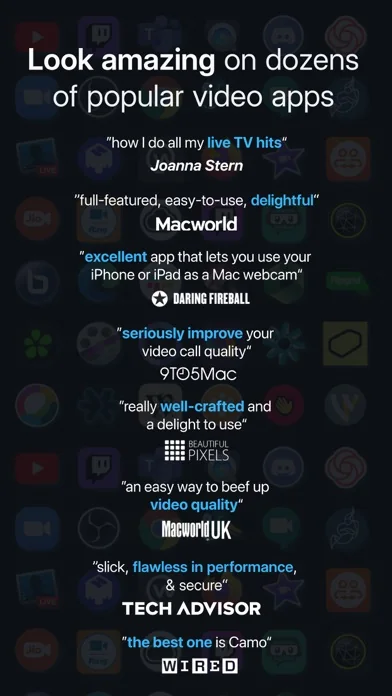
Joanna Stern, The Wall St. Journal – “how I do all my live TV hits”
MacWorld US – “full-featured, easy-to-use, and delightful”
9to5Mac – “an easy way to seriously improve your video call quality”
WIRED – “there are a number of apps which let you use your iOS device’s camera as your webcam, but the best one is Camo”
MacWorld UK – “an easy way to beef up the video quality on your calls”
With over 10 million users helped over the last decade, Reincubate is one of the UK’s most-loved software companies.
— EASY TO USE / PLUG AND PLAY / Wi-Fi —
No extra hardware needed, just connect your device to your Mac or PC. Choose between connecting wirelessly, for the most flexible experience, or opt for a trusty USB connection. With Wi-Fi connectivity, get set up for a call in seconds – no more looking around for a spare cable or a free port.
— POWERFUL ADJUSTMENTS & FILTERS —
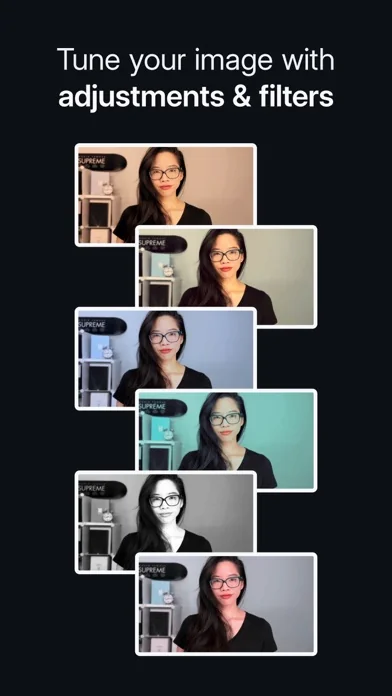
Camo Studio gives you full control of your video, letting you adjust lenses, exposure, colours, contrast, and more; and it lets you zoom, crop, and focus your image precisely how you want it. Apply cinematic styling and color grading to your video with 18 bespoke filters, including support for custom Cube, 3DL, and LUT files.
— STAND OUT WITH SPOTLIGHT & PORTRAIT —
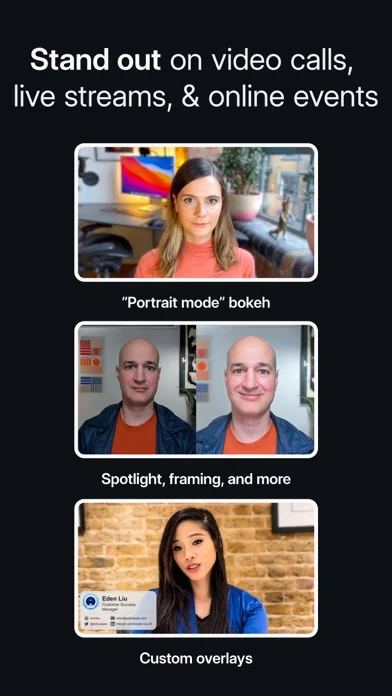
Use Spotlight to compensate for less-than-ideal lighting conditions, such as backlit or under-lit environments, by brightening yourself against your background. Portrait creates a sophisticated bokeh effect that cleanly separates you from the background and gives you full control over the depth of focus.
— VIRTUAL GREEN SCREEN AND PRIVACY —
Use Replace, Camo’s virtual green screen, to cleanly swap any image into your background. Or activate Privacy to cloak your surroundings with a pleasing diffused image effect. Both offer industry-leading performance, enabling video that foregrounds clarity without sacrificing appearance.
— FIND FREEDOM WITH AUTO FRAMING —
Camo’s auto-framing functionality keeps you at the center of the action, whether you’re shuffling around at your desk or presenting at a whiteboard. With a range of zoom options, you’ll remain firmly centered and proportioned on screen.
— COMPATIBLE WITH OVER 40 APPS —
Camo works perfectly with Zoom, Google Meet, Microsoft Teams, Safari, FaceTime, QuickTime, Chrome, OBS Studio, Streamlabs, Skype, Twitch, Panopto, ScreenFlow, Final Cut Pro X, and dozens of other video recording and streaming products.
— SECURITY AND PRIVACY FIRST —
Camo doesn’t know what you’re using it for, and doesn’t capture or transmit your video feed. It simply routes it from your iPhone to your computer. Your data is your business, not ours.
— NOT ONLY BUT ALSO! —
- Super low latency, high speed video with a range of resolutions
- Powerful presets to save and quickly switch to your favourite adjustments and settings
- Native support for iPadOS as well as your iPhone, and beautiful Dark Mode support throughout
- Camo offloads all processing to your iOS device, keeping your computer cool and fast
- Crop your video without losing quality with dynamic-resolution Smart Zoom
- Automatic image stabilisation minimises bumps and vibrations
- Virtually rotate your video without touching your device
- Switch between video from multiple iOS devices and lenses in real-time
- No ads in the app, not ever
— WE’RE HERE TO HELP —
We’re fanatical about supporting users, and we’d love to help you make the most of Camo. Reach out to us any time: support@reincubate.com
Camo Studio supports macOS 10.13 or later & Windows 10 or later.
— LEARN MORE —
About us: https://reincubate.com/camo/
How to make the most of Camo: https://reincubate.com/support/how-to/look-best-webcam-video/
FAQ: https://reincubate.com/support/camo/camo-faq/
Joanna Stern, The Wall St. Journal – “how I do all my live TV hits”
MacWorld US – “full-featured, easy-to-use, and delightful”
9to5Mac – “an easy way to seriously improve your video call quality”
WIRED – “there are a number of apps which let you use your iOS device’s camera as your webcam, but the best one is Camo”
MacWorld UK – “an easy way to beef up the video quality on your calls”
With over 10 million users helped over the last decade, Reincubate is one of the UK’s most-loved software companies.
— EASY TO USE / PLUG AND PLAY / Wi-Fi —
No extra hardware needed, just connect your device to your Mac or PC. Choose between connecting wirelessly, for the most flexible experience, or opt for a trusty USB connection. With Wi-Fi connectivity, get set up for a call in seconds – no more looking around for a spare cable or a free port.
— POWERFUL ADJUSTMENTS & FILTERS —
Camo Studio gives you full control of your video, letting you adjust lenses, exposure, colours, contrast, and more; and it lets you zoom, crop, and focus your image precisely how you want it. Apply cinematic styling and color grading to your video with 18 bespoke filters, including support for custom Cube, 3DL, and LUT files.
— STAND OUT WITH SPOTLIGHT & PORTRAIT —
Use Spotlight to compensate for less-than-ideal lighting conditions, such as backlit or under-lit environments, by brightening yourself against your background. Portrait creates a sophisticated bokeh effect that cleanly separates you from the background and gives you full control over the depth of focus.
— VIRTUAL GREEN SCREEN AND PRIVACY —
Use Replace, Camo’s virtual green screen, to cleanly swap any image into your background. Or activate Privacy to cloak your surroundings with a pleasing diffused image effect. Both offer industry-leading performance, enabling video that foregrounds clarity without sacrificing appearance.
— FIND FREEDOM WITH AUTO FRAMING —
Camo’s auto-framing functionality keeps you at the center of the action, whether you’re shuffling around at your desk or presenting at a whiteboard. With a range of zoom options, you’ll remain firmly centered and proportioned on screen.
— COMPATIBLE WITH OVER 40 APPS —
Camo works perfectly with Zoom, Google Meet, Microsoft Teams, Safari, FaceTime, QuickTime, Chrome, OBS Studio, Streamlabs, Skype, Twitch, Panopto, ScreenFlow, Final Cut Pro X, and dozens of other video recording and streaming products.
— SECURITY AND PRIVACY FIRST —
Camo doesn’t know what you’re using it for, and doesn’t capture or transmit your video feed. It simply routes it from your iPhone to your computer. Your data is your business, not ours.
— NOT ONLY BUT ALSO! —
- Super low latency, high speed video with a range of resolutions
- Powerful presets to save and quickly switch to your favourite adjustments and settings
- Native support for iPadOS as well as your iPhone, and beautiful Dark Mode support throughout
- Camo offloads all processing to your iOS device, keeping your computer cool and fast
- Crop your video without losing quality with dynamic-resolution Smart Zoom
- Automatic image stabilisation minimises bumps and vibrations
- Virtually rotate your video without touching your device
- Switch between video from multiple iOS devices and lenses in real-time
- No ads in the app, not ever
— WE’RE HERE TO HELP —
We’re fanatical about supporting users, and we’d love to help you make the most of Camo. Reach out to us any time: support@reincubate.com
Camo Studio supports macOS 10.13 or later & Windows 10 or later.
— LEARN MORE —
About us: https://reincubate.com/camo/
How to make the most of Camo: https://reincubate.com/support/how-to/look-best-webcam-video/
FAQ: https://reincubate.com/support/camo/camo-faq/
🆕 What's New · v2.4.0
Today's update is a big one, bringing audio-only mode, Bluetooth microphone support, virtual lens selection, and a refreshed UI alongside a range of improvements and fixes. If you run into any problems, please reach out to us at support@reincubate.com. We'd love to help and hear from you.
Features:
- Audio-only mode. You can now use your iPhone as a microphone with Camo Studio without activating the camera. (Requires Camo Studio 2.7.0 or later on Mac.)
- Bluetooth microphone support. Bluetooth mics connected to your iOS device can now be selected as audio devices in Camo Studio.
- Virtual lens and sensor crop selection. Lenses available in Camo Studio lens dropdown now match those in the iOS camera.
Improvements:
- We've refreshed the UI with a new liquid glass design.
- We've improved the quality and performance of background segmentation modes.
- The on-device video preview now shows the correctly rotated frame even when orientation lock is enabled.
Fixes:
- We've fixed a bug where video would appear rotated 90 degrees when using an AR effect.
- We've fixed a bug where a black edge could appear on the feed when increasing zoom with Auto framing.
- We've fixed an issue where the camera could appear to switch between lenses repeatedly.
- We've fixed a crash that could occur when fetching a background image from Camo Studio.
- We've fixed a bug where 60 fps could be selected while using smart zoom but would immediately revert to 30 fps.
Features:
- Audio-only mode. You can now use your iPhone as a microphone with Camo Studio without activating the camera. (Requires Camo Studio 2.7.0 or later on Mac.)
- Bluetooth microphone support. Bluetooth mics connected to your iOS device can now be selected as audio devices in Camo Studio.
- Virtual lens and sensor crop selection. Lenses available in Camo Studio lens dropdown now match those in the iOS camera.
Improvements:
- We've refreshed the UI with a new liquid glass design.
- We've improved the quality and performance of background segmentation modes.
- The on-device video preview now shows the correctly rotated frame even when orientation lock is enabled.
Fixes:
- We've fixed a bug where video would appear rotated 90 degrees when using an AR effect.
- We've fixed a bug where a black edge could appear on the feed when increasing zoom with Auto framing.
- We've fixed an issue where the camera could appear to switch between lenses repeatedly.
- We've fixed a crash that could occur when fetching a background image from Camo Studio.
- We've fixed a bug where 60 fps could be selected while using smart zoom but would immediately revert to 30 fps.
Profile & Insights
Everything we know — and don't — about this app and its company.
Identification
- App name
- Camo Camera
- Developer
- Reincubate
- Bundle ID
- com.reincubate.ios.cam
- App Store URL
- Open in App Store
- Category
- Utilities
- Content rating
- 4+
- Languages
- AR, NL, EN, FR, DE, IT, JA, KO, PT, RU, ZH, ES, SV
Company
- Website
- reincubate.com
- Tagline
- Unlock your potential
- Description
- Forward-thinking teams around the world use Reincubate for incredible video.
- Founded
- 2008
- HQ / Address
- 23 Mill Street, London
- Employees
- Not found
- Logo
- OG image
Revenue
- Verified revenue / mo
- Not found
- AI revenue estimate / mo
- Not found
- AI annual estimate
- Not found
- ML model estimate / mo
- $10.5K/mo
- Top-grossing rank
- Outside top 100 in US Utilities
- All-time revenue
- Not found
- Pricing
- Not found
Founder
- Name
- Not found
- X / Twitter
- https://twitter.com/afit
- Not found
- GitHub
- Not found
- X followers
- Not found
- Public statements
- Not found
Funding
- Total raised
- Not found
- Last round
- Not found
- Investors
- Not found
- Crunchbase
- Not found
- AngelList
- Not found
Press & Links
- Articles found
- Not found
- Listed on
- Not found
- Blog
- https://reincubate.com/blog/
- Press / News
- Not found
Contacts & Socials
- Socials
- Not found
- Phone
- Not found
- Contact page
- https://reincubate.com/support/
- About page
- https://reincubate.com/about/
📈Ratings growth6,083 ratings+69% lifetimeShow 3-year history estimate ▾
Tracked (58 weeks) Pre-tracking estimate (36 weeks) · model-based, ±5% noise · anchored to release date and current value
🌍Geographic ReachNot ranked
This app is currently outside the top 100 grossing in all 9 countries we monitor (US, UK, DE, FR, JP, CA, AU, BR, IN). Niche or new apps often launch this way — popularity rankings appear once daily revenue clears the regional threshold.
Profile is built from iTunes Lookup + developer site scrape + ML revenue model. Empty fields show "Not found" — additional sources (Crunchbase, X, IndieHackers, Acquire.com) coming.
More Utilities
My Verizon
★ 4.7 · 5,489,023 reviews
★ 4.7 · 4,551,928 reviews
myAT&T
★ 4.0 · 4,058,820 reviews
Google Chrome
★ 4.7 · 3,469,796 reviews
My Spectrum
★ 4.8 · 3,292,507 reviews
DuckDuckGo, Duck.ai (optional)
★ 4.8 · 2,325,859 reviews
Rechner₊
★ 4.7 · 1,717,164 reviews
QR Code Reader ϟ
★ 4.7 · 1,413,130 reviews
Browse BU Analytics
📚 All 55,000+ Books
🜍 Alchemy & Hermeticism
🔮 Magic & Ritual
🌙 Witchcraft & Paganism
⭐ Astrology & Cosmology
🃏 Divination & Tarot
📜 Utilities
✡️ Kabbalah & Jewish Mysticism
🕉️ Mysticism & Contemplation
🕊️ Theosophy & Anthroposophy
🏛️ Freemasonry & Secret Societies
👻 Spiritualism & Afterlife
📖 Sacred Texts & Gnosticism
👁️ Supernatural & Occult Fiction
🧘 Spiritual Development
📚 Esoteric History & Biography
Info
About BU Analytics