55
BU Score
Solid
PDF Office Pro, Acrobat Expert
✍️ bumetric analysis
“
PDF Office Pro, Acrobat Expert is an iOS app from heytopia in the Business category, currently rated 4.6★ across 63 ratings. Initial signal reads as mostly critical sentiment so far: users flag rough edges and unmet expectations.
Our BU Score puts it at 55: Solid (established niche player). For a Business app, that means established niche player.
Track changes month-over-month in the Performance section below: live snapshot history and revenue forecast included.
📊 Performance Tracking LIVE
Loading…
Rating
—
Reviews
—
Forecast Revenue / mo
—
Snapshots tracked
0
since first record
Range:
💰 Forecast Revenue / mo
MODELRevenue forecast computed from BU's 234 trigger model on each snapshot. Calibrated against ground-truth from 58 verified-revenue apps.
🔬Forecast Breakdown — Why This Estimate?Top 5 of 5 triggers
Our ML model uses 200+ signals from public data. These are the most influential for this app:
| Paid app ($0.00)METRIC | +$2,800 | |
| Excellent rating (4.6★)METRIC | +$2,200 | |
| Multilingual (13 languages)METRIC | +$1,500 | |
| Established app (5y old)METRIC | +$800 | |
| Pre-traction phase (63 ratings)METRIC | −$300 |
METRIC = structural app data · REVIEW = mined from user reviews · ✓ VERIFIED = Stripe-verified anchor (TrustMRR)
📈 Reviews Growth
LIVECumulative review count from first BU snapshot. Each point = a tracked update.
⭐ Rating Trend
LIVEAverage rating evolution. Updates with each new review batch.
🗓️ Snapshot Timeline
HISTORYEach bar shows a tracked update and the metric delta from the previous snapshot.
App Specs
🔐 Own this app? Claim & verify MRR →💾 149 MB🔞 4+📱 iOS 14.0+🔖 v7.0.1🔄 updated 4y ago🌐 AR, NL, EN, FR, DE +8📂 Business💰 Paid🚀 Launched 2020 (5y old)
📝 About this app
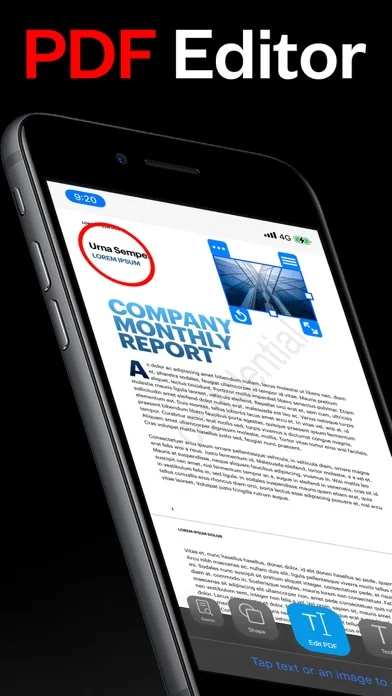
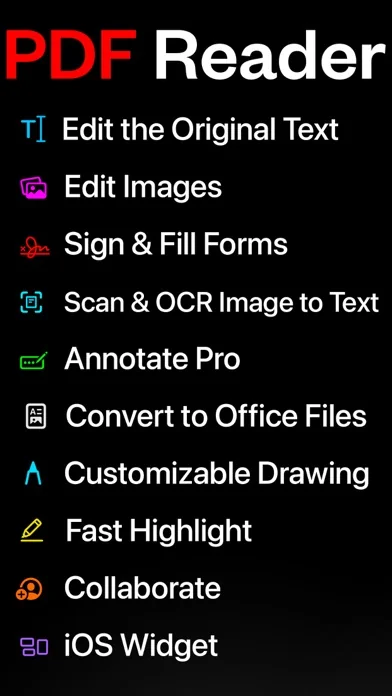
Introducing PDF Office Pro, the best PDF editor and reader! Edit text, images, sign, forms, highlight, OCR image to text, collaborate, use widgets, and much more!
PDF Office Pro is a productivity app that offers a feature packed way to work with PDF documents. Using PDF Office Pro, you can edit PDF text, edit PDF Images, draw on PDF docs with Apple Pencil (not required to draw), convert images to text, invite people for real-time collaborative editing, fill PDF forms, sign PDF docs, edit hyperlinks and upload unlimited PDFs on iCloud and access the data from any iOS and Mac device.
PDF Office Pro offers all the basic functionalities such as reading, highlight, draw, sign and organize PDF files; and more advanced features like rearranging PDF pages, real-time collaborative editing, online syncing, annotation, and so much more...
**PDF Office Pro bundles exciting features**
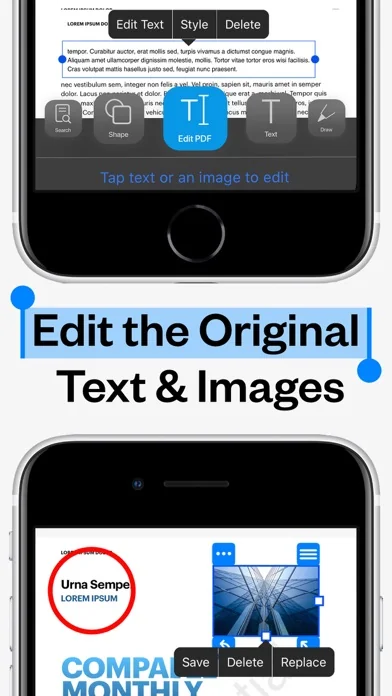
EDIT PDFs Original Text & Images
• Edit, add, remove existing word/s or text/s or image/s. Change the font, size, and color, alignment, fill static PDF docs/forms. Save, replace, delete and resize PDF images.
Powerful Editing Tool
• Beautiful UI to edit text in your PDF documents
• Freehand drawing with your finger or Apple Pencil
• Add your own text/notes in the existing body
• Scan & Fill PDF document/forms
• Merge large PDF docs for easy sharing
• Insert and Resize photo into PDFs
UNLIMITED UPLOADS AND DATA SYNCING
• Upload and Sync unlimited number of PDF files on iCloud and access the data from any iOS or Mac device.
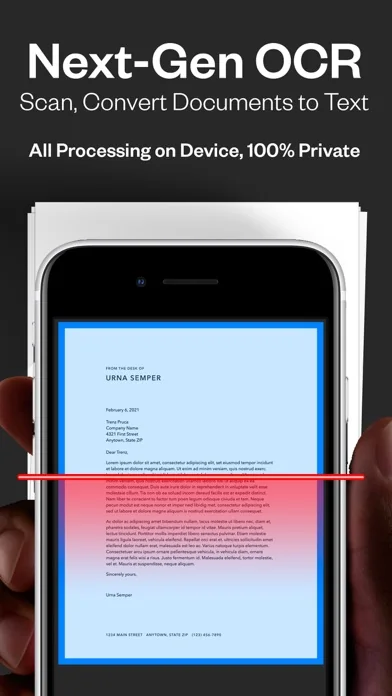
OCR - Convert Images to Text
• Simple convert an image(s) or PDF to text
• Next-Gen OCR with amazing accuracy
• Processing done on device, 100% private
World’s first real-time collaborative PDF editor
• Share your doc with friends/co-workers/clients
• Create a shared folder by inviting iClouds users for real-time collaborative editing. Get everyone’s feedback in one place.
• Start collaborating work and save all data in shared PDF folder
Annotate
• Annotate word and text with highlights, underlines, handwriting
• Add your comments or notes within the PDF file
• Use doc sign creator and add your own signatures
• Draw and insert different shapes and objects
DARK MODE
• Enable dark mode feature for long - time reading. Easily adjust the buttons and toolbars according to your convenience.
Organize PDFs
• Create a folder and organize your documents
• Sync iCloud Drive with the app
• Browse recently deleted PDFs
Unlimited PDF uploads and syncing
• Upload unlimited documents on iCloud
• Access these documents from your iPhone, iPad, and Mac
• Sync data online and never worry about any data loss
Copy Pages
• Take pages from one PDF and add to another
UPGRADE AND GET:
Convert PDFs to Word .docx Fully-Editable Files
Conversion Includes:
• Text Formatting & Attributes
• Annotations & Highlights
• Drawings
• Images
• Tables & more.
• The conversion is done on our AWS secure server. All files are deleted IMMEDIATELY and just incase, we do many things:
1) We completely erase the data server every 24 hours.
2) No data is saved or tracked.
3) We even change the name of the PDF to gibberish before uploading!
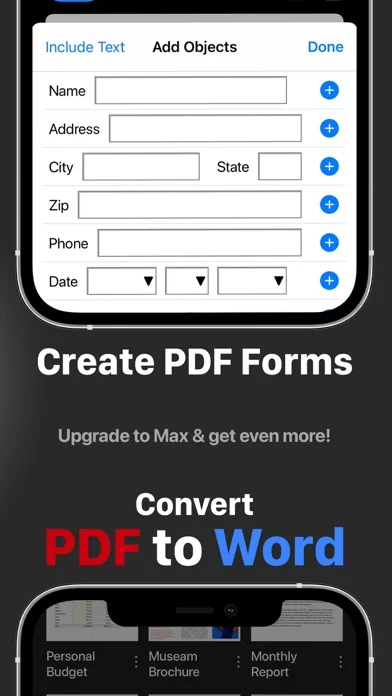
Create Custom PDF Forms
• Easy 'Start' with templates for common PDF form objects
• Add Text Input Boxes
• Checkboxes
• Radio
• Choices
• Buttons
SMART COMPRESS
• Control the resolution of images inside the PDF
• Adjust the image quality
• Flatten PDFs
• Remove all images if you’d like
Stamps & Stamps Builder:
• Emphasize sections of the PDF
• Create your own stamps
MORE
• Watermarks on All Pages or One Page
• Add/Edit Table of Contents for nice organized outlines
• Auto-Add Page numbers to your PDF and specify the exact format and location of the numbers
• Add a password to exported PDFs for added protection/security
PDF Office Pro is a productivity app that offers a feature packed way to work with PDF documents. Using PDF Office Pro, you can edit PDF text, edit PDF Images, draw on PDF docs with Apple Pencil (not required to draw), convert images to text, invite people for real-time collaborative editing, fill PDF forms, sign PDF docs, edit hyperlinks and upload unlimited PDFs on iCloud and access the data from any iOS and Mac device.
PDF Office Pro offers all the basic functionalities such as reading, highlight, draw, sign and organize PDF files; and more advanced features like rearranging PDF pages, real-time collaborative editing, online syncing, annotation, and so much more...
**PDF Office Pro bundles exciting features**
EDIT PDFs Original Text & Images
• Edit, add, remove existing word/s or text/s or image/s. Change the font, size, and color, alignment, fill static PDF docs/forms. Save, replace, delete and resize PDF images.
Powerful Editing Tool
• Beautiful UI to edit text in your PDF documents
• Freehand drawing with your finger or Apple Pencil
• Add your own text/notes in the existing body
• Scan & Fill PDF document/forms
• Merge large PDF docs for easy sharing
• Insert and Resize photo into PDFs
UNLIMITED UPLOADS AND DATA SYNCING
• Upload and Sync unlimited number of PDF files on iCloud and access the data from any iOS or Mac device.
OCR - Convert Images to Text
• Simple convert an image(s) or PDF to text
• Next-Gen OCR with amazing accuracy
• Processing done on device, 100% private
World’s first real-time collaborative PDF editor
• Share your doc with friends/co-workers/clients
• Create a shared folder by inviting iClouds users for real-time collaborative editing. Get everyone’s feedback in one place.
• Start collaborating work and save all data in shared PDF folder
Annotate
• Annotate word and text with highlights, underlines, handwriting
• Add your comments or notes within the PDF file
• Use doc sign creator and add your own signatures
• Draw and insert different shapes and objects
DARK MODE
• Enable dark mode feature for long - time reading. Easily adjust the buttons and toolbars according to your convenience.
Organize PDFs
• Create a folder and organize your documents
• Sync iCloud Drive with the app
• Browse recently deleted PDFs
Unlimited PDF uploads and syncing
• Upload unlimited documents on iCloud
• Access these documents from your iPhone, iPad, and Mac
• Sync data online and never worry about any data loss
Copy Pages
• Take pages from one PDF and add to another
UPGRADE AND GET:
Convert PDFs to Word .docx Fully-Editable Files
Conversion Includes:
• Text Formatting & Attributes
• Annotations & Highlights
• Drawings
• Images
• Tables & more.
• The conversion is done on our AWS secure server. All files are deleted IMMEDIATELY and just incase, we do many things:
1) We completely erase the data server every 24 hours.
2) No data is saved or tracked.
3) We even change the name of the PDF to gibberish before uploading!
Create Custom PDF Forms
• Easy 'Start' with templates for common PDF form objects
• Add Text Input Boxes
• Checkboxes
• Radio
• Choices
• Buttons
SMART COMPRESS
• Control the resolution of images inside the PDF
• Adjust the image quality
• Flatten PDFs
• Remove all images if you’d like
Stamps & Stamps Builder:
• Emphasize sections of the PDF
• Create your own stamps
MORE
• Watermarks on All Pages or One Page
• Add/Edit Table of Contents for nice organized outlines
• Auto-Add Page numbers to your PDF and specify the exact format and location of the numbers
• Add a password to exported PDFs for added protection/security
🆕 What's New · v7.0.1
MAJOR NEW VERSION 7.0!! Literally every single requested feature is here! Please continue to email with ideas! Please consider giving us a 5 star review!
What's in the 7.0 update:
• Smart Compress PDF
• Control the image quality, resolution & flatten PDF
• Our tests show PDFs with images can be as low at 15% the orginal PDF size with little quality lost! Great for emailing large PDFs with images
• Convert PDF to Editable Excel .xlsx files
• Convert PDF to PowerPoints *images only
• Convert PDF to Separate Image Files
• Edit PDF Text v.2
• Choose to edit a line or paragraph
• MUCH better at choosing the correct font when initially editing text
• MUCH better at formating the text edited
• Crop images in the PDF or photo annotations
• Add/Edit Table of Contents
• Automatically add Page Numbers to your PDFs
• Add a password to exported PDFs
• Bookmark Pages and view only bookmarked pages
• Signature annotations now appear in the PDFs
• Added buttons to Zoom In/Out in sidebar
• Merge PDFs - Create a folder of PDFs then click '...' and 'Merge PDFs'
• Print PDFs
What's in the 7.0 update:
• Smart Compress PDF
• Control the image quality, resolution & flatten PDF
• Our tests show PDFs with images can be as low at 15% the orginal PDF size with little quality lost! Great for emailing large PDFs with images
• Convert PDF to Editable Excel .xlsx files
• Convert PDF to PowerPoints *images only
• Convert PDF to Separate Image Files
• Edit PDF Text v.2
• Choose to edit a line or paragraph
• MUCH better at choosing the correct font when initially editing text
• MUCH better at formating the text edited
• Crop images in the PDF or photo annotations
• Add/Edit Table of Contents
• Automatically add Page Numbers to your PDFs
• Add a password to exported PDFs
• Bookmark Pages and view only bookmarked pages
• Signature annotations now appear in the PDFs
• Added buttons to Zoom In/Out in sidebar
• Merge PDFs - Create a folder of PDFs then click '...' and 'Merge PDFs'
• Print PDFs
Profile & Insights
Everything we know — and don't — about this app and its company.
Identification
- App name
- PDF Office Pro, Acrobat Expert
- Developer
- heytopia
- Bundle ID
- com.heytopia.pdfedit.iOS.Pro
- App Store URL
- Open in App Store
- Category
- Business
- Content rating
- 4+
- Languages
- AR, NL, EN, FR, DE, IT, JA, KO, PT, RU, ZH, ES, ZH
Company
- Website
- Not found
- Tagline
- Today
- Description
- Find apps and games for iPhone, iPad, Mac, and more on the App Store.
- Founded
- Not found
- HQ / Address
- Not found
- Employees
- Not found
- Logo
- OG image
Revenue
- Verified revenue / mo
- Not found
- AI revenue estimate / mo
- Not found
- AI annual estimate
- Not found
- ML model estimate / mo
- $287/mo
- Top-grossing rank
- Outside top 100 in US Business
- All-time revenue
- Not found
- Pricing
- Not found
Founder
- Name
- Not found
- X / Twitter
- Not found
- Not found
- GitHub
- Not found
- X followers
- Not found
- Public statements
- Not found
Funding
- Total raised
- Not found
- Last round
- Not found
- Investors
- Not found
- Crunchbase
- Not found
- AngelList
- Not found
Press & Links
- Articles found
- Not found
- Listed on
- Not found
- Blog
- Not found
- Press / News
- Not found
Contacts & Socials
- Socials
- Not found
- Not found
- Phone
- Not found
- Contact page
- Not found
- About page
- https://apps.apple.com/us/iphone/story/id1781301520
📈Ratings growth63 ratings+6200% lifetimeShow 3-year history estimate ▾
Tracked (9 weeks) Pre-tracking estimate (37 weeks) · model-based, ±5% noise · anchored to release date and current value
🌍Geographic ReachNot ranked
This app is currently outside the top 100 grossing in all 9 countries we monitor (US, UK, DE, FR, JP, CA, AU, BR, IN). Niche or new apps often launch this way — popularity rankings appear once daily revenue clears the regional threshold.
Profile is built from iTunes Lookup + developer site scrape + ML revenue model. Empty fields show "Not found" — additional sources (Crunchbase, X, IndieHackers, Acquire.com) coming.
Full revenue analysis
Read the article-style breakdown for PDF Office Pro, Acrobat Expert: category rank, percentile, growth signal, comparable apps, and how the forecast is calibrated against verified-MRR anchors in this niche.