62
BU Score
Solid
OM Image Share
✍️ BU Analytics Review
“
OM Image Share is an iOS app from OM Digital Solutions Corporation in the Photo & Video category, currently rated 4.4★ across 3,826 ratings. Initial signal reads as mostly critical sentiment so far — users flag rough edges and unmet expectations.
Our BU Score puts it at 62 — Solid (established niche player). For a Photo & Video app, that means established niche player.
Track changes month-over-month in the Performance section below — live snapshot history and revenue forecast included.
creator
📊 Performance Tracking LIVE
Loading…
Rating
—
Reviews
—
Forecast Revenue / mo
—
Snapshots tracked
0
since first record
Range:
💰 Forecast Revenue / mo
MODELRevenue forecast computed from BU's 234 trigger model on each snapshot. Calibrated against ground-truth from 58 verified-revenue apps.
🔬Forecast Breakdown — Why This Estimate?Top 6 of 6 triggers
Our ML model uses 200+ signals from public data. These are the most influential for this app:
| Low install base (3,826 ratings)METRIC | +$1,500 | |
| Multilingual (18 languages)METRIC | +$1,500 | |
| slowREVIEW | −$1,200 | |
| Good rating (4.4★)METRIC | +$800 | |
| Established app (4y old)METRIC | +$800 | |
| Ad-supported / freemiumMETRIC | +$600 |
METRIC = structural app data · REVIEW = mined from user reviews · ✓ VERIFIED = Stripe-verified anchor (TrustMRR)
📈 Reviews Growth
LIVECumulative review count from first BU snapshot. Each point = a tracked update.
💚Sentiment Over Time↑ green = positive · ↓ red = negative
Feb 25
Mar 25
Apr 25
May 25
Jun 25
Jul 25
Aug 25
Sep 25
Oct 25
Dec 25
Jan 26
Feb 26
⭐ Rating Trend
LIVEAverage rating evolution. Updates with each new review batch.
🗓️ Snapshot Timeline
HISTORYEach bar shows a tracked update and the metric delta from the previous snapshot.
App Specs
🔐 Own this app? Claim & verify MRR →💾 93 MB🔞 4+📱 iOS 16.0+🔖 v1.4.2🔄 updated 4mo ago🌐 CS, NL, EN, FI, FR +13📂 Photo & Video💰 Free🚀 Launched 2022 (4y old)
📝 About this app
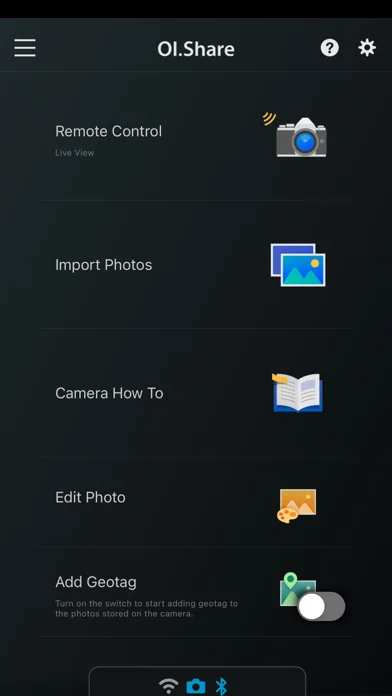
OM Image Share (OI.Share) is an app required for wirelessly importing photos captured on an OM Digital Solutions camera. In addition to importing photos, you can use your smartphone as a remote controller for remote shooting. This smartphone app makes photography more enjoyable than ever, and offers new ways to use your camera.
1. Easily Import Photos to Your Smartphone
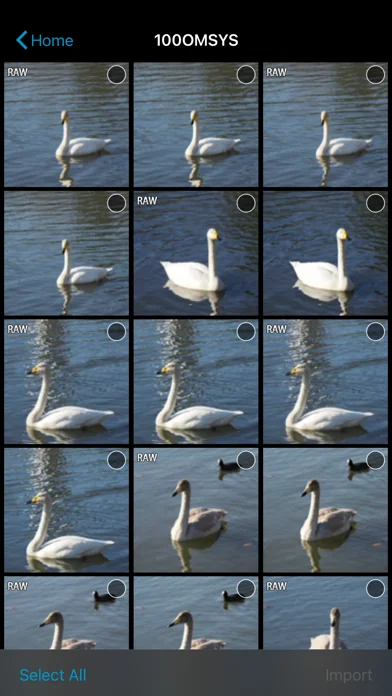
With OI.Share, you can view photos stored on the camera and import them to your smartphone. Simply select photos you want to share ahead of time on the camera (Share Order) to automatically import them when connected to your smartphone via Wi-Fi. With a Bluetooth and Wi-Fi ready camera, you can use OI.Share on its own to import photos for greater convenience.
2. Two Remote Shooting Modes
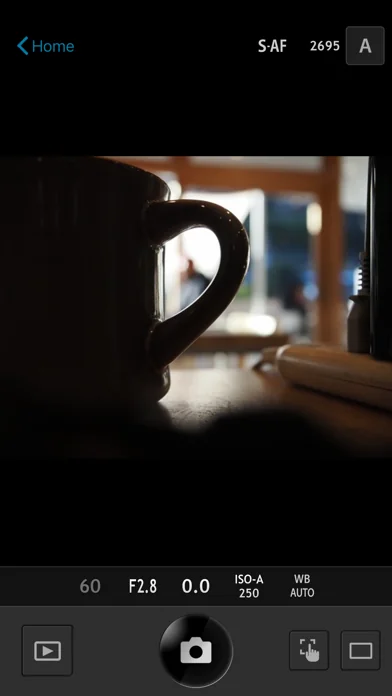
With remote shooting, you can view Live View images on your smartphone screen while executing shooting techniques in Live View, and in Remote Shutter, you can adjust shooting settings on the camera while using your smartphone to activate the shutter release.
3. Camera How To Offers Shooting Techniques with Tutorial Videos
Camera How To shows how to create beautiful bokeh, how to use Art Filter, and other shooting techniques in easy-to-understand videos. You can also view the camera manual.
* Supported on some models only.
4. Easy Connection
To connect your camera and smartphone, simply scan the QR code displayed on the camera LCD screen with OI.Share. That is all you need to do to complete setup.
* The camera whose QR code is scanned is registered to the app.
* To connect another camera, you must repeat the QR code is scanned step.
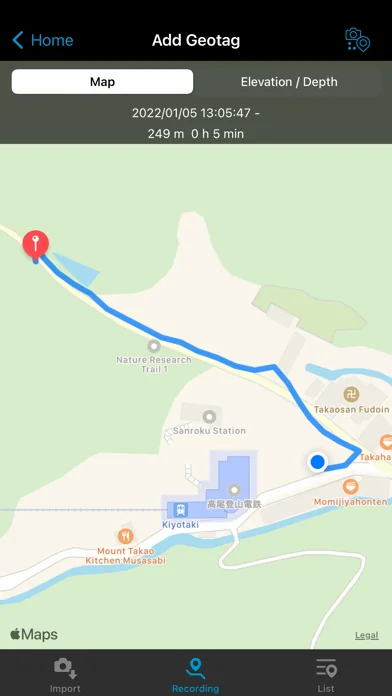
5. Display images and track data on your smartphone
During your journey, send your camera's track data by Wi-Fi to your smartphone and you will be able to check the progress that you have made on your journey thus far. Track data will be displayed together with images for easy identification.
* Display of movies and altitude/depth data is only possible when using compatible cameras. Compatible cameras: OM-D E-M1X, TG-6, TG-5, TG-Tracker
6. Organize track data and images on your smartphone
Manage your images and track data imported to your smartphone as single Activities. Relive the excitement of the moment and the feeling of accomplishment by viewing the track data together with your images.
7. Add location information
By simply transferring the GPS log recorded with a smartphone to the camera, location information can be added to photos captured with a compatible camera with built-in Wi-Fi.
When connected via Bluetooth, geotags are added during shooting.
* Supported on some models only.
8. Art Filter
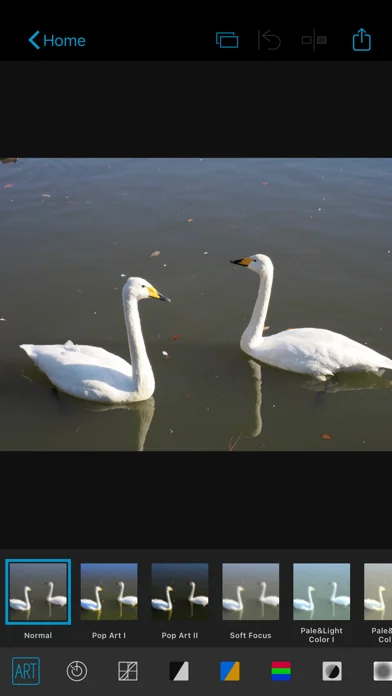
Select from 31 different filter options and 8 supplemental effects to expand your range of expression. Add Art Effects to your Art Filter photos for even more expressive imagery.
* Available Art Effects may differ depending on the Art Filter applied.
9. Colour Creator
With Color Creator, you can control the hue and color saturation for more dramatic photo finishes. Operate the Color Ring that appears on the screen to adjust the hues (30 levels) and saturation (8 levels) of the colors in your photo.
10. Highlight and Shadow Control
Highlight & Shadow Control lets you add variation to photos by controlling light and shadow sections of the image. Highlights, mid-range, and shadows can be individually adjusted using the tone curve that appears on the screen.
11. Dehaze and Clarity
You can use popular OM Workspace functions "Dehaze" and "Clarity" to easily enhance photo textures and give images a clearer finish.
* This app is not guaranteed to work on all Smartphone and tablet devices.
* Available functions will differ by camera.
* Wi-Fi is a registered trademark of the Wi-Fi Alliance.
* The Wi-Fi CERTIFIED Logo is a certification mark of the Wi-Fi Alliance.
* The Bluetooth® word mark and logos are registered trademarks owned by the Bluetooth SIG, Inc. and any use of such marks by OM Digital Solutions Corporation is under license.
1. Easily Import Photos to Your Smartphone
With OI.Share, you can view photos stored on the camera and import them to your smartphone. Simply select photos you want to share ahead of time on the camera (Share Order) to automatically import them when connected to your smartphone via Wi-Fi. With a Bluetooth and Wi-Fi ready camera, you can use OI.Share on its own to import photos for greater convenience.
2. Two Remote Shooting Modes
With remote shooting, you can view Live View images on your smartphone screen while executing shooting techniques in Live View, and in Remote Shutter, you can adjust shooting settings on the camera while using your smartphone to activate the shutter release.
3. Camera How To Offers Shooting Techniques with Tutorial Videos
Camera How To shows how to create beautiful bokeh, how to use Art Filter, and other shooting techniques in easy-to-understand videos. You can also view the camera manual.
* Supported on some models only.
4. Easy Connection
To connect your camera and smartphone, simply scan the QR code displayed on the camera LCD screen with OI.Share. That is all you need to do to complete setup.
* The camera whose QR code is scanned is registered to the app.
* To connect another camera, you must repeat the QR code is scanned step.
5. Display images and track data on your smartphone
During your journey, send your camera's track data by Wi-Fi to your smartphone and you will be able to check the progress that you have made on your journey thus far. Track data will be displayed together with images for easy identification.
* Display of movies and altitude/depth data is only possible when using compatible cameras. Compatible cameras: OM-D E-M1X, TG-6, TG-5, TG-Tracker
6. Organize track data and images on your smartphone
Manage your images and track data imported to your smartphone as single Activities. Relive the excitement of the moment and the feeling of accomplishment by viewing the track data together with your images.
7. Add location information
By simply transferring the GPS log recorded with a smartphone to the camera, location information can be added to photos captured with a compatible camera with built-in Wi-Fi.
When connected via Bluetooth, geotags are added during shooting.
* Supported on some models only.
8. Art Filter
Select from 31 different filter options and 8 supplemental effects to expand your range of expression. Add Art Effects to your Art Filter photos for even more expressive imagery.
* Available Art Effects may differ depending on the Art Filter applied.
9. Colour Creator
With Color Creator, you can control the hue and color saturation for more dramatic photo finishes. Operate the Color Ring that appears on the screen to adjust the hues (30 levels) and saturation (8 levels) of the colors in your photo.
10. Highlight and Shadow Control
Highlight & Shadow Control lets you add variation to photos by controlling light and shadow sections of the image. Highlights, mid-range, and shadows can be individually adjusted using the tone curve that appears on the screen.
11. Dehaze and Clarity
You can use popular OM Workspace functions "Dehaze" and "Clarity" to easily enhance photo textures and give images a clearer finish.
* This app is not guaranteed to work on all Smartphone and tablet devices.
* Available functions will differ by camera.
* Wi-Fi is a registered trademark of the Wi-Fi Alliance.
* The Wi-Fi CERTIFIED Logo is a certification mark of the Wi-Fi Alliance.
* The Bluetooth® word mark and logos are registered trademarks owned by the Bluetooth SIG, Inc. and any use of such marks by OM Digital Solutions Corporation is under license.
🆕 What's New · v1.4.2
The Privacy Policy has been revised.
Minor changes.
Minor changes.
Profile & Insights
Everything we know — and don't — about this app and its company.
Identification
- App name
- OM Image Share
- Developer
- OM Digital Solutions Corporation
- Bundle ID
- com.omdigitalsolutions.oishare
- App Store URL
- Open in App Store
- Category
- Photo & Video
- Content rating
- 4+
- Languages
- CS, NL, EN, FI, FR, DE, IT, JA, NB, PL, PT, RU, ZH, ES, SV, TH, ZH, TR
Company
- Website
- Not found
- Tagline
- Today
- Description
- Find apps and games for iPhone, iPad, Mac, and more on the App Store.
- Founded
- Not found
- HQ / Address
- Not found
- Employees
- Not found
- Logo
- OG image
Revenue
- Verified revenue / mo
- Not found
- AI revenue estimate / mo
- Not found
- AI annual estimate
- Not found
- ML model estimate / mo
- $680/mo
- Top-grossing rank
- Outside top 100 in US Photo & Video
- All-time revenue
- Not found
- Pricing
- Not found
Founder
- Name
- Not found
- X / Twitter
- Not found
- Not found
- GitHub
- Not found
- X followers
- Not found
- Public statements
- Not found
Funding
- Total raised
- Not found
- Last round
- Not found
- Investors
- Not found
- Crunchbase
- Not found
- AngelList
- Not found
Press & Links
- Articles found
- Not found
- Listed on
- Not found
- Blog
- https://apps.apple.com/us/app/letterloop-group-newsletters/id6468623700
- Press / News
- Not found
Contacts & Socials
- Socials
- Not found
- Not found
- Phone
- Not found
- Contact page
- Not found
- About page
- https://apps.apple.com/us/iphone/story/id1701453284
📈Ratings growth3,826 ratings+166% lifetimeShow 3-year history estimate ▾
Tracked (58 weeks) Pre-tracking estimate (35 weeks) · model-based, ±5% noise · anchored to release date and current value
🌍Geographic ReachNot ranked
This app is currently outside the top 100 grossing in all 9 countries we monitor (US, UK, DE, FR, JP, CA, AU, BR, IN). Niche or new apps often launch this way — popularity rankings appear once daily revenue clears the regional threshold.
Profile is built from iTunes Lookup + developer site scrape + ML revenue model. Empty fields show "Not found" — additional sources (Crunchbase, X, IndieHackers, Acquire.com) coming.
More Photo & Video
YouTube
★ 4.7 · 47,130,049 reviews
★ 4.7 · 29,023,044 reviews
Snapchat: Chatte mit Freunden
★ 4.5 · 5,772,278 reviews
Canva: KI-Foto- & Video-Editor
★ 4.9 · 3,343,015 reviews
Twitch: Live Streaming
★ 4.7 · 2,700,069 reviews
InShot - AI Video Editor
★ 4.8 · 2,426,316 reviews
PicCollage: KI Foto Collage
★ 4.8 · 1,808,632 reviews
FaceApp: Gesichtsbearbeitung
★ 4.7 · 1,750,154 reviews
Browse BU Analytics
📚 All 55,000+ Books
🜍 Alchemy & Hermeticism
🔮 Magic & Ritual
🌙 Witchcraft & Paganism
⭐ Astrology & Cosmology
🃏 Divination & Tarot
📜 Photo & Video
✡️ Kabbalah & Jewish Mysticism
🕉️ Mysticism & Contemplation
🕊️ Theosophy & Anthroposophy
🏛️ Freemasonry & Secret Societies
👻 Spiritualism & Afterlife
📖 Sacred Texts & Gnosticism
👁️ Supernatural & Occult Fiction
🧘 Spiritual Development
📚 Esoteric History & Biography
Info
About BU Analytics 