
34
BU Score
Emerging
ePrint
✍️ BU Analytics Review
“
ePrint is an iOS app from Microtech Corp. in the Utilities category, currently rated 2.1★ across 26 ratings. Initial signal reads as mixed reviews — supporters praise core features while critics cite stability/value gaps.
Our BU Score puts it at 34 — Emerging (early traction worth watching). For a Utilities app, that means early traction worth watching.
Track changes month-over-month in the Performance section below — live snapshot history and revenue forecast included.
creator
📊 Performance Tracking LIVE
Loading…
Rating
—
Reviews
—
Forecast Revenue / mo
—
Snapshots tracked
0
since first record
Range:
💰 Forecast Revenue / mo
MODELRevenue forecast computed from BU's 234 trigger model on each snapshot. Calibrated against ground-truth from 58 verified-revenue apps.
🔬Forecast Breakdown — Why This Estimate?Top 10 of 10 triggers
Our ML model uses 200+ signals from public data. These are the most influential for this app:
| Paid app ($0.00)METRIC | +$2,800 | |
| bugsREVIEW | −$1,800 | |
| 5 starREVIEW | +$1,800 | |
| excellent appREVIEW | +$1,500 | |
| Below-average rating (2.1★)METRIC | −$1,500 | |
| Mature app (17y old)METRIC | +$1,500 | |
| highly recommendREVIEW | +$1,400 | |
| slowREVIEW | −$1,200 | |
| Localized (7 languages)METRIC | +$600 | |
| Pre-traction phase (26 ratings)METRIC | −$300 |
METRIC = structural app data · REVIEW = mined from user reviews · ✓ VERIFIED = Stripe-verified anchor (TrustMRR)
📈 Reviews Growth
LIVECumulative review count from first BU snapshot. Each point = a tracked update.
⭐ Rating Trend
LIVEAverage rating evolution. Updates with each new review batch.
🗓️ Snapshot Timeline
HISTORYEach bar shows a tracked update and the metric delta from the previous snapshot.
App Specs
🔐 Own this app? Claim & verify MRR →💾 36 MB🔞 4+📱 iOS 12.0+🔖 v7.4🔄 updated 2y ago🌐 EN, FR, DE, IT, JA +2📂 Utilities💰 Paid🚀 Launched 2009 (17y old)
📝 About this app
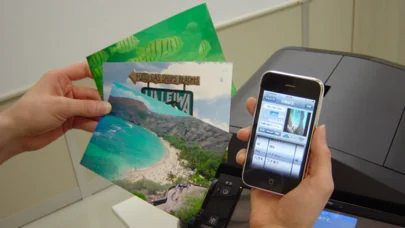
“ePrint” solves to print directory from iPad,iPhone or iPod touch.
*****
For ink-jet printer users:
Canon, brother, Samsung, Lexmark ink-jet printers are not available on ePrint.
*****
[The differences of ePrint and ePrint Free]
Paid Version Only:
- Web page printing. Also Downloaded Image or PDF file printing.
- Various print formats
- Print several pages
- Borderless or Border printing
- Supports shared printers by Mac (Regardless of Printer models)
Please test with “ePrint Free” at first, then get “ePrint”.
[HP ink-jet printer user]
when "Failed to get printer control command" message appears,
please set PDL to "PCL3GUI".
Also set "Port" is "Port9100", when register printer manually.
[Support Printers / PDL (Printer Description Language)]
ePrint works with the printers installing the following printer description language.
Please check each printer manufacture web site to confirm what printer description language your printer has.
Please check if ePrint supports your printer’s PDL before you purchase ePrint.
EPSON Inkjet Printer
- PDL: ESC/P-R (except for ESC/P raster)
EPSON Page Printer
- PDL: ESC/Page,ESC/Page-Color,ESC/Page-S(Color only)
HP Inkjet Printer
- PDL: PCL3GUI
HP Page Printer
- PDL: PCL (Except for HostBase model)
Canon Page Printer
- PDL: LOPS (Except for CAPT)
Canon, brother, Samsung, Lexmark or other manufacture’s Page Printer
ePrint works if the printer supports the following PDL.
- PCL
- PostScript
Canon, brother, Samsung, Lexmark or other manufacture’s Inkjet Printer
- NONE. (ePrint DONOT work.)
Shared printer by Mac
ePrint supports shared printer by Mac. It isn’t depends on Printer manufactures (PDL).
[Requirements]
Wi-Fi
Printer is connected on the network and printed through TCP/IP (LPR).
Printer should be available for SNMP.
Meet support printers conditions.
[New Features]
- Add Camera/ Web/ Server function limitation.
- Add e-mail attached file printing. (only for iPad)
Hold down an attached file icon on the Mail application.
- Support to call other application form the files on the server. (only for iPad)
- Support ESC/Page-S printing system (Epson page printer)
[Outline]
If you have “ePrint” and required printers, you don’t need PC anymore.
You can print various contents such as contacts, photos, notes, Web pages or PDF files contacts in your iPad,iPhone or iPod touch as you like.
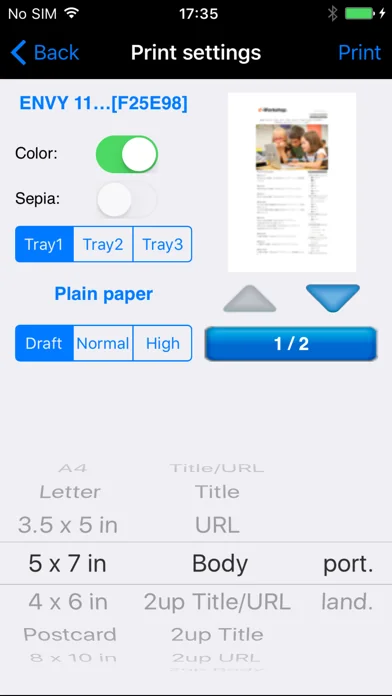
“ePrint” has a lot of print settings; paper size, color etc.
[Features]
1. Web page printing
- “ePrint” arranges linked PDF or image files before printing.
- You can save linked PDF or image files
- You can also specify print pages
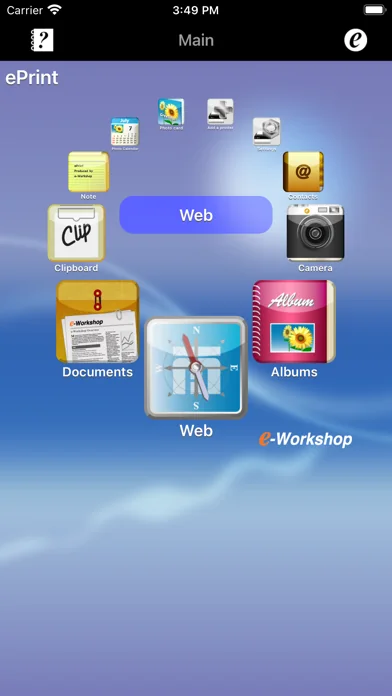
2. Camera (24 formats) (Borderless printing support)
- Date stamp or time stamp function
3. Contacts (3 formats)
4. Albums. (24 formats) (Borderless printing support)
5. Note. (6 formats)
6. Photo calendar (5 formats)
7. Photo card (13 formats)
8. Clipboard
9. Add a printer. (Bonjour search / Enter IP address)
10. Print Settings
Color
Duplex (Limited printer models)
Sepia
Paper size
Orientation
Media type
Print image preview
11. Support direct printing for the Printer connected AirMac with USB
12. Support Printing for the shared printer by Mac
13. Display consumable information (Limited printer models)
Produced by e-Workshop
*****
For ink-jet printer users:
Canon, brother, Samsung, Lexmark ink-jet printers are not available on ePrint.
*****
[The differences of ePrint and ePrint Free]
Paid Version Only:
- Web page printing. Also Downloaded Image or PDF file printing.
- Various print formats
- Print several pages
- Borderless or Border printing
- Supports shared printers by Mac (Regardless of Printer models)
Please test with “ePrint Free” at first, then get “ePrint”.
[HP ink-jet printer user]
when "Failed to get printer control command" message appears,
please set PDL to "PCL3GUI".
Also set "Port" is "Port9100", when register printer manually.
[Support Printers / PDL (Printer Description Language)]
ePrint works with the printers installing the following printer description language.
Please check each printer manufacture web site to confirm what printer description language your printer has.
Please check if ePrint supports your printer’s PDL before you purchase ePrint.
EPSON Inkjet Printer
- PDL: ESC/P-R (except for ESC/P raster)
EPSON Page Printer
- PDL: ESC/Page,ESC/Page-Color,ESC/Page-S(Color only)
HP Inkjet Printer
- PDL: PCL3GUI
HP Page Printer
- PDL: PCL (Except for HostBase model)
Canon Page Printer
- PDL: LOPS (Except for CAPT)
Canon, brother, Samsung, Lexmark or other manufacture’s Page Printer
ePrint works if the printer supports the following PDL.
- PCL
- PostScript
Canon, brother, Samsung, Lexmark or other manufacture’s Inkjet Printer
- NONE. (ePrint DONOT work.)
Shared printer by Mac
ePrint supports shared printer by Mac. It isn’t depends on Printer manufactures (PDL).
[Requirements]
Wi-Fi
Printer is connected on the network and printed through TCP/IP (LPR).
Printer should be available for SNMP.
Meet support printers conditions.
[New Features]
- Add Camera/ Web/ Server function limitation.
- Add e-mail attached file printing. (only for iPad)
Hold down an attached file icon on the Mail application.
- Support to call other application form the files on the server. (only for iPad)
- Support ESC/Page-S printing system (Epson page printer)
[Outline]
If you have “ePrint” and required printers, you don’t need PC anymore.
You can print various contents such as contacts, photos, notes, Web pages or PDF files contacts in your iPad,iPhone or iPod touch as you like.
“ePrint” has a lot of print settings; paper size, color etc.
[Features]
1. Web page printing
- “ePrint” arranges linked PDF or image files before printing.
- You can save linked PDF or image files
- You can also specify print pages
2. Camera (24 formats) (Borderless printing support)
- Date stamp or time stamp function
3. Contacts (3 formats)
4. Albums. (24 formats) (Borderless printing support)
5. Note. (6 formats)
6. Photo calendar (5 formats)
7. Photo card (13 formats)
8. Clipboard
9. Add a printer. (Bonjour search / Enter IP address)
10. Print Settings
Color
Duplex (Limited printer models)
Sepia
Paper size
Orientation
Media type
Print image preview
11. Support direct printing for the Printer connected AirMac with USB
12. Support Printing for the shared printer by Mac
13. Display consumable information (Limited printer models)
Produced by e-Workshop
🆕 What's New · v7.4
Fixed minor bugs.
Profile & Insights
Everything we know — and don't — about this app and its company.
Identification
- App name
- ePrint
- Developer
- Microtech Corp.
- Bundle ID
- jp.co.microtech.ePrint
- App Store URL
- Open in App Store
- Category
- Utilities
- Content rating
- 4+
- Languages
- EN, FR, DE, IT, JA, PT, ES
Company
- Website
- www.e-workshop-dev.com
- Tagline
- Not found
- Description
- Not found
- Founded
- Not found
- HQ / Address
- Not found
- Employees
- Not found
- Logo
- Not found
Revenue
- Verified revenue / mo
- Not found
- AI revenue estimate / mo
- Not found
- AI annual estimate
- Not found
- ML model estimate / mo
- $9.9K/mo
- Top-grossing rank
- Outside top 100 in US Utilities
- All-time revenue
- Not found
- Pricing
- Not found
Founder
- Name
- Not found
- X / Twitter
- Not found
- Not found
- GitHub
- Not found
- X followers
- Not found
- Public statements
- Not found
Funding
- Total raised
- Not found
- Last round
- Not found
- Investors
- Not found
- Crunchbase
- Not found
- AngelList
- Not found
Press & Links
- Articles found
- Not found
- Listed on
- Not found
- Blog
- Not found
- Press / News
- Not found
Contacts & Socials
- Socials
- Not found
- Not found
- Phone
- Not found
- Contact page
- Not found
- About page
- Not found
📈Ratings growth26 ratings+-89% lifetimeShow 3-year history estimate ▾
Tracked (58 weeks) Pre-tracking estimate (37 weeks) · model-based, ±5% noise · anchored to release date and current value
🌍Geographic ReachNot ranked
This app is currently outside the top 100 grossing in all 9 countries we monitor (US, UK, DE, FR, JP, CA, AU, BR, IN). Niche or new apps often launch this way — popularity rankings appear once daily revenue clears the regional threshold.
Profile is built from iTunes Lookup + developer site scrape + ML revenue model. Empty fields show "Not found" — additional sources (Crunchbase, X, IndieHackers, Acquire.com) coming.
More by Microtech Corp.
View all →More Utilities
My Verizon
★ 4.7 · 5,489,023 reviews
★ 4.7 · 4,551,928 reviews
myAT&T
★ 4.0 · 4,058,820 reviews
Google Chrome
★ 4.7 · 3,469,796 reviews
My Spectrum
★ 4.8 · 3,292,507 reviews
DuckDuckGo, Duck.ai (optional)
★ 4.8 · 2,325,859 reviews
Rechner₊
★ 4.7 · 1,717,164 reviews
QR Code Reader ϟ
★ 4.7 · 1,413,130 reviews
Browse BU Analytics
📚 All 55,000+ Books
🜍 Alchemy & Hermeticism
🔮 Magic & Ritual
🌙 Witchcraft & Paganism
⭐ Astrology & Cosmology
🃏 Divination & Tarot
📜 Utilities
✡️ Kabbalah & Jewish Mysticism
🕉️ Mysticism & Contemplation
🕊️ Theosophy & Anthroposophy
🏛️ Freemasonry & Secret Societies
👻 Spiritualism & Afterlife
📖 Sacred Texts & Gnosticism
👁️ Supernatural & Occult Fiction
🧘 Spiritual Development
📚 Esoteric History & Biography
Info
About BU Analytics