
50
BU Score
Solid
SkyText
✍️ bumetric analysis
“
SkyText is an iOS app from Heynow Software in the Social Networking category, currently rated 5.0★ across 1 ratings. Initial signal reads as mixed reviews: supporters praise core features while critics cite stability and value gaps.
Our BU Score puts it at 50: Solid (established niche player). For a Social Networking app, that means established niche player.
Track changes month-over-month in the Performance section below: live snapshot history and revenue forecast included.
📊 Performance Tracking LIVE
Loading…
Rating
—
Reviews
—
Forecast Revenue / mo
—
Snapshots tracked
0
since first record
Range:
💰 Forecast Revenue / mo
MODELRevenue forecast computed from BU's 234 trigger model on each snapshot. Calibrated against ground-truth from 58 verified-revenue apps.
🔬Forecast Breakdown — Why This Estimate?Top 5 of 5 triggers
Our ML model uses 200+ signals from public data. These are the most influential for this app:
| Paid app ($0.00)METRIC | +$2,800 | |
| Excellent rating (5.0★)METRIC | +$2,200 | |
| Mature app (17y old)METRIC | +$1,500 | |
| Single-language (English only)METRIC | −$400 | |
| Pre-traction phase (1 ratings)METRIC | −$300 |
METRIC = structural app data · REVIEW = mined from user reviews · ✓ VERIFIED = Stripe-verified anchor (TrustMRR)
📈 Reviews Growth
LIVECumulative review count from first BU snapshot. Each point = a tracked update.
⭐ Rating Trend
LIVEAverage rating evolution. Updates with each new review batch.
🗓️ Snapshot Timeline
HISTORYEach bar shows a tracked update and the metric delta from the previous snapshot.
App Specs
🔐 Own this app? Claim & verify MRR →💾 12 MB🔞 4+📱 iOS 12.4+🔖 v2.0.0🔄 updated 1y ago🌐 EN📂 Social Networking💰 Paid🚀 Launched 2009 (17y old)
📝 About this app
SkyText is the premier text-scrolling application for the iPhone and iPod Touch from Heynow Software.
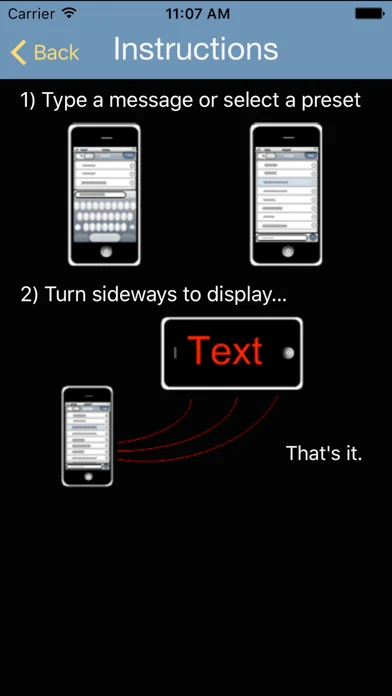
SkyText allows you to type messages on your touch device and display them instantly as scrolling text on its screen. In real time. All from one screen.
Here's how it works:
1. Hold your iPhone/iPod Touch in portrait orientation and type text on the keyboard, just like text messaging.
2. Raise your hand (the one holding the device) and face the screen toward the person that you want to display the message to, in landscape orientation. SkyText uses the accelerometer to sense the change in orientation and automatically scrolls the message.
That's it. Quick and easy. The way it should be.
When would you use SkyText?
• In a loud, crowded bar
• A hottie is looking at you from a distance and you want to break the ice
• You've become thirsty
• Your buddy is a the end of the bar, and you just need to taunt him
• At a concert
• On the golf course
• At the airport
• At a sporting event
• In the parking lot, picking up your kids after a concert
• At the beach
• In the library
• At the race track
• While hunting or fishing
• Six of you are going skiing, 3 people each in 2 cars. Cell reception is spotty, you need to communicate and don't want to "scream & freeze"
• You're a sound engineer and you need to tell the guitar player to turn down
• You're in church and need to discreetly tell the reverend that his fly is unzipped
• Anywhere you need to communicate with somebody and:
• They are unable to hear you
• You need to get their attention
• You can't get to them
• You can't make a sound but want to get a message across
When would *you* use SkyText?
And, in case you're wondering:
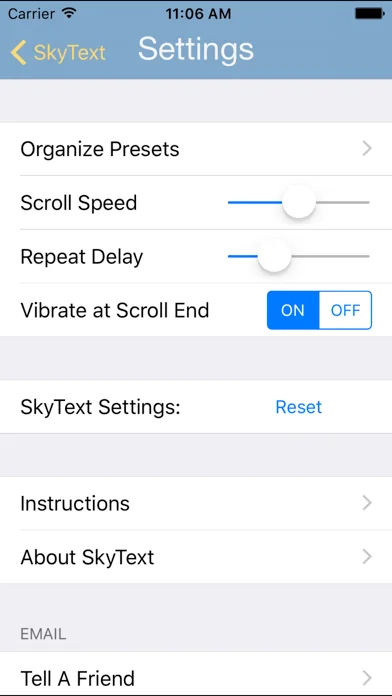
√ Yes, after the message ends there's a brief delay, you get a single vibration, and the message scrolls again.
√ Yes, when you bring your hand back down, SkyText has cleared the text-entry box and the cursor is blinking, ready for you to type your next message.
√ Yes, if you want re-display the last message, it's still available on the screen. Just tap on it to display it again.
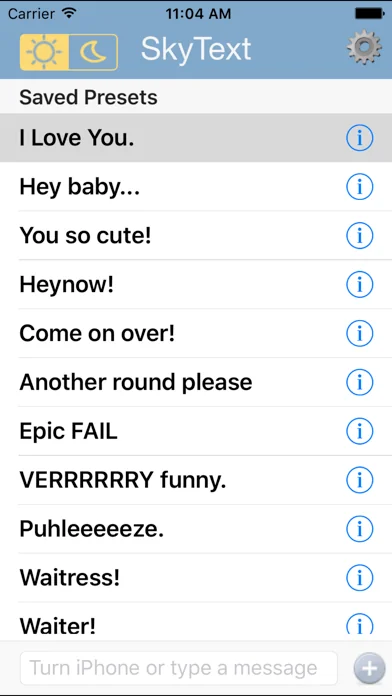
√ Yes, you can store messages as preset messages and quickly select them for display with one tap.
√ Yes, you can also edit a preset message quickly and display it, with or without saving the edits to the preset itself!
√ Yes, you can quickly go between hand-typing and preset messages on the same screen.
√ Yes, there are two font/background color combinations for day and night display, quickly accessible on the screen.
√ Yes, we know some people are left-handed. SkyText scrolls the text properly regardless of which way you turn it into landscape. You can even flip your phone upside down once it's scrolling, and watch the fun.
We put a lot of time and effort into SkyText because, frankly, you shouldn't have to.
We're Heynow.
SkyText allows you to type messages on your touch device and display them instantly as scrolling text on its screen. In real time. All from one screen.
Here's how it works:
1. Hold your iPhone/iPod Touch in portrait orientation and type text on the keyboard, just like text messaging.
2. Raise your hand (the one holding the device) and face the screen toward the person that you want to display the message to, in landscape orientation. SkyText uses the accelerometer to sense the change in orientation and automatically scrolls the message.
That's it. Quick and easy. The way it should be.
When would you use SkyText?
• In a loud, crowded bar
• A hottie is looking at you from a distance and you want to break the ice
• You've become thirsty
• Your buddy is a the end of the bar, and you just need to taunt him
• At a concert
• On the golf course
• At the airport
• At a sporting event
• In the parking lot, picking up your kids after a concert
• At the beach
• In the library
• At the race track
• While hunting or fishing
• Six of you are going skiing, 3 people each in 2 cars. Cell reception is spotty, you need to communicate and don't want to "scream & freeze"
• You're a sound engineer and you need to tell the guitar player to turn down
• You're in church and need to discreetly tell the reverend that his fly is unzipped
• Anywhere you need to communicate with somebody and:
• They are unable to hear you
• You need to get their attention
• You can't get to them
• You can't make a sound but want to get a message across
When would *you* use SkyText?
And, in case you're wondering:
√ Yes, after the message ends there's a brief delay, you get a single vibration, and the message scrolls again.
√ Yes, when you bring your hand back down, SkyText has cleared the text-entry box and the cursor is blinking, ready for you to type your next message.
√ Yes, if you want re-display the last message, it's still available on the screen. Just tap on it to display it again.
√ Yes, you can store messages as preset messages and quickly select them for display with one tap.
√ Yes, you can also edit a preset message quickly and display it, with or without saving the edits to the preset itself!
√ Yes, you can quickly go between hand-typing and preset messages on the same screen.
√ Yes, there are two font/background color combinations for day and night display, quickly accessible on the screen.
√ Yes, we know some people are left-handed. SkyText scrolls the text properly regardless of which way you turn it into landscape. You can even flip your phone upside down once it's scrolling, and watch the fun.
We put a lot of time and effort into SkyText because, frankly, you shouldn't have to.
We're Heynow.
🆕 What's New · v2.0.0
UI refresh. Same great features.
Profile & Insights
Everything we know — and don't — about this app and its company.
Identification
- App name
- SkyText
- Developer
- Heynow Software
- Bundle ID
- com.heynow.SkyText
- App Store URL
- Open in App Store
- Category
- Social Networking
- Content rating
- 4+
- Languages
- EN
Company
- Website
- heynow.com
- Tagline
- Not found
- Description
- Heynow Software -- we develop iPhone and Mac OS X apps
- Founded
- Not found
- HQ / Address
- Not found
- Employees
- Not found
- Logo
- Not found
Revenue
- Verified revenue / mo
- Not found
- AI revenue estimate / mo
- Not found
- AI annual estimate
- Not found
- ML model estimate / mo
- $746/mo
- Top-grossing rank
- Outside top 100 in US Social Networking
- All-time revenue
- Not found
- Pricing
- Not found
Founder
- Name
- Not found
- X / Twitter
- Not found
- Not found
- GitHub
- Not found
- X followers
- Not found
- Public statements
- Not found
Funding
- Total raised
- Not found
- Last round
- Not found
- Investors
- Not found
- Crunchbase
- Not found
- AngelList
- Not found
Press & Links
- Articles found
- Not found
- Listed on
- Not found
- Blog
- https://heynow.com/news.html
- Press / News
- Not found
Contacts & Socials
- Socials
- Not found
- Not found
- Phone
- Not found
- Contact page
- https://heynow.com/contact.html
- About page
- Not found
⭐Recent App Store Reviews14 latest · avg 4.36★ · 78.6% 5★ · 14.3% 1★
5★11 (79%)
4★1 (7%)
3★0 (0%)
2★0 (0%)
1★2 (14%)
+0 ratings/week
Praise: great ×6 love ×2 perfect ×2 awesome ×2 best ×1Complaints: crash ×2
Top positive
★★★★★ Great Idea - Very Useful App !
I tried Sky Text mostly just to see how it worked. It is a very cool application and works great. What I did not expect, however, was to end up using it so much. In less than a week of having it installed on my iPhone, I've actually fo…
★★★★★ This is super cool!
I love this app! It is really easy to use - I love the way it just takes a flick of the wrist! Ok - maybe it is a twist of the hand - but it works! And it is fun to keep track of what you are saying - I text a bunch and this follows a forma…
Top negative
★☆☆☆☆ Great idea, if it worked!!!!
What a waste of $2 , the app constantly crashes and the presets do not save upon exit!! Dont waste your money!!!! GArbage!…
★☆☆☆☆ Stupid
This app is so stupid! There is a much better app called name in lights that's easier to use and looks cooler. Go get that and don't waste your time with this crap.…
📈Ratings growth1 ratings+-50% lifetimeShow 3-year history estimate ▾
Tracked (14 weeks) Pre-tracking estimate (37 weeks) · model-based, ±5% noise · anchored to release date and current value
🌍Geographic ReachNot ranked
This app is currently outside the top 100 grossing in all 9 countries we monitor (US, UK, DE, FR, JP, CA, AU, BR, IN). Niche or new apps often launch this way — popularity rankings appear once daily revenue clears the regional threshold.
Profile is built from iTunes Lookup + developer site scrape + ML revenue model. Empty fields show "Not found" — additional sources (Crunchbase, X, IndieHackers, Acquire.com) coming.
Full revenue analysis
Read the article-style breakdown for SkyText: category rank, percentile, growth signal, comparable apps, and how the forecast is calibrated against verified-MRR anchors in this niche.
