13
BU Score
Niche
FingerCAD
✍️ bumetric analysis
“
FingerCAD is an iOS app from Gianluca Natalini in the Productivity category, currently rated 1.0★ across 4 ratings. Initial signal reads as mostly critical sentiment so far: users flag rough edges and unmet expectations.
Our BU Score puts it at 13: Niche (micro-niche or pre-traction stage). For a Productivity app, that means micro-niche or pre-traction stage.
Track changes month-over-month in the Performance section below: live snapshot history and revenue forecast included.
📊 Performance Tracking LIVE
Loading…
Rating
—
Reviews
—
Forecast Revenue / mo
—
Snapshots tracked
0
since first record
Range:
💰 Forecast Revenue / mo
MODELRevenue forecast computed from BU's 234 trigger model on each snapshot. Calibrated against ground-truth from 58 verified-revenue apps.
🔬Forecast Breakdown — Why This Estimate?Top 5 of 5 triggers
Our ML model uses 200+ signals from public data. These are the most influential for this app:
| Paid app ($0.00)METRIC | +$2,800 | |
| Below-average rating (1.0★)METRIC | −$1,500 | |
| Mature app (16y old)METRIC | +$1,500 | |
| Single-language (English only)METRIC | −$400 | |
| Pre-traction phase (4 ratings)METRIC | −$300 |
METRIC = structural app data · REVIEW = mined from user reviews · ✓ VERIFIED = Stripe-verified anchor (TrustMRR)
📈 Reviews Growth
LIVECumulative review count from first BU snapshot. Each point = a tracked update.
⭐ Rating Trend
LIVEAverage rating evolution. Updates with each new review batch.
🗓️ Snapshot Timeline
HISTORYEach bar shows a tracked update and the metric delta from the previous snapshot.
App Specs
🔐 Own this app? Claim & verify MRR →💾 4 MB🔞 4+📱 iOS 16.0+🔖 v4.0🔄 updated 3y ago🌐 EN📂 Productivity💰 Paid🚀 Launched 2010 (16y old)
📝 About this app
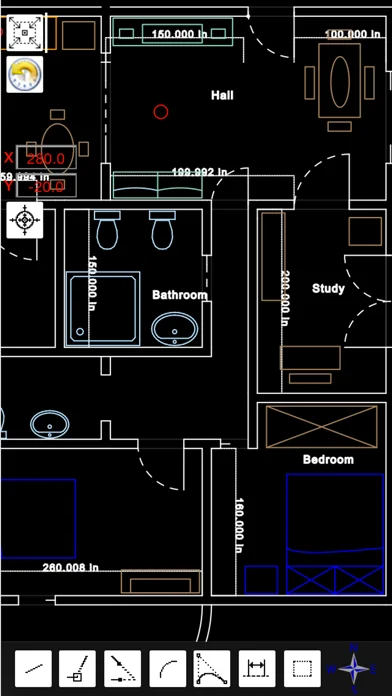
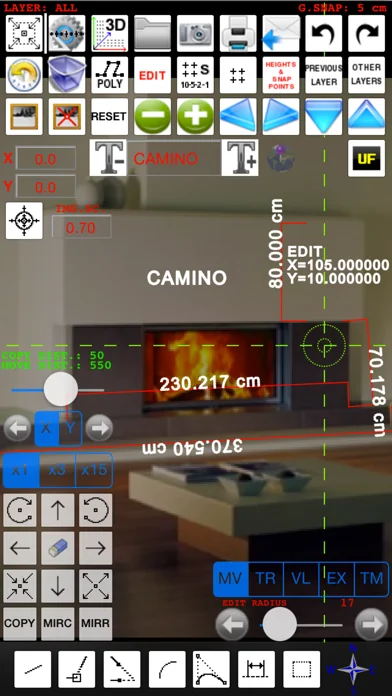
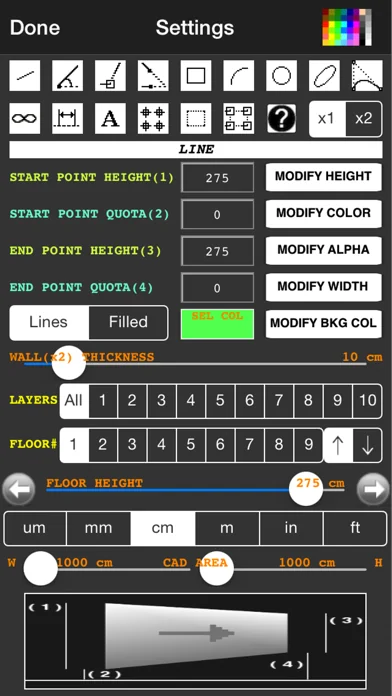
"FingerCAD" is the first CAD application for technical drawing with fingers assisted by computer for portable devices. With "FingerCAD" you can draw houses, bridges, planimetry of apartments, mechanical components, geometrical figures, everything that can be designed with a common PC CAD. Useful for the engineers on construction site, for architects, surveyors, designers, students etc.. The design possibilities with "FingerCAD" are endless and all this using only your portable device, during a travel or comfortably seated or standing at work. The ease of use makes it very useful and versatile. The final design can be saved using standard formats (ex. DXF) and can be sent via e-mail or printed. The zoom and pan, the customization of the drawing, the common cad tools, autosaving and the ability to continue operations even in subsequent sessions of use (at boot "FingerCAD" will load automatically the design saved in the previous session of use), possibility to add measurements and free text makes it truly unique. Each CAD object is treated as a separate object; You can then go back in time by removing the objects from last to first (also in next sessions of work), select and remove the undesired parts / incorrect objects. The "automatic acquisition of nearest vertices" facilitates the drawing of adjacent graphics objects and the function "2x" allows you to draw walls (double line) automatically (you can specify the thickness of the wall as desired). The three RGB components, alpha transparency, the freehand drawing, the ability to fill an object with colors, the color palette, the color picker, in addition to the common functions of a CAD give you the ability to add manual graphical effects at the overall design (also using freehand drawing).
MODIFY, COPY AND MOVE for CAD objects (also from one layer to another one).
AUTOMATIC CALCULATION OF THE MEASUREMENT OF THE AREA OF A GENERIC POLYGONAL 3D SURFACE.
Virtual Reality Exploration: you can walk in the 3D model and observe it using first person view (Finger3D + FingerCAD).
HIGH PRECISION OF DRAWING: using the “under finger dynamic drawing preview “ you can see exactly where for example the initial / final point of a line will be placed (observing the preview window that shows the area of drawing not visible under the finger).
AUTO-PAN for work area: if you reach the border of the screen, FingerCAD shifts automatically the work area so you can continue to draw longest lines - you have not to use the "zoom out" to draw long lines.
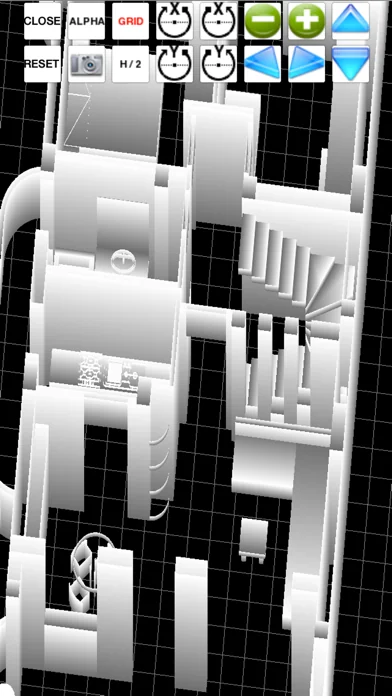
.OBJ 2D and 3D export routine: export the CAD design for 3D modeling softwares such as Finger3D, Blender, Maya 3D, etc... or print it using 3D printers
DXF export/import for AutoCad, qCad, SolidWorks, LibreCAD, ...
PDF export.
File formats conversions:
- from DXF to OBJ
- from DXF to PDF
- from DXF to IMAGE (JPG,PNG)
3D models can be displayed directly using the "FingerCAD 3D VIEWER".
DROPBOX / iCloud Drive file sharing (IN and OUT)
Ability to import DXF files from a WEB LINK and/or from an EMAIL ATTACHMENT.
Ability to PRINT the design (using AirPrint).
Other features:
- CAD (computer assisted design)
- Walls with adjustable thickness
- Snap to control points
- Free text
- UNDO/REDO for the graphics objects, from last to first
- Selection and ability to transform/move/delete selected objects
- Autosave
- Grid
- Snap to grid
- Adjustable grid
- Labels indicating the finger position on the cad area
- Many selectable unit of measurement
- Design multi-layer and multi-floor
- The selected objects can be moved or copied from one layer to another layer or from a floor to another floor
- Preview of other layers in the current layer
- Scale and rotate
- Extend
- Trim
- Mirror
- Send with an email the generated .dxf, .obj, .pdf files
- Ability to share .dxf, .obj, .pdf with other installed apps
- DXF part library (architecture, communication, electrical, electronics, mechanical, misc, processing, templates, zipf_libs)
MODIFY, COPY AND MOVE for CAD objects (also from one layer to another one).
AUTOMATIC CALCULATION OF THE MEASUREMENT OF THE AREA OF A GENERIC POLYGONAL 3D SURFACE.
Virtual Reality Exploration: you can walk in the 3D model and observe it using first person view (Finger3D + FingerCAD).
HIGH PRECISION OF DRAWING: using the “under finger dynamic drawing preview “ you can see exactly where for example the initial / final point of a line will be placed (observing the preview window that shows the area of drawing not visible under the finger).
AUTO-PAN for work area: if you reach the border of the screen, FingerCAD shifts automatically the work area so you can continue to draw longest lines - you have not to use the "zoom out" to draw long lines.
.OBJ 2D and 3D export routine: export the CAD design for 3D modeling softwares such as Finger3D, Blender, Maya 3D, etc... or print it using 3D printers
DXF export/import for AutoCad, qCad, SolidWorks, LibreCAD, ...
PDF export.
File formats conversions:
- from DXF to OBJ
- from DXF to PDF
- from DXF to IMAGE (JPG,PNG)
3D models can be displayed directly using the "FingerCAD 3D VIEWER".
DROPBOX / iCloud Drive file sharing (IN and OUT)
Ability to import DXF files from a WEB LINK and/or from an EMAIL ATTACHMENT.
Ability to PRINT the design (using AirPrint).
Other features:
- CAD (computer assisted design)
- Walls with adjustable thickness
- Snap to control points
- Free text
- UNDO/REDO for the graphics objects, from last to first
- Selection and ability to transform/move/delete selected objects
- Autosave
- Grid
- Snap to grid
- Adjustable grid
- Labels indicating the finger position on the cad area
- Many selectable unit of measurement
- Design multi-layer and multi-floor
- The selected objects can be moved or copied from one layer to another layer or from a floor to another floor
- Preview of other layers in the current layer
- Scale and rotate
- Extend
- Trim
- Mirror
- Send with an email the generated .dxf, .obj, .pdf files
- Ability to share .dxf, .obj, .pdf with other installed apps
- DXF part library (architecture, communication, electrical, electronics, mechanical, misc, processing, templates, zipf_libs)
🆕 What's New · v4.0
New development/support team:
- the FingerCAD project restarts with this new version optimized for the new iOS and for all compatible iPhone models
- created new support on Facebook (with development team) for end users (new Facebook page: “Gianluca Natalini”):
> any of your requests (by email or on Messenger) will be implemented and added to FingerCAD as soon as possible with a free update
> replies to your messages (in 24 hours), to your questions, clarifications, help…
App improvements:
Improved drawing and user experience in this version of FingreCAD, on every type of iPhone:
- more workspace area now also on iPhone
- app interfaces redesigned and optimized for each screen/resolution, so you can use every available pixel of your iPhone screen
- revised all the source code and optimized for the new iOS
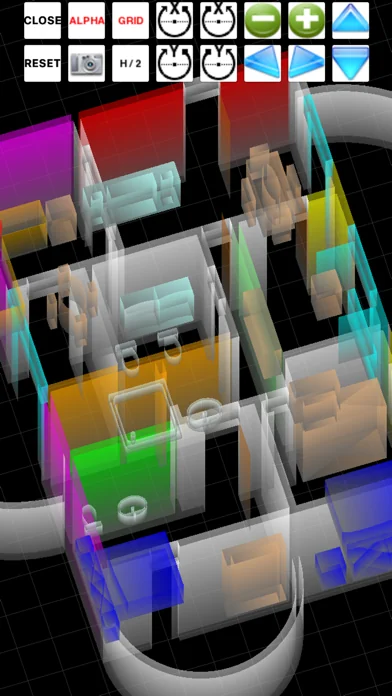
- improved the FingerCAD "COLOR 3D VIEWER": best 3D visualizer and colored 3D models using the colors assigned to the drawn CAD objects
- best routines to measure the area of a generic polygonal 3D surface
- improved app performances
- added the ability to insert generic polygonal filled surfaces
- best VRE (Virtual Reality Exploration) using Finger3D together with FingerCAD: you can walk in the 3D model and observe it using first person view:
> see it in action "FingerCAD HD and Finger3D HD VRE mode demo" on YouTube: https://youtu.be/S4G43AckKuc
- minor bugs fixed for new iOS
App documentation:
- New documentation (soon also available on Amazon) and video tutorials now available at URL: http://www.ngcybit.it/iTunesApp/fingercad/quick-user-guide.html
- the FingerCAD project restarts with this new version optimized for the new iOS and for all compatible iPhone models
- created new support on Facebook (with development team) for end users (new Facebook page: “Gianluca Natalini”):
> any of your requests (by email or on Messenger) will be implemented and added to FingerCAD as soon as possible with a free update
> replies to your messages (in 24 hours), to your questions, clarifications, help…
App improvements:
Improved drawing and user experience in this version of FingreCAD, on every type of iPhone:
- more workspace area now also on iPhone
- app interfaces redesigned and optimized for each screen/resolution, so you can use every available pixel of your iPhone screen
- revised all the source code and optimized for the new iOS
- improved the FingerCAD "COLOR 3D VIEWER": best 3D visualizer and colored 3D models using the colors assigned to the drawn CAD objects
- best routines to measure the area of a generic polygonal 3D surface
- improved app performances
- added the ability to insert generic polygonal filled surfaces
- best VRE (Virtual Reality Exploration) using Finger3D together with FingerCAD: you can walk in the 3D model and observe it using first person view:
> see it in action "FingerCAD HD and Finger3D HD VRE mode demo" on YouTube: https://youtu.be/S4G43AckKuc
- minor bugs fixed for new iOS
App documentation:
- New documentation (soon also available on Amazon) and video tutorials now available at URL: http://www.ngcybit.it/iTunesApp/fingercad/quick-user-guide.html
Profile & Insights
Everything we know — and don't — about this app and its company.
Identification
- App name
- FingerCAD
- Developer
- Gianluca Natalini
- Bundle ID
- com.GianlucaNataliniNGCYBIT.FingerCAD
- App Store URL
- Open in App Store
- Category
- Productivity
- Content rating
- 4+
- Languages
- EN
Company
- Website
- www.ngcybit.it
- Tagline
- NGCYBIT Robotics
- Description
- NGCYBIT - Gianluca Natalini FREE apps, books and music
- Founded
- Not found
- HQ / Address
- Not found
- Employees
- Not found
- Logo
- Not found
Revenue
- Verified revenue / mo
- Not found
- AI revenue estimate / mo
- Not found
- AI annual estimate
- Not found
- ML model estimate / mo
- $86/mo
- Top-grossing rank
- Outside top 100 in US Productivity
- All-time revenue
- Not found
- Pricing
- Not found
Founder
- Name
- Not found
- X / Twitter
- https://twitter.com/GianlucaNat
- http://it.linkedin.com/in/gianlucanatalini
- GitHub
- Not found
- X followers
- Not found
- Public statements
- Not found
Funding
- Total raised
- Not found
- Last round
- Not found
- Investors
- Not found
- Crunchbase
- Not found
- AngelList
- Not found
Press & Links
- Articles found
- Not found
- Listed on
- Not found
- Blog
- Not found
- Press / News
- Not found
Contacts & Socials
📈Ratings growth4 ratings+300% lifetimeShow 3-year history estimate ▾
Tracked (20 weeks) Pre-tracking estimate (37 weeks) · model-based, ±5% noise · anchored to release date and current value
🌍Geographic ReachNot ranked
This app is currently outside the top 100 grossing in all 9 countries we monitor (US, UK, DE, FR, JP, CA, AU, BR, IN). Niche or new apps often launch this way — popularity rankings appear once daily revenue clears the regional threshold.
Profile is built from iTunes Lookup + developer site scrape + ML revenue model. Empty fields show "Not found" — additional sources (Crunchbase, X, IndieHackers, Acquire.com) coming.
More by Gianluca Natalini
View all →Full revenue analysis
Read the article-style breakdown for FingerCAD: category rank, percentile, growth signal, comparable apps, and how the forecast is calibrated against verified-MRR anchors in this niche.