47
BU Score
Emerging
Brother iPrint&Scan
✍️ BU Analytics Review
“
Brother iPrint&Scan is an iOS app from Brother Industries, LTD. in the Utilities category, currently rated 2.6★ across 2,035 ratings. Initial signal reads as mostly critical sentiment so far — users flag rough edges and unmet expectations.
Our BU Score puts it at 47 — Emerging (early traction worth watching). For a Utilities app, that means early traction worth watching.
Track changes month-over-month in the Performance section below — live snapshot history and revenue forecast included.
creator
📊 Performance Tracking LIVE
Loading…
Rating
—
Reviews
—
Forecast Revenue / mo
—
Snapshots tracked
0
since first record
Range:
💰 Forecast Revenue / mo
MODELRevenue forecast computed from BU's 234 trigger model on each snapshot. Calibrated against ground-truth from 58 verified-revenue apps.
🔬Forecast Breakdown — Why This Estimate?Top 9 of 9 triggers
Our ML model uses 200+ signals from public data. These are the most influential for this app:
| bugsREVIEW | −$1,800 | |
| 5 starREVIEW | +$1,800 | |
| excellent appREVIEW | +$1,500 | |
| Low install base (2,035 ratings)METRIC | +$1,500 | |
| Below-average rating (2.6★)METRIC | −$1,500 | |
| Mature app (15y old)METRIC | +$1,500 | |
| Multilingual (21 languages)METRIC | +$1,500 | |
| slowREVIEW | −$1,200 | |
| Ad-supported / freemiumMETRIC | +$600 |
METRIC = structural app data · REVIEW = mined from user reviews · ✓ VERIFIED = Stripe-verified anchor (TrustMRR)
📈 Reviews Growth
LIVECumulative review count from first BU snapshot. Each point = a tracked update.
💚Sentiment Over Time↑ green = positive · ↓ red = negative
Apr 25
May 25
Jun 25
Jul 25
Aug 25
Sep 25
Oct 25
Nov 25
Dec 25
Jan 26
Feb 26
Mar 26
⭐ Rating Trend
LIVEAverage rating evolution. Updates with each new review batch.
🗓️ Snapshot Timeline
HISTORYEach bar shows a tracked update and the metric delta from the previous snapshot.
App Specs
🔐 Own this app? Claim & verify MRR →💾 37 MB🔞 17+📱 iOS 15.0+🔖 v6.15.5🔄 updated 2d ago🌐 DA, NL, EN, FI, FR +16📂 Utilities💰 Paid🚀 Launched 2010 (15y old)
📝 About this app
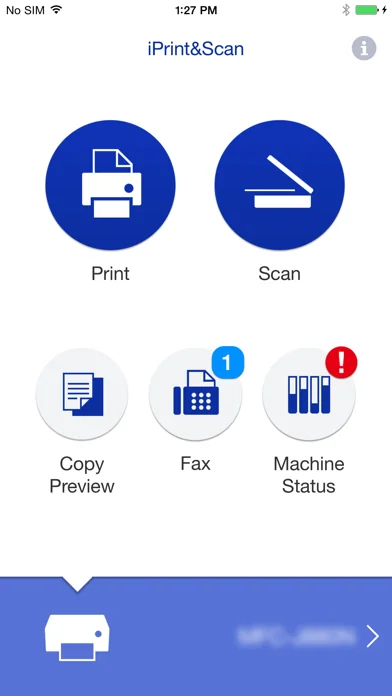
Brother iPrint&Scan is a free app that enables you to print from and scan to your iOS device (iPhone / iPod touch / iPad). Use your local wireless network to connect your iOS device to your Brother printer or all-in-one. Some new advanced functions have been added, including edit, fax send, fax preview, copy preview, and machine status. Visit your local Brother website for a list of supported models.
[Key Features]
- Easy to use menu.
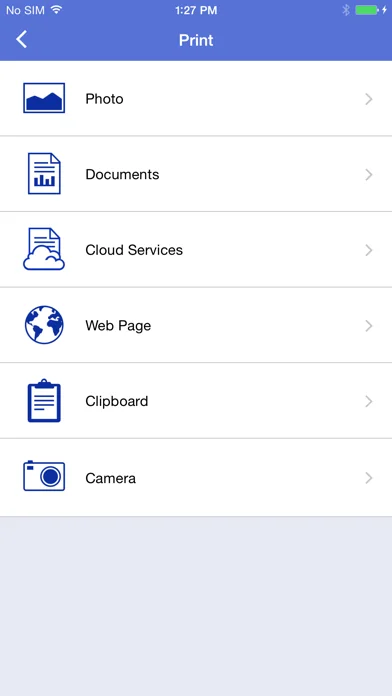
- Simple steps to print your favorite photos, web pages and documents (PDF, Word, Excel®, PowerPoint®, Text).
- Print photos directly from your iPhone camera.
- Print PDF files or Microsoft® Office documents or Text files by starting the app from "Open in..."
- Print your documents and photos directly from the following cloud services: Dropbox™, OneDrive, Evernote®.
- Print what you copied to the clipboard.
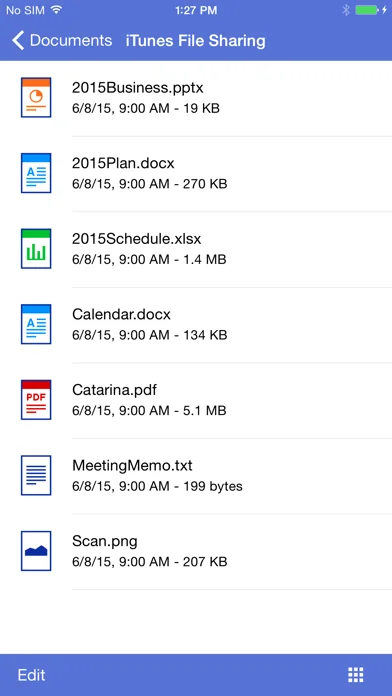
- Use iTunes File Sharing to send compatible files (PDF, Word, Excel®, PowerPoint®, Text, JPEG, PNG, TIFF) to iPrint&Scan for convenient printing at a later time.
- Scan directly to your iPhone/iPod touch/iPad.
- Save scanned images to your photo album, iCloud or Facebook / X / Flickr accounts or send them in an E-mail (PDF, JPEG).
- Print scanned images saved to iCloud from this app.
- Automatically search for supported devices on a local wireless network.
- No computer and no driver required.
*To save scanned images directly to Facebook / X / Flickr, you must first register your accounts on your mobile device.
[Advanced Functions]
(Only available on new models.)
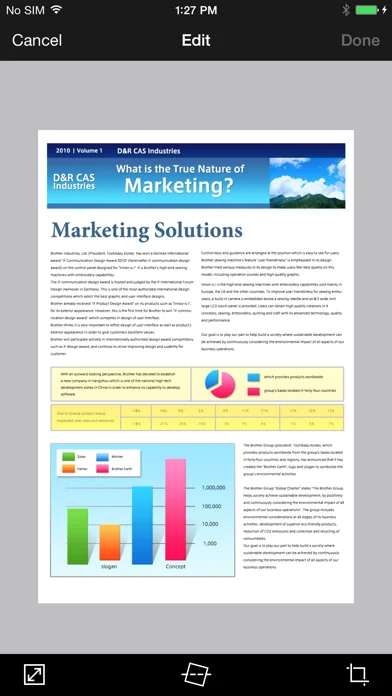
- Edit previewed images using the editing tools (scale, straighten, crop) if necessary.
- Send a fax directly from your mobile device.
(This app feature requires access to the address book of your mobile device.)
- View received faxes stored on your machine on your mobile device.
- The copy preview function enables you to preview an image and edit it if necessary before copying to avoid copy errors.
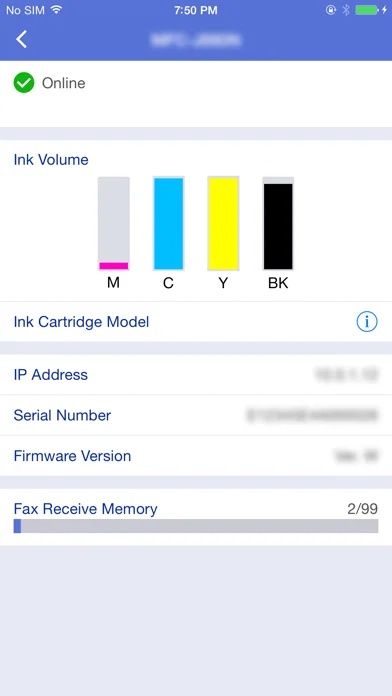
- View the machine’s status such as ink/toner volume and error messages on your mobile device.
*Compatible functions will depend on the selected device.
[Compatible Print Settings]
- Paper Size -
4" x 6" (10 x 15cm)
Photo L (3.5" x 5" / 9 x 13 cm)
Photo 2L (5" x 7" / 13 x 18 cm)
A4
Letter
Legal
A3
Ledger
- Media Type -
Glossy Paper
Plain Paper
- Copies -
Up to 5
[Compatible Scan Settings]
- Document Size -
A4
Letter
4" x 6" (10 x 15cm)
Photo L (3.5" x 5" / 9 x 13 cm)
Card (2.4" x 3.5" / 60 x 90 mm)
Legal
A3
Ledger
- Scan Type -
Color
Color (Fast)
Black & White
[Access Permission Information]
You must check and allow the essential access permissions below to use Brother iPrint&Scan service.
Essential Permission
• Contact information: access to your contact numbers is needed when you use functions like fax, but you can limit access to the specific contact necessary for the service.
Optional Permission
• Location information: It is requested only when you use device search features like Wi-Fi Direct, Bluetooth, or NFC.
Optional data is required to use the corresponding function, and even if permission is not granted, services other than the corresponding function can be used.
*Compatible settings will depend on the selected device and function.
*Evernote is a trademark of Evernote Corporation and used under a license.
*Microsoft, Excel, and PowerPoint are either registered trademarks or trademarks of Microsoft Corporation in the United States and/or other countries.
*To help us improve the application, send your feedback to Feedback-mobile-apps-ps@brother.com. Please note that we may not be able to respond to individual emails.
[Key Features]
- Easy to use menu.
- Simple steps to print your favorite photos, web pages and documents (PDF, Word, Excel®, PowerPoint®, Text).
- Print photos directly from your iPhone camera.
- Print PDF files or Microsoft® Office documents or Text files by starting the app from "Open in..."
- Print your documents and photos directly from the following cloud services: Dropbox™, OneDrive, Evernote®.
- Print what you copied to the clipboard.
- Use iTunes File Sharing to send compatible files (PDF, Word, Excel®, PowerPoint®, Text, JPEG, PNG, TIFF) to iPrint&Scan for convenient printing at a later time.
- Scan directly to your iPhone/iPod touch/iPad.
- Save scanned images to your photo album, iCloud or Facebook / X / Flickr accounts or send them in an E-mail (PDF, JPEG).
- Print scanned images saved to iCloud from this app.
- Automatically search for supported devices on a local wireless network.
- No computer and no driver required.
*To save scanned images directly to Facebook / X / Flickr, you must first register your accounts on your mobile device.
[Advanced Functions]
(Only available on new models.)
- Edit previewed images using the editing tools (scale, straighten, crop) if necessary.
- Send a fax directly from your mobile device.
(This app feature requires access to the address book of your mobile device.)
- View received faxes stored on your machine on your mobile device.
- The copy preview function enables you to preview an image and edit it if necessary before copying to avoid copy errors.
- View the machine’s status such as ink/toner volume and error messages on your mobile device.
*Compatible functions will depend on the selected device.
[Compatible Print Settings]
- Paper Size -
4" x 6" (10 x 15cm)
Photo L (3.5" x 5" / 9 x 13 cm)
Photo 2L (5" x 7" / 13 x 18 cm)
A4
Letter
Legal
A3
Ledger
- Media Type -
Glossy Paper
Plain Paper
- Copies -
Up to 5
[Compatible Scan Settings]
- Document Size -
A4
Letter
4" x 6" (10 x 15cm)
Photo L (3.5" x 5" / 9 x 13 cm)
Card (2.4" x 3.5" / 60 x 90 mm)
Legal
A3
Ledger
- Scan Type -
Color
Color (Fast)
Black & White
[Access Permission Information]
You must check and allow the essential access permissions below to use Brother iPrint&Scan service.
Essential Permission
• Contact information: access to your contact numbers is needed when you use functions like fax, but you can limit access to the specific contact necessary for the service.
Optional Permission
• Location information: It is requested only when you use device search features like Wi-Fi Direct, Bluetooth, or NFC.
Optional data is required to use the corresponding function, and even if permission is not granted, services other than the corresponding function can be used.
*Compatible settings will depend on the selected device and function.
*Evernote is a trademark of Evernote Corporation and used under a license.
*Microsoft, Excel, and PowerPoint are either registered trademarks or trademarks of Microsoft Corporation in the United States and/or other countries.
*To help us improve the application, send your feedback to Feedback-mobile-apps-ps@brother.com. Please note that we may not be able to respond to individual emails.
🆕 What's New · v6.15.5
Minor fixes for improved functionality
Profile & Insights
Everything we know — and don't — about this app and its company.
Identification
- App name
- Brother iPrint&Scan
- Developer
- Brother Industries, LTD.
- Bundle ID
- com.brother.iPrint-Scan
- App Store URL
- Open in App Store
- Category
- Utilities
- Content rating
- 17+
- Languages
- DA, NL, EN, FI, FR, DE, ID, IT, JA, KO, NB, PL, PT, RU, ZH, ES, SV, TH, ZH, TR, VI
Company
- Website
- www.brother.com
- Tagline
- Not found
- Description
- Not found
- Founded
- Not found
- HQ / Address
- Not found
- Employees
- Not found
- Logo
- Not found
Revenue
- Verified revenue / mo
- Not found
- AI revenue estimate / mo
- Not found
- AI annual estimate
- Not found
- ML model estimate / mo
- $1.9K/mo
- Top-grossing rank
- Outside top 100 in US Utilities
- All-time revenue
- Not found
- Pricing
- Not found
Founder
- Name
- Not found
- X / Twitter
- Not found
- Not found
- GitHub
- Not found
- X followers
- Not found
- Public statements
- Not found
Funding
- Total raised
- Not found
- Last round
- Not found
- Investors
- Not found
- Crunchbase
- Not found
- AngelList
- Not found
Press & Links
- Articles found
- Not found
- Listed on
- Not found
- Blog
- Not found
- Press / News
- Not found
Contacts & Socials
- Socials
- Not found
- Not found
- Phone
- Not found
- Contact page
- Not found
- About page
- Not found
📈Ratings growth2,035 ratings+14% lifetimeShow 3-year history estimate ▾
Tracked (60 weeks) Pre-tracking estimate (36 weeks) · model-based, ±5% noise · anchored to release date and current value
🌍Geographic ReachNot ranked
This app is currently outside the top 100 grossing in all 9 countries we monitor (US, UK, DE, FR, JP, CA, AU, BR, IN). Niche or new apps often launch this way — popularity rankings appear once daily revenue clears the regional threshold.
Profile is built from iTunes Lookup + developer site scrape + ML revenue model. Empty fields show "Not found" — additional sources (Crunchbase, X, IndieHackers, Acquire.com) coming.
More Utilities
My Verizon
★ 4.7 · 5,489,023 reviews
★ 4.7 · 4,551,928 reviews
myAT&T
★ 4.0 · 4,058,820 reviews
Google Chrome
★ 4.7 · 3,469,796 reviews
My Spectrum
★ 4.8 · 3,292,507 reviews
DuckDuckGo, Duck.ai (optional)
★ 4.8 · 2,325,859 reviews
Rechner₊
★ 4.7 · 1,717,164 reviews
QR Code Reader ϟ
★ 4.7 · 1,413,130 reviews
Browse BU Analytics
📚 All 55,000+ Books
🜍 Alchemy & Hermeticism
🔮 Magic & Ritual
🌙 Witchcraft & Paganism
⭐ Astrology & Cosmology
🃏 Divination & Tarot
📜 Utilities
✡️ Kabbalah & Jewish Mysticism
🕉️ Mysticism & Contemplation
🕊️ Theosophy & Anthroposophy
🏛️ Freemasonry & Secret Societies
👻 Spiritualism & Afterlife
📖 Sacred Texts & Gnosticism
👁️ Supernatural & Occult Fiction
🧘 Spiritual Development
📚 Esoteric History & Biography
Info
About BU Analytics