35
BU Score
Emerging
A2DPblocker - Bluetooth Mono
✍️ bumetric analysis
“
A2DPblocker - Bluetooth Mono is an iOS app from Gnavicks in the Utilities category, currently rated 2.0★ across 11 ratings. Initial signal reads as mostly critical sentiment so far: users flag rough edges and unmet expectations.
Our BU Score puts it at 35: Emerging (early traction worth watching). For a Utilities app, that means early traction worth watching.
Track changes month-over-month in the Performance section below: live snapshot history and revenue forecast included.
📊 Performance Tracking LIVE
Loading…
Rating
—
Reviews
—
Forecast Revenue / mo
—
Snapshots tracked
0
since first record
Range:
💰 Forecast Revenue / mo
MODELRevenue forecast computed from BU's 234 trigger model on each snapshot. Calibrated against ground-truth from 58 verified-revenue apps.
🔬Forecast Breakdown — Why This Estimate?Top 6 of 6 triggers
Our ML model uses 200+ signals from public data. These are the most influential for this app:
| Paid app ($0.00)METRIC | +$2,800 | |
| 5 starREVIEW | +$1,800 | |
| Below-average rating (2.0★)METRIC | −$1,500 | |
| Mature app (14y old)METRIC | +$1,500 | |
| Single-language (English only)METRIC | −$400 | |
| Pre-traction phase (11 ratings)METRIC | −$300 |
METRIC = structural app data · REVIEW = mined from user reviews · ✓ VERIFIED = Stripe-verified anchor (TrustMRR)
📈 Reviews Growth
LIVECumulative review count from first BU snapshot. Each point = a tracked update.
⭐ Rating Trend
LIVEAverage rating evolution. Updates with each new review batch.
🗓️ Snapshot Timeline
HISTORYEach bar shows a tracked update and the metric delta from the previous snapshot.
App Specs
🔐 Own this app? Claim & verify MRR →💾 2 MB🔞 4+📱 iOS 7.0+🔖 v1.7.2🔄 updated 7y ago🌐 EN📂 Utilities💰 Paid🚀 Launched 2011 (14y old)
📝 About this app
WHAT IS IT?
------------------------------------------//
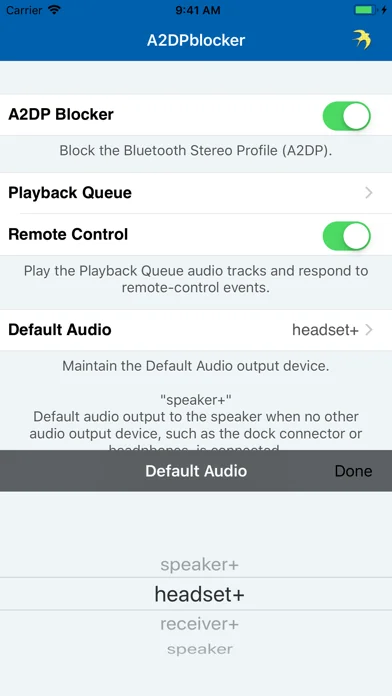
A2DPblocker is an audio player that blocks the Advanced Audio Distribution Profile (A2DP) (i.e. Bluetooth Stereo Profile) from connecting on a Bluetooth enabled iOS device without completely disabling the Bluetooth hardware. This enables the iOS device to continue to perform other Bluetooth functions like default audio output from another audio app (dictation, audio books, podcasts, GPS, music streaming, etc.) to a Hands-Free Profile (HFP) enabled Bluetooth car kit, headset, etc. as well as make phone calls over Bluetooth, and wirelessly control the iPod with a paired AVRCP enabled Bluetooth accessory.
A2DP was introduced in iOS 3.0 and this app simply blocks A2DP from connecting and maintains the default audio output device when it's running in the foreground (including when the screen is locked on iOS 3.1 or later devices) or background (requires iOS 4.0 or later).
You can finally disable A2DP once and for all with this app and stop manually changing the default audio output device each time your car kit, headset, or whatever A2DP enabled Bluetooth accessory you have connects to your iOS device.
FEATURES
------------------------------------------//
- blocks A2DP.
- defaults audio output from another audio app to a HFP enabled Bluetooth car kit, headset, etc.
- maintains the default audio output device.
- built-in iPod controls.
- audio Playback Queue (requires iOS 4.0 or later).
- suppresses audio notification alerts (only on pre-iOS 7.0 or earlier devices).
HOW TO USE
------------------------------------------//
1.) Pair your Bluetooth enabled iOS device with your Bluetooth car kit, headset, etc.
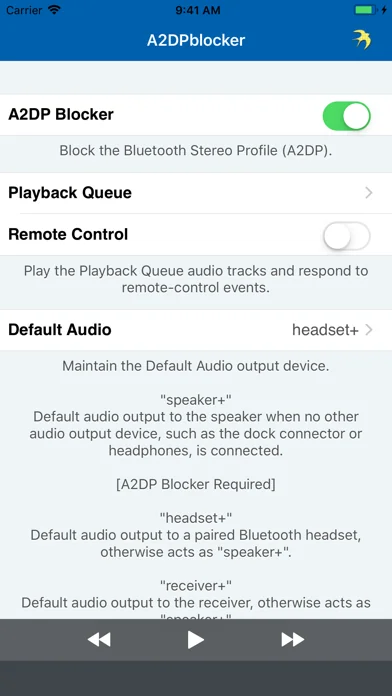
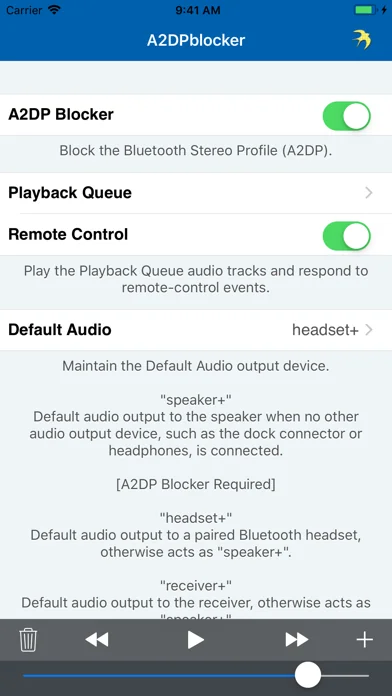
2.) Launch A2DPblocker and ensure “A2DP Blocker" switch is ON.
3.) Add a downloaded non-DRM (i.e. not copy-protected) audio track from your music library to the Playback Queue on iOS 4.0 or later and adjust the independent volume slider to guarantee A2DP is blocked.
4.) Ensure “Remote Control" switch is OFF.
5.) Set Default Audio to “speaker+” / “receiver” / “speaker” to block A2DP or “headset+” to default audio output via HFP.
6.) Play Playback Queue.
7.) Launch and configure your other audio app or begin playing the iPod with the built-in iPod controls or an attached accessory.
Now your Bluetooth enabled iOS device should block the A2DP connection from occurring or audio should now be streaming via the HFP connection as long as A2DPblocker is active. Successive launches of A2DPblocker doesn't require reconfiguration and it will not interfere with the phone call function or transport controls (AVRCP).
NOTICE
------------------------------------------//
HFP enabled Bluetooth car kits, headsets, etc. that only support the phone call function may configure A2DPblocker to utilize the same connection to playback audio (see HOW TO USE). However, the audio quality of the HFP standard is designed to be low bitrate, mono, and frequency limited to voice ranges, which is why music streaming may sound a bit lacking, but streaming dictation, audio books, podcasts, GPS, etc. for example would sound normal.
REQUIREMENTS
------------------------------------------//
- requires iOS 7.0 or later.
- Bluetooth.
- microphone or other audio input.
- works best with the audio Playback Queue active.
CONTACT INFO
------------------------------------------//
Please contact me with your questions and/or comments. If you just love A2DPblocker then please leave a review!
- twitter.com/gnavicks
- dkanem.selfip.com
------------------------------------------//
A2DPblocker is an audio player that blocks the Advanced Audio Distribution Profile (A2DP) (i.e. Bluetooth Stereo Profile) from connecting on a Bluetooth enabled iOS device without completely disabling the Bluetooth hardware. This enables the iOS device to continue to perform other Bluetooth functions like default audio output from another audio app (dictation, audio books, podcasts, GPS, music streaming, etc.) to a Hands-Free Profile (HFP) enabled Bluetooth car kit, headset, etc. as well as make phone calls over Bluetooth, and wirelessly control the iPod with a paired AVRCP enabled Bluetooth accessory.
A2DP was introduced in iOS 3.0 and this app simply blocks A2DP from connecting and maintains the default audio output device when it's running in the foreground (including when the screen is locked on iOS 3.1 or later devices) or background (requires iOS 4.0 or later).
You can finally disable A2DP once and for all with this app and stop manually changing the default audio output device each time your car kit, headset, or whatever A2DP enabled Bluetooth accessory you have connects to your iOS device.
FEATURES
------------------------------------------//
- blocks A2DP.
- defaults audio output from another audio app to a HFP enabled Bluetooth car kit, headset, etc.
- maintains the default audio output device.
- built-in iPod controls.
- audio Playback Queue (requires iOS 4.0 or later).
- suppresses audio notification alerts (only on pre-iOS 7.0 or earlier devices).
HOW TO USE
------------------------------------------//
1.) Pair your Bluetooth enabled iOS device with your Bluetooth car kit, headset, etc.
2.) Launch A2DPblocker and ensure “A2DP Blocker" switch is ON.
3.) Add a downloaded non-DRM (i.e. not copy-protected) audio track from your music library to the Playback Queue on iOS 4.0 or later and adjust the independent volume slider to guarantee A2DP is blocked.
4.) Ensure “Remote Control" switch is OFF.
5.) Set Default Audio to “speaker+” / “receiver” / “speaker” to block A2DP or “headset+” to default audio output via HFP.
6.) Play Playback Queue.
7.) Launch and configure your other audio app or begin playing the iPod with the built-in iPod controls or an attached accessory.
Now your Bluetooth enabled iOS device should block the A2DP connection from occurring or audio should now be streaming via the HFP connection as long as A2DPblocker is active. Successive launches of A2DPblocker doesn't require reconfiguration and it will not interfere with the phone call function or transport controls (AVRCP).
NOTICE
------------------------------------------//
HFP enabled Bluetooth car kits, headsets, etc. that only support the phone call function may configure A2DPblocker to utilize the same connection to playback audio (see HOW TO USE). However, the audio quality of the HFP standard is designed to be low bitrate, mono, and frequency limited to voice ranges, which is why music streaming may sound a bit lacking, but streaming dictation, audio books, podcasts, GPS, etc. for example would sound normal.
REQUIREMENTS
------------------------------------------//
- requires iOS 7.0 or later.
- Bluetooth.
- microphone or other audio input.
- works best with the audio Playback Queue active.
CONTACT INFO
------------------------------------------//
Please contact me with your questions and/or comments. If you just love A2DPblocker then please leave a review!
- twitter.com/gnavicks
- dkanem.selfip.com
🆕 What's New · v1.7.2
A2DPblocker v1.7.2 is ready!
- built with iOS 11 :)
- iOS versions earlier than iOS 7.0 are no longer supported.
- added 5.8-inch and 6.5-inch super retina display support.
- added 6.1-inch liquid retina display support.
- fixed crash when using remote-control on iOS 11.3 or later.
- updated About screen.
Your 5 star reviews keep the updates coming!
Please contact me with your questions and/or comments. If you just love A2DPblocker then please leave a review!
- twitter.com/gnavicks
- dkanem.selfip.com
- built with iOS 11 :)
- iOS versions earlier than iOS 7.0 are no longer supported.
- added 5.8-inch and 6.5-inch super retina display support.
- added 6.1-inch liquid retina display support.
- fixed crash when using remote-control on iOS 11.3 or later.
- updated About screen.
Your 5 star reviews keep the updates coming!
Please contact me with your questions and/or comments. If you just love A2DPblocker then please leave a review!
- twitter.com/gnavicks
- dkanem.selfip.com
Profile & Insights
Everything we know — and don't — about this app and its company.
Identification
- App name
- A2DPblocker - Bluetooth Mono
- Developer
- Gnavicks
- Bundle ID
- com.gnavicks.A2DPblocker
- App Store URL
- Open in App Store
- Category
- Utilities
- Content rating
- 4+
- Languages
- EN
Company
- Website
- dkanem.selfip.com
- Tagline
- Not found
- Description
- Not found
- Founded
- Not found
- HQ / Address
- Not found
- Employees
- Not found
- Logo
- Not found
Revenue
- Verified revenue / mo
- Not found
- AI revenue estimate / mo
- Not found
- AI annual estimate
- Not found
- ML model estimate / mo
- $10.5K/mo
- Top-grossing rank
- Outside top 100 in US Utilities
- All-time revenue
- Not found
- Pricing
- Not found
Founder
- Name
- Not found
- X / Twitter
- Not found
- Not found
- GitHub
- Not found
- X followers
- Not found
- Public statements
- Not found
Funding
- Total raised
- Not found
- Last round
- Not found
- Investors
- Not found
- Crunchbase
- Not found
- AngelList
- Not found
Press & Links
- Articles found
- Not found
- Listed on
- Not found
- Blog
- Not found
- Press / News
- Not found
Contacts & Socials
- Socials
- Not found
- Not found
- Phone
- Not found
- Contact page
- Not found
- About page
- Not found
📈Ratings growth11 ratings+-72% lifetimeShow 3-year history estimate ▾
Tracked (59 weeks) Pre-tracking estimate (37 weeks) · model-based, ±5% noise · anchored to release date and current value
🌍Geographic ReachNot ranked
This app is currently outside the top 100 grossing in all 9 countries we monitor (US, UK, DE, FR, JP, CA, AU, BR, IN). Niche or new apps often launch this way — popularity rankings appear once daily revenue clears the regional threshold.
Profile is built from iTunes Lookup + developer site scrape + ML revenue model. Empty fields show "Not found" — additional sources (Crunchbase, X, IndieHackers, Acquire.com) coming.
Full revenue analysis
Read the article-style breakdown for A2DPblocker - Bluetooth Mono: category rank, percentile, growth signal, comparable apps, and how the forecast is calibrated against verified-MRR anchors in this niche.