61
BU Score
Solid
Epson iProjection
✍️ bumetric analysis
“
Epson iProjection is an iOS app from Seiko Epson Corporation in the Productivity category, currently rated 4.3★ across 3,253 ratings. Initial signal reads as mixed reviews: supporters praise core features while critics cite stability and value gaps.
Our BU Score puts it at 61: Solid (established niche player). For a Productivity app, that means established niche player.
Track changes month-over-month in the Performance section below: live snapshot history and revenue forecast included.
📊 Performance Tracking LIVE
Loading…
Rating
—
Reviews
—
Forecast Revenue / mo
—
Snapshots tracked
0
since first record
Range:
💰 Forecast Revenue / mo
MODELRevenue forecast computed from BU's 234 trigger model on each snapshot. Calibrated against ground-truth from 58 verified-revenue apps.
🔬Forecast Breakdown — Why This Estimate?Top 8 of 8 triggers
Our ML model uses 200+ signals from public data. These are the most influential for this app:
| bugsREVIEW | −$1,800 | |
| 5 starREVIEW | +$1,800 | |
| Low install base (3,253 ratings)METRIC | +$1,500 | |
| Mature app (14y old)METRIC | +$1,500 | |
| slowREVIEW | −$1,200 | |
| Good rating (4.3★)METRIC | +$800 | |
| Ad-supported / freemiumMETRIC | +$600 | |
| Localized (9 languages)METRIC | +$600 |
METRIC = structural app data · REVIEW = mined from user reviews · ✓ VERIFIED = Stripe-verified anchor (TrustMRR)
📈 Reviews Growth
LIVECumulative review count from first BU snapshot. Each point = a tracked update.
💚Sentiment Over Time↑ green = positive · ↓ red = negative
Jun 24
Aug 24
Sep 24
Nov 24
Dec 24
Jan 25
Feb 25
May 25
Sep 25
Oct 25
Jan 26
Mar 26
⭐ Rating Trend
LIVEAverage rating evolution. Updates with each new review batch.
🗓️ Snapshot Timeline
HISTORYEach bar shows a tracked update and the metric delta from the previous snapshot.
App Specs
🔐 Own this app? Claim & verify MRR →💾 27 MB🔞 4+📱 iOS 15.0+🔖 v4.2.0🔄 updated 6mo ago🌐 AR, EN, FR, DE, JA +4📂 Productivity💰 Free🚀 Launched 2012 (14y old)
📝 About this app
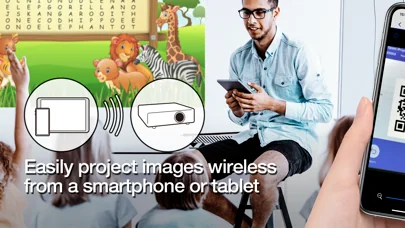
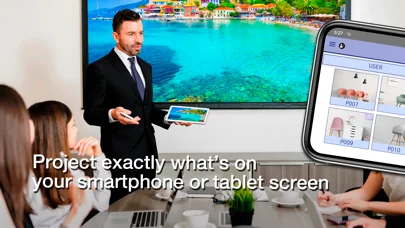
Epson iProjection is a wireless projection app for iPhone®, iPad®, or iPod® touch. This app makes it easy to mirror your device's screen, and project documents and photos wirelessly to a supported Epson projector.
[Key Features]
1. Mirror your device’s screen and output your device’s audio from the projector.
2. Project your photos in the "Photos" app, project documents loaded in this app, and project in real-time video from your device's camera.
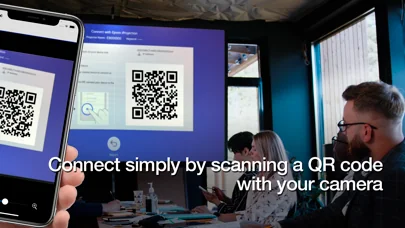
3. Easily connect your device by scanning a projected QR code.
4. Connect up to 50 devices to the projector, display up to four screens simultaneously, and share your projected image with the other connected devices.
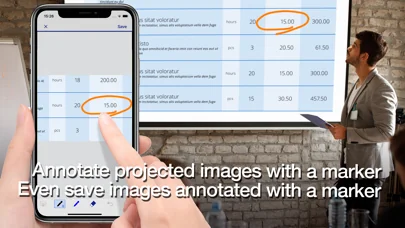
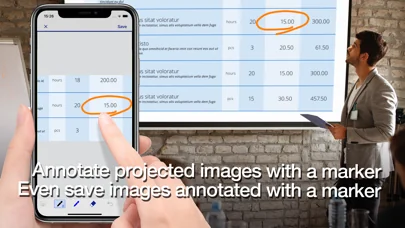
5. Annotate projected images with a pen tool and save the edited images on your device.
6. Control the projector like a remote control.
[Notes]
• For supported projectors, visit https://support.epson.net/projector_appinfo/iprojection/en/. You can also check "Supported Projectors" in the app's support menu.
• While mirroring your device’s screen, video and audio may be delayed depending on the device and network specifications. Only unprotected content can be projected.
• Use the mirroring feature to project videos in the "Photos" app.
[About Projecting Documents]
• The following file types are supported when projecting using "Documents".
- Microsoft® Word
- Microsoft® Excel
- Microsoft® PowerPoint
- Keynote
- PDF
- JPG
- PNG
- The file types mentioned above are also supported when stored in cloud file services
• Depending on the document, the projected image may differ from the image on the computer or at the time of creation, for example, some characters may not be projected correctly. If this occurs, use the mirroring feature ("Mirror device screen") instead.
• Animations and screen transition effects, videos, and audio are not played. Use the mirroring feature to play them.
• We recommend testing the projection in advance when using this app for presentations.
[Using the App]
Make sure that the network settings for the projector have been completed.
1. Switch the input source on the projector to "LAN". Network information is displayed.
2. Connect to the same network as the projector from "Settings" > "Wi-Fi" on your iPhone/iPad/iPod touch.
3. Start Epson iProjection and connect to the projector.
4. Select and project from "Mirror device screen", "Photos", "Documents", "Web Page", or "Camera".
[App permissions]
The app requires the following permissions for specific features.
【Required】 Local Network
- Search for and connect to the projector.
【Optional】] Photo
- Project selected photos from the device to the projector.
* You can use the app without granting the optional permissions, but some features may not work.
All images are examples and may differ from the actual screens.
[Key Features]
1. Mirror your device’s screen and output your device’s audio from the projector.
2. Project your photos in the "Photos" app, project documents loaded in this app, and project in real-time video from your device's camera.
3. Easily connect your device by scanning a projected QR code.
4. Connect up to 50 devices to the projector, display up to four screens simultaneously, and share your projected image with the other connected devices.
5. Annotate projected images with a pen tool and save the edited images on your device.
6. Control the projector like a remote control.
[Notes]
• For supported projectors, visit https://support.epson.net/projector_appinfo/iprojection/en/. You can also check "Supported Projectors" in the app's support menu.
• While mirroring your device’s screen, video and audio may be delayed depending on the device and network specifications. Only unprotected content can be projected.
• Use the mirroring feature to project videos in the "Photos" app.
[About Projecting Documents]
• The following file types are supported when projecting using "Documents".
- Microsoft® Word
- Microsoft® Excel
- Microsoft® PowerPoint
- Keynote
- JPG
- PNG
- The file types mentioned above are also supported when stored in cloud file services
• Depending on the document, the projected image may differ from the image on the computer or at the time of creation, for example, some characters may not be projected correctly. If this occurs, use the mirroring feature ("Mirror device screen") instead.
• Animations and screen transition effects, videos, and audio are not played. Use the mirroring feature to play them.
• We recommend testing the projection in advance when using this app for presentations.
[Using the App]
Make sure that the network settings for the projector have been completed.
1. Switch the input source on the projector to "LAN". Network information is displayed.
2. Connect to the same network as the projector from "Settings" > "Wi-Fi" on your iPhone/iPad/iPod touch.
3. Start Epson iProjection and connect to the projector.
4. Select and project from "Mirror device screen", "Photos", "Documents", "Web Page", or "Camera".
[App permissions]
The app requires the following permissions for specific features.
【Required】 Local Network
- Search for and connect to the projector.
【Optional】] Photo
- Project selected photos from the device to the projector.
* You can use the app without granting the optional permissions, but some features may not work.
All images are examples and may differ from the actual screens.
🆕 What's New · v4.2.0
- Added support for French, German, Traditional Chinese, and Arabic.
Profile & Insights
Everything we know — and don't — about this app and its company.
Identification
- App name
- Epson iProjection
- Developer
- Seiko Epson Corporation
- Bundle ID
- com.epson.iProjection
- App Store URL
- Open in App Store
- Category
- Productivity
- Content rating
- 4+
- Languages
- AR, EN, FR, DE, JA, PT, ZH, ES, ZH
Company
- Website
- Not found
- Tagline
- Today
- Description
- Find apps and games for iPhone, iPad, Mac, and more on the App Store.
- Founded
- Not found
- HQ / Address
- Not found
- Employees
- Not found
- Logo
- OG image
Revenue
- Verified revenue / mo
- Not found
- AI revenue estimate / mo
- Not found
- AI annual estimate
- Not found
- ML model estimate / mo
- $401/mo
- Top-grossing rank
- Outside top 100 in US Productivity
- All-time revenue
- Not found
- Pricing
- Not found
Founder
- Name
- Not found
- X / Twitter
- Not found
- Not found
- GitHub
- Not found
- X followers
- Not found
- Public statements
- Not found
Funding
- Total raised
- Not found
- Last round
- Not found
- Investors
- Not found
- Crunchbase
- Not found
- AngelList
- Not found
Press & Links
- Articles found
- Not found
- Listed on
- Not found
- Blog
- https://apps.apple.com/us/app/letterloop-group-newsletters/id6468623700
- Press / News
- Not found
Contacts & Socials
- Socials
- Not found
- Not found
- Phone
- Not found
- Contact page
- Not found
- About page
- https://apps.apple.com/us/iphone/story/id1895870717
📈Ratings growth3,253 ratings+2143% lifetimeShow 3-year history estimate ▾
Tracked (59 weeks) Pre-tracking estimate (37 weeks) · model-based, ±5% noise · anchored to release date and current value
🌍Geographic ReachNot ranked
This app is currently outside the top 100 grossing in all 9 countries we monitor (US, UK, DE, FR, JP, CA, AU, BR, IN). Niche or new apps often launch this way — popularity rankings appear once daily revenue clears the regional threshold.
Profile is built from iTunes Lookup + developer site scrape + ML revenue model. Empty fields show "Not found" — additional sources (Crunchbase, X, IndieHackers, Acquire.com) coming.
Full revenue analysis
Read the article-style breakdown for Epson iProjection: category rank, percentile, growth signal, comparable apps, and how the forecast is calibrated against verified-MRR anchors in this niche.
