

 45
45

BU Score
Emerging
TrueDoF-Pro DoF Calculator



✍️ bumetric analysis
“
TrueDoF-Pro DoF Calculator is an iOS app from George Douvos in the Photo & Video category, currently rated 4.0★ across 8 ratings. Initial signal reads as mixed reviews: supporters praise core features while critics cite stability and value gaps.
Our BU Score puts it at 45: Emerging (early traction worth watching). For a Photo & Video app, that means early traction worth watching.
Track changes month-over-month in the Performance section below: live snapshot history and revenue forecast included.
📊 Performance Tracking LIVE
Loading…
Rating
—
Reviews
—
Forecast Revenue / mo
—
Snapshots tracked
0
since first record
Range:
💰 Forecast Revenue / mo
MODELRevenue forecast computed from BU's 234 trigger model on each snapshot. Calibrated against ground-truth from 58 verified-revenue apps.
🔬Forecast Breakdown — Why This Estimate?Top 5 of 5 triggers
Our ML model uses 200+ signals from public data. These are the most influential for this app:
| Paid app ($0.00)METRIC | +$2,800 | |
| Mature app (14y old)METRIC | +$1,500 | |
| Good rating (4.0★)METRIC | +$800 | |
| Single-language (English only)METRIC | −$400 | |
| Pre-traction phase (8 ratings)METRIC | −$300 |
METRIC = structural app data · REVIEW = mined from user reviews · ✓ VERIFIED = Stripe-verified anchor (TrustMRR)
📈 Reviews Growth
LIVECumulative review count from first BU snapshot. Each point = a tracked update.
⭐ Rating Trend
LIVEAverage rating evolution. Updates with each new review batch.
🗓️ Snapshot Timeline
HISTORYEach bar shows a tracked update and the metric delta from the previous snapshot.
App Specs
🔐 Own this app? Claim & verify MRR →💾 14 MB🔞 4+📱 iOS 12.0+🔖 v6.0🔄 updated 7y ago🌐 EN📂 Photo & Video💰 Paid🚀 Launched 2012 (14y old)
📝 About this app
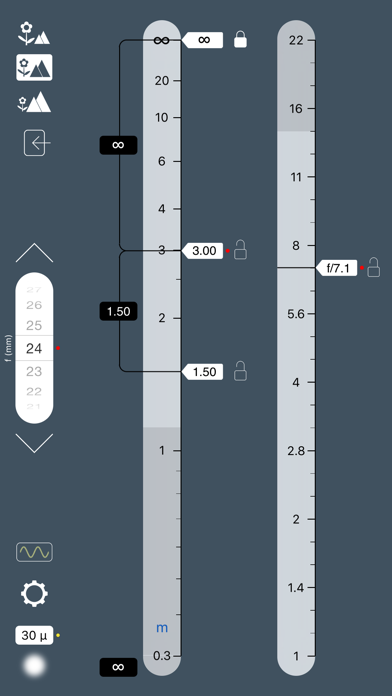
TrueDoF-Pro is a major step forward in working with depth of field. Specifically designed for working professionals, the app offers features, versatility, customisability and no-fuss ease of use to make it the ideal tool — a tool that simply does its job (superbly) without getting in the way.
And it’s a tool that works the way YOU want it to work:
* Directly set any relevant quantity you like, even the near and far limits of DoF.
* Lock any input in place; vary any other input.
Want to “work backwards,” whereby you specify the depth of field you’re after, and have the app tell you what aperture and focus distance you need? Couldn't be easier. Enter what you want directly; get instant results.
Want to lock in a particular far limit of depth of field (e.g. as a cinematographer, would you like to lock in the far end of a set)? Slide the far limit pointer to your desired distance, and hit its lock button. Freely change any other input you like.
A key (and unique) TrueDoF feature is the option to include the effects of diffraction in the calculation of DoF, giving a much more accurate indication of how sharp the image will be (see the article "Image Sharpness vs Aperture" at www.georgedouvos.com).
A partial list of features:
* Elegant, interactive, easy to read interface, with both graphical and numerical display of data
* Fast, no-fuss input; real-time output
* Unprecedented input options: Want to specify a far limit of DoF? Or a near limit? Now you can.
* Lock any input (aperture lock not available on iPhone 5s)
* Option to “work backwards” — set your desired depth of field, see what focus distance and aperture you need
* Hyperfocal function — lock your far limit at infinity
* Option to include the effects of diffraction
* Optional visual indication of the limits imposed by diffraction
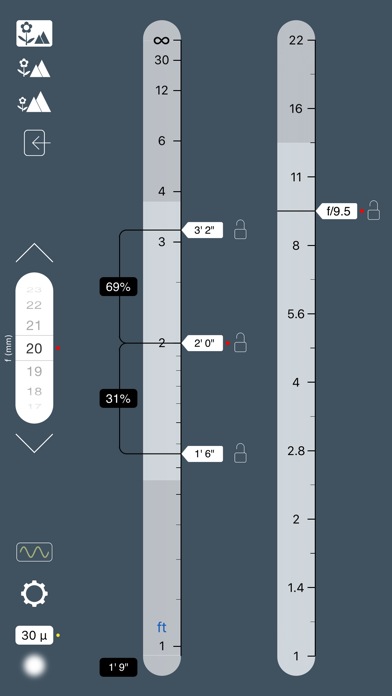
* Customisability of numerical readouts (show, hide, display distances or blur size, display front and rear DoF as distances or %)
* User-definable focal length presets for the scroll wheel's rapid selection buttons, for super-fast selection of YOUR lenses
* Support for all formats up to 8x10in
* User-selectable distance scales
* Distance units changed directly on main screen by tapping m/ft button
* Optional "distance snap" function
* Optional input of focus distance via keypad
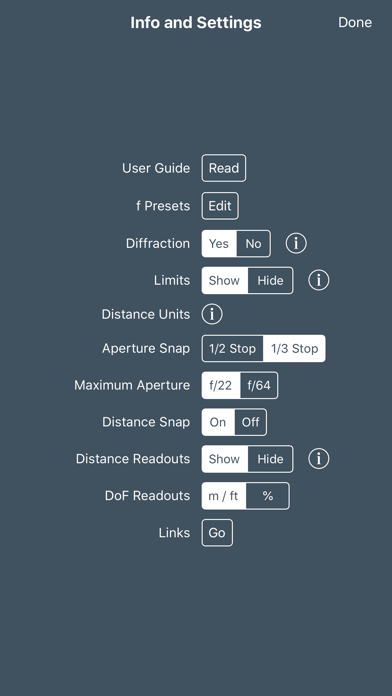
* User-selectable aperture scales (reading to f/22 or f/64)
* Aperture slider snap to half or third stops (user selectable)
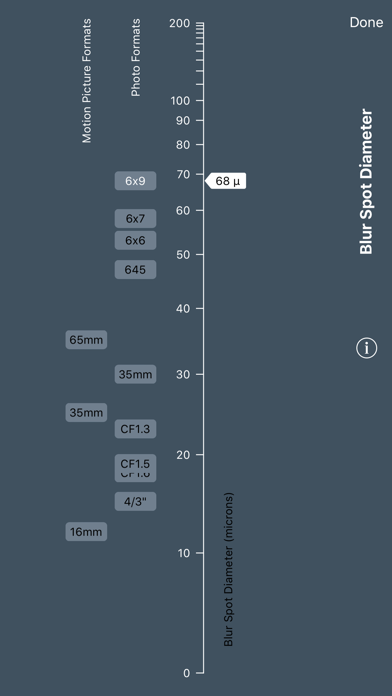
* Easily switch between settings for different cameras: a simple slider to set a blur spot diameter (circle of confusion); no tedious listing of camera models
* Blur spot diameter is displayed on the main screen, so you won't find yourself working with the wrong setting
* Facility to specify wavelength, for use when shooting in the infrared or ultraviolet parts of the spectrum
* Visual indication of wavelength on the main screen
* Context specific help
* Comprehensive User Guide
A note on intended use:
In any DoF calculator, you specify a sharpness criterion — the blur spot diameter. All calculations reference that value. In some situations (e.g. landscape photography) it is best to work quite differently: Specify the distances to the nearest and furthest objects that you wish to appear sharp and, from that, determine the focus distance and aperture that will give the SHARPEST POSSIBLE IMAGE (not simply one that meets your preset sharpness standard, which may not be the best possible). For that, there is only one app: OptimumCS-Pro, the unique optimum camera settings calculator (this is NOT simply a DoF calculator that "works backwards").
And if, in your landscape and architectural photography, you would like to achieve insanely huge depth of field, with astonishing image sharpness, try FocusStacker. Take the guesswork out of the focus stacking technique and achieve remarkably consistently (and excellent!) results.
And it’s a tool that works the way YOU want it to work:
* Directly set any relevant quantity you like, even the near and far limits of DoF.
* Lock any input in place; vary any other input.
Want to “work backwards,” whereby you specify the depth of field you’re after, and have the app tell you what aperture and focus distance you need? Couldn't be easier. Enter what you want directly; get instant results.
Want to lock in a particular far limit of depth of field (e.g. as a cinematographer, would you like to lock in the far end of a set)? Slide the far limit pointer to your desired distance, and hit its lock button. Freely change any other input you like.
A key (and unique) TrueDoF feature is the option to include the effects of diffraction in the calculation of DoF, giving a much more accurate indication of how sharp the image will be (see the article "Image Sharpness vs Aperture" at www.georgedouvos.com).
A partial list of features:
* Elegant, interactive, easy to read interface, with both graphical and numerical display of data
* Fast, no-fuss input; real-time output
* Unprecedented input options: Want to specify a far limit of DoF? Or a near limit? Now you can.
* Lock any input (aperture lock not available on iPhone 5s)
* Option to “work backwards” — set your desired depth of field, see what focus distance and aperture you need
* Hyperfocal function — lock your far limit at infinity
* Option to include the effects of diffraction
* Optional visual indication of the limits imposed by diffraction
* Customisability of numerical readouts (show, hide, display distances or blur size, display front and rear DoF as distances or %)
* User-definable focal length presets for the scroll wheel's rapid selection buttons, for super-fast selection of YOUR lenses
* Support for all formats up to 8x10in
* User-selectable distance scales
* Distance units changed directly on main screen by tapping m/ft button
* Optional "distance snap" function
* Optional input of focus distance via keypad
* User-selectable aperture scales (reading to f/22 or f/64)
* Aperture slider snap to half or third stops (user selectable)
* Easily switch between settings for different cameras: a simple slider to set a blur spot diameter (circle of confusion); no tedious listing of camera models
* Blur spot diameter is displayed on the main screen, so you won't find yourself working with the wrong setting
* Facility to specify wavelength, for use when shooting in the infrared or ultraviolet parts of the spectrum
* Visual indication of wavelength on the main screen
* Context specific help
* Comprehensive User Guide
A note on intended use:
In any DoF calculator, you specify a sharpness criterion — the blur spot diameter. All calculations reference that value. In some situations (e.g. landscape photography) it is best to work quite differently: Specify the distances to the nearest and furthest objects that you wish to appear sharp and, from that, determine the focus distance and aperture that will give the SHARPEST POSSIBLE IMAGE (not simply one that meets your preset sharpness standard, which may not be the best possible). For that, there is only one app: OptimumCS-Pro, the unique optimum camera settings calculator (this is NOT simply a DoF calculator that "works backwards").
And if, in your landscape and architectural photography, you would like to achieve insanely huge depth of field, with astonishing image sharpness, try FocusStacker. Take the guesswork out of the focus stacking technique and achieve remarkably consistently (and excellent!) results.
🆕 What's New · v6.0
This update adds optional readout of image blur for objects at the extremes of depth of field and at focus (where image blur will be non-zero if you opt to include the effects of diffraction).
Why would this be useful? After all, image blur at the extremes of depth of field should simply be your specified circle of confusion. Well, not if you focus beyond the hyperlocal distance.
Some landscape photographers place greater emphasis on image sharpness for far objects (the horizon or, say, a line of trees on a ridge) than for near objects. They reason that the eye/brain expects distant objects to be sharp but can tolerate a wee bit of image blur up close. So they focus a little beyond the hyperlocal distance. Well, now you can have a readout of image blur and better judge where you would like to place focus.
By the way: You'll have the far limit pointer at infinity, but don't lock it in place. Locking it engages Hyperfocal Mode, which you don't want in this case.
The update also adds more flexible options with regard to switching off numerical readouts, for those who prefer a more minimalist interface — one that relies on the use of analog scales.
If you're new to TrueDoF-Pro, don't forget to check out the Links page where, among other things, you will find links to articles on image sharpness, depth of field, etc. You may end up looking at such things a little differently.
Why would this be useful? After all, image blur at the extremes of depth of field should simply be your specified circle of confusion. Well, not if you focus beyond the hyperlocal distance.
Some landscape photographers place greater emphasis on image sharpness for far objects (the horizon or, say, a line of trees on a ridge) than for near objects. They reason that the eye/brain expects distant objects to be sharp but can tolerate a wee bit of image blur up close. So they focus a little beyond the hyperlocal distance. Well, now you can have a readout of image blur and better judge where you would like to place focus.
By the way: You'll have the far limit pointer at infinity, but don't lock it in place. Locking it engages Hyperfocal Mode, which you don't want in this case.
The update also adds more flexible options with regard to switching off numerical readouts, for those who prefer a more minimalist interface — one that relies on the use of analog scales.
If you're new to TrueDoF-Pro, don't forget to check out the Links page where, among other things, you will find links to articles on image sharpness, depth of field, etc. You may end up looking at such things a little differently.
Profile & Insights
Everything we know — and don't — about this app and its company.
Identification
- App name
- TrueDoF-Pro DoF Calculator
- Developer
- George Douvos
- Bundle ID
- com.douvos.TrueDoF-Pro
- App Store URL
- Open in App Store
- Category
- Photo & Video
- Content rating
- 4+
- Languages
- EN
Company
- Website
- www.georgedouvos.com
- Tagline
- Not found
- Description
- Not found
- Founded
- Not found
- HQ / Address
- Not found
- Employees
- Not found
- Logo
- Not found
Revenue
- Verified revenue / mo
- Not found
- AI revenue estimate / mo
- Not found
- AI annual estimate
- Not found
- ML model estimate / mo
- $86/mo
- Top-grossing rank
- Outside top 100 in US Photo & Video
- All-time revenue
- Not found
- Pricing
- Not found
Founder
- Name
- Not found
- X / Twitter
- Not found
- Not found
- GitHub
- Not found
- X followers
- Not found
- Public statements
- Not found
Funding
- Total raised
- Not found
- Last round
- Not found
- Investors
- Not found
- Crunchbase
- Not found
- AngelList
- Not found
Press & Links
- Articles found
- Not found
- Listed on
- Not found
- Blog
- Not found
- Press / News
- Not found
Contacts & Socials
- Socials
- Not found
- Not found
- Phone
- Not found
- Contact page
- Not found
- About page
- Not found
⭐Recent App Store Reviews14 latest · avg 3.64★ · 64.3% 5★ · 28.6% 1★
5★9 (64%)
4★0 (0%)
3★0 (0%)
2★1 (7%)
1★4 (29%)
+0 ratings/week
Praise: great ×5 love ×3 fantastic ×2 perfect ×1 excellent ×1
Top positive
★★★★★ Love it.
Does exactly what it is supposed to do.…
★★★★★ I like it
This is a great tool for quickly estimating DOF for night shooting (DOF preview doesn't work so well in low light). It has presets for your favorite focal lengths.
I'm an amateur and find this very handy. Probably less handy for…
Top negative
★☆☆☆☆ New features not working. No lock icons for depth sliders.
Needs more work.…
★☆☆☆☆ unusable
unusable. there is no list of sensors or cameras with their particular circle of confusion.…
📈Ratings growth8 ratings+700% lifetimeShow 3-year history estimate ▾
Tracked (15 weeks) Pre-tracking estimate (37 weeks) · model-based, ±5% noise · anchored to release date and current value
🌍Geographic ReachNot ranked
This app is currently outside the top 100 grossing in all 9 countries we monitor (US, UK, DE, FR, JP, CA, AU, BR, IN). Niche or new apps often launch this way — popularity rankings appear once daily revenue clears the regional threshold.
Profile is built from iTunes Lookup + developer site scrape + ML revenue model. Empty fields show "Not found" — additional sources (Crunchbase, X, IndieHackers, Acquire.com) coming.




Full revenue analysis
Read the article-style breakdown for TrueDoF-Pro DoF Calculator: category rank, percentile, growth signal, comparable apps, and how the forecast is calibrated against verified-MRR anchors in this niche.