47
BU Score
Emerging
TeamViewer QuickSupport
✍️ BU Analytics Review
“
TeamViewer QuickSupport is an iOS app from TeamViewer Germany GmbH in the Productivity category, currently rated 2.9★ across 5,133 ratings. Initial signal reads as mixed reviews — supporters praise core features while critics cite stability/value gaps.
Our BU Score puts it at 47 — Emerging (early traction worth watching). For a Productivity app, that means early traction worth watching.
Track changes month-over-month in the Performance section below — live snapshot history and revenue forecast included.
creator
📊 Performance Tracking LIVE
Loading…
Rating
—
Reviews
—
Forecast Revenue / mo
—
Snapshots tracked
0
since first record
Range:
💰 Forecast Revenue / mo
MODELRevenue forecast computed from BU's 234 trigger model on each snapshot. Calibrated against ground-truth from 58 verified-revenue apps.
🔬Forecast Breakdown — Why This Estimate?Top 8 of 8 triggers
Our ML model uses 200+ signals from public data. These are the most influential for this app:
| cancelledREVIEW | −$1,500 | |
| excellent appREVIEW | +$1,500 | |
| Low install base (5,133 ratings)METRIC | +$1,500 | |
| Below-average rating (2.9★)METRIC | −$1,500 | |
| Mature app (12y old)METRIC | +$1,500 | |
| Multilingual (28 languages)METRIC | +$1,500 | |
| slowREVIEW | −$1,200 | |
| Ad-supported / freemiumMETRIC | +$600 |
METRIC = structural app data · REVIEW = mined from user reviews · ✓ VERIFIED = Stripe-verified anchor (TrustMRR)
📈 Reviews Growth
LIVECumulative review count from first BU snapshot. Each point = a tracked update.
💚Sentiment Over Time↑ green = positive · ↓ red = negative
May 24
Jun 24
Jul 24
Aug 24
Sep 24
Nov 24
Aug 25
Sep 25
Oct 25
Nov 25
⭐ Rating Trend
LIVEAverage rating evolution. Updates with each new review batch.
🗓️ Snapshot Timeline
HISTORYEach bar shows a tracked update and the metric delta from the previous snapshot.
App Specs
🔐 Own this app? Claim & verify MRR →💾 58 MB🔞 4+📱 iOS 15.4+🔖 v15.77.1🔄 updated 2w ago🌐 HR, CS, DA, NL, EN +23📂 Productivity💰 Free🚀 Launched 2013 (12y old)
📝 About this app
WHAT’S NEW:
• Full control over sessions
To allow your partner to connect to your device, simply enter the code they provided into the ‘Join Session’ box. You control access to your device and end the session whenever you choose.
• Easy for your eyes and your battery
You asked, we listened. QuickSupport now features dark mode for a more comfortable experience and better battery life.
• Rotate your screen with ease
Vertical or horizontal — the app adapts seamlessly to your preferred orientation.
• Get onboard quickly
Discover all the new UI features with our guided tour, making it easy to get started.
• Improved transparency
Connect only with users you trust. The app will provide you with user details, such as name, email, country, and license type, so you can verify the identity before granting access to your device.
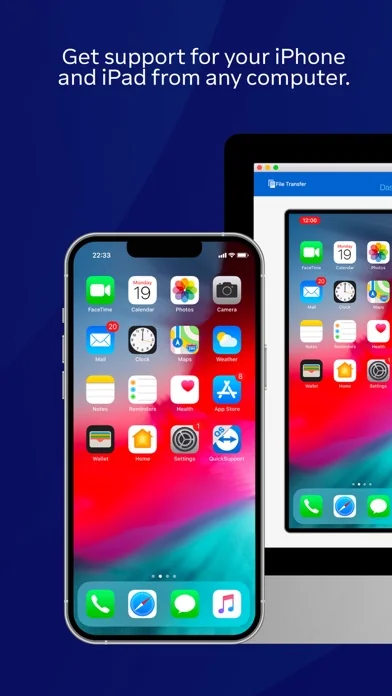
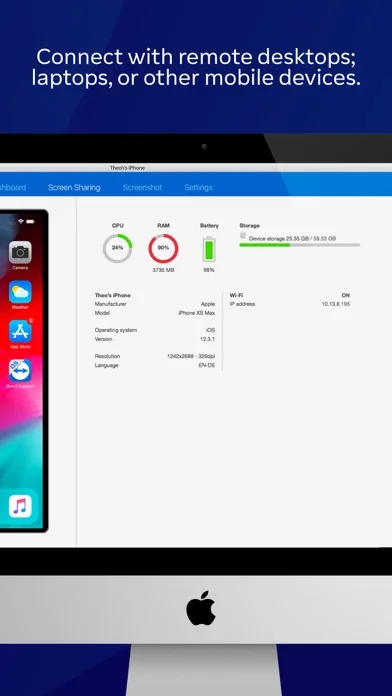
The QuickSupport app by TeamViewer allows you to get instant IT support for your iPhone or iPad.
In just a few easy steps, QuickSupport enables your trusted remote partner to connect to your device to:
• provide IT support
• transfer files back and forth
• communicate with you via chat
• view device information
• adjust WIFI settings, and much more.
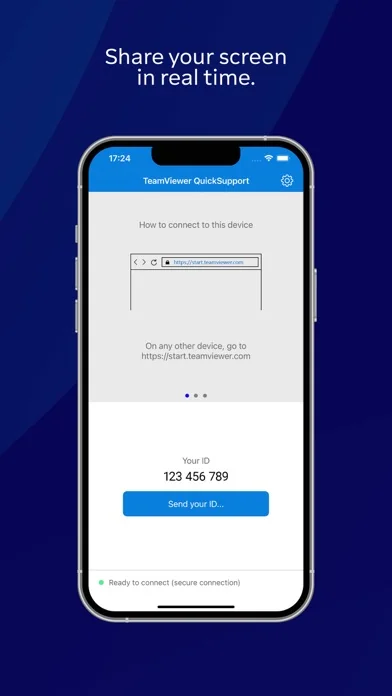
It can receive connection requests from any device (desktop, web browser or mobile).
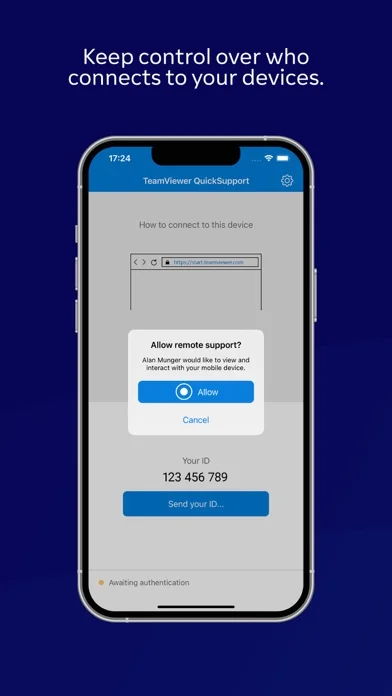
TeamViewer applies the highest security standards to your connections, ensuring you are always in control of granting access to your device and establishing or ending sessions.
To establish a connection to your device, you need to do the following:
1. Open the app on your screen. Connections can't be established if the app is running in the background.
2. Share your ID with your partner or enter a code into the ‘Join Session’ box.
3. Accept the connection request every time. Without your explicit permission, the connection can’t be established.
QuickSupport is available to install on any device and model, including Samsung, Nokia, Sony, Huawei, Lenovo, Honeywell, Zebra, Elo, MobileBase, Fujitsu, Philips, Hisense, Doro, TCL and many more.
Key features include:
• Trusted connections (user account verification)
• Session codes for fast connections
• Dark mode
• Screen rotation
• Remote control
• Chat
• View device information
• File transfer
• App list (Start/Uninstall apps)
• Push and pull Wi-Fi settings
• View system diagnostic information
• Real-time screenshot of the device
• Store confidential information into the device clipboard
• Secured connection with 256 Bit AES Session Encoding.
Quick startup guide:
1. Your session partner will send you a personal link to the QuickSupport application. Clicking the link will start the app download.
2. Open the QuickSupport app on your device.
3. You will see a prompt to join a session created by your remote partner.
4. When you accept the connection, the remote session will begin.
"Information on Optional Access*
● Microphone: Fill the video feed with audio, or used to record message or session
*You can use the app even if you do not allow the optional permissions. Please use in-app settings to disable the access."
• Full control over sessions
To allow your partner to connect to your device, simply enter the code they provided into the ‘Join Session’ box. You control access to your device and end the session whenever you choose.
• Easy for your eyes and your battery
You asked, we listened. QuickSupport now features dark mode for a more comfortable experience and better battery life.
• Rotate your screen with ease
Vertical or horizontal — the app adapts seamlessly to your preferred orientation.
• Get onboard quickly
Discover all the new UI features with our guided tour, making it easy to get started.
• Improved transparency
Connect only with users you trust. The app will provide you with user details, such as name, email, country, and license type, so you can verify the identity before granting access to your device.
The QuickSupport app by TeamViewer allows you to get instant IT support for your iPhone or iPad.
In just a few easy steps, QuickSupport enables your trusted remote partner to connect to your device to:
• provide IT support
• transfer files back and forth
• communicate with you via chat
• view device information
• adjust WIFI settings, and much more.
It can receive connection requests from any device (desktop, web browser or mobile).
TeamViewer applies the highest security standards to your connections, ensuring you are always in control of granting access to your device and establishing or ending sessions.
To establish a connection to your device, you need to do the following:
1. Open the app on your screen. Connections can't be established if the app is running in the background.
2. Share your ID with your partner or enter a code into the ‘Join Session’ box.
3. Accept the connection request every time. Without your explicit permission, the connection can’t be established.
QuickSupport is available to install on any device and model, including Samsung, Nokia, Sony, Huawei, Lenovo, Honeywell, Zebra, Elo, MobileBase, Fujitsu, Philips, Hisense, Doro, TCL and many more.
Key features include:
• Trusted connections (user account verification)
• Session codes for fast connections
• Dark mode
• Screen rotation
• Remote control
• Chat
• View device information
• File transfer
• App list (Start/Uninstall apps)
• Push and pull Wi-Fi settings
• View system diagnostic information
• Real-time screenshot of the device
• Store confidential information into the device clipboard
• Secured connection with 256 Bit AES Session Encoding.
Quick startup guide:
1. Your session partner will send you a personal link to the QuickSupport application. Clicking the link will start the app download.
2. Open the QuickSupport app on your device.
3. You will see a prompt to join a session created by your remote partner.
4. When you accept the connection, the remote session will begin.
"Information on Optional Access*
● Microphone: Fill the video feed with audio, or used to record message or session
*You can use the app even if you do not allow the optional permissions. Please use in-app settings to disable the access."
🆕 What's New · v15.77.1
- Improved how the content of the Log File interacts with the Settings sidebar in Liquid Glass.
- Fixed a bug where the request to enable screen sharing was not shown.
Profile & Insights
Everything we know — and don't — about this app and its company.
Identification
- App name
- TeamViewer QuickSupport
- Developer
- TeamViewer Germany GmbH
- Bundle ID
- com.teamviewer.teamviewerQS
- App Store URL
- Open in App Store
- Category
- Productivity
- Content rating
- 4+
- Languages
- HR, CS, DA, NL, EN, FI, FR, DE, EL, HU, ID, IT, JA, KO, NB, PL, PT, RO, RU, ZH, SK, ES, SV, TH, ZH, TR, UK, VI
Company
- Website
- www.teamviewer.com
- Tagline
- IT-Automatisierung. Smart und flexibel mit KI.
- Description
- Remote-Desktop-Access-Lösungen von TeamViewer: Verbinden Sie sich mit entfernten Computern, leisten Sie Remote-Support und arbeiten Sie online zusammen ➤ Kostenlos für den privaten Gebrauch!
- Founded
- Not found
- HQ / Address
- Not found
- Employees
- Not found
- Logo
- OG image
Revenue
- Verified revenue / mo
- Not found
- AI revenue estimate / mo
- Not found
- AI annual estimate
- Not found
- ML model estimate / mo
- $598/mo
- Top-grossing rank
- Outside top 100 in US Productivity
- All-time revenue
- Not found
- Pricing
- Not found
Founder
- Name
- Not found
- X / Twitter
- Not found
- https://www.linkedin.com/company/teamviewer/
- GitHub
- Not found
- X followers
- Not found
- Public statements
- Not found
Funding
- Total raised
- Not found
- Last round
- Not found
- Investors
- Not found
- Crunchbase
- Not found
- AngelList
- Not found
Press & Links
- Articles found
- Not found
- Listed on
- Not found
- Blog
- https://www.teamviewer.com/de/resources/success-stories/
- Press / News
- Not found
Contacts & Socials
- Socials
- facebook · instagram · linkedin · youtube
- Not found
- Phone
- Not found
- Contact page
- https://www.teamviewer.com/de/global/contact-sales/
- About page
- https://www.teamviewer.com/de/integrations/microsoft-teams/
📈Ratings growth5,133 ratings+1061% lifetimeShow 3-year history estimate ▾
Tracked (58 weeks) Pre-tracking estimate (33 weeks) · model-based, ±5% noise · anchored to release date and current value
🌍Geographic ReachNot ranked
This app is currently outside the top 100 grossing in all 9 countries we monitor (US, UK, DE, FR, JP, CA, AU, BR, IN). Niche or new apps often launch this way — popularity rankings appear once daily revenue clears the regional threshold.
Profile is built from iTunes Lookup + developer site scrape + ML revenue model. Empty fields show "Not found" — additional sources (Crunchbase, X, IndieHackers, Acquire.com) coming.
More by TeamViewer Germany GmbH
View all →More Productivity
Microsoft Outlook
★ 4.8 · 8,891,395 reviews
Google Drive – online backup
★ 4.8 · 7,526,498 reviews
ChatGPT
★ 4.8 · 7,136,919 reviews
Yahoo Mail – Alles im Blick
★ 4.7 · 4,623,459 reviews
HP
★ 4.6 · 4,011,497 reviews
Google Docs
★ 4.8 · 3,078,214 reviews
Microsoft Word
★ 4.7 · 2,843,856 reviews
Gmail – E-Mail von Google
★ 4.7 · 2,406,337 reviews
Browse BU Analytics
📚 All 55,000+ Books
🜍 Alchemy & Hermeticism
🔮 Magic & Ritual
🌙 Witchcraft & Paganism
⭐ Astrology & Cosmology
🃏 Divination & Tarot
📜 Productivity
✡️ Kabbalah & Jewish Mysticism
🕉️ Mysticism & Contemplation
🕊️ Theosophy & Anthroposophy
🏛️ Freemasonry & Secret Societies
👻 Spiritualism & Afterlife
📖 Sacred Texts & Gnosticism
👁️ Supernatural & Occult Fiction
🧘 Spiritual Development
📚 Esoteric History & Biography
Info
About BU Analytics