
 49
49

BU Score
Emerging

Before and After Pro Slider



✍️ bumetric analysis
“
Before and After Pro Slider is an iOS app from Bogdan Dobrea in the Photo & Video category, currently rated 3.2★ across 30 ratings. Initial signal reads as largely positive sentiment, users highlighting consistency and feature depth.
Our BU Score puts it at 49: Emerging (early traction worth watching). For a Photo & Video app, that means early traction worth watching.
Track changes month-over-month in the Performance section below: live snapshot history and revenue forecast included.
📊 Performance Tracking LIVE
Loading…
Rating
—
Reviews
—
Forecast Revenue / mo
—
Snapshots tracked
0
since first record
Range:
💰 Forecast Revenue / mo
MODELRevenue forecast computed from BU's 234 trigger model on each snapshot. Calibrated against ground-truth from 58 verified-revenue apps.
🔬Forecast Breakdown — Why This Estimate?Top 5 of 5 triggers
Our ML model uses 200+ signals from public data. These are the most influential for this app:
| Paid app ($0.00)METRIC | +$2,800 | |
| 5 starREVIEW | +$1,800 | |
| Below-average rating (3.2★)METRIC | −$1,500 | |
| Mature app (12y old)METRIC | +$1,500 | |
| Pre-traction phase (30 ratings)METRIC | −$300 |
METRIC = structural app data · REVIEW = mined from user reviews · ✓ VERIFIED = Stripe-verified anchor (TrustMRR)
📈 Reviews Growth
LIVECumulative review count from first BU snapshot. Each point = a tracked update.
💚Sentiment Over Time↑ green = positive · ↓ red = negative
Sep 24
Dec 24
Nov 25
⭐ Rating Trend
LIVEAverage rating evolution. Updates with each new review batch.
🗓️ Snapshot Timeline
HISTORYEach bar shows a tracked update and the metric delta from the previous snapshot.
App Specs
🔐 Own this app? Claim & verify MRR →💾 76 MB🔞 4+📱 iOS 12.2+🔖 v3.2.4🔄 updated 2y ago🌐 EN, RU📂 Photo & Video💰 Paid🚀 Launched 2013 (12y old)
📝 About this app
Important: please read the app's description before acquiring the app.
The manual sliding functionality is only available inside the app (you will not be able to drag the slider after sharing the slideshow video on a social platform).
The app is compatible with iPhone 5s, iPad 5th gen, iPad Mini 2nd gen or newer devices.
Try before you buy: look for Before and After Photo Compare
Main features of Before and After Pro Slider:
- no ads
- easy to use with detailed How To Use screen
- English and Russian language support
- the settings and slides are automatically saved and will be used when you start the app again
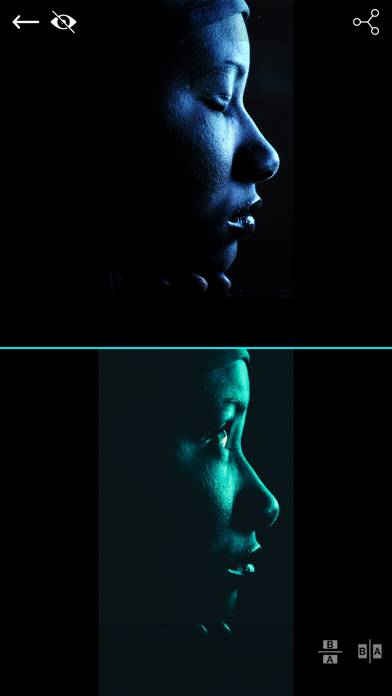
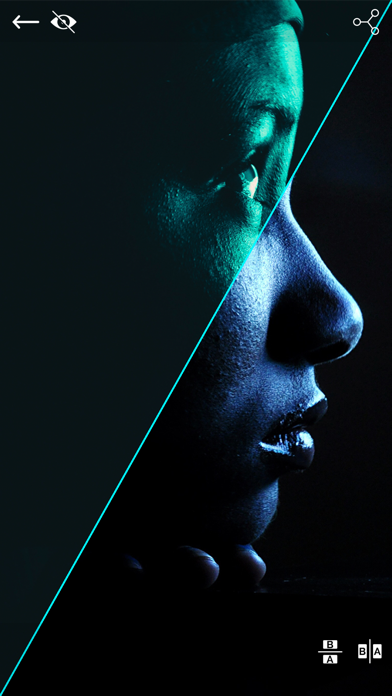
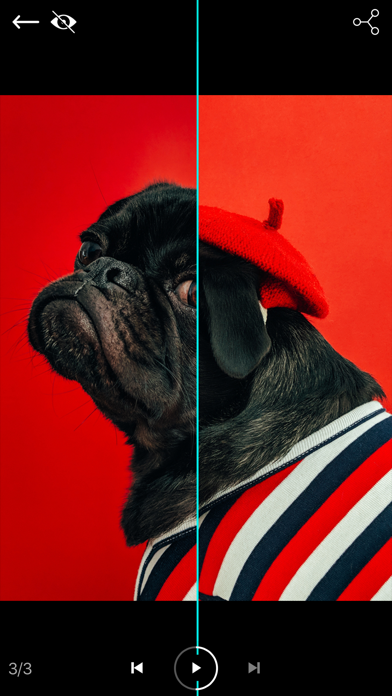
- 2 Image Compare mode where you can manually drag the slider (vertically, horizontally, oblique or reverted oblique). In this screen you can access the Side by Side mode by pressing the button in the bottom right corner
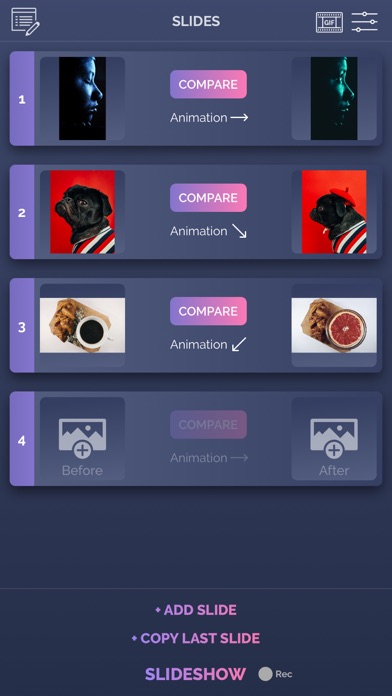
- Slideshow mode where you can present your before/after slides (30 max) in an animated way. The reveal animation will run by itself for each slide.
- you can preview the existing before/after image when taking a new picture
- you can control the direction of each slide in the slideshow and also you can duplicate the last slide
- you can record the slideshow and then trim it before saving or sharing it.
- you can convert your recorded slideshow (or any other video) to an animated GIF
- ability to save/share a snapshot of the current slide. Only a screenshot will be saved/shared, so you won't have the slider functionality when you perform this operation.The recording feature is built into iOS and it can behave strangely sometimes, so please be aware of this. If you experience issues, a device restart is required.
How to use:
- tap on the before/after image slots to load the images from the Library (or take a new one with the camera). You can load both before/after images at the same time (if both slots are open). Optionally, you can load a logo (for best results, use a png image with transparency) that will be shown in one of the corners when you are in Slideshow mode
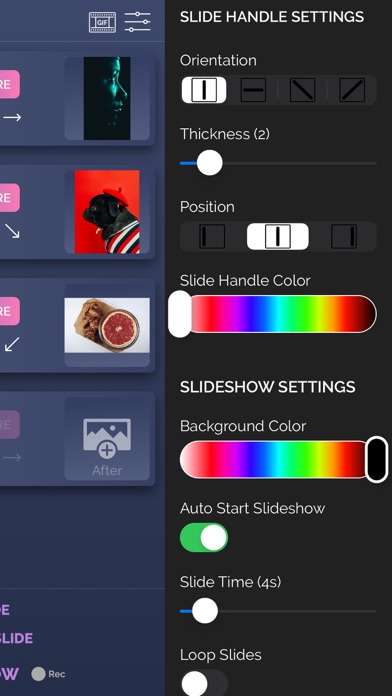
- modify the slide handle/slideshow settings to match your needs
- once both images are loaded, tap on the Compare button and drag the slider with your finger
- to create Slideshow, the before and after images for the current slide must be present (valid only for the first slide). Once the images are loaded and you altered to settings to match your preferenes, tap on the Slideshow button and watch it run automatically. To add a new slide, tap on the Add Slide button at the bottom of the screen and then add images to it. You can edit the slides order by going into the Edit mode (top left button)
- to add background music to the Slideshow, from the side menu, tap the Pick Song button and load a song from your device's library. Next time you press the Slideshow button, the song will play.
- to hide the top and bottom control bars in 2 Image Compare/Slideshow mode, tap on the eye icon in the top right corner. To show them again, double tap or long press on the device's screen
- To record, activate the Rec button and then press the Slideshow button. The recording will stop once the slideshow is finished, and you will be presented with the resulting video. From there you will be able to trim it before saving/sharing it.
- To export a slideshow recording to GIF, then press the GIF button in the top right corner, load the slideshow video, trim it (20 seconds maximum), then press EXPORT GIF button and then save/share it.
The app is suitable for those who want to compare the before and after images (to see weight loss or diet/fitness program results, makeup or aesthetic transformation etc) or to impress their friends/bosses/clients with the work they've done, by presenting them the stages of their work in a cool way.
If you're having trouble loading images, try turning on the User Regular Image Picker switch in the side menu settings.
Enjoy this app and don't forget to contact us through the app's contact form if you have something to say!
The manual sliding functionality is only available inside the app (you will not be able to drag the slider after sharing the slideshow video on a social platform).
The app is compatible with iPhone 5s, iPad 5th gen, iPad Mini 2nd gen or newer devices.
Try before you buy: look for Before and After Photo Compare
Main features of Before and After Pro Slider:
- no ads
- easy to use with detailed How To Use screen
- English and Russian language support
- the settings and slides are automatically saved and will be used when you start the app again
- 2 Image Compare mode where you can manually drag the slider (vertically, horizontally, oblique or reverted oblique). In this screen you can access the Side by Side mode by pressing the button in the bottom right corner
- Slideshow mode where you can present your before/after slides (30 max) in an animated way. The reveal animation will run by itself for each slide.
- you can preview the existing before/after image when taking a new picture
- you can control the direction of each slide in the slideshow and also you can duplicate the last slide
- you can record the slideshow and then trim it before saving or sharing it.
- you can convert your recorded slideshow (or any other video) to an animated GIF
- ability to save/share a snapshot of the current slide. Only a screenshot will be saved/shared, so you won't have the slider functionality when you perform this operation.The recording feature is built into iOS and it can behave strangely sometimes, so please be aware of this. If you experience issues, a device restart is required.
How to use:
- tap on the before/after image slots to load the images from the Library (or take a new one with the camera). You can load both before/after images at the same time (if both slots are open). Optionally, you can load a logo (for best results, use a png image with transparency) that will be shown in one of the corners when you are in Slideshow mode
- modify the slide handle/slideshow settings to match your needs
- once both images are loaded, tap on the Compare button and drag the slider with your finger
- to create Slideshow, the before and after images for the current slide must be present (valid only for the first slide). Once the images are loaded and you altered to settings to match your preferenes, tap on the Slideshow button and watch it run automatically. To add a new slide, tap on the Add Slide button at the bottom of the screen and then add images to it. You can edit the slides order by going into the Edit mode (top left button)
- to add background music to the Slideshow, from the side menu, tap the Pick Song button and load a song from your device's library. Next time you press the Slideshow button, the song will play.
- to hide the top and bottom control bars in 2 Image Compare/Slideshow mode, tap on the eye icon in the top right corner. To show them again, double tap or long press on the device's screen
- To record, activate the Rec button and then press the Slideshow button. The recording will stop once the slideshow is finished, and you will be presented with the resulting video. From there you will be able to trim it before saving/sharing it.
- To export a slideshow recording to GIF, then press the GIF button in the top right corner, load the slideshow video, trim it (20 seconds maximum), then press EXPORT GIF button and then save/share it.
The app is suitable for those who want to compare the before and after images (to see weight loss or diet/fitness program results, makeup or aesthetic transformation etc) or to impress their friends/bosses/clients with the work they've done, by presenting them the stages of their work in a cool way.
If you're having trouble loading images, try turning on the User Regular Image Picker switch in the side menu settings.
Enjoy this app and don't forget to contact us through the app's contact form if you have something to say!
Profile & Insights
Everything we know — and don't — about this app and its company.
Identification
- App name
- Before and After Pro Slider
- Developer
- Bogdan Dobrea
- Bundle ID
- com.arjunaweb.beforeAfterProSlideriPhone
- App Store URL
- Open in App Store
- Category
- Photo & Video
- Content rating
- 4+
- Languages
- EN, RU
Company
- Website
- Not found
- Tagline
- Today
- Description
- Find apps and games for iPhone, iPad, Mac, and more on the App Store.
- Founded
- Not found
- HQ / Address
- Not found
- Employees
- Not found
- Logo
- OG image
Revenue
- Verified revenue / mo
- Not found
- AI revenue estimate / mo
- Not found
- AI annual estimate
- Not found
- ML model estimate / mo
- $11.6K/mo
- Top-grossing rank
- Outside top 100 in US Photo & Video
- All-time revenue
- Not found
- Pricing
- Not found
Founder
- Name
- Not found
- X / Twitter
- Not found
- Not found
- GitHub
- Not found
- X followers
- Not found
- Public statements
- Not found
Funding
- Total raised
- Not found
- Last round
- Not found
- Investors
- Not found
- Crunchbase
- Not found
- AngelList
- Not found
Press & Links
- Articles found
- Not found
- Listed on
- Not found
- Blog
- https://apps.apple.com/us/app/letterloop-group-newsletters/id6468623700
- Press / News
- Not found
Contacts & Socials
- Socials
- Not found
- Not found
- Phone
- Not found
- Contact page
- Not found
- About page
- https://apps.apple.com/us/iphone/story/id1583092806
📈Ratings growth30 ratings+2900% lifetimeShow 3-year history estimate ▾
Tracked (35 weeks) Pre-tracking estimate (37 weeks) · model-based, ±5% noise · anchored to release date and current value
🌍Geographic ReachNot ranked
This app is currently outside the top 100 grossing in all 9 countries we monitor (US, UK, DE, FR, JP, CA, AU, BR, IN). Niche or new apps often launch this way — popularity rankings appear once daily revenue clears the regional threshold.
Profile is built from iTunes Lookup + developer site scrape + ML revenue model. Empty fields show "Not found" — additional sources (Crunchbase, X, IndieHackers, Acquire.com) coming.




Full revenue analysis
Read the article-style breakdown for Before and After Pro Slider: category rank, percentile, growth signal, comparable apps, and how the forecast is calibrated against verified-MRR anchors in this niche.