51
BU Score
Solid
Receipts Pro
✍️ BU Analytics Review
“
Receipts Pro is an iOS app from Tidal Pool Software in the Finance category, currently rated 3.8★ across 4 ratings. Initial signal reads as largely positive sentiment, users highlighting consistency and feature depth.
Our BU Score puts it at 51 — Solid (established niche player). For a Finance app, that means established niche player.
Track changes month-over-month in the Performance section below — live snapshot history and revenue forecast included.
📊 Performance Tracking LIVE
Loading…
Rating
—
Reviews
—
Forecast Revenue / mo
—
Snapshots tracked
0
since first record
Range:
💰 Forecast Revenue / mo
MODELRevenue forecast computed from BU's 234 trigger model on each snapshot. Calibrated against ground-truth from 58 verified-revenue apps.
🔬Forecast Breakdown — Why This Estimate?Top 6 of 6 triggers
Our ML model uses 200+ signals from public data. These are the most influential for this app:
| Paid app ($0.00)METRIC | +$2,800 | |
| worth every pennyREVIEW | +$2,000 | |
| 5 starREVIEW | +$1,800 | |
| Mature app (12y old)METRIC | +$1,500 | |
| Single-language (English only)METRIC | −$400 | |
| Pre-traction phase (4 ratings)METRIC | −$300 |
METRIC = structural app data · REVIEW = mined from user reviews · ✓ VERIFIED = Stripe-verified anchor (TrustMRR)
📈 Reviews Growth
LIVECumulative review count from first BU snapshot. Each point = a tracked update.
⭐ Rating Trend
LIVEAverage rating evolution. Updates with each new review batch.
🗓️ Snapshot Timeline
HISTORYEach bar shows a tracked update and the metric delta from the previous snapshot.
App Specs
🔐 Own this app? Claim & verify MRR →💾 32 MB🔞 4+📱 iOS 15.0+🔖 v5.2.3🔄 updated 3y ago🌐 EN📂 Finance💰 Paid🚀 Launched 2013 (12y old)
📝 About this app
*** Featured by Apple in Taxes & Receipts collection ***
Track your personal and business income/expenses (including mileage) with Receipts. Receipts is the most customizable and powerful expense tracking app available. Create budgets, accounts, categories, filters, and nine different types of custom receipt fields. Receipts helps you save time when submitting expense reports and during tax season.
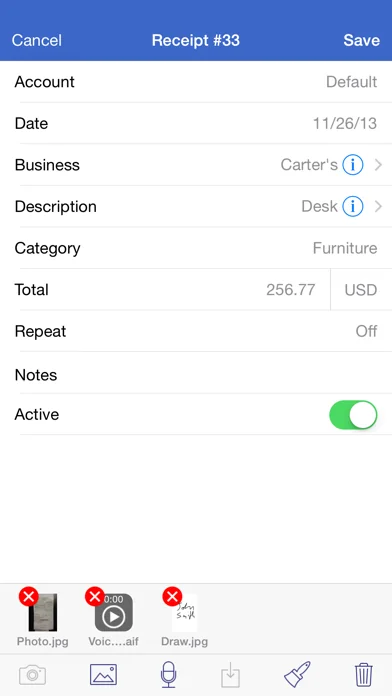
Add new receipts quickly using the autofill feature. Capture photos, add drawings, record voice memos, and attach files from other apps. Receipt totals may be entered in any currency and are instantly converted to your home currency. Create sophisticated filters based on multiple receipt fields to quickly find your receipts.
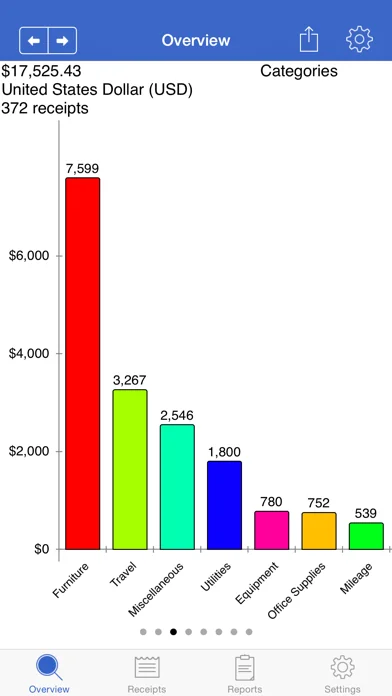
Browse through graphs to keep track of income and spending. See how much money is spent over time and by account, category, and currency.
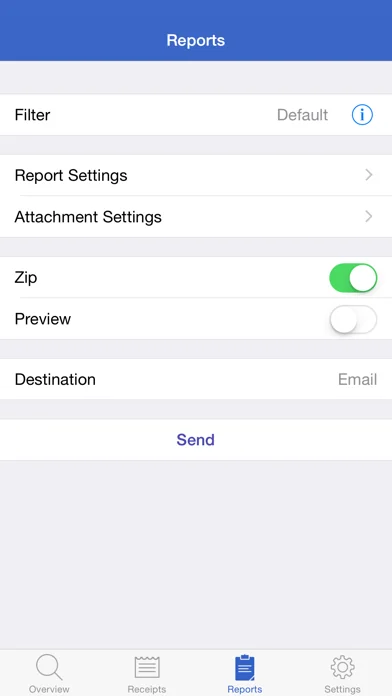
Generate Excel, PDF, HTML, and CSV reports with attachments. Optionally embed photos and drawings in PDF reports. Specify report names and add custom headers. Select which receipt fields to include and sort/group receipts by any field. Share reports using a variety of options including Box, CloudApp, Dropbox, Evernote, and Google Drive.
Keep track of business, family, or group income/expenses by syncing to the cloud. Enable automatic sync support to keep multiple devices up to date. Import and export receipts (CSV) with attachments to multiple destinations.
Overview:
- pie and bar graphs for accounts, categories, units, spending over time, custom currency fields, and income/expenses
- email, print, and open graphs in other apps
Receipts:
- add income, expense, or mileage receipts
- add receipts in any currency and set account/home currency totals
- use autofill to populate new receipts based on previous receipts
- add repeating receipts with interval and end date
- attach photos, drawings, voice memos, and other files to receipts
- rotate, scale, crop, and adjust brightness, contrast, and saturation for receipt photos
Reports:
- generate Excel, PDF, CSV, and HTML reports with attachments
- add custom report headers
- select report file names and report names
- sort and group report receipts by any field
- specify which fields to include and their order
- option to embed photos and drawings in PDF reports (1, 2, or 4 per page)
- overlay receipt fields on photos and drawings
- include links to file attachments (Excel and HTML)
- zip report and attachment files
- preview report before sending
- send reports via email, iTunes File Sharing, WiFi, another app, print, iCloud, Box, CloudApp, Dropbox, Evernote, and Google Drive
Settings:
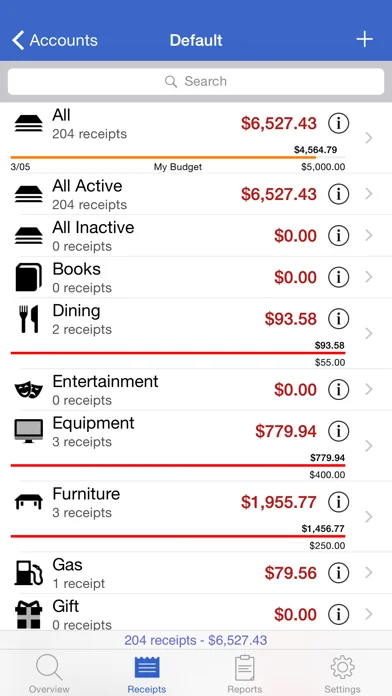
- add accounts to manage groups of receipts
- use budgets to keep track of spending
- create categories and subcategories
- select account and category icons (over 450 included) and a tint colour
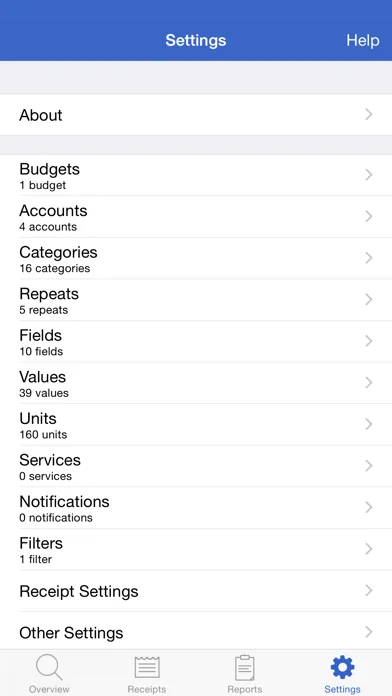
- custom receipt fields including currency, date, list, number, percent, percent total, switch, tags, and text types
- create receipt filters using any combination of fields
- notifications remind you to add receipts, save backups, and create reports
- passcode for keeping financial data secure
Data:
- keep multiple devices in sync (requires Box, Dropbox, or Google Drive account)
- import and export receipts (CSV) with attachments
- backup/restore data and settings
Track your personal and business income/expenses (including mileage) with Receipts. Receipts is the most customizable and powerful expense tracking app available. Create budgets, accounts, categories, filters, and nine different types of custom receipt fields. Receipts helps you save time when submitting expense reports and during tax season.
Add new receipts quickly using the autofill feature. Capture photos, add drawings, record voice memos, and attach files from other apps. Receipt totals may be entered in any currency and are instantly converted to your home currency. Create sophisticated filters based on multiple receipt fields to quickly find your receipts.
Browse through graphs to keep track of income and spending. See how much money is spent over time and by account, category, and currency.
Generate Excel, PDF, HTML, and CSV reports with attachments. Optionally embed photos and drawings in PDF reports. Specify report names and add custom headers. Select which receipt fields to include and sort/group receipts by any field. Share reports using a variety of options including Box, CloudApp, Dropbox, Evernote, and Google Drive.
Keep track of business, family, or group income/expenses by syncing to the cloud. Enable automatic sync support to keep multiple devices up to date. Import and export receipts (CSV) with attachments to multiple destinations.
Overview:
- pie and bar graphs for accounts, categories, units, spending over time, custom currency fields, and income/expenses
- email, print, and open graphs in other apps
Receipts:
- add income, expense, or mileage receipts
- add receipts in any currency and set account/home currency totals
- use autofill to populate new receipts based on previous receipts
- add repeating receipts with interval and end date
- attach photos, drawings, voice memos, and other files to receipts
- rotate, scale, crop, and adjust brightness, contrast, and saturation for receipt photos
Reports:
- generate Excel, PDF, CSV, and HTML reports with attachments
- add custom report headers
- select report file names and report names
- sort and group report receipts by any field
- specify which fields to include and their order
- option to embed photos and drawings in PDF reports (1, 2, or 4 per page)
- overlay receipt fields on photos and drawings
- include links to file attachments (Excel and HTML)
- zip report and attachment files
- preview report before sending
- send reports via email, iTunes File Sharing, WiFi, another app, print, iCloud, Box, CloudApp, Dropbox, Evernote, and Google Drive
Settings:
- add accounts to manage groups of receipts
- use budgets to keep track of spending
- create categories and subcategories
- select account and category icons (over 450 included) and a tint colour
- custom receipt fields including currency, date, list, number, percent, percent total, switch, tags, and text types
- create receipt filters using any combination of fields
- notifications remind you to add receipts, save backups, and create reports
- passcode for keeping financial data secure
Data:
- keep multiple devices in sync (requires Box, Dropbox, or Google Drive account)
- import and export receipts (CSV) with attachments
- backup/restore data and settings
🆕 What's New · v5.2.3
- update currency exchange rate API
- update default currency exchange rates
Profile & Insights
Everything we know — and don't — about this app and its company.
Identification
- App name
- Receipts Pro
- Developer
- Tidal Pool Software
- Bundle ID
- com.tidalpoolsoftware.receiptspro5
- App Store URL
- Open in App Store
- Category
- Finance
- Content rating
- 4+
- Languages
- EN
Company
- Website
- www.tidalpool.ca
- Tagline
- Not found
- Description
- Not found
- Founded
- Not found
- HQ / Address
- Not found
- Employees
- Not found
- Logo
- Not found
Revenue
- Verified revenue / mo
- Not found
- AI revenue estimate / mo
- Not found
- AI annual estimate
- Not found
- ML model estimate / mo
- $22.3K/mo
- Top-grossing rank
- Outside top 100 in US Finance
- All-time revenue
- Not found
- Pricing
- Not found
Founder
- Name
- Not found
- X / Twitter
- Not found
- Not found
- GitHub
- Not found
- X followers
- Not found
- Public statements
- Not found
Funding
- Total raised
- Not found
- Last round
- Not found
- Investors
- Not found
- Crunchbase
- Not found
- AngelList
- Not found
Press & Links
- Articles found
- Not found
- Listed on
- Not found
- Blog
- Not found
- Press / News
- Not found
Contacts & Socials
- Socials
- Not found
- Not found
- Phone
- Not found
- Contact page
- Not found
- About page
- Not found
📈Ratings growth4 ratings+300% lifetimeShow 3-year history estimate ▾
Tracked (11 weeks) Pre-tracking estimate (37 weeks) · model-based, ±5% noise · anchored to release date and current value
🌍Geographic ReachNot ranked
This app is currently outside the top 100 grossing in all 9 countries we monitor (US, UK, DE, FR, JP, CA, AU, BR, IN). Niche or new apps often launch this way — popularity rankings appear once daily revenue clears the regional threshold.
Profile is built from iTunes Lookup + developer site scrape + ML revenue model. Empty fields show "Not found" — additional sources (Crunchbase, X, IndieHackers, Acquire.com) coming.