70
BU Score
Strong
CropSize: Bildgrößen Editor
✍️ BU Analytics Review
“
CropSize: Bildgrößen Editor is an iOS app from Aliaksei Khutarshchykau in the Photo & Video category, currently rated 4.7★ across 407 ratings. Initial signal reads as largely positive sentiment, users highlighting consistency and feature depth.
Our BU Score puts it at 70 — Strong (healthy traction). For a Photo & Video app, that means healthy traction.
Track changes month-over-month in the Performance section below — live snapshot history and revenue forecast included.
creator
📊 Performance Tracking LIVE
Loading…
Rating
—
Reviews
—
Forecast Revenue / mo
—
Snapshots tracked
0
since first record
Range:
💰 Forecast Revenue / mo
MODELRevenue forecast computed from BU's 234 trigger model on each snapshot. Calibrated against ground-truth from 58 verified-revenue apps.
🔬Forecast Breakdown — Why This Estimate?Top 9 of 9 triggers
Our ML model uses 200+ signals from public data. These are the most influential for this app:
| Paid app ($0.00)METRIC | +$2,800 | |
| Excellent rating (4.7★)METRIC | +$2,200 | |
| worth every pennyREVIEW | +$2,000 | |
| 5 starREVIEW | +$1,800 | |
| excellent appREVIEW | +$1,500 | |
| Mature app (12y old)METRIC | +$1,500 | |
| highly recommendREVIEW | +$1,400 | |
| Early-stage install base (407 ratings)METRIC | +$400 | |
| Single-language (English only)METRIC | −$400 |
METRIC = structural app data · REVIEW = mined from user reviews · ✓ VERIFIED = Stripe-verified anchor (TrustMRR)
📈 Reviews Growth
LIVECumulative review count from first BU snapshot. Each point = a tracked update.
💚Sentiment Over Time↑ green = positive · ↓ red = negative
Aug 24
Nov 24
Jul 25
⭐ Rating Trend
LIVEAverage rating evolution. Updates with each new review batch.
🗓️ Snapshot Timeline
HISTORYEach bar shows a tracked update and the metric delta from the previous snapshot.
App Specs
🔐 Own this app? Claim & verify MRR →💾 10 MB🔞 4+📱 iOS 14.0+🔖 v5.5.5🔄 updated 3mo ago🌐 EN📂 Photo & Video💰 Paid🚀 Launched 2013 (12y old)
📝 About this app
CropSize is your go-to app for precise image resizing and editing. Make your photos the perfect size, composition, and quality for photo library, social media, and various projects. Enhance results with accurate color adjustments and properly crafted metadata. Automate the entire editing process with batch processing and workflows. Share and print your creations in the right format and dimensions. All these tasks are easily achievable with CropSize—an excellent addition to your photo editing toolkit!
As an essential element of your editing arsenal, CropSize plays a distinctive role as it allows to specify exact sizes and positions for image crop and resize, where other apps offer only approximate solutions. It also provides detailed information throughout the editing process, making your experience more transparent and intuitive. Additionally, the app's ability to operate in various units of measurement can notably streamline your workflows.
With these comprehensive features, CropSize ensures you have the control you need to achieve your editing goals:
PHOTO CROP
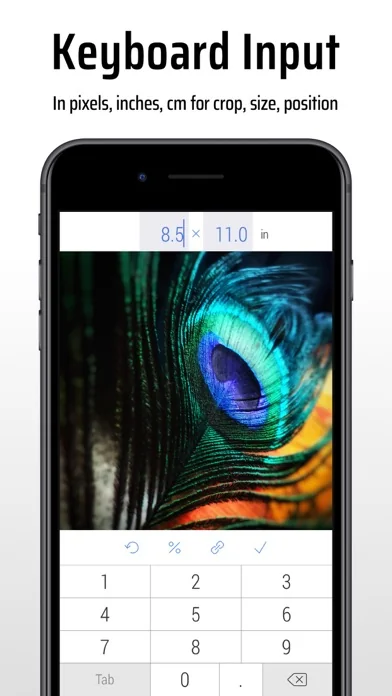
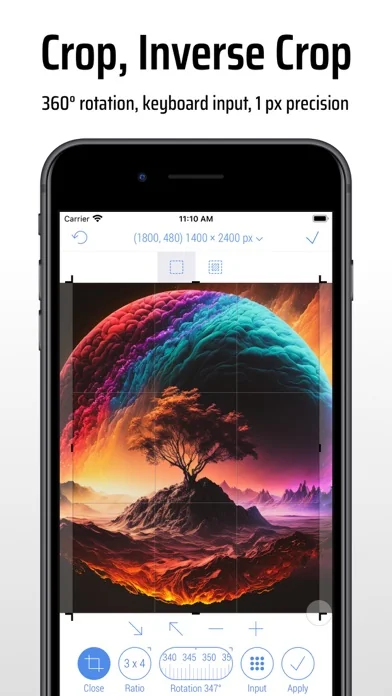
• Crop photos in Standard and Inverse Crop modes, using pixels, inches, centimeters, or percentages
• Adjust the size and position of the crop frame using gestures or by entering values on the keyboard
• Rotate images smoothly within a 0-360° range with a slider or specify rotation angle via keyboard (Long press slider)
• Change the crop aspect ratio using customizable presets (Long press Ratio button)
• Adjust the crop position and size by one pixel in correction mode (Tap a marker)
• View crop-specific image details, including size, position, rotation, and estimated file size
IMAGE RESIZE
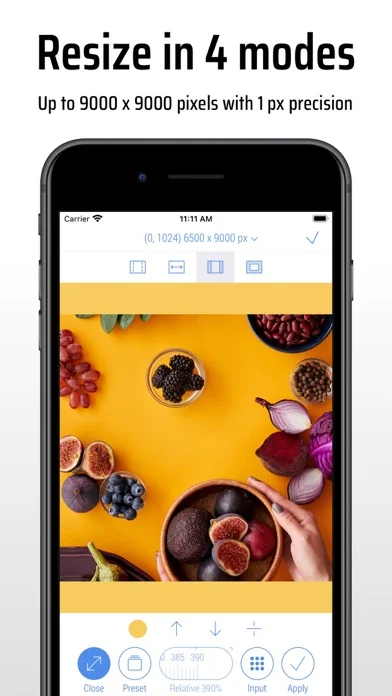
• Resize images in Stretch, Insert, Clip, and Canvas Size modes, using pixels, inches, centimeters, or percentages
• Specify exact image size via the keyboard or customizable presets, up to 9000 x 9000 pixels (81 megapixels)
• Resize proportionally with a percentage slider or specify the relative size via the keyboard (Long press slider)
• Adjust position using gestures and one-pixel corrections for Insert, Clip, and Canvas Size modes
• Preview changes in actual size
• View resize-specific image details, including size, offset, and estimated file size
PHOTO FILTER
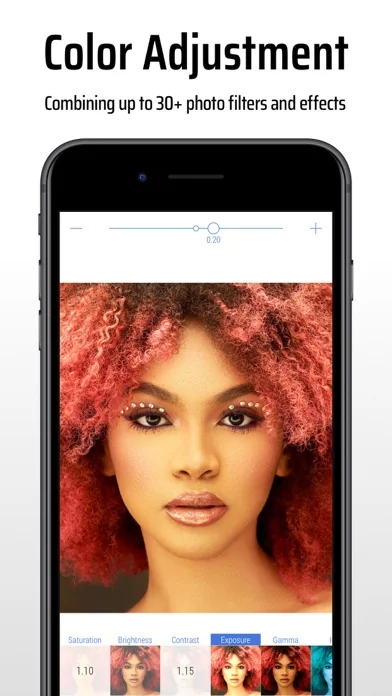
• Apply any combination of photo filters and effects, including Chrome, Bloom, Vignette, Sepia, Sharpen, Blur, and more
• Adjust filter intensity using a slider or horizontal on-screen gestures
• View changes Before / After using two-finger gestures
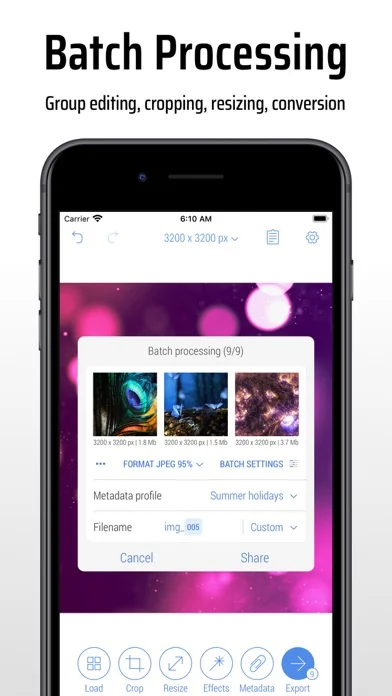
BATCH PROCESSING & WORKFLOWS
• Edit multiple photos simultaneously, applying the same combinations of crop, resize, color, orientation, and metadata changes to all of them
• Use workflows by saving entire editing sessions as reusable Programs on the History screen, and accessing them from the Load screen
• Edit up to 50 photos shared with CropSize from other apps or the Photo Library
PHOTO METADATA
• View image details on the Load and Metadata screen
• Update photo DPI and creation date
• Provide information and copyrights using up to 25 fields of IPTC metadata
• Remove original GPS, EXIF, TIFF, and JFIF details from your photos
• Create and manage multiple metadata profiles for better organization
IMAGE ORIENTATION:
• Flip and rotate images using one-finger swipe gestures on the Main and Batch Processing screen
SHARE AND PRINT:
• Choose export formats: Auto, PNG, TIFF, JPEG, and HEIC, with compression quality for JPEG and HEIC
• Specify metadata settings using one of your previously created metadata profiles
• Configure export filenames using original values, custom entries, or filename patterns
• Save images to the Photo Library, automatically organizing Results and Originals into a convenient album structure
• Print multiple photos on A4, Letter, and other page sizes using exclusive “Print Plus” option from sharing menu
GUIDES
• Explore our step-by-step guides: https://www.cropsize.com/guides
• Watch the video overview of main features: https://vimeo.com/188002923
As an essential element of your editing arsenal, CropSize plays a distinctive role as it allows to specify exact sizes and positions for image crop and resize, where other apps offer only approximate solutions. It also provides detailed information throughout the editing process, making your experience more transparent and intuitive. Additionally, the app's ability to operate in various units of measurement can notably streamline your workflows.
With these comprehensive features, CropSize ensures you have the control you need to achieve your editing goals:
PHOTO CROP
• Crop photos in Standard and Inverse Crop modes, using pixels, inches, centimeters, or percentages
• Adjust the size and position of the crop frame using gestures or by entering values on the keyboard
• Rotate images smoothly within a 0-360° range with a slider or specify rotation angle via keyboard (Long press slider)
• Change the crop aspect ratio using customizable presets (Long press Ratio button)
• Adjust the crop position and size by one pixel in correction mode (Tap a marker)
• View crop-specific image details, including size, position, rotation, and estimated file size
IMAGE RESIZE
• Resize images in Stretch, Insert, Clip, and Canvas Size modes, using pixels, inches, centimeters, or percentages
• Specify exact image size via the keyboard or customizable presets, up to 9000 x 9000 pixels (81 megapixels)
• Resize proportionally with a percentage slider or specify the relative size via the keyboard (Long press slider)
• Adjust position using gestures and one-pixel corrections for Insert, Clip, and Canvas Size modes
• Preview changes in actual size
• View resize-specific image details, including size, offset, and estimated file size
PHOTO FILTER
• Apply any combination of photo filters and effects, including Chrome, Bloom, Vignette, Sepia, Sharpen, Blur, and more
• Adjust filter intensity using a slider or horizontal on-screen gestures
• View changes Before / After using two-finger gestures
BATCH PROCESSING & WORKFLOWS
• Edit multiple photos simultaneously, applying the same combinations of crop, resize, color, orientation, and metadata changes to all of them
• Use workflows by saving entire editing sessions as reusable Programs on the History screen, and accessing them from the Load screen
• Edit up to 50 photos shared with CropSize from other apps or the Photo Library
PHOTO METADATA
• View image details on the Load and Metadata screen
• Update photo DPI and creation date
• Provide information and copyrights using up to 25 fields of IPTC metadata
• Remove original GPS, EXIF, TIFF, and JFIF details from your photos
• Create and manage multiple metadata profiles for better organization
IMAGE ORIENTATION:
• Flip and rotate images using one-finger swipe gestures on the Main and Batch Processing screen
SHARE AND PRINT:
• Choose export formats: Auto, PNG, TIFF, JPEG, and HEIC, with compression quality for JPEG and HEIC
• Specify metadata settings using one of your previously created metadata profiles
• Configure export filenames using original values, custom entries, or filename patterns
• Save images to the Photo Library, automatically organizing Results and Originals into a convenient album structure
• Print multiple photos on A4, Letter, and other page sizes using exclusive “Print Plus” option from sharing menu
GUIDES
• Explore our step-by-step guides: https://www.cropsize.com/guides
• Watch the video overview of main features: https://vimeo.com/188002923
🆕 What's New · v5.5.5
Version 5.5.5 includes core system improvements and minor bug fixes.
We’ve migrated to the latest system SDK to ensure optimal performance and long-term stability. Additionally, we fixed minor bugs to improve the performance of Programs within the app.
Profile & Insights
Everything we know — and don't — about this app and its company.
Identification
- App name
- CropSize: Bildgrößen Editor
- Developer
- Aliaksei Khutarshchykau
- Bundle ID
- com.khuala.imgtool
- App Store URL
- Open in App Store
- Category
- Photo & Video
- Content rating
- 4+
- Languages
- EN
Company
- Website
- www.cropsize.com
- Tagline
- CROPSIZE
- Description
- PHOTO CROP
- Founded
- Not found
- HQ / Address
- Not found
- Employees
- Not found
- Logo
- OG image
Revenue
- Verified revenue / mo
- Not found
- AI revenue estimate / mo
- Not found
- AI annual estimate
- Not found
- ML model estimate / mo
- $38.7K/mo
- Top-grossing rank
- Outside top 100 in US Photo & Video
- All-time revenue
- Not found
- Pricing
- Not found
Founder
- Name
- Not found
- X / Twitter
- https://twitter.com/cropsize
- Not found
- GitHub
- Not found
- X followers
- Not found
- Public statements
- Not found
Funding
- Total raised
- Not found
- Last round
- Not found
- Investors
- Not found
- Crunchbase
- Not found
- AngelList
- Not found
Press & Links
- Articles found
- Not found
- Listed on
- Not found
- Blog
- https://www.cropsize.com/press
- Press / News
- Not found
Contacts & Socials
- Socials
- facebook · twitter · youtube
- Not found
- Phone
- Not found
- Contact page
- https://www.cropsize.com/contact
- About page
- Not found
📈Ratings growth407 ratings+1465% lifetimeShow 3-year history estimate ▾
Tracked (59 weeks) Pre-tracking estimate (37 weeks) · model-based, ±5% noise · anchored to release date and current value
🌍Geographic ReachNot ranked
This app is currently outside the top 100 grossing in all 9 countries we monitor (US, UK, DE, FR, JP, CA, AU, BR, IN). Niche or new apps often launch this way — popularity rankings appear once daily revenue clears the regional threshold.
Profile is built from iTunes Lookup + developer site scrape + ML revenue model. Empty fields show "Not found" — additional sources (Crunchbase, X, IndieHackers, Acquire.com) coming.
More Photo & Video
YouTube
★ 4.7 · 47,130,049 reviews
★ 4.7 · 29,023,044 reviews
Snapchat: Chatte mit Freunden
★ 4.5 · 5,772,278 reviews
Canva: KI-Foto- & Video-Editor
★ 4.9 · 3,343,015 reviews
Twitch: Live Streaming
★ 4.7 · 2,700,069 reviews
InShot - AI Video Editor
★ 4.8 · 2,426,316 reviews
PicCollage: KI Foto Collage
★ 4.8 · 1,808,632 reviews
FaceApp: Gesichtsbearbeitung
★ 4.7 · 1,750,154 reviews
Browse BU Analytics
📚 All 55,000+ Books
🜍 Alchemy & Hermeticism
🔮 Magic & Ritual
🌙 Witchcraft & Paganism
⭐ Astrology & Cosmology
🃏 Divination & Tarot
📜 Photo & Video
✡️ Kabbalah & Jewish Mysticism
🕉️ Mysticism & Contemplation
🕊️ Theosophy & Anthroposophy
🏛️ Freemasonry & Secret Societies
👻 Spiritualism & Afterlife
📖 Sacred Texts & Gnosticism
👁️ Supernatural & Occult Fiction
🧘 Spiritual Development
📚 Esoteric History & Biography
Info
About BU Analytics