
46
BU Score
Emerging
Zoom Rooms
✍️ BU Analytics Review
“
Zoom Rooms is an iOS app from Zoom Communications, Inc. in the Business category, currently rated 3.4★ across 227 ratings. Initial signal reads as mixed reviews — supporters praise core features while critics cite stability/value gaps.
Our BU Score puts it at 46 — Emerging (early traction worth watching). For a Business app, that means early traction worth watching.
Track changes month-over-month in the Performance section below — live snapshot history and revenue forecast included.
creator
📊 Performance Tracking LIVE
Loading…
Rating
—
Reviews
—
Forecast Revenue / mo
—
Snapshots tracked
0
since first record
Range:
💰 Forecast Revenue / mo
MODELRevenue forecast computed from BU's 234 trigger model on each snapshot. Calibrated against ground-truth from 58 verified-revenue apps.
🔬Forecast Breakdown — Why This Estimate?Top 5 of 5 triggers
Our ML model uses 200+ signals from public data. These are the most influential for this app:
| Below-average rating (3.4★)METRIC | −$1,500 | |
| Multilingual (17 languages)METRIC | +$1,500 | |
| Established app (4y old)METRIC | +$800 | |
| Ad-supported / freemiumMETRIC | +$600 | |
| Early-stage install base (227 ratings)METRIC | +$400 |
METRIC = structural app data · REVIEW = mined from user reviews · ✓ VERIFIED = Stripe-verified anchor (TrustMRR)
📈 Reviews Growth
LIVECumulative review count from first BU snapshot. Each point = a tracked update.
💚Sentiment Over Time↑ green = positive · ↓ red = negative
Jun 24
Aug 24
Feb 25
Apr 25
May 25
Jun 25
Jul 25
Nov 25
Feb 26
⭐ Rating Trend
LIVEAverage rating evolution. Updates with each new review batch.
🗓️ Snapshot Timeline
HISTORYEach bar shows a tracked update and the metric delta from the previous snapshot.
App Specs
🔐 Own this app? Claim & verify MRR →💾 328 MB🔞 4+📱 iOS 14.0+🔖 v7.0.5🔄 updated 1d ago🌐 NL, EN, FR, DE, ID +12📂 Business💰 Paid🚀 Launched 2022 (4y old)
📝 About this app
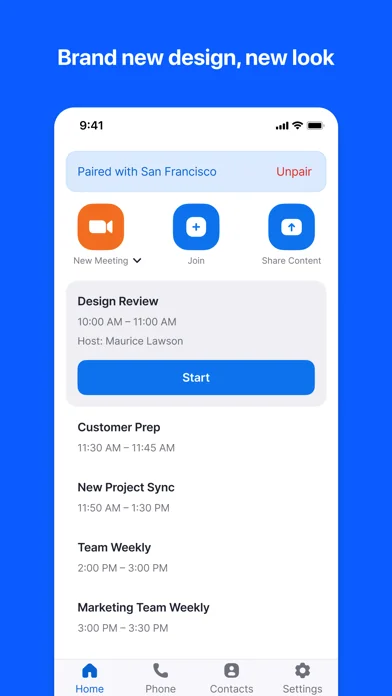
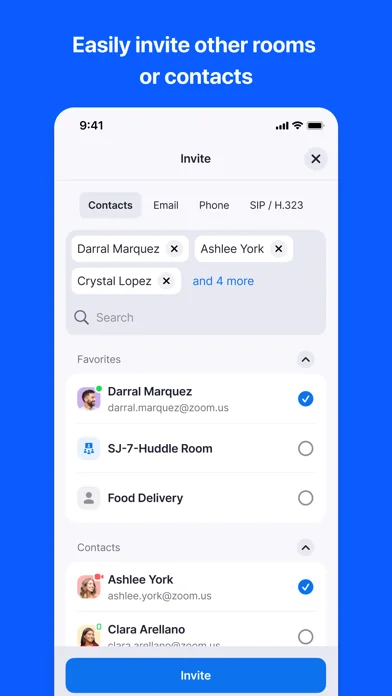
Zoom Rooms video conferencing systems use appliance or custom hardware deployments to bring high-quality video, audio, and sharing to any type of workspace, making it extremely flexible. Easily connect to participants on mobile devices, desktops, and in other rooms across a variety of locations.
The Zoom Rooms app on iPad has five modes to choose from: Zoom Rooms Controller, Zoom Rooms for Touch, scheduling display, workspace desk, and reservation only room.
Zoom Rooms Controller
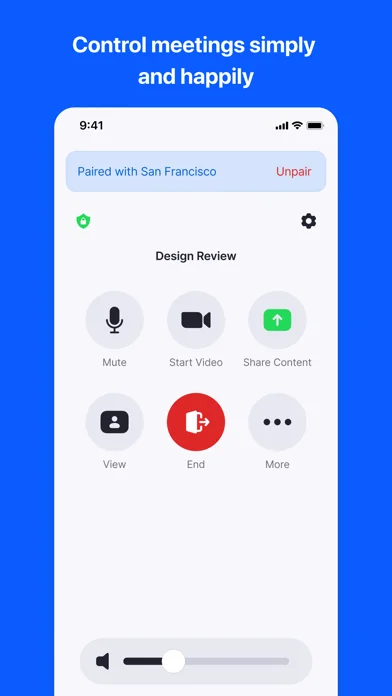
Connect your iPad to a Mac, PC, or Zoom Rooms Appliance as the dedicated Zoom Rooms Controller for that room. The iPhone app allows you to pair with a Zoom Room, giving you similar control functionality from your personal mobile device.
Zoom Rooms for Touch
Use the iPad as a Zoom Rooms (for shared spaces), Zoom Rooms kiosk, personal Zoom Rooms or Zoom Rooms digital signage only device. Zoom Rooms (for shared spaces) and personal Zoom Rooms allow you to start or join Zoom meetings, start a Zoom Whiteboard session, and access other Zoom Rooms features. Zoom Rooms kiosk can be configured to provide virtual receptionist and Workspace Reservation functionality. Zoom Rooms digital signage only can be configured to show digital signage content. Consult Zoom support documentation for more details.
Zoom Rooms Scheduling Display
Connect your iPad to a Mac, PC, or Zoom Rooms Appliance as the dedicated scheduling display for that room. A scheduling display is usually placed outside the room to show current availability, display upcoming meetings, and allow users to reserve the room on an ad-hoc basis.
Workspace Desk
Use the iPad to display the status of a workspace desk and allow users to make ad-hoc reservations or check in for their existing scheduled reservation with a QR code.
Reservation Only Room
Use the iPad to display the status of a workspace reservation only room and allow users to make ad-hoc reservations or check in for their existing scheduled reservation with a QR code.
Simply install the Zoom Rooms app and follow the on-screen instructions to select a mode and activate.
KEY FEATURES:
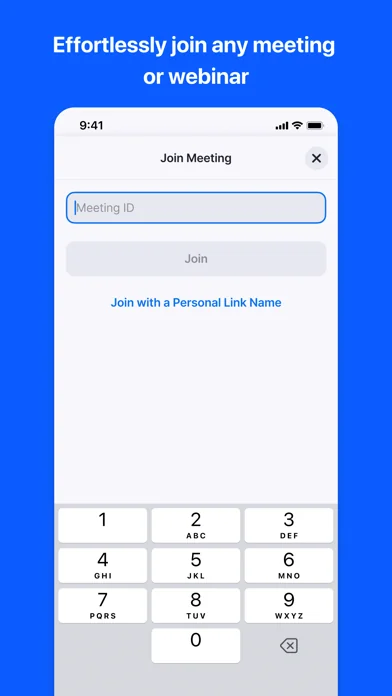
● One touch to join or start a meeting
● Intuitive room controls to easily manage audio, video, participants, and more
● Supports native room control integration to control lighting, projectors, and more
Follow us on social @zoom!
Have a question? Contact us at http://support.zoom.us.
The Zoom Rooms app on iPad has five modes to choose from: Zoom Rooms Controller, Zoom Rooms for Touch, scheduling display, workspace desk, and reservation only room.
Zoom Rooms Controller
Connect your iPad to a Mac, PC, or Zoom Rooms Appliance as the dedicated Zoom Rooms Controller for that room. The iPhone app allows you to pair with a Zoom Room, giving you similar control functionality from your personal mobile device.
Zoom Rooms for Touch
Use the iPad as a Zoom Rooms (for shared spaces), Zoom Rooms kiosk, personal Zoom Rooms or Zoom Rooms digital signage only device. Zoom Rooms (for shared spaces) and personal Zoom Rooms allow you to start or join Zoom meetings, start a Zoom Whiteboard session, and access other Zoom Rooms features. Zoom Rooms kiosk can be configured to provide virtual receptionist and Workspace Reservation functionality. Zoom Rooms digital signage only can be configured to show digital signage content. Consult Zoom support documentation for more details.
Zoom Rooms Scheduling Display
Connect your iPad to a Mac, PC, or Zoom Rooms Appliance as the dedicated scheduling display for that room. A scheduling display is usually placed outside the room to show current availability, display upcoming meetings, and allow users to reserve the room on an ad-hoc basis.
Workspace Desk
Use the iPad to display the status of a workspace desk and allow users to make ad-hoc reservations or check in for their existing scheduled reservation with a QR code.
Reservation Only Room
Use the iPad to display the status of a workspace reservation only room and allow users to make ad-hoc reservations or check in for their existing scheduled reservation with a QR code.
Simply install the Zoom Rooms app and follow the on-screen instructions to select a mode and activate.
KEY FEATURES:
● One touch to join or start a meeting
● Intuitive room controls to easily manage audio, video, participants, and more
● Supports native room control integration to control lighting, projectors, and more
Follow us on social @zoom!
Have a question? Contact us at http://support.zoom.us.
🆕 What's New · v7.0.5
Admin features (Zoom Rooms for Controller):
• Restricted permission mode for Microsoft 365 calendar integration
In-meeting features (Zoom Rooms for Controller):
• AI Note Taker support for Zoom Rooms
In-meeting features (Zoom Rooms for Touch):
• Support Real-time Audio Translation in ZCC
• Support SNT when speaker phone on mute
Resolved Issues:
• Minor bug fixes
• Security enhancements
• Restricted permission mode for Microsoft 365 calendar integration
In-meeting features (Zoom Rooms for Controller):
• AI Note Taker support for Zoom Rooms
In-meeting features (Zoom Rooms for Touch):
• Support Real-time Audio Translation in ZCC
• Support SNT when speaker phone on mute
Resolved Issues:
• Minor bug fixes
• Security enhancements
Profile & Insights
Everything we know — and don't — about this app and its company.
Identification
- App name
- Zoom Rooms
- Developer
- Zoom Communications, Inc.
- Bundle ID
- us.zoom.zpcontroller
- App Store URL
- Open in App Store
- Category
- Business
- Content rating
- 4+
- Languages
- NL, EN, FR, DE, ID, IT, JA, KO, PL, PT, RU, ZH, ES, SV, ZH, TR, VI
Company
- Website
- zoom.us
- Tagline
- Find out what's possible when work connects
- Description
- Modernize workflows with Zoom's trusted collaboration tools: including video meetings, Zoom Chat, VoIP phone, webinars, whiteboard, contact center, and events.
- Founded
- 2011-04-21
- HQ / Address
- San Jose, CA
- Employees
- Not found
- Logo
- OG image
Revenue
- Verified revenue / mo
- Not found
- AI revenue estimate / mo
- Not found
- AI annual estimate
- Not found
- ML model estimate / mo
- $459/mo
- Top-grossing rank
- Outside top 100 in US Business
- All-time revenue
- Not found
- Pricing
- Not found
Founder
- Name
- Eric Yuan
- X / Twitter
- https://twitter.com/zoom
- https://www.linkedin.com/company/zoom/
- GitHub
- Not found
- X followers
- Not found
- Public statements
- Not found
Funding
- Total raised
- Not found
- Last round
- Not found
- Investors
- Not found
- Crunchbase
- Not found
- AngelList
- Not found
Press & Links
- Articles found
- Not found
- Listed on
- Not found
- Blog
- Not found
- Press / News
- Not found
Contacts & Socials
📈Ratings growth227 ratings+22600% lifetimeShow 3-year history estimate ▾
Tracked (27 weeks) Pre-tracking estimate (36 weeks) · model-based, ±5% noise · anchored to release date and current value
🌍Geographic ReachNot ranked
This app is currently outside the top 100 grossing in all 9 countries we monitor (US, UK, DE, FR, JP, CA, AU, BR, IN). Niche or new apps often launch this way — popularity rankings appear once daily revenue clears the regional threshold.
Profile is built from iTunes Lookup + developer site scrape + ML revenue model. Empty fields show "Not found" — additional sources (Crunchbase, X, IndieHackers, Acquire.com) coming.
More by Zoom Communications, Inc.
View all →More Business
ADP Mobile Solutions
★ 4.7 · 4,262,021 reviews
Indeed Jobs
★ 4.8 · 3,901,656 reviews
Microsoft Teams
★ 4.8 · 3,356,470 reviews
Zoom Workplace
★ 4.7 · 3,159,593 reviews
DoorDash - Dasher
★ 4.7 · 2,457,049 reviews
Duo Mobile
★ 4.9 · 2,095,068 reviews
Workday
★ 4.3 · 1,714,839 reviews
USPS Mobile®
★ 4.8 · 1,688,972 reviews
Browse BU Analytics
📚 All 55,000+ Books
🜍 Alchemy & Hermeticism
🔮 Magic & Ritual
🌙 Witchcraft & Paganism
⭐ Astrology & Cosmology
🃏 Divination & Tarot
📜 Business
✡️ Kabbalah & Jewish Mysticism
🕉️ Mysticism & Contemplation
🕊️ Theosophy & Anthroposophy
🏛️ Freemasonry & Secret Societies
👻 Spiritualism & Afterlife
📖 Sacred Texts & Gnosticism
👁️ Supernatural & Occult Fiction
🧘 Spiritual Development
📚 Esoteric History & Biography
Info
About BU Analytics