60
BU Score
Solid
Booklover - eBook Reader
✍️ BU Analytics Review
“
Booklover - eBook Reader is an iOS app from Plastic Software, Inc. in the Food & Drink category, currently rated 4.6★ across 54 ratings. Initial signal reads as mixed reviews — supporters praise core features while critics cite stability/value gaps.
Our BU Score puts it at 60 — Solid (established niche player). For a Food & Drink app, that means established niche player.
Track changes month-over-month in the Performance section below — live snapshot history and revenue forecast included.
📊 Performance Tracking LIVE
Loading…
Rating
—
Reviews
—
Forecast Revenue / mo
—
Snapshots tracked
0
since first record
Range:
💰 Forecast Revenue / mo
MODELRevenue forecast computed from BU's 234 trigger model on each snapshot. Calibrated against ground-truth from 58 verified-revenue apps.
🔬Forecast Breakdown — Why This Estimate?Top 6 of 6 triggers
Our ML model uses 200+ signals from public data. These are the most influential for this app:
| Paid app ($0.00)METRIC | +$2,800 | |
| Excellent rating (4.6★)METRIC | +$2,200 | |
| 5 starREVIEW | +$1,800 | |
| Mature app (11y old)METRIC | +$1,500 | |
| slowREVIEW | −$1,200 | |
| Pre-traction phase (54 ratings)METRIC | −$300 |
METRIC = structural app data · REVIEW = mined from user reviews · ✓ VERIFIED = Stripe-verified anchor (TrustMRR)
📈 Reviews Growth
LIVECumulative review count from first BU snapshot. Each point = a tracked update.
💚Sentiment Over Time↑ green = positive · ↓ red = negative
Sep 24
Dec 24
Feb 25
May 25
Nov 25
Jan 26
⭐ Rating Trend
LIVEAverage rating evolution. Updates with each new review batch.
🗓️ Snapshot Timeline
HISTORYEach bar shows a tracked update and the metric delta from the previous snapshot.
App Specs
🔐 Own this app? Claim & verify MRR →💾 19 MB🔞 17+📱 iOS 18.6+🔖 v3.7.1🔄 updated 2mo ago🌐 EN, JA📂 Food & Drink💰 Paid🚀 Launched 2015 (11y old)
📝 About this app
Booklover is a highly responsive and robust eBook reader. It excels at handling PDFs, manga, and scanned books.
The metadata-driven library management system makes it easy to organize and enjoy a large collection of books in PDF, ZIP/CBZ, and RAR/CBR formats.
Seamlessly integrated with iCloud Drive, books in the iCloud Drive/Booklover folder automatically appear in the app’s library and can be downloaded on demand.
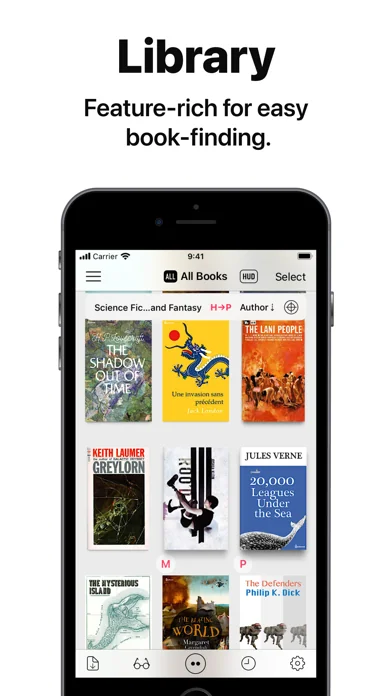
In the library, you can organize books by genres and arrange them using various bibliographic details such as title, author, publisher, and more.
With the search field and powerful Library Navigator, you can quickly locate a book among thousands in your collection.
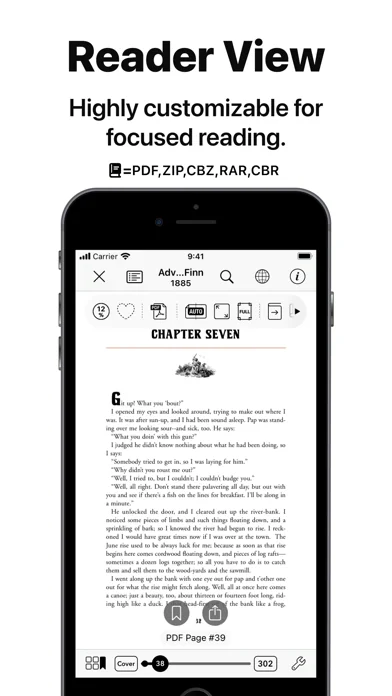
Customize your reading experience with settings for each book, including page layout, transition axis and style, cropping, filters, progress direction, background, and more.
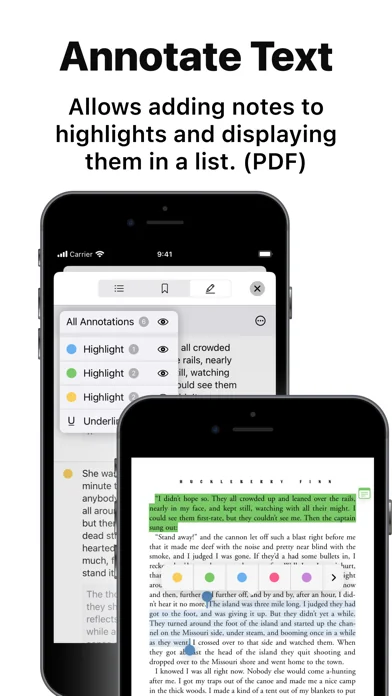
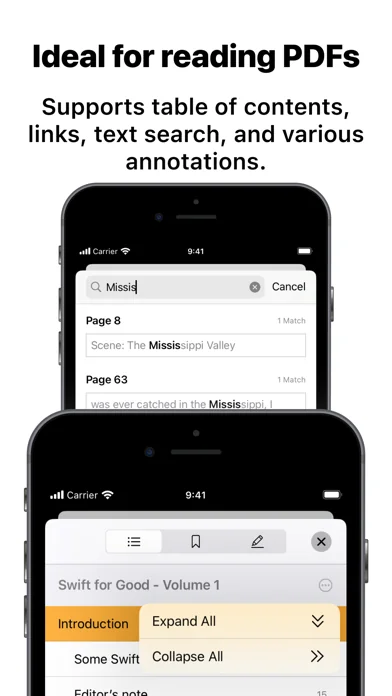
Booklover supports bookmarks with titles and notes, as well as PDF text annotations (highlights), text search, and a table of contents.
Main Features:
# General
• Manage and view eBooks (PDF, ZIP/CBZ, RAR/CBR)
• Support for archived image files in JPG, PNG, GIF, HEIF, WEBP, AVIF, and JPEG XL formats
• Automatic syncing of book files placed in iCloud Drive/Booklover. On-demand caching (download) of the remote files
• Import files via iTunes (Windows), Finder (Mac), AirDrop, Drag & Drop, "Open with..." etc.
• Import files via apps from various cloud storage services, such as Dropbox and OneDrive, as well as other services accessible through the iOS Files app.
• Slide Over / Split View (iPad)
• Hardware keyboard support (mainly in the reader)
# Library
• Section books by genre (ON/OFF)
• The Library Navigator (ON/OFF)
• Histories of added and opened books
• Context Menu for individual books (long-press a book cover)
• Change sort order: By Title, Author, Publisher, Filename, Added Date, etc.
• Alphanumeric Index Labels (ON/OFF)
• Toggle display of cover accessories
• Adjust cover grid size
• Responsive Shadow (shows page volume with shadow)
• Filter books by Status, Genre, Tags, etc.
• Search books by various bibliographic details, file name, and tags
# Reader
• PDF text annotations (highlights) with notes, text search, and a table of contents
• Bookmarks with titles and notes
• Lists of bookmarks and PDF annotations
• Page transition settings: Axis (Horizontal, Vertical), Style (Scroll, Continuous Scroll, Stack, Crossfade, Zoom fade, Instant)
• Progress direction setting: Left to Right, Right to Left (for vertical text, manga, Arabic, etc.)
• Page layout setting: Automatic, Single-Page, Two-Pages (spread)
• Separate page layout settings for view orientation (Portrait / Landscape)
• Page trimming (for images only)
• Page sizing: Show All, Width-Fit, Height-Fit
• Page thumbnail view (overview, bookmarks)
• Image correction filters
• Dynamic background (When the "Background Color" option for a book is set to "Dynamic")
• Adjust page spread position (Insert adjuster page at the beginning of the book body)
• Text recognition within images (with compatible devices only)
• Export (share) the currently displayed page
# Book Management
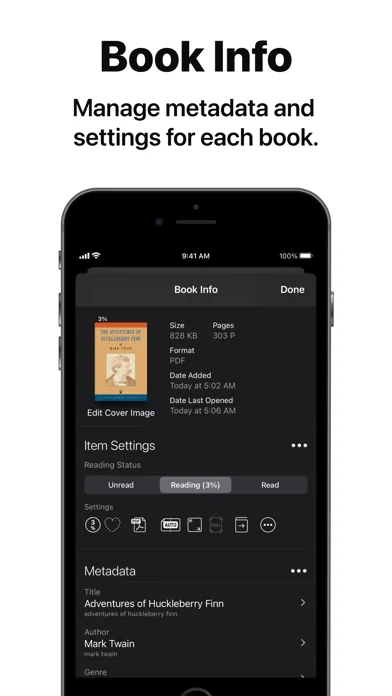
• Edit metadata: Title, Author, Genre, Publisher, Published Date, ISBN, etc.
• Edit Tags (Can be used as filter criteria in the side menu)
• Extract metadata (title/author) from PDFs
• Extract various metadata from file names with configurable extraction rules
• Automatic/Manual cropping of book covers
• Batch modification of book settings and metadata
• Transfer book files: "Open with...", AirDrop, Drag & Drop, etc.
• Can manage the content files and data separately ("Ghost Book")
———————————————
# Acknowledgments [Books used in the screenshots]
• "Give My Regards to Black Jack" by SHUHO SATO (Manga on Web: http://mangaonweb.com)
• Public domain books from Feedbooks (http://www.feedbooks.com)
• Public domain comics from digitalcomicmuseum.com (http://digitalcomicmuseum.com)
The metadata-driven library management system makes it easy to organize and enjoy a large collection of books in PDF, ZIP/CBZ, and RAR/CBR formats.
Seamlessly integrated with iCloud Drive, books in the iCloud Drive/Booklover folder automatically appear in the app’s library and can be downloaded on demand.
In the library, you can organize books by genres and arrange them using various bibliographic details such as title, author, publisher, and more.
With the search field and powerful Library Navigator, you can quickly locate a book among thousands in your collection.
Customize your reading experience with settings for each book, including page layout, transition axis and style, cropping, filters, progress direction, background, and more.
Booklover supports bookmarks with titles and notes, as well as PDF text annotations (highlights), text search, and a table of contents.
Main Features:
# General
• Manage and view eBooks (PDF, ZIP/CBZ, RAR/CBR)
• Support for archived image files in JPG, PNG, GIF, HEIF, WEBP, AVIF, and JPEG XL formats
• Automatic syncing of book files placed in iCloud Drive/Booklover. On-demand caching (download) of the remote files
• Import files via iTunes (Windows), Finder (Mac), AirDrop, Drag & Drop, "Open with..." etc.
• Import files via apps from various cloud storage services, such as Dropbox and OneDrive, as well as other services accessible through the iOS Files app.
• Slide Over / Split View (iPad)
• Hardware keyboard support (mainly in the reader)
# Library
• Section books by genre (ON/OFF)
• The Library Navigator (ON/OFF)
• Histories of added and opened books
• Context Menu for individual books (long-press a book cover)
• Change sort order: By Title, Author, Publisher, Filename, Added Date, etc.
• Alphanumeric Index Labels (ON/OFF)
• Toggle display of cover accessories
• Adjust cover grid size
• Responsive Shadow (shows page volume with shadow)
• Filter books by Status, Genre, Tags, etc.
• Search books by various bibliographic details, file name, and tags
# Reader
• PDF text annotations (highlights) with notes, text search, and a table of contents
• Bookmarks with titles and notes
• Lists of bookmarks and PDF annotations
• Page transition settings: Axis (Horizontal, Vertical), Style (Scroll, Continuous Scroll, Stack, Crossfade, Zoom fade, Instant)
• Progress direction setting: Left to Right, Right to Left (for vertical text, manga, Arabic, etc.)
• Page layout setting: Automatic, Single-Page, Two-Pages (spread)
• Separate page layout settings for view orientation (Portrait / Landscape)
• Page trimming (for images only)
• Page sizing: Show All, Width-Fit, Height-Fit
• Page thumbnail view (overview, bookmarks)
• Image correction filters
• Dynamic background (When the "Background Color" option for a book is set to "Dynamic")
• Adjust page spread position (Insert adjuster page at the beginning of the book body)
• Text recognition within images (with compatible devices only)
• Export (share) the currently displayed page
# Book Management
• Edit metadata: Title, Author, Genre, Publisher, Published Date, ISBN, etc.
• Edit Tags (Can be used as filter criteria in the side menu)
• Extract metadata (title/author) from PDFs
• Extract various metadata from file names with configurable extraction rules
• Automatic/Manual cropping of book covers
• Batch modification of book settings and metadata
• Transfer book files: "Open with...", AirDrop, Drag & Drop, etc.
• Can manage the content files and data separately ("Ghost Book")
———————————————
# Acknowledgments [Books used in the screenshots]
• "Give My Regards to Black Jack" by SHUHO SATO (Manga on Web: http://mangaonweb.com)
• Public domain books from Feedbooks (http://www.feedbooks.com)
• Public domain comics from digitalcomicmuseum.com (http://digitalcomicmuseum.com)
🆕 What's New · v3.7.1
This version addresses a rendering issue in the reader view and introduces some usability improvements.
Fixes
• [Reader View] Mitigated small gaps that might be shown at the edge of the pages when magnifying content with small logical sizes
Improvements
• [Library] Selections for books are preserved after making editing actions for selected books, so that another editing action can be made successively
• Other miscellaneous user experience improvements
Others
• As previously announced, the in-app "User Authentication" feature has been removed. Please use the operating system's built-in “Lock or Hide Apps” feature instead of Booklover’s user authentication.
• Starting with new installations of this version (3.7.0), “Give My Regards to Black Jack” is no longer provided within the Booklover app. For users updating from versions prior to 3.7.0, availability will also be discontinued in the next release. Please download it from the official website of the author Shuho Sato at https://densho810.com/free/ .
Fixes
• [Reader View] Mitigated small gaps that might be shown at the edge of the pages when magnifying content with small logical sizes
Improvements
• [Library] Selections for books are preserved after making editing actions for selected books, so that another editing action can be made successively
• Other miscellaneous user experience improvements
Others
• As previously announced, the in-app "User Authentication" feature has been removed. Please use the operating system's built-in “Lock or Hide Apps” feature instead of Booklover’s user authentication.
• Starting with new installations of this version (3.7.0), “Give My Regards to Black Jack” is no longer provided within the Booklover app. For users updating from versions prior to 3.7.0, availability will also be discontinued in the next release. Please download it from the official website of the author Shuho Sato at https://densho810.com/free/ .
Profile & Insights
Everything we know — and don't — about this app and its company.
Identification
- App name
- Booklover - eBook Reader
- Developer
- Plastic Software, Inc.
- Bundle ID
- com.plastic-software.Booklover
- App Store URL
- Open in App Store
- Category
- Food & Drink
- Content rating
- 17+
- Languages
- EN, JA
Company
- Website
- Not found
- Tagline
- Today
- Description
- Find apps and games for iPhone, iPad, Mac, and more on the App Store.
- Founded
- Not found
- HQ / Address
- Not found
- Employees
- Not found
- Logo
- OG image
Revenue
- Verified revenue / mo
- Not found
- AI revenue estimate / mo
- Not found
- AI annual estimate
- Not found
- ML model estimate / mo
- $3.7K/mo
- Top-grossing rank
- Outside top 100 in US Food & Drink
- All-time revenue
- Not found
- Pricing
- Not found
Founder
- Name
- Not found
- X / Twitter
- Not found
- Not found
- GitHub
- Not found
- X followers
- Not found
- Public statements
- Not found
Funding
- Total raised
- Not found
- Last round
- Not found
- Investors
- Not found
- Crunchbase
- Not found
- AngelList
- Not found
Press & Links
- Articles found
- Not found
- Listed on
- Not found
- Blog
- https://apps.apple.com/us/app/letterloop-group-newsletters/id6468623700
- Press / News
- Not found
Contacts & Socials
- Socials
- Not found
- Not found
- Phone
- Not found
- Contact page
- Not found
- About page
- https://apps.apple.com/us/iphone/story/id1648916522
📈Ratings growth54 ratings+5300% lifetimeShow 3-year history estimate ▾
Tracked (18 weeks) Pre-tracking estimate (37 weeks) · model-based, ±5% noise · anchored to release date and current value
🌍Geographic ReachNot ranked
This app is currently outside the top 100 grossing in all 9 countries we monitor (US, UK, DE, FR, JP, CA, AU, BR, IN). Niche or new apps often launch this way — popularity rankings appear once daily revenue clears the regional threshold.
Profile is built from iTunes Lookup + developer site scrape + ML revenue model. Empty fields show "Not found" — additional sources (Crunchbase, X, IndieHackers, Acquire.com) coming.
More Food & Drink
DoorDash: Food, Grocery, More
★ 4.8 · 21,691,269 reviews
Uber Eats: Essen, Lieferdienst
★ 4.8 · 10,346,813 reviews
McDonald's
★ 4.8 · 7,675,129 reviews
Kindle
★ 4.9 · 5,609,451 reviews
Audible: Audiobooks & Podcasts
★ 4.8 · 5,507,414 reviews
Libby, die Bibliotheks-App
★ 4.7 · 4,126,898 reviews
Chick-fil-A
★ 4.9 · 3,909,638 reviews
Hoopla Digital
★ 4.8 · 1,341,327 reviews
Browse BU Analytics
📚 All 55,000+ Books
🜍 Alchemy & Hermeticism
🔮 Magic & Ritual
🌙 Witchcraft & Paganism
⭐ Astrology & Cosmology
🃏 Divination & Tarot
📜 Food & Drink
✡️ Kabbalah & Jewish Mysticism
🕉️ Mysticism & Contemplation
🕊️ Theosophy & Anthroposophy
🏛️ Freemasonry & Secret Societies
👻 Spiritualism & Afterlife
📖 Sacred Texts & Gnosticism
👁️ Supernatural & Occult Fiction
🧘 Spiritual Development
📚 Esoteric History & Biography
Info
About BU Analytics