59
BU Score
Solid
ShuBook 2P 書僕
✍️ bumetric analysis
“
ShuBook 2P 書僕 is an iOS app from Ambibma Ltd. in the Food & Drink category, currently rated 4.4★ across 7 ratings. Initial signal reads as mixed reviews: supporters praise core features while critics cite stability and value gaps.
Our BU Score puts it at 59: Solid (established niche player). For a Food & Drink app, that means established niche player.
Track changes month-over-month in the Performance section below: live snapshot history and revenue forecast included.
📊 Performance Tracking LIVE
Loading…
Rating
—
Reviews
—
Forecast Revenue / mo
—
Snapshots tracked
0
since first record
Range:
💰 Forecast Revenue / mo
MODELRevenue forecast computed from BU's 234 trigger model on each snapshot. Calibrated against ground-truth from 58 verified-revenue apps.
🔬Forecast Breakdown — Why This Estimate?Top 6 of 6 triggers
Our ML model uses 200+ signals from public data. These are the most influential for this app:
| Paid app ($0.00)METRIC | +$2,800 | |
| 5 starREVIEW | +$1,800 | |
| excellent appREVIEW | +$1,500 | |
| Mature app (11y old)METRIC | +$1,500 | |
| Good rating (4.4★)METRIC | +$800 | |
| Pre-traction phase (7 ratings)METRIC | −$300 |
METRIC = structural app data · REVIEW = mined from user reviews · ✓ VERIFIED = Stripe-verified anchor (TrustMRR)
📈 Reviews Growth
LIVECumulative review count from first BU snapshot. Each point = a tracked update.
⭐ Rating Trend
LIVEAverage rating evolution. Updates with each new review batch.
🗓️ Snapshot Timeline
HISTORYEach bar shows a tracked update and the metric delta from the previous snapshot.
App Specs
🔐 Own this app? Claim & verify MRR →💾 53 MB🔞 17+📱 iOS 9.0+🔖 v3.3.2🔄 updated 6y ago🌐 EN, ZH, ZH📂 Food & Drink💰 Paid🚀 Launched 2014 (11y old)
📝 About this app
自動轉換中文橫排為豎排、簡體為繁體、文字為語音的讀書與聽書app首選
ShuBook 2P has all the functionalities of ShuBook 2M, plus extensive Chinese book specific features.
■ 中文書專用特色(Chinese book specific features)
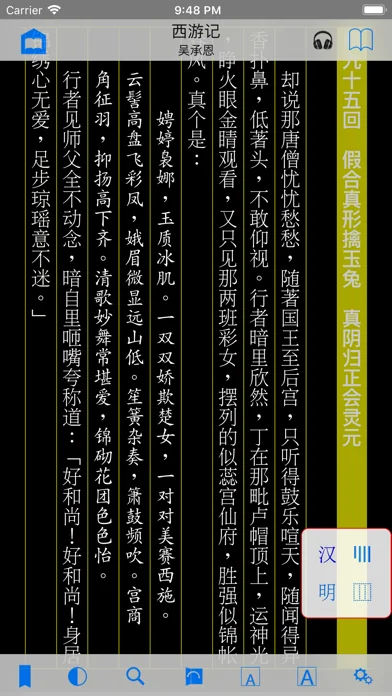
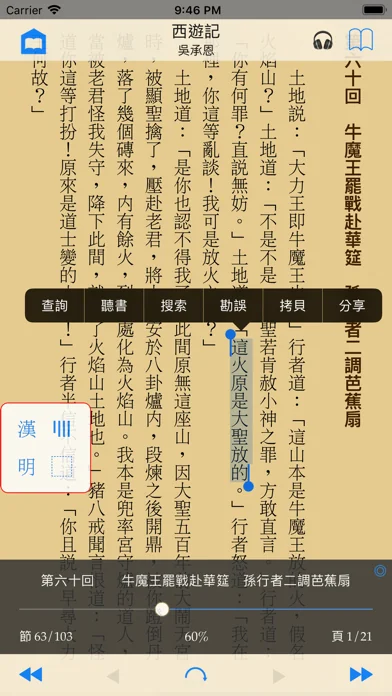
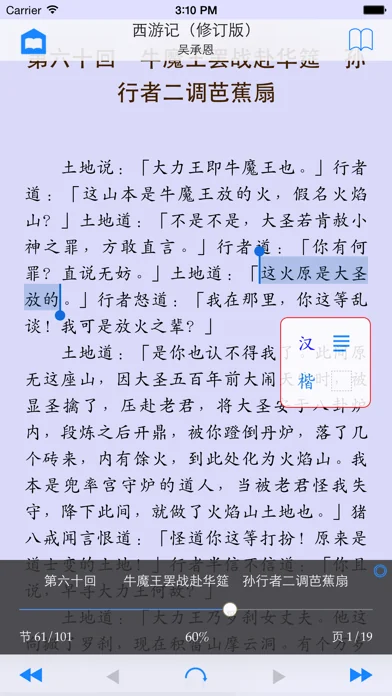
① 新的圖章型中文專用控制界面:印泥紅框,內含四個帶藍字半透明按鈕,分別控制橫豎、線框、簡繁、字體的轉換;圖章本身可以自由拖動
② 橫排與豎排的雙向轉換:原本為橫排設計的書也可以豎排(直排)讀
③ 豎排線框:有線框為仿古線裝書風格,格調優雅;無線框為仿今平装書風格,格調簡約
④ 簡體字與繁體字的雙向轉換:一個簡體字可能對應多個繁體字(正體字),正確轉換需要看前文後理。新算法再次提高了分析前文後理的能力,簡繁轉換的準確率繼續遠遠領先於同類軟件
⑤ 內置三套優質字體(明體、楷體、黑體):可以在同一本書裡混合使用,例如一般文字為明體,標題為黑體,而引文或韻文(如詩詞歌賦等)為楷體,讓版面更美觀、更好讀
⑥ 控制界面自動適應橫排與豎排:跳頁滑桿、書頁底部顯示閱讀進度幼線、翻頁手勢等的前進後退方向都一起隨橫排豎排的切換而變
⑦ 中文書與外文書各自一套排版參數設定,互不干擾:比如中文書用楷體,對應行距要較大;外文書則用 Georgia,對應行距可較小。
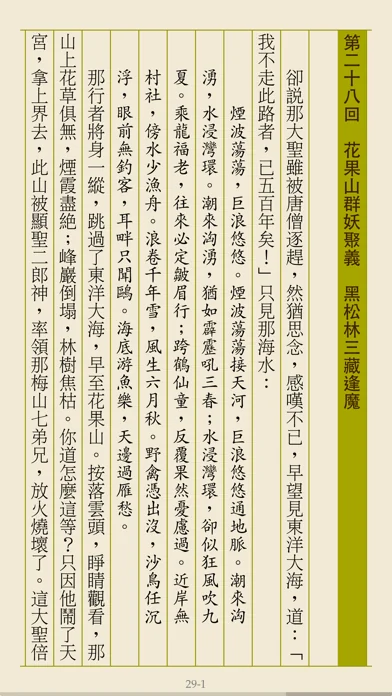
⑧ 自動產生多字體混編書:內置的碧瑪版《西遊記》示範了如何以空格符號去標記韻文或引文,以微小的增量編輯成本,得到超值的排版效果
⑨ 支持讀者勘誤「好讀網站UPDB格式」書的整個流程:下載書本;發現錯謬,提出更正,並製作勘誤表;上傳勘誤表
⑩ 支持自創的「書僕開放格式」,以方便用戶自己製作TXT電子書,格式簡易,效果美觀
⑪ 支持聽書功能,適用於所有豎排中文書,可選普通話或廣東話、朗讀語速等等,關掉屏幕也可聽書
■ READING BOOKS
① Read DRM-free and password-free books of 3 fluid-layout formats and 5 fixed-layout formats
② Read fluid-layout formats (EPUB, TXT, UPDB) in horizontal page-turning mode
③ Read fixed-layout formats (PDF, RTF, DOC, XLS, PPT) in vertical page-scrolling mode
④ Read in both portrait and landscape orientation
⑤ Long press on text to lookup built-in dictionary, read aloud, and copy
⑥ Sync book reading progress via AirDrop and email
⑦ Support all compatible iPhone and iPad models at native screen resolution
⑧ Provide an option to auto-reopen last book read at the page you left off for fluid-layout formats and fixed-layout formats
For fluid-layout formats:
① Customize various layout parameters (font family, font size, text alignment, page margin, paragraph indentation, paragraph spacing, line spacing, letter spacing, hyphenation) and apply color themes
② Import unlimited number of user font files (TTF, TTC, OTF) via AirDrop, DropBox, Safari, Mail
③ Provide 16 built-in eye-pleasing color themes and 3 customizable color themes, where you can control background, text, heading and link colors
④ Jump to any page quickly and precisely via page slider with an unobtrusive reading progress line at the bottom of the page
⑤ Offer Night mode and brightness control by vertical swipe to complement iOS system brightness control via Control Center
⑥ Perform fast full text search and automatically save recent searches
⑦ Save an unlimited number of bookmarks per book
⑧ Long press on text to lookup built-in dictionary, read aloud, copy, search (and correct for UPDB)
■ MANAGING BOOKS
① Manage easily thousands of books in Library
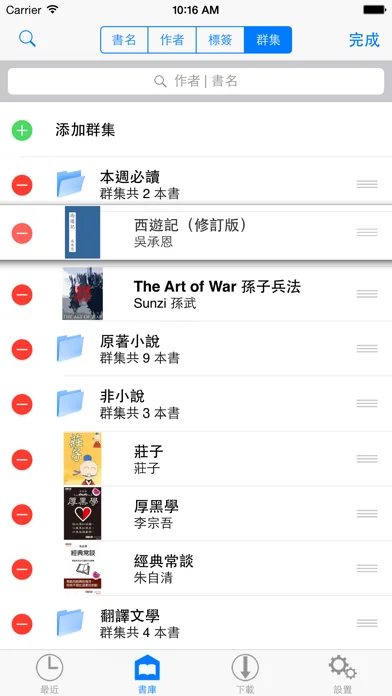
② Group books by titles, authors, tags, and clusters with reading progress display
③ Group books by authors hierarchically in Library allowing multiple authors per book
④ Group books by tags hierarchically in Library allowing multiple tags per book
⑤ Group books by clusters hierarchically in Library allowing adding/removing/editing of clusters and re-ordering of clusters and their books
⑥ Search books in Library by title or author, or with help of the index bar
⑦ Edit book info, including title, author, tags and book cover image, for which you can choose from Album and online sources
■ GETTING BOOKS IN AND OUT
① Provide convenient access to millions of free ebooks from multiple sources (HTML websites and OPDS catalogs), including Dropbox and websites you input
② Perform TXT encoding auto-detection and TXT Smart Break after download/import of TXT files
③ Support downloading tags of books from OPDS catalogs
④ Smart batch download from calibre (and other OPDS servers on LAN) with an option to skip downloading books that are already in Library
⑤ Support iTunes File Sharing to import and export books
⑥ Send and receive books by email
ShuBook 2P has all the functionalities of ShuBook 2M, plus extensive Chinese book specific features.
■ 中文書專用特色(Chinese book specific features)
① 新的圖章型中文專用控制界面:印泥紅框,內含四個帶藍字半透明按鈕,分別控制橫豎、線框、簡繁、字體的轉換;圖章本身可以自由拖動
② 橫排與豎排的雙向轉換:原本為橫排設計的書也可以豎排(直排)讀
③ 豎排線框:有線框為仿古線裝書風格,格調優雅;無線框為仿今平装書風格,格調簡約
④ 簡體字與繁體字的雙向轉換:一個簡體字可能對應多個繁體字(正體字),正確轉換需要看前文後理。新算法再次提高了分析前文後理的能力,簡繁轉換的準確率繼續遠遠領先於同類軟件
⑤ 內置三套優質字體(明體、楷體、黑體):可以在同一本書裡混合使用,例如一般文字為明體,標題為黑體,而引文或韻文(如詩詞歌賦等)為楷體,讓版面更美觀、更好讀
⑥ 控制界面自動適應橫排與豎排:跳頁滑桿、書頁底部顯示閱讀進度幼線、翻頁手勢等的前進後退方向都一起隨橫排豎排的切換而變
⑦ 中文書與外文書各自一套排版參數設定,互不干擾:比如中文書用楷體,對應行距要較大;外文書則用 Georgia,對應行距可較小。
⑧ 自動產生多字體混編書:內置的碧瑪版《西遊記》示範了如何以空格符號去標記韻文或引文,以微小的增量編輯成本,得到超值的排版效果
⑨ 支持讀者勘誤「好讀網站UPDB格式」書的整個流程:下載書本;發現錯謬,提出更正,並製作勘誤表;上傳勘誤表
⑩ 支持自創的「書僕開放格式」,以方便用戶自己製作TXT電子書,格式簡易,效果美觀
⑪ 支持聽書功能,適用於所有豎排中文書,可選普通話或廣東話、朗讀語速等等,關掉屏幕也可聽書
■ READING BOOKS
① Read DRM-free and password-free books of 3 fluid-layout formats and 5 fixed-layout formats
② Read fluid-layout formats (EPUB, TXT, UPDB) in horizontal page-turning mode
③ Read fixed-layout formats (PDF, RTF, DOC, XLS, PPT) in vertical page-scrolling mode
④ Read in both portrait and landscape orientation
⑤ Long press on text to lookup built-in dictionary, read aloud, and copy
⑥ Sync book reading progress via AirDrop and email
⑦ Support all compatible iPhone and iPad models at native screen resolution
⑧ Provide an option to auto-reopen last book read at the page you left off for fluid-layout formats and fixed-layout formats
For fluid-layout formats:
① Customize various layout parameters (font family, font size, text alignment, page margin, paragraph indentation, paragraph spacing, line spacing, letter spacing, hyphenation) and apply color themes
② Import unlimited number of user font files (TTF, TTC, OTF) via AirDrop, DropBox, Safari, Mail
③ Provide 16 built-in eye-pleasing color themes and 3 customizable color themes, where you can control background, text, heading and link colors
④ Jump to any page quickly and precisely via page slider with an unobtrusive reading progress line at the bottom of the page
⑤ Offer Night mode and brightness control by vertical swipe to complement iOS system brightness control via Control Center
⑥ Perform fast full text search and automatically save recent searches
⑦ Save an unlimited number of bookmarks per book
⑧ Long press on text to lookup built-in dictionary, read aloud, copy, search (and correct for UPDB)
■ MANAGING BOOKS
① Manage easily thousands of books in Library
② Group books by titles, authors, tags, and clusters with reading progress display
③ Group books by authors hierarchically in Library allowing multiple authors per book
④ Group books by tags hierarchically in Library allowing multiple tags per book
⑤ Group books by clusters hierarchically in Library allowing adding/removing/editing of clusters and re-ordering of clusters and their books
⑥ Search books in Library by title or author, or with help of the index bar
⑦ Edit book info, including title, author, tags and book cover image, for which you can choose from Album and online sources
■ GETTING BOOKS IN AND OUT
① Provide convenient access to millions of free ebooks from multiple sources (HTML websites and OPDS catalogs), including Dropbox and websites you input
② Perform TXT encoding auto-detection and TXT Smart Break after download/import of TXT files
③ Support downloading tags of books from OPDS catalogs
④ Smart batch download from calibre (and other OPDS servers on LAN) with an option to skip downloading books that are already in Library
⑤ Support iTunes File Sharing to import and export books
⑥ Send and receive books by email
🆕 What's New · v3.3.2
- Fixed some minor bugs
Profile & Insights
Everything we know — and don't — about this app and its company.
Identification
- App name
- ShuBook 2P 書僕
- Developer
- Ambibma Ltd.
- Bundle ID
- com.ambibma.ShuBook2P
- App Store URL
- Open in App Store
- Category
- Food & Drink
- Content rating
- 17+
- Languages
- EN, ZH, ZH
Company
- Website
- www.ambibma.com
- Tagline
- Not found
- Description
- Not found
- Founded
- Not found
- HQ / Address
- Not found
- Employees
- Not found
- Logo
- Not found
Revenue
- Verified revenue / mo
- Not found
- AI revenue estimate / mo
- Not found
- AI annual estimate
- Not found
- ML model estimate / mo
- $19.2K/mo
- Top-grossing rank
- Outside top 100 in US Food & Drink
- All-time revenue
- Not found
- Pricing
- Not found
Founder
- Name
- Not found
- X / Twitter
- Not found
- Not found
- GitHub
- Not found
- X followers
- Not found
- Public statements
- Not found
Funding
- Total raised
- Not found
- Last round
- Not found
- Investors
- Not found
- Crunchbase
- Not found
- AngelList
- Not found
Press & Links
- Articles found
- Not found
- Listed on
- Not found
- Blog
- Not found
- Press / News
- Not found
Contacts & Socials
- Socials
- Not found
- Not found
- Phone
- Not found
- Contact page
- Not found
- About page
- Not found
⭐Recent App Store Reviews8 latest · avg 3.75★ · 50.0% 5★ · 12.5% 1★
5★4 (50%)
4★1 (12%)
3★1 (12%)
2★1 (12%)
1★1 (12%)
+0 ratings/week
Praise: excellent ×1 great ×1 favorite ×1
Top positive
★★★★★ 讀書神器、好讀下載方便
早前下載好讀 EPUB 書本有問題,起初還以為是書僕的錯誤,聯絡書僕客服之後,才知道是好讀方面出錯,現在好讀已經修正了問題。非常感謝書僕客服,雖然不是他們的錯誤,但他們亦盡力協助。一流的軟件,一流的服務,他們贏得我的最高評價。…
★★★★★ 最好用的读书app
太棒了,这个app我已经下载了好几年啦,时不时的用用,期间还下载过别的好多读书app,多数尚可的用用就被开发者当作摇钱树了,感觉shubook长久以来一如既往,一直是最好用的一个,所以最近购买了付费版,希望开发者再接再厉,保持优良传统…
Top negative
★☆☆☆☆ Not worth the trouble to upgrade from 1F
I have ShuBook 1F installed a while ago. I made the mistake of trying upgrade to 2P.
I have couple hundred of books about 2100mb.
The migration procedure requires total size
of books be less than 2 gig bytes.
Unless I put in lots of work…
★★☆☆☆ 好讀下載錯誤
無法下載好讀網的書…
📈Ratings growth7 ratings+600% lifetimeShow 3-year history estimate ▾
Tracked (10 weeks) Pre-tracking estimate (37 weeks) · model-based, ±5% noise · anchored to release date and current value
🌍Geographic ReachNot ranked
This app is currently outside the top 100 grossing in all 9 countries we monitor (US, UK, DE, FR, JP, CA, AU, BR, IN). Niche or new apps often launch this way — popularity rankings appear once daily revenue clears the regional threshold.
Profile is built from iTunes Lookup + developer site scrape + ML revenue model. Empty fields show "Not found" — additional sources (Crunchbase, X, IndieHackers, Acquire.com) coming.
More by Ambibma Ltd.
View all →Full revenue analysis
Read the article-style breakdown for ShuBook 2P 書僕: category rank, percentile, growth signal, comparable apps, and how the forecast is calibrated against verified-MRR anchors in this niche.