42
BU Score
Emerging
System Status -
✍️ BU Analytics Review
“
System Status - is an iOS app from Kenichi Yoshikawa in the Productivity category, currently rated 4.0★ across 3 ratings. Initial signal reads as largely positive sentiment, users highlighting consistency and feature depth.
Our BU Score puts it at 42 — Emerging (early traction worth watching). For a Productivity app, that means early traction worth watching.
Track changes month-over-month in the Performance section below — live snapshot history and revenue forecast included.
📊 Performance Tracking LIVE
Loading…
Rating
—
Reviews
—
Forecast Revenue / mo
—
Snapshots tracked
0
since first record
Range:
💰 Forecast Revenue / mo
MODELRevenue forecast computed from BU's 234 trigger model on each snapshot. Calibrated against ground-truth from 58 verified-revenue apps.
🔬Forecast Breakdown — Why This Estimate?Top 5 of 5 triggers
Our ML model uses 200+ signals from public data. These are the most influential for this app:
| Paid app ($0.00)METRIC | +$2,800 | |
| Mature app (10y old)METRIC | +$1,500 | |
| Multilingual (13 languages)METRIC | +$1,500 | |
| Good rating (4.0★)METRIC | +$800 | |
| Pre-traction phase (3 ratings)METRIC | −$300 |
METRIC = structural app data · REVIEW = mined from user reviews · ✓ VERIFIED = Stripe-verified anchor (TrustMRR)
📈 Reviews Growth
LIVECumulative review count from first BU snapshot. Each point = a tracked update.
⭐ Rating Trend
LIVEAverage rating evolution. Updates with each new review batch.
🗓️ Snapshot Timeline
HISTORYEach bar shows a tracked update and the metric delta from the previous snapshot.
App Specs
🔐 Own this app? Claim & verify MRR →💾 1 MB🔞 4+📱 iOS 11.0+🔖 v6.1.2🔄 updated 3y ago🌐 AR, EN, FR, DE, HI +8📂 Productivity💰 Paid🚀 Launched 2015 (10y old)
📝 About this app
Detail information on operating system indicates it, and it's possible to save it and print.
iPhone user can see wide screen view because it corresponds to a horizontal screen of the iPhone. In addition, iPad Air2 or later, iPad mini 4 or later, and iPad Pro or later can Split View and Slide Over and iPhone with 3D Touch that can be memory optimization from home screen.
Also supports dark mode, and you can change the appearance of the app with Setting: Appearance in INFORMATION.
Features
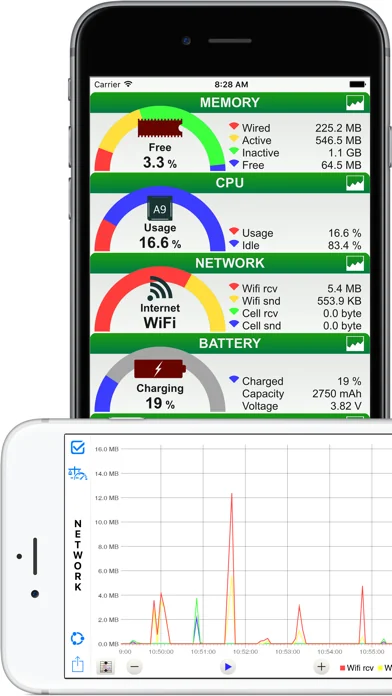
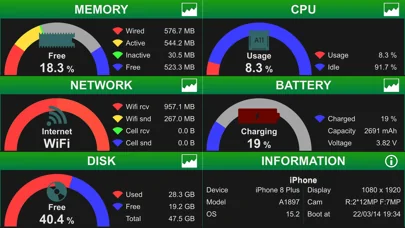
GENERAL : Rial time monitoring of memory, CPU, battery, disk usage and network connect
- Memory : Fee space ratio wired, active, inactive and free memory usage
- CPU : Usage and idle state
- Network : Wi-Fi, 3G or LTE connection state, sent and received data since system boot time
- Battery : Charge level and state (Full, Unplugged or Charging)
- Disk : Used, free and total space
- Information : Summary device information
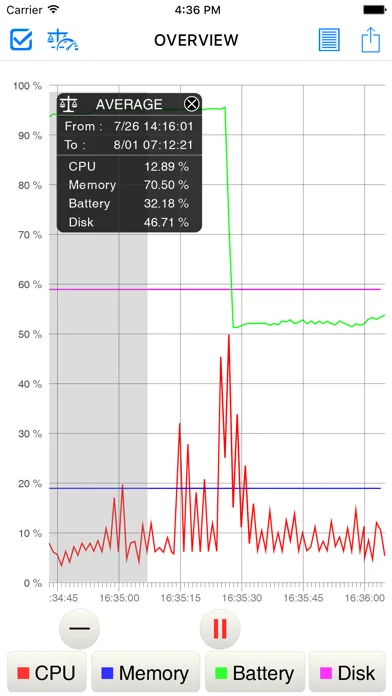
OVERVIEW : Graph
- Line chart of memory, CPU, battery and disk usage
OVERVIEW DETAILS : CPU, battery etc, list
- CPU Status : CPU usage
- Battery Status : battery charged and battery status
- Disk usage : Disk free space and total disk space
- System uptime : system boot time and uptime
- Connection : default getaway address and dns server address
- WiFi : Connect IP address, subnet mask, SSID, BSSID, received & sent data since system boot
- Cellular : Connect IP address, network type(LTE / 3G) and received & sent data since system boot
MEMORY : Graph
- Stacked line chart of wired, active, inactive, other memory usage
MEMORY DETAILS : Memory details list
- Memory Usage : wired, active, inactive, other, free, total memory and page size usage
- Page IN/OUT : page ins and page outs
- Page fault : faults and COW faults
- Page lookup : lookups and hits
- Page purge : purgeable count and purges
- Other Page : zero Filled, reactivated and speculative read
CPU : Graph
- Stacked line chart of CPU usage
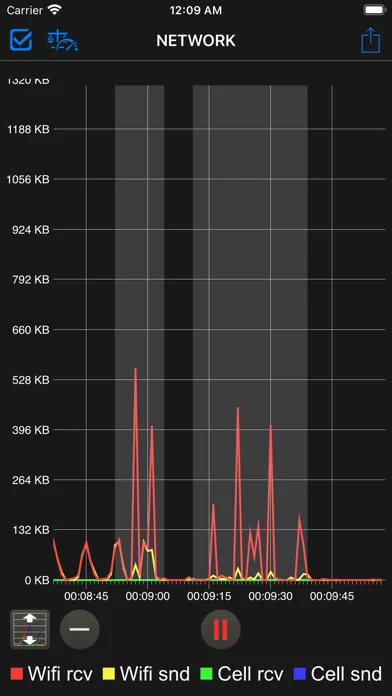
NETWORK : Graph
- Line chart of wi-fi received and sent, cellular received and sent data
- Change the scale of the number of bytes(manually or automatically)
BATTERY : Graph
- Stacked line chart of battery charged level
DISK : Graph
- Stacked line chart of disk used space
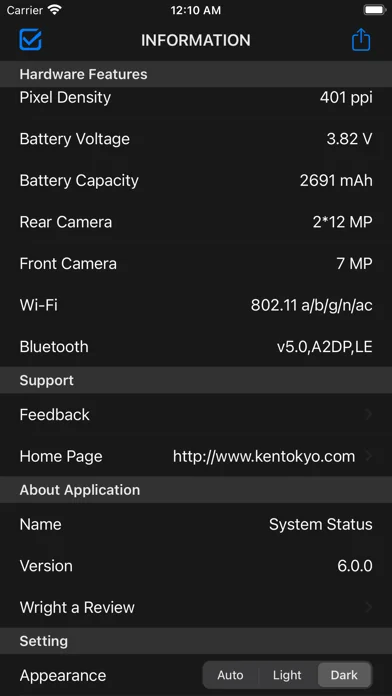
INFORMATION
- Operating System : system, system build number, Kernel, system boot, uptime etc
- Device Information : device name, id, device model etc
- CPU Information : CPU model, GPU model, CPU frequency etc
- Hardware Features : display resolution, pixel density, etc
- Setting : Appearance : Auto, Light and Dark
Function of then Graph general
- Time scale change by button or double tap
- Scrolling past data
- AirPrint, save image, AirDrop, export email and more
- Background monitoring(3 minutes)
- Display the maximum value or the average value (range can be set)
- Move to the location of the maximum value
Supports
Non retina and Retina display on iPhone,iPad.
iPhone 4s or later, iPhone SE or later, iPhone X or later, iPad 2 or later, iPad Air or later and iPad mini or later.
iPhone, iPad both vertical and horizontal screen display.
Supported by "3D Touch" of the iPhone.
Supported by "Split View" and "Slide Over" of the iPad.
iOS 11.0 and later.
iPhone user can see wide screen view because it corresponds to a horizontal screen of the iPhone. In addition, iPad Air2 or later, iPad mini 4 or later, and iPad Pro or later can Split View and Slide Over and iPhone with 3D Touch that can be memory optimization from home screen.
Also supports dark mode, and you can change the appearance of the app with Setting: Appearance in INFORMATION.
Features
GENERAL : Rial time monitoring of memory, CPU, battery, disk usage and network connect
- Memory : Fee space ratio wired, active, inactive and free memory usage
- CPU : Usage and idle state
- Network : Wi-Fi, 3G or LTE connection state, sent and received data since system boot time
- Battery : Charge level and state (Full, Unplugged or Charging)
- Disk : Used, free and total space
- Information : Summary device information
OVERVIEW : Graph
- Line chart of memory, CPU, battery and disk usage
OVERVIEW DETAILS : CPU, battery etc, list
- CPU Status : CPU usage
- Battery Status : battery charged and battery status
- Disk usage : Disk free space and total disk space
- System uptime : system boot time and uptime
- Connection : default getaway address and dns server address
- WiFi : Connect IP address, subnet mask, SSID, BSSID, received & sent data since system boot
- Cellular : Connect IP address, network type(LTE / 3G) and received & sent data since system boot
MEMORY : Graph
- Stacked line chart of wired, active, inactive, other memory usage
MEMORY DETAILS : Memory details list
- Memory Usage : wired, active, inactive, other, free, total memory and page size usage
- Page IN/OUT : page ins and page outs
- Page fault : faults and COW faults
- Page lookup : lookups and hits
- Page purge : purgeable count and purges
- Other Page : zero Filled, reactivated and speculative read
CPU : Graph
- Stacked line chart of CPU usage
NETWORK : Graph
- Line chart of wi-fi received and sent, cellular received and sent data
- Change the scale of the number of bytes(manually or automatically)
BATTERY : Graph
- Stacked line chart of battery charged level
DISK : Graph
- Stacked line chart of disk used space
INFORMATION
- Operating System : system, system build number, Kernel, system boot, uptime etc
- Device Information : device name, id, device model etc
- CPU Information : CPU model, GPU model, CPU frequency etc
- Hardware Features : display resolution, pixel density, etc
- Setting : Appearance : Auto, Light and Dark
Function of then Graph general
- Time scale change by button or double tap
- Scrolling past data
- AirPrint, save image, AirDrop, export email and more
- Background monitoring(3 minutes)
- Display the maximum value or the average value (range can be set)
- Move to the location of the maximum value
Supports
Non retina and Retina display on iPhone,iPad.
iPhone 4s or later, iPhone SE or later, iPhone X or later, iPad 2 or later, iPad Air or later and iPad mini or later.
iPhone, iPad both vertical and horizontal screen display.
Supported by "3D Touch" of the iPhone.
Supported by "Split View" and "Slide Over" of the iPad.
iOS 11.0 and later.
🆕 What's New · v6.1.2
Support latest iPad.
Profile & Insights
Everything we know — and don't — about this app and its company.
Identification
- App name
- System Status -
- Developer
- Kenichi Yoshikawa
- Bundle ID
- Ken.U-Status
- App Store URL
- Open in App Store
- Category
- Productivity
- Content rating
- 4+
- Languages
- AR, EN, FR, DE, HI, IT, JA, KO, PT, RU, ZH, ES, ZH
Company
- Website
- Not found
- Tagline
- Today
- Description
- Find apps and games for iPhone, iPad, Mac, and more on the App Store.
- Founded
- Not found
- HQ / Address
- Not found
- Employees
- Not found
- Logo
- OG image
Revenue
- Verified revenue / mo
- Not found
- AI revenue estimate / mo
- Not found
- AI annual estimate
- Not found
- ML model estimate / mo
- $86/mo
- Top-grossing rank
- Outside top 100 in US Productivity
- All-time revenue
- Not found
- Pricing
- Not found
Founder
- Name
- Not found
- X / Twitter
- Not found
- Not found
- GitHub
- Not found
- X followers
- Not found
- Public statements
- Not found
Funding
- Total raised
- Not found
- Last round
- Not found
- Investors
- Not found
- Crunchbase
- Not found
- AngelList
- Not found
Press & Links
- Articles found
- Not found
- Listed on
- Not found
- Blog
- https://apps.apple.com/us/app/letterloop-group-newsletters/id6468623700
- Press / News
- Not found
Contacts & Socials
- Socials
- Not found
- Not found
- Phone
- Not found
- Contact page
- Not found
- About page
- https://apps.apple.com/us/iphone/story/id1860412460
📈Ratings growth3 ratings+200% lifetimeShow 3-year history estimate ▾
Tracked (3 weeks) Pre-tracking estimate (37 weeks) · model-based, ±5% noise · anchored to release date and current value
🌍Geographic ReachNot ranked
This app is currently outside the top 100 grossing in all 9 countries we monitor (US, UK, DE, FR, JP, CA, AU, BR, IN). Niche or new apps often launch this way — popularity rankings appear once daily revenue clears the regional threshold.
Profile is built from iTunes Lookup + developer site scrape + ML revenue model. Empty fields show "Not found" — additional sources (Crunchbase, X, IndieHackers, Acquire.com) coming.