80
BU Score
Excellent
GPS АнтиРадар (радар-детектор)
✍️ bumetric analysis
“
GPS АнтиРадар (радар-детектор) is an Android app from AIRBITS & Reactive Phone in the Travel & Local category, currently rated 4.8★ across 260,875 ratings. Initial signal reads as largely positive sentiment, users highlighting consistency and feature depth.
Our BU Score puts it at 80: Excellent (strong product-market fit). For a Travel & Local app, that means strong product-market fit.
Track changes month-over-month in the Performance section below: live snapshot history and revenue forecast included.
📊 Performance Tracking LIVE
Loading…
Rating
—
Reviews
—
Forecast Revenue / mo
—
Snapshots tracked
0
since first record
Range:
💰 Forecast Revenue / mo
MODELRevenue forecast computed from BU's 234 trigger model on each snapshot. Calibrated against ground-truth from 58 verified-revenue apps.
🔬Forecast Breakdown — Why This Estimate?Top 3 of 3 triggers
Our ML model uses 200+ signals from public data. These are the most influential for this app:
| High install base (260,875 ratings)METRIC | +$12,000 | |
| Excellent rating (4.8★)METRIC | +$2,200 | |
| Ad-supported / freemiumMETRIC | +$600 |
METRIC = structural app data · REVIEW = mined from user reviews · ✓ VERIFIED = Stripe-verified anchor (TrustMRR)
📈 Reviews Growth
LIVECumulative review count from first BU snapshot. Each point = a tracked update.
⭐ Rating Trend
LIVEAverage rating evolution. Updates with each new review batch.
🗓️ Snapshot Timeline
HISTORYEach bar shows a tracked update and the metric delta from the previous snapshot.
App Specs
🔐 Own this app? Claim & verify MRR →🔖 vVaries with device📂 Travel & Local💰 Free
📝 About this app
Key features:
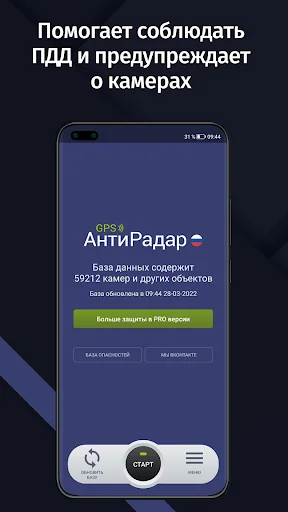
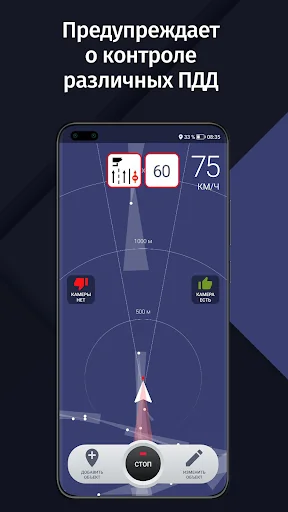
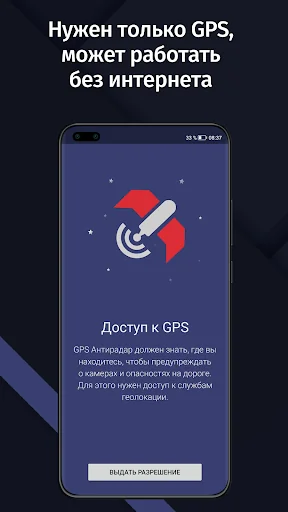
• GPS AntiRadar works as a radar detector and warns you about fixed cameras and traffic police radars along your route.
• Uses the latest RadarBase.info database of cameras and hazards.
• The hazard database contains cameras, obstacles, speed bumps, dangerous pedestrian crossings, and other objects that require driver attention.
• Convenient, simple, and fully Russified interface.
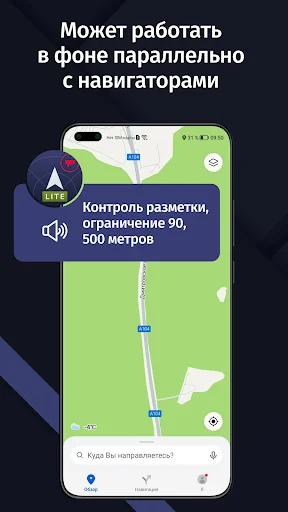
• Runs in the background. You can run Yandex or Google Maps, navigation, or any other programs. The app will notify you in a pleasant female voice when approaching a camera or hazard.
• The database covers all regions of Russia and some CIS countries.
• The app does not require an internet connection. Just update the database before your trip.
• An indispensable assistant on the road and while traveling by car!
If your speed is more than 19 km/h above the speed limit when approaching a camera, the app will play a warning sound. This is important, as the fine for speeding by more than 20 km/h now starts at 500 rubles.
• Map of cameras in our database: https://radarbase.info
• Our Telegram channel: https://t.me/radarbase
• Our forum: https://radarbase.info/forum/sections
Here you can leave your suggestions, comments, information about missing cameras, etc.
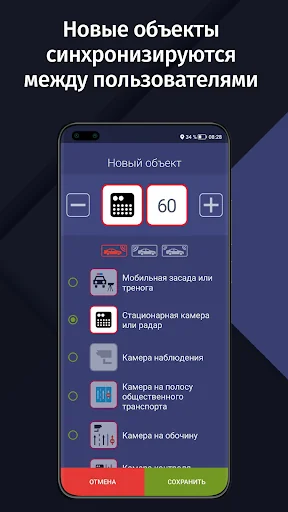
The app works using known data on the locations of fixed cameras and traffic police radars (such as Strelka or Start ST) and other objects. The PRO version allows you to add missing cameras manually and synchronize them between users! You don't need to wait for us to add cameras; it's updated easily and conveniently by users themselves!
Attention! GPS AntiRadar is your assistant, but it does not guarantee the absence of fines, as new cameras may not be added to the database immediately. Please obey traffic rules. A real radar detector is certainly more reliable, but this app is free!
---
Frequently Asked Questions:
1. The app can't find a GPS signal. What should I do?
GPS performance depends on many factors, including weather. Many apps, such as navigation apps, use GSM triangulation using cell towers in addition to GPS (we don't use this due to its high error rate).
• Go to an open area. The GPS signal won't be found in an apartment or other enclosed space.
• Make sure the GPS module is enabled. When GPS AntiRadar is enabled, a system notification about GPS operation should appear in the Android event bar.
• Try turning the GPS module off and then back on.
• Try restarting the device.
2. There is no sound notification. What should I do?
• Make sure the volume for all notifications is set to maximum. You can find this setting by following this path: open the standard Android settings -> Sound -> Volume.
• Make sure the "Always Warn" mode is set in GPS AntiRadar. This will allow the sound to play without violating traffic regulations.
• Test the functionality by driving near a camera. As soon as the camera type and speed limit for that camera appear on the screen, a beep should sound.
• When connecting the device to the car stereo via Bluetooth, make sure other apps can play sound notifications.
3. For the app to run in the background on Xiaomi, Huawei, Meizu, and some other devices, you need to configure the device settings. See our instructions:
• Xiaomi: https://radarbase.info/forum/topic/125
• Meizu and ZTE: https://radarbase.info/forum/topic/126
• Huawei and Honor: https://radarbase.info/forum/topic/124
• OPPO: https://radarbase.info/forum/topic/123
• Samsung: https://radarbase.info/forum/topic/128
• General for all devices: https://radarbase.info/forum/topic/122
• GPS AntiRadar works as a radar detector and warns you about fixed cameras and traffic police radars along your route.
• Uses the latest RadarBase.info database of cameras and hazards.
• The hazard database contains cameras, obstacles, speed bumps, dangerous pedestrian crossings, and other objects that require driver attention.
• Convenient, simple, and fully Russified interface.
• Runs in the background. You can run Yandex or Google Maps, navigation, or any other programs. The app will notify you in a pleasant female voice when approaching a camera or hazard.
• The database covers all regions of Russia and some CIS countries.
• The app does not require an internet connection. Just update the database before your trip.
• An indispensable assistant on the road and while traveling by car!
If your speed is more than 19 km/h above the speed limit when approaching a camera, the app will play a warning sound. This is important, as the fine for speeding by more than 20 km/h now starts at 500 rubles.
• Map of cameras in our database: https://radarbase.info
• Our Telegram channel: https://t.me/radarbase
• Our forum: https://radarbase.info/forum/sections
Here you can leave your suggestions, comments, information about missing cameras, etc.
The app works using known data on the locations of fixed cameras and traffic police radars (such as Strelka or Start ST) and other objects. The PRO version allows you to add missing cameras manually and synchronize them between users! You don't need to wait for us to add cameras; it's updated easily and conveniently by users themselves!
Attention! GPS AntiRadar is your assistant, but it does not guarantee the absence of fines, as new cameras may not be added to the database immediately. Please obey traffic rules. A real radar detector is certainly more reliable, but this app is free!
---
Frequently Asked Questions:
1. The app can't find a GPS signal. What should I do?
GPS performance depends on many factors, including weather. Many apps, such as navigation apps, use GSM triangulation using cell towers in addition to GPS (we don't use this due to its high error rate).
• Go to an open area. The GPS signal won't be found in an apartment or other enclosed space.
• Make sure the GPS module is enabled. When GPS AntiRadar is enabled, a system notification about GPS operation should appear in the Android event bar.
• Try turning the GPS module off and then back on.
• Try restarting the device.
2. There is no sound notification. What should I do?
• Make sure the volume for all notifications is set to maximum. You can find this setting by following this path: open the standard Android settings -> Sound -> Volume.
• Make sure the "Always Warn" mode is set in GPS AntiRadar. This will allow the sound to play without violating traffic regulations.
• Test the functionality by driving near a camera. As soon as the camera type and speed limit for that camera appear on the screen, a beep should sound.
• When connecting the device to the car stereo via Bluetooth, make sure other apps can play sound notifications.
3. For the app to run in the background on Xiaomi, Huawei, Meizu, and some other devices, you need to configure the device settings. See our instructions:
• Xiaomi: https://radarbase.info/forum/topic/125
• Meizu and ZTE: https://radarbase.info/forum/topic/126
• Huawei and Honor: https://radarbase.info/forum/topic/124
• OPPO: https://radarbase.info/forum/topic/123
• Samsung: https://radarbase.info/forum/topic/128
• General for all devices: https://radarbase.info/forum/topic/122
Profile & Insights
Everything we know — and don't — about this app and its company.
Identification
- App name
- GPS АнтиРадар (радар-детектор)
- Developer
- AIRBITS & Reactive Phone
- Bundle ID
- air.StrelkaSDFREE
- App Store URL
- Open in App Store
- Category
- Travel & Local
- Content rating
- Not found
- Languages
- Not found
Company
- Website
- Not found
- Tagline
- Not found
- Description
- Not found
- Founded
- Not found
- HQ / Address
- Not found
- Employees
- Not found
- Logo
- Not found
Revenue
- Verified revenue / mo
- Not found
- AI revenue estimate / mo
- Not found
- AI annual estimate
- Not found
- ML model estimate / mo
- $3.2K/mo
- Top-grossing rank
- Not found
- All-time revenue
- Not found
- Pricing
- Not found
Founder
- Name
- Not found
- X / Twitter
- Not found
- Not found
- GitHub
- Not found
- X followers
- Not found
- Public statements
- Not found
Funding
- Total raised
- Not found
- Last round
- Not found
- Investors
- Not found
- Crunchbase
- Not found
- AngelList
- Not found
Press & Links
- Articles found
- Not found
- Listed on
- Not found
- Blog
- Not found
- Press / News
- Not found
Contacts & Socials
- Socials
- Not found
- Not found
- Phone
- Not found
- Contact page
- Not found
- About page
- Not found
Profile is built from iTunes Lookup + developer site scrape + ML revenue model. Empty fields show "Not found" — additional sources (Crunchbase, X, IndieHackers, Acquire.com) coming.
Full revenue analysis
Read the article-style breakdown for GPS АнтиРадар (радар-детектор): category rank, percentile, growth signal, comparable apps, and how the forecast is calibrated against verified-MRR anchors in this niche.