72
BU Score
Strong
Dev Tools(Developer)-Decompile
✍️ BU Analytics Review
“
Dev Tools(Developer)-Decompile is an Android app from Trinea in the Tools category, currently rated 4.6★ across 16,172 ratings. Initial signal reads as largely positive sentiment, users highlighting consistency and feature depth.
Our BU Score puts it at 72 — Strong (healthy traction). For a Tools app, that means healthy traction.
Track changes month-over-month in the Performance section below — live snapshot history and revenue forecast included.
creator
📊 Performance Tracking LIVE
Loading…
Rating
—
Reviews
—
Forecast Revenue / mo
—
Snapshots tracked
0
since first record
Range:
💰 Forecast Revenue / mo
MODELRevenue forecast computed from BU's 234 trigger model on each snapshot. Calibrated against ground-truth from 58 verified-revenue apps.
🔬Forecast Breakdown — Why This Estimate?Top 3 of 3 triggers
Our ML model uses 200+ signals from public data. These are the most influential for this app:
| Mid install base (16,172 ratings)METRIC | +$5,500 | |
| Excellent rating (4.6★)METRIC | +$2,200 | |
| Ad-supported / freemiumMETRIC | +$600 |
METRIC = structural app data · REVIEW = mined from user reviews · ✓ VERIFIED = Stripe-verified anchor (TrustMRR)
📈 Reviews Growth
LIVECumulative review count from first BU snapshot. Each point = a tracked update.
⭐ Rating Trend
LIVEAverage rating evolution. Updates with each new review batch.
🗓️ Snapshot Timeline
HISTORYEach bar shows a tracked update and the metric delta from the previous snapshot.
App Specs
🔐 Own this app? Claim & verify MRR →🔖 v9.3.0-gp🔄 updated 2w ago📂 Tools💰 Free
📝 About this app
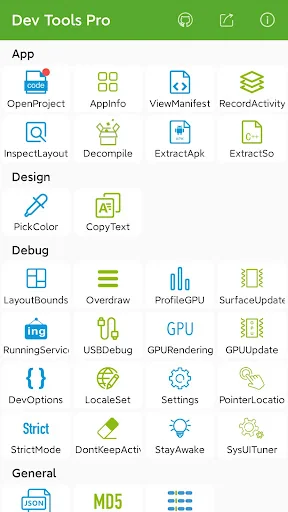
Android Dev Tools is a powerful, productive, automation, essential Android Development Assistant, It can improve your development productivity. It can be used to decompile other app, view layout detail info of other app, view color of screen(color sampler or eyedropper), view the latest open source projects, view activity history, view manifest of any apps, view recently used or installed apps, extract apk or so, debug applications, view phone hardware and software-related information and so on, the more features will be added later. including:
► <b>App Layout Inspector Tool</b>(Paid)
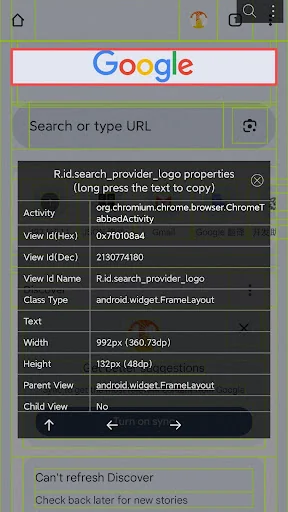
View or export layout or view info of other app, can show view id, width height, parent and child view, coordinate of view.
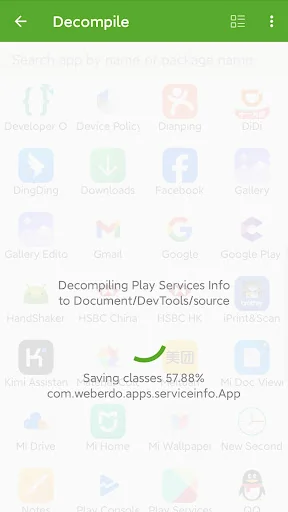
► <b>Decompile other app</b>(Paid)
View app's java file, resource and other file easily, support share files
► <b>View screen color</b>(Paid)
Similar to color sampler tool or eyedropper, you can view or copy the color and coordinate of any other App easily, and more ARGB and CMYK
► <b>View the latest open source projects daily</b>(Free)
A well-selected daily Android open source project.
► <b>View activity history</b>(Paid)
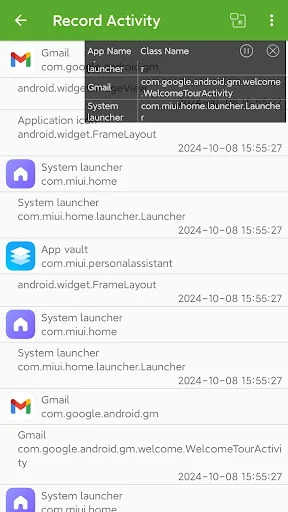
View the appName, packageName, title, icon, start time of the activity opened, also include current activity, top activity. support open in small window mode.
► <b>View manifest of any apps</b>(Paid)
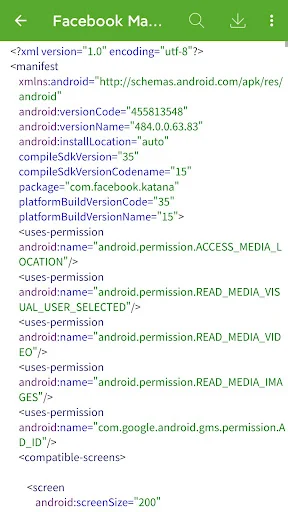
View manifest of any apps, search any content of manifest, save manifest to sdcard in text or html.
► <b>App Management—View info of apps</b>(Free)
You can manage your app easily. View apps installed, recently used apps, recently installed apps in grid mode.
View app package name, version, uid, apk dir, so dir, data dir, first install and last upgrade time, component info and so on.
► <b>Extract apk or so of apps</b>(Paid)
Extract any app's source apk or so file.
► <b>Open or close the options in the developer options quickly</b>(Free)
What used to take seconds is reduced to one click! it includes show screen layout, debug gpu overdraw, show layout updates, forced GPU rendering, show GPU view updates, show GPU Rendering, show pointer position, strict mode, don't keep activities, stay awake, Running Service.
<b>Note</b>: This part of the feature is to solve the cumbersome operation of the developer option through the automated way, <b>if you are tired of the cumbersome operation of the developer option also, then this tool is for you</b>. <u>If you need a tool different from the system developer option, this is not what you want, don't install it, thanks</u>.
► <b>View the system info quickly</b>(Free)
includes system version information, hardware information, screen information, CPU information, virtual machine information, network-related information, Device ID information.
► <b>Open other common features quickly</b>(Free)
includes settings, System UI Tuner, language switching, developer options, my applications.
<b>Shortcuts:</b>
(1) You can add tool shortcuts to the desktop by long pressing the tool icon;
(2) You can add tool widgets to the desktop;
(3) You can start the tool through the shortcut quickly on Android 7.1, long pressing the application icon in the desktop;
(4) You can add the tool to the notification Quick Settings Tile on Android 7.0.
AccessibilityService: We use this feature to turn on or off some developer options automatically, get classname of current activity(Pro Version), get view info of current page(Pro Version) to save your time. We can use this service only after you granted it. We promise not to collect any of your information.
It is available for Android 5.0 and above.
Any suggestions or bugs are welcome to give us feedback:
official website: https://codekk.com/
Facebook page: https://facebook.com/Dev-Tools-917225741954586/
► <b>App Layout Inspector Tool</b>(Paid)
View or export layout or view info of other app, can show view id, width height, parent and child view, coordinate of view.
► <b>Decompile other app</b>(Paid)
View app's java file, resource and other file easily, support share files
► <b>View screen color</b>(Paid)
Similar to color sampler tool or eyedropper, you can view or copy the color and coordinate of any other App easily, and more ARGB and CMYK
► <b>View the latest open source projects daily</b>(Free)
A well-selected daily Android open source project.
► <b>View activity history</b>(Paid)
View the appName, packageName, title, icon, start time of the activity opened, also include current activity, top activity. support open in small window mode.
► <b>View manifest of any apps</b>(Paid)
View manifest of any apps, search any content of manifest, save manifest to sdcard in text or html.
► <b>App Management—View info of apps</b>(Free)
You can manage your app easily. View apps installed, recently used apps, recently installed apps in grid mode.
View app package name, version, uid, apk dir, so dir, data dir, first install and last upgrade time, component info and so on.
► <b>Extract apk or so of apps</b>(Paid)
Extract any app's source apk or so file.
► <b>Open or close the options in the developer options quickly</b>(Free)
What used to take seconds is reduced to one click! it includes show screen layout, debug gpu overdraw, show layout updates, forced GPU rendering, show GPU view updates, show GPU Rendering, show pointer position, strict mode, don't keep activities, stay awake, Running Service.
<b>Note</b>: This part of the feature is to solve the cumbersome operation of the developer option through the automated way, <b>if you are tired of the cumbersome operation of the developer option also, then this tool is for you</b>. <u>If you need a tool different from the system developer option, this is not what you want, don't install it, thanks</u>.
► <b>View the system info quickly</b>(Free)
includes system version information, hardware information, screen information, CPU information, virtual machine information, network-related information, Device ID information.
► <b>Open other common features quickly</b>(Free)
includes settings, System UI Tuner, language switching, developer options, my applications.
<b>Shortcuts:</b>
(1) You can add tool shortcuts to the desktop by long pressing the tool icon;
(2) You can add tool widgets to the desktop;
(3) You can start the tool through the shortcut quickly on Android 7.1, long pressing the application icon in the desktop;
(4) You can add the tool to the notification Quick Settings Tile on Android 7.0.
AccessibilityService: We use this feature to turn on or off some developer options automatically, get classname of current activity(Pro Version), get view info of current page(Pro Version) to save your time. We can use this service only after you granted it. We promise not to collect any of your information.
It is available for Android 5.0 and above.
Any suggestions or bugs are welcome to give us feedback:
official website: https://codekk.com/
Facebook page: https://facebook.com/Dev-Tools-917225741954586/
Profile & Insights
Everything we know — and don't — about this app and its company.
Identification
- App name
- Dev Tools(Developer)-Decompile
- Developer
- Trinea
- Bundle ID
- cn.trinea.android.developertools
- App Store URL
- Open in App Store
- Category
- Tools
- Content rating
- Not found
- Languages
- Not found
Company
- Website
- Not found
- Tagline
- Not found
- Description
- Not found
- Founded
- Not found
- HQ / Address
- Not found
- Employees
- Not found
- Logo
- Not found
Revenue
- Verified revenue / mo
- Not found
- AI revenue estimate / mo
- Not found
- AI annual estimate
- Not found
- ML model estimate / mo
- $1.4K/mo
- Top-grossing rank
- Not found
- All-time revenue
- Not found
- Pricing
- Not found
Founder
- Name
- Not found
- X / Twitter
- Not found
- Not found
- GitHub
- Not found
- X followers
- Not found
- Public statements
- Not found
Funding
- Total raised
- Not found
- Last round
- Not found
- Investors
- Not found
- Crunchbase
- Not found
- AngelList
- Not found
Press & Links
- Articles found
- Not found
- Listed on
- Not found
- Blog
- Not found
- Press / News
- Not found
Contacts & Socials
- Socials
- Not found
- Not found
- Phone
- Not found
- Contact page
- Not found
- About page
- Not found
Profile is built from iTunes Lookup + developer site scrape + ML revenue model. Empty fields show "Not found" — additional sources (Crunchbase, X, IndieHackers, Acquire.com) coming.
More Tools
Phone by Google
★ 4.5 · 47,248,471 reviews
Google Play services
★ 4.3 · 44,619,167 reviews
★ 4.1 · 29,135,018 reviews
Gboard - the Google Keyboard
★ 4.5 · 18,500,531 reviews
SHAREit: Transfer, Share Files
★ 4.3 · 18,247,718 reviews
gov.br
★ 4.5 · 12,551,225 reviews
MyTelkomsel – Buy Internet
★ 3.7 · 11,917,556 reviews
myIM3: Data Plan & Buy Package
★ 4.4 · 10,992,500 reviews
Browse BU Analytics
📚 All 55,000+ Books
🜍 Alchemy & Hermeticism
🔮 Magic & Ritual
🌙 Witchcraft & Paganism
⭐ Astrology & Cosmology
🃏 Divination & Tarot
📜 Tools
✡️ Kabbalah & Jewish Mysticism
🕉️ Mysticism & Contemplation
🕊️ Theosophy & Anthroposophy
🏛️ Freemasonry & Secret Societies
👻 Spiritualism & Afterlife
📖 Sacred Texts & Gnosticism
👁️ Supernatural & Occult Fiction
🧘 Spiritual Development
📚 Esoteric History & Biography
Info
About BU Analytics