61
BU Score
Solid
Hello Card Dialer
✍️ BU Analytics Review
“
Hello Card Dialer is an Android app from Allvins in the Communication category, currently rated 4.2★ across 5,150 ratings. Initial signal reads as largely positive sentiment, users highlighting consistency and feature depth.
Our BU Score puts it at 61 — Solid (established niche player). For a Communication app, that means established niche player.
Track changes month-over-month in the Performance section below — live snapshot history and revenue forecast included.
creator
📊 Performance Tracking LIVE
Loading…
Rating
—
Reviews
—
Forecast Revenue / mo
—
Snapshots tracked
0
since first record
Range:
💰 Forecast Revenue / mo
MODELRevenue forecast computed from BU's 234 trigger model on each snapshot. Calibrated against ground-truth from 58 verified-revenue apps.
🔬Forecast Breakdown — Why This Estimate?Top 4 of 4 triggers
Our ML model uses 200+ signals from public data. These are the most influential for this app:
| Low install base (5,150 ratings)METRIC | +$1,500 | |
| Mature app (11y old)METRIC | +$1,500 | |
| Good rating (4.2★)METRIC | +$800 | |
| Ad-supported / freemiumMETRIC | +$600 |
METRIC = structural app data · REVIEW = mined from user reviews · ✓ VERIFIED = Stripe-verified anchor (TrustMRR)
📈 Reviews Growth
LIVECumulative review count from first BU snapshot. Each point = a tracked update.
⭐ Rating Trend
LIVEAverage rating evolution. Updates with each new review batch.
🗓️ Snapshot Timeline
HISTORYEach bar shows a tracked update and the metric delta from the previous snapshot.
App Specs
🔐 Own this app? Claim & verify MRR →🔖 v1.77🔄 updated 1y ago📂 Communication💰 Free📺 Ad-supported🚀 Launched 2014 (11y old)
📝 About this app
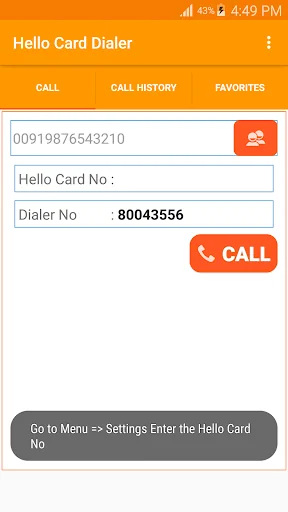
Hello Card Dialer application will help you to make international calls using Hello Card in UAE.
Just buy Hello Card from grocery and save in hello card dialer. Now you can call easily. Your call history will be saved in your mobile. you can able to clear also.
User can customize the Call Confirmation, IVR Language and Destination Country.
User can Enter a Phone Number with isd code and press call to make calls. (00 [isd code]
[phone number])
User can select a contact from contact list by clicking the contact icon on the screen.
<b>Screens</b> :
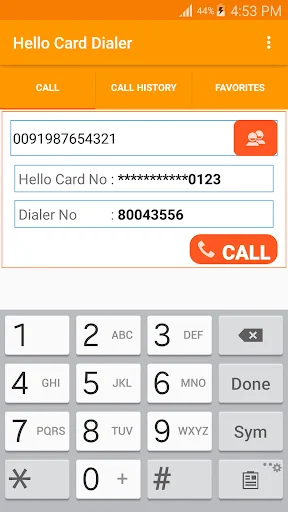
<b>Call</b>:
1. Type the phone number and Dial (phone number should be 00 format. for example 0091987654321)
2. Click the contact icon to select a contact
3. press call to make a call
<b>Call History</b>
1. You can make calls from the call history Screen. Click on the call log to Make a Call
2. Click the star icon to make the phone number as Favourite Number
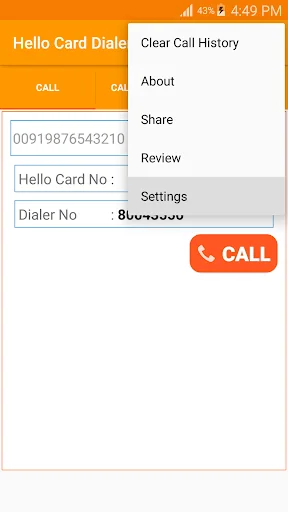
3. if you want to clear the log, tap the menu button and press Clear Call History
<b>Favorite</b>
1. You can make calls from the Favourites Screen. Click on the number to Make a Call
2. you can remove the number from favourites using delete button
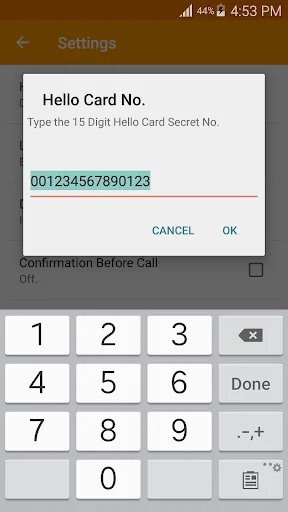
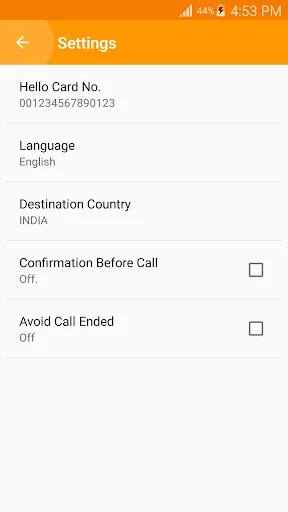
<b>Settings</b> (select from menu)
1. Hello Card Pin Number
2. Language Selection
3. Country Selection
4. Confirm Before Call - Enable if you want to confirm the mobile number
5. Avoid Call Ended - Enable if you are facing call ended problem
<b>Steps</b>:
1. Enter the Mobile Number / select from contacts
2. Press Call Button
3. Phone call screen will open
4. Call will be connected to the call center
5. Language will be entered automatically based on you language preference
6. UAE Hello Calling Card secret number will entered by system
7. Now you can hear the balance information in you preferred language
8. Now your Destination number will entered by system
9. Now you can hear the balance minutes for that destination number(country)
10. If the Call-centre tells incorrect international number means, end the call, try one more time. it will work.
<b>Note</b> :
* Hello Card Number stored in your device only. We won’t allow others to read it.
* Make sure you are entering correct secret code from Hello Card.
* Hello Card Dialer will store your Hello Calling Card Number in application,
if you are doing uninstall or update, the secret number may be removed.
so save your calling card number in your message or take a picture of it.
* we have tested Hello Calling Card in du. It will work fine in du.
* This is not a VoIP application.
* It will work with calling card(Hello Calling Card UAE) only.
* It will work without Internet Connection.
* It will use the Normal Phone call(toll free number), Charges will taken from calling card.
* if you are facing call ended problem, enable "Avoid Call Ended" option in settings
<b>Facebook</b>:
<a href="https://www.google.com/url?q=https%3A%2F%2Fwww.facebook.com%2FHelloCardDialer%2F&sa=D&sntz=1&usg=AOvVaw1CNkShxsJSqQtRn36WcYNa">https://www.facebook.com/HelloCardDialer</a>
<b>Hello Card Dialer App</b>
<a href="https://hellocarddialer.page.link/app">https://hellocarddialer.page.link/app</a>
<b>Allvins YouTube Channel</b>
<a href="https://www.youtube.com/allvins?sub_confirmation=1">https://www.youtube.com/allvins</a>
Just buy Hello Card from grocery and save in hello card dialer. Now you can call easily. Your call history will be saved in your mobile. you can able to clear also.
User can customize the Call Confirmation, IVR Language and Destination Country.
User can Enter a Phone Number with isd code and press call to make calls. (00 [isd code]
[phone number])
User can select a contact from contact list by clicking the contact icon on the screen.
<b>Screens</b> :
<b>Call</b>:
1. Type the phone number and Dial (phone number should be 00 format. for example 0091987654321)
2. Click the contact icon to select a contact
3. press call to make a call
<b>Call History</b>
1. You can make calls from the call history Screen. Click on the call log to Make a Call
2. Click the star icon to make the phone number as Favourite Number
3. if you want to clear the log, tap the menu button and press Clear Call History
<b>Favorite</b>
1. You can make calls from the Favourites Screen. Click on the number to Make a Call
2. you can remove the number from favourites using delete button
<b>Settings</b> (select from menu)
1. Hello Card Pin Number
2. Language Selection
3. Country Selection
4. Confirm Before Call - Enable if you want to confirm the mobile number
5. Avoid Call Ended - Enable if you are facing call ended problem
<b>Steps</b>:
1. Enter the Mobile Number / select from contacts
2. Press Call Button
3. Phone call screen will open
4. Call will be connected to the call center
5. Language will be entered automatically based on you language preference
6. UAE Hello Calling Card secret number will entered by system
7. Now you can hear the balance information in you preferred language
8. Now your Destination number will entered by system
9. Now you can hear the balance minutes for that destination number(country)
10. If the Call-centre tells incorrect international number means, end the call, try one more time. it will work.
<b>Note</b> :
* Hello Card Number stored in your device only. We won’t allow others to read it.
* Make sure you are entering correct secret code from Hello Card.
* Hello Card Dialer will store your Hello Calling Card Number in application,
if you are doing uninstall or update, the secret number may be removed.
so save your calling card number in your message or take a picture of it.
* we have tested Hello Calling Card in du. It will work fine in du.
* This is not a VoIP application.
* It will work with calling card(Hello Calling Card UAE) only.
* It will work without Internet Connection.
* It will use the Normal Phone call(toll free number), Charges will taken from calling card.
* if you are facing call ended problem, enable "Avoid Call Ended" option in settings
<b>Facebook</b>:
<a href="https://www.google.com/url?q=https%3A%2F%2Fwww.facebook.com%2FHelloCardDialer%2F&sa=D&sntz=1&usg=AOvVaw1CNkShxsJSqQtRn36WcYNa">https://www.facebook.com/HelloCardDialer</a>
<b>Hello Card Dialer App</b>
<a href="https://hellocarddialer.page.link/app">https://hellocarddialer.page.link/app</a>
<b>Allvins YouTube Channel</b>
<a href="https://www.youtube.com/allvins?sub_confirmation=1">https://www.youtube.com/allvins</a>
Profile & Insights
Everything we know — and don't — about this app and its company.
Identification
- App name
- Hello Card Dialer
- Developer
- Allvins
- Bundle ID
- com.allvins.android.HelloDialer
- App Store URL
- Open in App Store
- Category
- Communication
- Content rating
- Not found
- Languages
- Not found
Company
- Website
- www.allvins.com
- Tagline
- Not found
- Description
- Not found
- Founded
- Not found
- HQ / Address
- Not found
- Employees
- Not found
- Logo
- Not found
Revenue
- Verified revenue / mo
- Not found
- AI revenue estimate / mo
- Not found
- AI annual estimate
- Not found
- ML model estimate / mo
- $802/mo
- Top-grossing rank
- Not found
- All-time revenue
- Not found
- Pricing
- Not found
Founder
- Name
- Not found
- X / Twitter
- Not found
- Not found
- GitHub
- Not found
- X followers
- Not found
- Public statements
- Not found
Funding
- Total raised
- Not found
- Last round
- Not found
- Investors
- Not found
- Crunchbase
- Not found
- AngelList
- Not found
Press & Links
- Articles found
- Not found
- Listed on
- Not found
- Blog
- Not found
- Press / News
- Not found
Contacts & Socials
- Socials
- Not found
- Not found
- Phone
- Not found
- Contact page
- Not found
- About page
- Not found
📈Ratings growth5,150 ratings+26% lifetimeShow 3-year history estimate ▾
Tracked (1 weeks) Pre-tracking estimate (37 weeks) · model-based, ±5% noise · anchored to release date and current value
Profile is built from iTunes Lookup + developer site scrape + ML revenue model. Empty fields show "Not found" — additional sources (Crunchbase, X, IndieHackers, Acquire.com) coming.
More by Allvins
View all →Five Card Dialer
★ 3.8 · 1,871 reviews
Tamil Text Viewer - View Tamil document in Android
★ 3.2 · 506 reviews
du Balance Check (UAE)
★ 4.5 · 40 reviews
IDD Prefix Dialer (IDD/ISD)
★ 4.2 · 17 reviews
Dawli Card Dialer (Ooredoo Qatar)
★ 4.6 · 14 reviews
Mobile Balance Check (MB Check)
★ 4.1 · 13 reviews
Five Card Dialer du
★ 3.3 · 11 reviews
Etisalat Balance Check (UAE)
★ 0.0 · 0 reviews
More Communication
Messenger
★ 4.7 · 111,504,646 reviews
Google Chrome
★ 4.1 · 48,570,478 reviews
Google Messages
★ 4.4 · 41,302,270 reviews
Truecaller: Spam Call Blocker
★ 4.4 · 28,223,834 reviews
WhatsApp Business
★ 4.7 · 22,111,378 reviews
UC Browser-Safe, Fast, Private
★ 4.4 · 21,847,671 reviews
Rakuten Viber Messenger
★ 4.1 · 16,765,117 reviews
Gmail
★ 4.1 · 14,271,296 reviews
Browse BU Analytics
📚 All 55,000+ Books
🜍 Alchemy & Hermeticism
🔮 Magic & Ritual
🌙 Witchcraft & Paganism
⭐ Astrology & Cosmology
🃏 Divination & Tarot
📜 Communication
✡️ Kabbalah & Jewish Mysticism
🕉️ Mysticism & Contemplation
🕊️ Theosophy & Anthroposophy
🏛️ Freemasonry & Secret Societies
👻 Spiritualism & Afterlife
📖 Sacred Texts & Gnosticism
👁️ Supernatural & Occult Fiction
🧘 Spiritual Development
📚 Esoteric History & Biography
Info
About BU Analytics