77
BU Score
Strong
Infinite Painter
✍️ BU Analytics Review
“
Infinite Painter is an Android app from Infinite Studio LLC in the Art & Design category, currently rated 4.5★ across 234,782 ratings. Initial signal reads as largely positive sentiment, users highlighting consistency and feature depth.
Our BU Score puts it at 77 — Strong (healthy traction). For a Art & Design app, that means healthy traction.
Track changes month-over-month in the Performance section below — live snapshot history and revenue forecast included.
📊 Performance Tracking LIVE
Loading…
Rating
—
Reviews
—
Forecast Revenue / mo
—
Snapshots tracked
0
since first record
Range:
💰 Forecast Revenue / mo
MODELRevenue forecast computed from BU's 234 trigger model on each snapshot. Calibrated against ground-truth from 58 verified-revenue apps.
🔬Forecast Breakdown — Why This Estimate?Top 3 of 3 triggers
Our ML model uses 200+ signals from public data. These are the most influential for this app:
| High install base (234,782 ratings)METRIC | +$12,000 | |
| Good rating (4.5★)METRIC | +$800 | |
| Ad-supported / freemiumMETRIC | +$600 |
METRIC = structural app data · REVIEW = mined from user reviews · ✓ VERIFIED = Stripe-verified anchor (TrustMRR)
📈 Reviews Growth
LIVECumulative review count from first BU snapshot. Each point = a tracked update.
⭐ Rating Trend
LIVEAverage rating evolution. Updates with each new review batch.
🗓️ Snapshot Timeline
HISTORYEach bar shows a tracked update and the metric delta from the previous snapshot.
App Specs
🔐 Own this app? Claim & verify MRR →🔖 v7.2.4🔄 updated 3mo ago📂 Art & Design💰 Free
📝 About this app
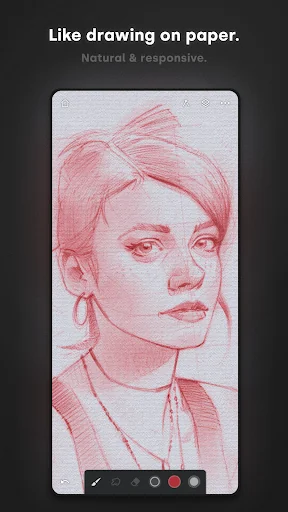
Experience one of the best-designed painting, sketching, and drawing apps for tablets, phones, and Chromebooks. Used by millions, this award-winning app brings rich, powerful features to all artists, whether art is your hobby, passion or career.
<b>HIGHLIGHTS</b>
- Best-in-class pencils
- Minimal and intuitive interface
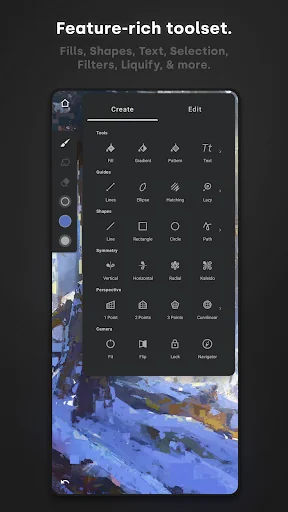
- Robust, powerful tool set
- Share Timelapse recordings with your friends
- Convert brush strokes into editable shapes
<b>REIMAGINING BRUSHES</b>
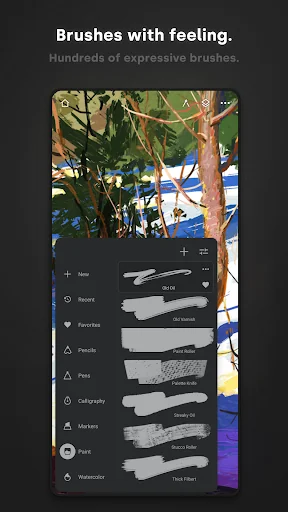
- Hundreds of built-in brushes
- Realistic brush to canvas interaction
- Over 100 customizable brush settings
- Organize and share your favorite brushes and brush sets
- Designed for stylus devices with full pressure and tilt support
- Apply realtime color adjustments and live effects to any brush
- Sample lower layers when blending
- Import and export custom brushes and brush sets
<b>GETTING THE MOST OUT OF YOUR SPACE</b>
- More canvas, less clutter with a clean, customizable interface
- Assign finger functions separate from your stylus
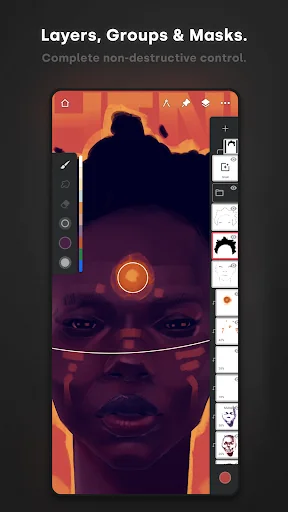
- Expand and collapse layers with a flick
- Dock brush settings for quick, easy editing
- Quick access eyedropper
- Rotate and flip canvas with gestures
- Group layers with a pinch
<b>MAKING ART LESS WORK</b>
- Pin tools and actions to the main interface
- Pull the color wheel on the canvas with two fingers
- Add multiple reference images
- Lighting-fast saving and loading
- Step back in time with Project History
<b>DIVERSIFYING TOOLS</b>
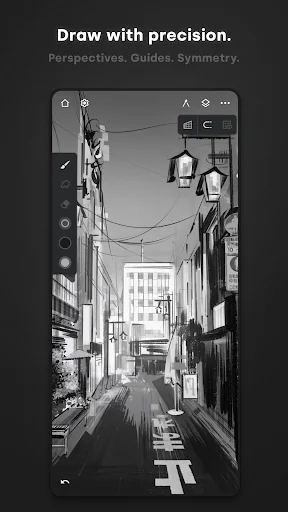
- Simple or complex symmetry with Radial or Kaleidoscope
- Draw with precision using Guides or Shapes
- Smart shape detection by pausing when drawing
- Innovative Hatching guide
<b>NEVER LOSING PERSPECTIVE</b>
- Design 3D cityscapes with five different Perspective Guides
- Drag Rectangle and Circle shapes in perspective
- Create game art with Isometric perspective
<b>PIXEL-PERFECT EDITING</b>
- Seamless Pattern projects
- Selection & Masking tools
- Industry-leading Transformations
- Transform multiple layers at once
- Gradient and Pattern Fill tools
- Target separate layers or all layers with Fill tools
- Drag with Fill tool or Magic Wand for live tolerance adjustment
- Bring your painting to life with Timelapse
- Canvas Preview with flip and grayscale (for checking proportions and values)
- Artistic & Photo cloning
- Tools for pattern creation
<b>EVERYTHING YOU NEED TO CREATE</b>
- 64-bit Deep Color when painting
- Layer support with 30 blend modes
- Masks for layers, adjustments, and groups
- Clipping masks
- Gradient map, Color Curves, and Filter layers
- Industry-leading color correction
- Over 40 live Filter effects
- Focus and Tilt-shift masking
- Liquify
- Crop and Resize
- Pattern and Array tools
- Powerful selection workspace
- Photoshop®-like smart layers for multiple transformations without loss of quality
- Solo & Trace modes
- Print presets & CMYK color modes
<b>ACCELERATE YOUR WORKFLOW</b>
- Import from Photos, Camera, Clipboard, or Image Search
- Search over 1 million free for commercial-use images
- Export images as JPG, PNG, WEBP, ZIP, layered PSD files, or Painter projects
- Share artwork to Infinite Painter's ever-growing community and see what others are creating #InfinitePainter
<i>WHAT’S FREE?</i>
- 3 layers at the device resolution
- Solid Fill, Lasso selection, Basic Transform and Symmetry tools
- Seamless Pattern projects
- All the built-in brushes and brush editing
- Smart shape detection
<i>WHAT’S PRO?</i>
- HD canvas sizes and tons of layers*
- Adjustments and live Filter layers
- Layer groups and masks
- Over 40 powerful, professional tools
* Maximum number of layers depends on the canvas size and your device
<b>TAKE INFINITE PAINTER WITH YOU</b>
See what you can do.
ARTIST CREDITS
Tiffanie Mang
Yong Hong Zhong
Kamila Stankiewicz
Anthony Jones (RobotPencil)
Andrew Theophilopoulos (Theonidas)
Piotr Kann
@dwight_theartist
Constantine Rotkevich
Diane Kay
Ssecretgarden
Gadelhac
RapCore
Sunyu
<b>HIGHLIGHTS</b>
- Best-in-class pencils
- Minimal and intuitive interface
- Robust, powerful tool set
- Share Timelapse recordings with your friends
- Convert brush strokes into editable shapes
<b>REIMAGINING BRUSHES</b>
- Hundreds of built-in brushes
- Realistic brush to canvas interaction
- Over 100 customizable brush settings
- Organize and share your favorite brushes and brush sets
- Designed for stylus devices with full pressure and tilt support
- Apply realtime color adjustments and live effects to any brush
- Sample lower layers when blending
- Import and export custom brushes and brush sets
<b>GETTING THE MOST OUT OF YOUR SPACE</b>
- More canvas, less clutter with a clean, customizable interface
- Assign finger functions separate from your stylus
- Expand and collapse layers with a flick
- Dock brush settings for quick, easy editing
- Quick access eyedropper
- Rotate and flip canvas with gestures
- Group layers with a pinch
<b>MAKING ART LESS WORK</b>
- Pin tools and actions to the main interface
- Pull the color wheel on the canvas with two fingers
- Add multiple reference images
- Lighting-fast saving and loading
- Step back in time with Project History
<b>DIVERSIFYING TOOLS</b>
- Simple or complex symmetry with Radial or Kaleidoscope
- Draw with precision using Guides or Shapes
- Smart shape detection by pausing when drawing
- Innovative Hatching guide
<b>NEVER LOSING PERSPECTIVE</b>
- Design 3D cityscapes with five different Perspective Guides
- Drag Rectangle and Circle shapes in perspective
- Create game art with Isometric perspective
<b>PIXEL-PERFECT EDITING</b>
- Seamless Pattern projects
- Selection & Masking tools
- Industry-leading Transformations
- Transform multiple layers at once
- Gradient and Pattern Fill tools
- Target separate layers or all layers with Fill tools
- Drag with Fill tool or Magic Wand for live tolerance adjustment
- Bring your painting to life with Timelapse
- Canvas Preview with flip and grayscale (for checking proportions and values)
- Artistic & Photo cloning
- Tools for pattern creation
<b>EVERYTHING YOU NEED TO CREATE</b>
- 64-bit Deep Color when painting
- Layer support with 30 blend modes
- Masks for layers, adjustments, and groups
- Clipping masks
- Gradient map, Color Curves, and Filter layers
- Industry-leading color correction
- Over 40 live Filter effects
- Focus and Tilt-shift masking
- Liquify
- Crop and Resize
- Pattern and Array tools
- Powerful selection workspace
- Photoshop®-like smart layers for multiple transformations without loss of quality
- Solo & Trace modes
- Print presets & CMYK color modes
<b>ACCELERATE YOUR WORKFLOW</b>
- Import from Photos, Camera, Clipboard, or Image Search
- Search over 1 million free for commercial-use images
- Export images as JPG, PNG, WEBP, ZIP, layered PSD files, or Painter projects
- Share artwork to Infinite Painter's ever-growing community and see what others are creating #InfinitePainter
<i>WHAT’S FREE?</i>
- 3 layers at the device resolution
- Solid Fill, Lasso selection, Basic Transform and Symmetry tools
- Seamless Pattern projects
- All the built-in brushes and brush editing
- Smart shape detection
<i>WHAT’S PRO?</i>
- HD canvas sizes and tons of layers*
- Adjustments and live Filter layers
- Layer groups and masks
- Over 40 powerful, professional tools
* Maximum number of layers depends on the canvas size and your device
<b>TAKE INFINITE PAINTER WITH YOU</b>
See what you can do.
ARTIST CREDITS
Tiffanie Mang
Yong Hong Zhong
Kamila Stankiewicz
Anthony Jones (RobotPencil)
Andrew Theophilopoulos (Theonidas)
Piotr Kann
@dwight_theartist
Constantine Rotkevich
Diane Kay
Ssecretgarden
Gadelhac
RapCore
Sunyu
Profile & Insights
Everything we know — and don't — about this app and its company.
Identification
- App name
- Infinite Painter
- Developer
- Infinite Studio LLC
- Bundle ID
- com.brakefield.painter
- App Store URL
- Open in App Store
- Category
- Art & Design
- Content rating
- Not found
- Languages
- Not found
Company
- Website
- Not found
- Tagline
- Not found
- Description
- Not found
- Founded
- Not found
- HQ / Address
- Not found
- Employees
- Not found
- Logo
- Not found
Revenue
- Verified revenue / mo
- Not found
- AI revenue estimate / mo
- Not found
- AI annual estimate
- Not found
- ML model estimate / mo
- $3.1K/mo
- Top-grossing rank
- Not found
- All-time revenue
- Not found
- Pricing
- Not found
Founder
- Name
- Not found
- X / Twitter
- Not found
- Not found
- GitHub
- Not found
- X followers
- Not found
- Public statements
- Not found
Funding
- Total raised
- Not found
- Last round
- Not found
- Investors
- Not found
- Crunchbase
- Not found
- AngelList
- Not found
Press & Links
- Articles found
- Not found
- Listed on
- Not found
- Blog
- Not found
- Press / News
- Not found
Contacts & Socials
- Socials
- Not found
- Not found
- Phone
- Not found
- Contact page
- Not found
- About page
- Not found
Profile is built from iTunes Lookup + developer site scrape + ML revenue model. Empty fields show "Not found" — additional sources (Crunchbase, X, IndieHackers, Acquire.com) coming.
More by Infinite Studio LLC
View all →More Art & Design
ibis Paint X
★ 4.5 · 2,922,620 reviews
FlipaClip: Draw 2D Animation
★ 4.3 · 774,718 reviews
Adobe Express: AI Photo, Video
★ 4.6 · 762,153 reviews
MediBang Paint:Draw Art, Comic
★ 3.7 · 301,205 reviews
Stickman: draw animation maker
★ 4.3 · 255,771 reviews
Poster Maker - Flyer maker
★ 4.8 · 238,876 reviews
Thumbnail Maker - Channel art
★ 4.1 · 225,599 reviews
PENUP – Drawing-sharing SNS
★ 4.6 · 219,384 reviews
Browse BU Analytics
📚 All 55,000+ Books
🜍 Alchemy & Hermeticism
🔮 Magic & Ritual
🌙 Witchcraft & Paganism
⭐ Astrology & Cosmology
🃏 Divination & Tarot
📜 Art & Design
✡️ Kabbalah & Jewish Mysticism
🕉️ Mysticism & Contemplation
🕊️ Theosophy & Anthroposophy
🏛️ Freemasonry & Secret Societies
👻 Spiritualism & Afterlife
📖 Sacred Texts & Gnosticism
👁️ Supernatural & Occult Fiction
🧘 Spiritual Development
📚 Esoteric History & Biography
Info
About BU Analytics 


