36
BU Score
Emerging
DVDマネージャー(DVD/ブルーレイ管理)
✍️ bumetric analysis
“
DVDマネージャー(DVD/ブルーレイ管理) is an Android app from Busey in the Entertainment category, currently rated 2.3★ across 427 ratings. Initial signal reads as mostly critical sentiment so far: users flag rough edges and unmet expectations.
Our BU Score puts it at 36: Emerging (early traction worth watching). For a Entertainment app, that means early traction worth watching.
Track changes month-over-month in the Performance section below: live snapshot history and revenue forecast included.
📊 Performance Tracking LIVE
Loading…
Rating
—
Reviews
—
Forecast Revenue / mo
—
Snapshots tracked
0
since first record
Range:
💰 Forecast Revenue / mo
MODELRevenue forecast computed from BU's 234 trigger model on each snapshot. Calibrated against ground-truth from 58 verified-revenue apps.
🔬Forecast Breakdown — Why This Estimate?Top 3 of 3 triggers
Our ML model uses 200+ signals from public data. These are the most influential for this app:
| Below-average rating (2.3★)METRIC | −$1,500 | |
| Ad-supported / freemiumMETRIC | +$600 | |
| Early-stage install base (427 ratings)METRIC | +$400 |
METRIC = structural app data · REVIEW = mined from user reviews · ✓ VERIFIED = Stripe-verified anchor (TrustMRR)
📈 Reviews Growth
LIVECumulative review count from first BU snapshot. Each point = a tracked update.
⭐ Rating Trend
LIVEAverage rating evolution. Updates with each new review batch.
🗓️ Snapshot Timeline
HISTORYEach bar shows a tracked update and the metric delta from the previous snapshot.
App Specs
🔐 Own this app? Claim & verify MRR →🔖 v1.9.1🔄 updated 1mo ago📂 Entertainment💰 Free
📝 About this app
You can manage DVD / Blu-ray with simple but rich functions such as unlimited folders that are unlikely and memos that can be searched.
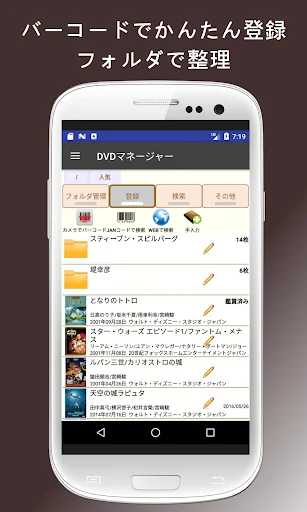
● You can freely create folders.
there is no limit.
You can create as many subfolders as you like in a folder.
Recommended for those who want to organize many DVDs.
● You can choose from 4 ways to register.
1) Read barcode
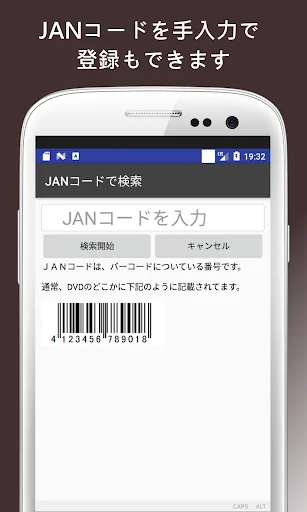
2) Enter the barcode manually
3) Search on the WEB (keyword)
4) Manual input
Since the barcode reading has a continuous mode, you can register many barcodes at once.
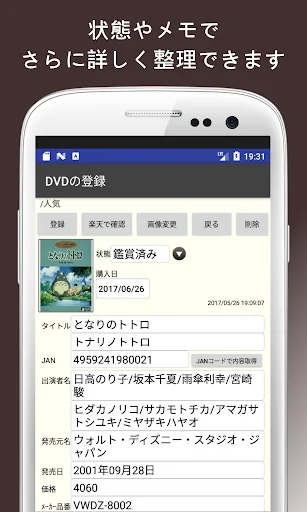
● You can enter the status and memo.
The status is set as follows.
Purchase schedule, rental schedule, unviewed, watched, etc.
You can enter characters freely.
"Buy more" etc.
What you enter will be displayed in the list from the next time, so just select it.
You can also search for status and memos.
● Sorting is free
You can combine and sort as many as 12 items.
The order of items can be set freely.
(The folder always comes to the top)
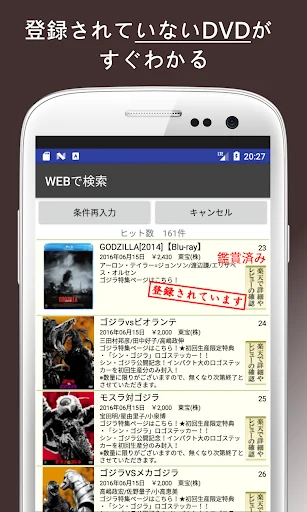
● In the WEB search, "Registered" is displayed when it is registered.
Therefore, you can immediately see what is not registered! !!
● You can search by the number of registrations ranking.
There is a ranking of the number on the search screen.
It is a total based on the number of registered lines.
"About TOP50"
If you are looking for a publisher that you often see, just select from the list.
● Backup / restore
You can back up in CSV format.
You can back up directly to the main unit or the cloud.
Cloud backup can also be used to change smartphone models.
● I am using Rakuten Books Book Search.
If you can't find it in the search, you can enter it manually.
Unfortunately, Amazon Search is not available by convention.
● You can check Rakuten Books immediately.
You can purchase it as it is and receive it with free shipping.
For reference when looking for the next movie to watch, or what did that performer / director not watch? Such.
Of course, it can also be used for management so that you do not see the same thing.
-----------------------------------------
・ Rental DVDs use a JAN code that is different from the products sold to the general public.
In that case, it may not be possible to search the barcode.
-----------------------------------------
The developer of this app is certified by Androider's Authorized Developer as a safe and secure app developer.
https://androider.jp/developer/c4f3b36cdf69a80e1d097ad014d87e29/
-----------------------------------------
The following is made with another application.
It has the same operability. Please use it.
Book management is <a href="https://play.google.com/store/apps/details?id=com.bsy_web.bookmanager&hl=ja"> [Collection Manager] </a>
CD management is <a href="https://play.google.com/store/apps/details?id=com.bsy_web.cdmanager"> [CD Manager] </a>
Magazine management is <a href="https://play.google.com/store/apps/details?id=com.bsy_web.magazinemanager"> [Magazine Manager] </a>
Cosmetics management is <a href="https://play.google.com/store/apps/details?id=com.bsy_web.mycosmehistory&hl=ja"> [My Cosmetics History] </a>
Books and magazines have different registered contents, so we decided to use different apps.
-----------------------------------------
Version upgrade history
2018.12.25 Ver1.2.0
・ Compatible with Android 8 (Oreo) and 9 (Pie)
・ Icon change
2017.07.31 Ver1.1.3
-Significantly improved display speed when changing folders
-Corrected the size of the built-in parcode reader
2017.03.02 Ver1.1.2
-Fixed an error in automatic folder search
2017.02.19 Ver1.1.0
・ Updated the development environment
-Added a built-in barcode reader
-Create backup and restore to the cloud (Dropbox)
・ Change the menu to a hamburger menu
-Added the limit setting for the number of displays in one folder to "Settings (advanced)".
・ Privacy policy added
2016.04.28 Ver1.0.19
-Changed to remember the previously selected position of "Approximately TOP50".
-Added display limit processing directly under the folder
2016.03.30 Ver1.0.18
-Added the function to search the title and performer name even in Kana when searching for registered DVDs.
-Added a function to display the menu by clicking the icon on the upper left of the home screen.
2015.07.02 Ver1.0.17
・ "Settings" is divided into "basic" and "advanced"
-The startup folder will be the last opened folder.
-The number of books in the folder is the total of the subfolders.
-Changed the backup saving method.
I devised to make it easier to synchronize with Google Drive, DropBox, etc.
2015.04.12 Ver1.0.16
・ Move FAQ to button menu
-Corrected the list display when "Search by ISBN"
2015.03.31 Ver1.0.15
-Added FAQ to the menu
・ Move the current total number of registrations to [About this app]
2015.03.10 Ver1.0.14
-Fixed the problem that TOP50 list cannot be selected.
-Adjust the characters in the book list display
-Added measures to be taken when images cannot be acquired from the camera.
2015.01.07 Ver1.0.13
-Changed the folder hierarchy display on the top of the main screen to a button.
・ Started selling tickets that can hide advertisements in premium services
2014.12.20 Ver1.0.12
-Fixed the case that the sponsor application could not be opened
2014.12.19 Ver1.0.11
-Change the backup image format
・ Introduced premium points that can hide advertisements
2014.12.03 Ver1.0.10
・ Completely change the outline of the menu button
-Added a character clear function to the search screen
-Added a function to display the number of hits in search results.
-Changed to include folders in all selections
-Added purchase date clear to the function in the dialog
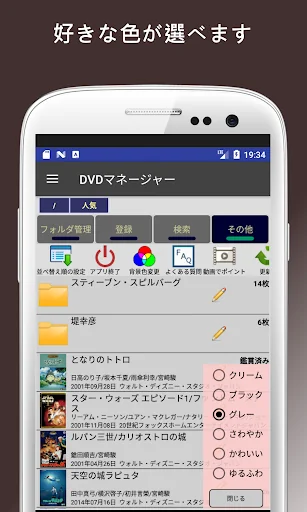
・ Change the background color white to cream
・ Add fast scroll in addition to WEB search
-Fixed the case that "Not applicable" may be displayed on the way when searching the web.
2014.11.18 Ver1.0.9
-Fixed the problem that "Background color change" could not be saved.
2014.11.17 Ver1.0.8
-Added multiple selection function to search
-Added "Exit app" and "Change background color" buttons
-Changed so that the screen does not rotate during backup / restore / batch deletion / batch movement.
2014.10.25 Ver1.0.7
-Fixed the problem that non-purchasable items such as out-of-stock items and discontinued items were not displayed in the results when acquiring Rakuten data.
2014.10.19 Ver1.0.6
-Fixed the problem that was deteriorated every time the image was saved (changed the handling of the image to jpg-> png)
2014.10.17 Ver1.0.5
・ Changed WEB search to additional scroll method
-Added a button to check reviews in WEB search results
-Fixed the problem that the initial value of "Status, Purchase date" was not set when reading continuous barcodes.
-Change the position of the folder creation icon
・ Change the advertising medium and display method
2014.09.21 Ver1.0.4
・ Fix the barcode application to the QR code scanner
2014.09.07 Ver1.0.3
-Added ranking function to registered search
2014.09.07 Ver1.0.2
・ Addition of ranking function to the WEB search screen
-Added 3 types of barcode reading operations for settings.
-Changed "Registered" to a stamp in Web search.
・ Changed to be able to move apps to SD card
-Change the "unregistered" image in the help
-Error handling during backup / restore (for Android 4.4 or later)
・ The font size of JAN code search has been greatly changed.
・ Added "About this app"
The functions verified by "Collection Manager" have been improved.
2014.08.13 Ver1.0.1
-Change the character position in the list. Dealing with the fact that many titles were longer than expected
2014.08.12 Ver1.0.0
Release
● You can freely create folders.
there is no limit.
You can create as many subfolders as you like in a folder.
Recommended for those who want to organize many DVDs.
● You can choose from 4 ways to register.
1) Read barcode
2) Enter the barcode manually
3) Search on the WEB (keyword)
4) Manual input
Since the barcode reading has a continuous mode, you can register many barcodes at once.
● You can enter the status and memo.
The status is set as follows.
Purchase schedule, rental schedule, unviewed, watched, etc.
You can enter characters freely.
"Buy more" etc.
What you enter will be displayed in the list from the next time, so just select it.
You can also search for status and memos.
● Sorting is free
You can combine and sort as many as 12 items.
The order of items can be set freely.
(The folder always comes to the top)
● In the WEB search, "Registered" is displayed when it is registered.
Therefore, you can immediately see what is not registered! !!
● You can search by the number of registrations ranking.
There is a ranking of the number on the search screen.
It is a total based on the number of registered lines.
"About TOP50"
If you are looking for a publisher that you often see, just select from the list.
● Backup / restore
You can back up in CSV format.
You can back up directly to the main unit or the cloud.
Cloud backup can also be used to change smartphone models.
● I am using Rakuten Books Book Search.
If you can't find it in the search, you can enter it manually.
Unfortunately, Amazon Search is not available by convention.
● You can check Rakuten Books immediately.
You can purchase it as it is and receive it with free shipping.
For reference when looking for the next movie to watch, or what did that performer / director not watch? Such.
Of course, it can also be used for management so that you do not see the same thing.
-----------------------------------------
・ Rental DVDs use a JAN code that is different from the products sold to the general public.
In that case, it may not be possible to search the barcode.
-----------------------------------------
The developer of this app is certified by Androider's Authorized Developer as a safe and secure app developer.
https://androider.jp/developer/c4f3b36cdf69a80e1d097ad014d87e29/
-----------------------------------------
The following is made with another application.
It has the same operability. Please use it.
Book management is <a href="https://play.google.com/store/apps/details?id=com.bsy_web.bookmanager&hl=ja"> [Collection Manager] </a>
CD management is <a href="https://play.google.com/store/apps/details?id=com.bsy_web.cdmanager"> [CD Manager] </a>
Magazine management is <a href="https://play.google.com/store/apps/details?id=com.bsy_web.magazinemanager"> [Magazine Manager] </a>
Cosmetics management is <a href="https://play.google.com/store/apps/details?id=com.bsy_web.mycosmehistory&hl=ja"> [My Cosmetics History] </a>
Books and magazines have different registered contents, so we decided to use different apps.
-----------------------------------------
Version upgrade history
2018.12.25 Ver1.2.0
・ Compatible with Android 8 (Oreo) and 9 (Pie)
・ Icon change
2017.07.31 Ver1.1.3
-Significantly improved display speed when changing folders
-Corrected the size of the built-in parcode reader
2017.03.02 Ver1.1.2
-Fixed an error in automatic folder search
2017.02.19 Ver1.1.0
・ Updated the development environment
-Added a built-in barcode reader
-Create backup and restore to the cloud (Dropbox)
・ Change the menu to a hamburger menu
-Added the limit setting for the number of displays in one folder to "Settings (advanced)".
・ Privacy policy added
2016.04.28 Ver1.0.19
-Changed to remember the previously selected position of "Approximately TOP50".
-Added display limit processing directly under the folder
2016.03.30 Ver1.0.18
-Added the function to search the title and performer name even in Kana when searching for registered DVDs.
-Added a function to display the menu by clicking the icon on the upper left of the home screen.
2015.07.02 Ver1.0.17
・ "Settings" is divided into "basic" and "advanced"
-The startup folder will be the last opened folder.
-The number of books in the folder is the total of the subfolders.
-Changed the backup saving method.
I devised to make it easier to synchronize with Google Drive, DropBox, etc.
2015.04.12 Ver1.0.16
・ Move FAQ to button menu
-Corrected the list display when "Search by ISBN"
2015.03.31 Ver1.0.15
-Added FAQ to the menu
・ Move the current total number of registrations to [About this app]
2015.03.10 Ver1.0.14
-Fixed the problem that TOP50 list cannot be selected.
-Adjust the characters in the book list display
-Added measures to be taken when images cannot be acquired from the camera.
2015.01.07 Ver1.0.13
-Changed the folder hierarchy display on the top of the main screen to a button.
・ Started selling tickets that can hide advertisements in premium services
2014.12.20 Ver1.0.12
-Fixed the case that the sponsor application could not be opened
2014.12.19 Ver1.0.11
-Change the backup image format
・ Introduced premium points that can hide advertisements
2014.12.03 Ver1.0.10
・ Completely change the outline of the menu button
-Added a character clear function to the search screen
-Added a function to display the number of hits in search results.
-Changed to include folders in all selections
-Added purchase date clear to the function in the dialog
・ Change the background color white to cream
・ Add fast scroll in addition to WEB search
-Fixed the case that "Not applicable" may be displayed on the way when searching the web.
2014.11.18 Ver1.0.9
-Fixed the problem that "Background color change" could not be saved.
2014.11.17 Ver1.0.8
-Added multiple selection function to search
-Added "Exit app" and "Change background color" buttons
-Changed so that the screen does not rotate during backup / restore / batch deletion / batch movement.
2014.10.25 Ver1.0.7
-Fixed the problem that non-purchasable items such as out-of-stock items and discontinued items were not displayed in the results when acquiring Rakuten data.
2014.10.19 Ver1.0.6
-Fixed the problem that was deteriorated every time the image was saved (changed the handling of the image to jpg-> png)
2014.10.17 Ver1.0.5
・ Changed WEB search to additional scroll method
-Added a button to check reviews in WEB search results
-Fixed the problem that the initial value of "Status, Purchase date" was not set when reading continuous barcodes.
-Change the position of the folder creation icon
・ Change the advertising medium and display method
2014.09.21 Ver1.0.4
・ Fix the barcode application to the QR code scanner
2014.09.07 Ver1.0.3
-Added ranking function to registered search
2014.09.07 Ver1.0.2
・ Addition of ranking function to the WEB search screen
-Added 3 types of barcode reading operations for settings.
-Changed "Registered" to a stamp in Web search.
・ Changed to be able to move apps to SD card
-Change the "unregistered" image in the help
-Error handling during backup / restore (for Android 4.4 or later)
・ The font size of JAN code search has been greatly changed.
・ Added "About this app"
The functions verified by "Collection Manager" have been improved.
2014.08.13 Ver1.0.1
-Change the character position in the list. Dealing with the fact that many titles were longer than expected
2014.08.12 Ver1.0.0
Release
Profile & Insights
Everything we know — and don't — about this app and its company.
Identification
- App name
- DVDマネージャー(DVD/ブルーレイ管理)
- Developer
- Busey
- Bundle ID
- com.bsy_web.dvdmanager
- App Store URL
- Open in App Store
- Category
- Entertainment
- Content rating
- Not found
- Languages
- Not found
Company
- Website
- Not found
- Tagline
- Not found
- Description
- Not found
- Founded
- Not found
- HQ / Address
- Not found
- Employees
- Not found
- Logo
- Not found
Revenue
- Verified revenue / mo
- Not found
- AI revenue estimate / mo
- Not found
- AI annual estimate
- Not found
- ML model estimate / mo
- $328/mo
- Top-grossing rank
- Not found
- All-time revenue
- Not found
- Pricing
- Not found
Founder
- Name
- Not found
- X / Twitter
- Not found
- Not found
- GitHub
- Not found
- X followers
- Not found
- Public statements
- Not found
Funding
- Total raised
- Not found
- Last round
- Not found
- Investors
- Not found
- Crunchbase
- Not found
- AngelList
- Not found
Press & Links
- Articles found
- Not found
- Listed on
- Not found
- Blog
- Not found
- Press / News
- Not found
Contacts & Socials
- Socials
- Not found
- Not found
- Phone
- Not found
- Contact page
- Not found
- About page
- Not found
Profile is built from iTunes Lookup + developer site scrape + ML revenue model. Empty fields show "Not found" — additional sources (Crunchbase, X, IndieHackers, Acquire.com) coming.
Full revenue analysis
Read the article-style breakdown for DVDマネージャー(DVD/ブルーレイ管理): category rank, percentile, growth signal, comparable apps, and how the forecast is calibrated against verified-MRR anchors in this niche.