75
BU Score
Strong
Cast to TV+ Chromecast Roku TV
✍️ BU Analytics Review
“
Cast to TV+ Chromecast Roku TV is an Android app from Castify in the Video Players & Editors category, currently rated 4.6★ across 84,946 ratings. Initial signal reads as mixed reviews — supporters praise core features while critics cite stability/value gaps.
Our BU Score puts it at 75 — Strong (healthy traction). For a Video Players & Editors app, that means healthy traction.
Track changes month-over-month in the Performance section below — live snapshot history and revenue forecast included.
creator
📊 Performance Tracking LIVE
Loading…
Rating
—
Reviews
—
Forecast Revenue / mo
—
Snapshots tracked
0
since first record
Range:
💰 Forecast Revenue / mo
MODELRevenue forecast computed from BU's 234 trigger model on each snapshot. Calibrated against ground-truth from 58 verified-revenue apps.
🔬Forecast Breakdown — Why This Estimate?Top 3 of 3 triggers
Our ML model uses 200+ signals from public data. These are the most influential for this app:
| Mid install base (84,946 ratings)METRIC | +$5,500 | |
| Excellent rating (4.6★)METRIC | +$2,200 | |
| Ad-supported / freemiumMETRIC | +$600 |
METRIC = structural app data · REVIEW = mined from user reviews · ✓ VERIFIED = Stripe-verified anchor (TrustMRR)
📈 Reviews Growth
LIVECumulative review count from first BU snapshot. Each point = a tracked update.
⭐ Rating Trend
LIVEAverage rating evolution. Updates with each new review batch.
🗓️ Snapshot Timeline
HISTORYEach bar shows a tracked update and the metric delta from the previous snapshot.
App Specs
🔐 Own this app? Claim & verify MRR →🔖 v12.294🔄 updated 2w ago📂 Video Players & Editors💰 Free
📝 About this app
<b>Castify</b> Official app
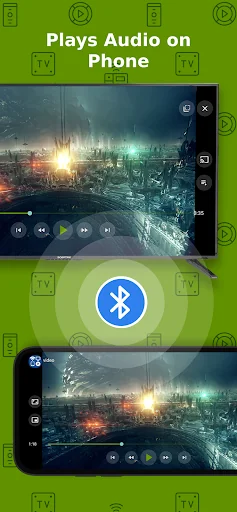
Cast videos, music, photos...or watch on phone.
<b>All features are completely free. Pro version only removes app's ads.</b>
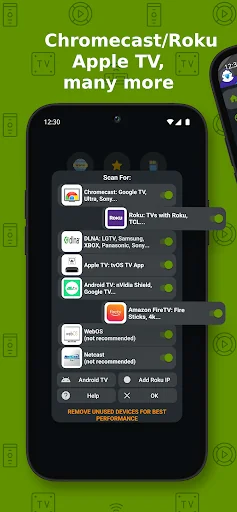
<b>Streaming Devices:</b>
Chromecast 1, 2, and Ultra HD 4K
Roku Premiere, Express, Streaming Stick, or Roku TV
Fire TV or Fire Stick
DLNA receivers
Xbox One, Xbox 360
Google Cast receivers
Smart TVs with DLNA built-in including: LG TV, TCL, Phillips, Sony Bravia, Samsung, Sharp, Panasonic, and many others. Please check your TV's user manual.
Any Web Browser: can send videos to a web browser such as Chrome, Firefox, Amazon Silk, a browser on TV or PlayStation 4.
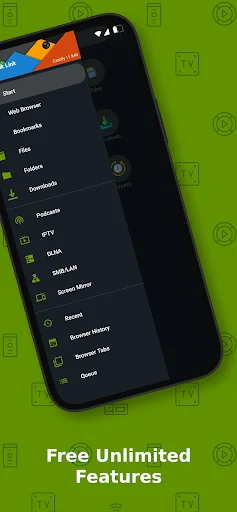
<b>Play From Sources: </b>
- Phone Files
- Browser Websites
- IPTV
- Podcasts
- DLNA Servers
- SMB, Samba, NAS, LAN
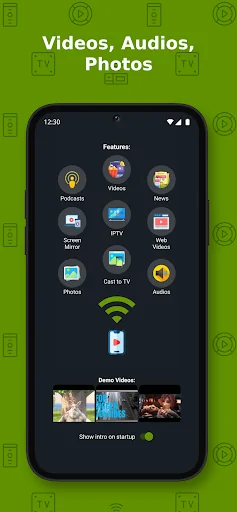
<b>Castify Features:</b>
- AI Subtitle Generate: create subtitles for any given video
- AI Subtitle Translation: translate SRT subtitles
- Cast to TV, video, movie, music, or photos
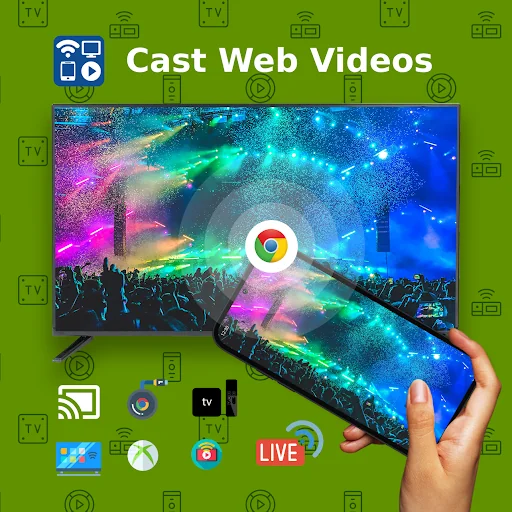
- Cast web videos found online from websites
- Universal Remote Controls for Roku, Android TV, Samsung, LGTV, FireTV
- Popup Blocker
- Screen Mirroring
- IPTV supporting m3u playlists
- Stream to TV from local files on phone to Chromecast, Roku, Xbox, DLNA
- Website Bookmarks
- Searching of videos on any websites
- Picture in Picture(PiP)
- Roku Channel TV App
- Subtitles for Chromecast & Roku
- Podcasts
- Cast to any Web Browser, Chrome, etc
This app works best with Roku & Google Chromecast. Users may experience limited functionalities with other casting receivers.
Cast & Stream movies, videos, or music from web browser to TV, or from your IPTV providers.
Cast phone's movie, music, or photos found on your phone/tablet to TV with compatible streaming devices.
<b>Usage Steps:</b>
1. Use the app's browser to navigate to a website.
2. The browser will try to find any playable video, movies, or music on that site.
3. Then play it locally on the Phone/Tablet, or cast to TV with Chromecast or one of the compatible streaming receivers.
<b>Supported Formats:</b>
MP4 movie
MKV files
MP3 music & podcast
JPG, PNG images
HTML5 video
HLS Live Streaming
IPTV m3u file or urls
4K and HD where available
<b>Features & Limitations of Some Streaming Receivers</b>
Screen Mirroring:
- The screen mirror feature is available only on newer Android devices.
Roku Streaming devices & TV:
- Screen Mirroring can be enabled in settings
- Remote control
Apple TV AirPlay:
- AirPlay must be enabled in settings
- Battery Optimization must be disabled for Android 6.0 Marshmallow and up, local cast of audio and photo not supported. MKV files not supported. Some urls formats not supported.
Xbox One & Xbox 360:
- DLNA must be enabled in settings
Fire TV: some video movie formats not supported.
The following streaming devices and Smart TVs are also supported: DLNA devices, Android TV, Xbox One & Xbox 360, WebOS, Netcast
Some Smart TVs have Google Chromecast app (or DLNA) built-in.
If you have any of those models, please check if it has one of the streaming receivers to see if it's compatible to cast to TV.
Castify does not modify the video sources. It only sends the original source to your streaming receivers. The app does not hosts any content. Therefore the compatibility and availability of the videos are dependent on the source websites themselves.
-This app only casts from websites that uses public format. Proprietary video & movie formats will not cast to TV.
-If a video is not playing or a disconnection occurs, it could be several reasons:
1. The ISP(Internet Service Provider)
2. The source website itself
3. Insufficient WIFI signal strength
<b>Troubleshooting:</b>
-Ensure your WIFI connection is stable and on the same network. Streaming online movies to TV requires a good internet connection.
-<b>Most connection problems can be resolved by restarting the casting receivers or phone.</b>
-Flash movie websites are not supported by stream device manufacturers.
Cast videos, music, photos...or watch on phone.
<b>All features are completely free. Pro version only removes app's ads.</b>
<b>Streaming Devices:</b>
Chromecast 1, 2, and Ultra HD 4K
Roku Premiere, Express, Streaming Stick, or Roku TV
Fire TV or Fire Stick
DLNA receivers
Xbox One, Xbox 360
Google Cast receivers
Smart TVs with DLNA built-in including: LG TV, TCL, Phillips, Sony Bravia, Samsung, Sharp, Panasonic, and many others. Please check your TV's user manual.
Any Web Browser: can send videos to a web browser such as Chrome, Firefox, Amazon Silk, a browser on TV or PlayStation 4.
<b>Play From Sources: </b>
- Phone Files
- Browser Websites
- IPTV
- Podcasts
- DLNA Servers
- SMB, Samba, NAS, LAN
<b>Castify Features:</b>
- AI Subtitle Generate: create subtitles for any given video
- AI Subtitle Translation: translate SRT subtitles
- Cast to TV, video, movie, music, or photos
- Cast web videos found online from websites
- Universal Remote Controls for Roku, Android TV, Samsung, LGTV, FireTV
- Popup Blocker
- Screen Mirroring
- IPTV supporting m3u playlists
- Stream to TV from local files on phone to Chromecast, Roku, Xbox, DLNA
- Website Bookmarks
- Searching of videos on any websites
- Picture in Picture(PiP)
- Roku Channel TV App
- Subtitles for Chromecast & Roku
- Podcasts
- Cast to any Web Browser, Chrome, etc
This app works best with Roku & Google Chromecast. Users may experience limited functionalities with other casting receivers.
Cast & Stream movies, videos, or music from web browser to TV, or from your IPTV providers.
Cast phone's movie, music, or photos found on your phone/tablet to TV with compatible streaming devices.
<b>Usage Steps:</b>
1. Use the app's browser to navigate to a website.
2. The browser will try to find any playable video, movies, or music on that site.
3. Then play it locally on the Phone/Tablet, or cast to TV with Chromecast or one of the compatible streaming receivers.
<b>Supported Formats:</b>
MP4 movie
MKV files
MP3 music & podcast
JPG, PNG images
HTML5 video
HLS Live Streaming
IPTV m3u file or urls
4K and HD where available
<b>Features & Limitations of Some Streaming Receivers</b>
Screen Mirroring:
- The screen mirror feature is available only on newer Android devices.
Roku Streaming devices & TV:
- Screen Mirroring can be enabled in settings
- Remote control
Apple TV AirPlay:
- AirPlay must be enabled in settings
- Battery Optimization must be disabled for Android 6.0 Marshmallow and up, local cast of audio and photo not supported. MKV files not supported. Some urls formats not supported.
Xbox One & Xbox 360:
- DLNA must be enabled in settings
Fire TV: some video movie formats not supported.
The following streaming devices and Smart TVs are also supported: DLNA devices, Android TV, Xbox One & Xbox 360, WebOS, Netcast
Some Smart TVs have Google Chromecast app (or DLNA) built-in.
If you have any of those models, please check if it has one of the streaming receivers to see if it's compatible to cast to TV.
Castify does not modify the video sources. It only sends the original source to your streaming receivers. The app does not hosts any content. Therefore the compatibility and availability of the videos are dependent on the source websites themselves.
-This app only casts from websites that uses public format. Proprietary video & movie formats will not cast to TV.
-If a video is not playing or a disconnection occurs, it could be several reasons:
1. The ISP(Internet Service Provider)
2. The source website itself
3. Insufficient WIFI signal strength
<b>Troubleshooting:</b>
-Ensure your WIFI connection is stable and on the same network. Streaming online movies to TV requires a good internet connection.
-<b>Most connection problems can be resolved by restarting the casting receivers or phone.</b>
-Flash movie websites are not supported by stream device manufacturers.
Profile & Insights
Everything we know — and don't — about this app and its company.
Identification
- App name
- Cast to TV+ Chromecast Roku TV
- Developer
- Castify
- Bundle ID
- com.castify
- App Store URL
- Open in App Store
- Category
- Video Players & Editors
- Content rating
- Not found
- Languages
- Not found
Company
- Website
- Not found
- Tagline
- Not found
- Description
- Not found
- Founded
- Not found
- HQ / Address
- Not found
- Employees
- Not found
- Logo
- Not found
Revenue
- Verified revenue / mo
- Not found
- AI revenue estimate / mo
- Not found
- AI annual estimate
- Not found
- ML model estimate / mo
- $2.2K/mo
- Top-grossing rank
- Not found
- All-time revenue
- Not found
- Pricing
- Not found
Founder
- Name
- Not found
- X / Twitter
- Not found
- Not found
- GitHub
- Not found
- X followers
- Not found
- Public statements
- Not found
Funding
- Total raised
- Not found
- Last round
- Not found
- Investors
- Not found
- Crunchbase
- Not found
- AngelList
- Not found
Press & Links
- Articles found
- Not found
- Listed on
- Not found
- Blog
- Not found
- Press / News
- Not found
Contacts & Socials
- Socials
- Not found
- Not found
- Phone
- Not found
- Contact page
- Not found
- About page
- Not found
Profile is built from iTunes Lookup + developer site scrape + ML revenue model. Empty fields show "Not found" — additional sources (Crunchbase, X, IndieHackers, Acquire.com) coming.
More Video Players & Editors
TikTok
★ 4.5 · 23,257,202 reviews
MX Player
★ 4.2 · 13,979,081 reviews
CapCut - Video Editor
★ 3.5 · 12,702,185 reviews
VivaVideo - Video Cut & Editor
★ 4.3 · 12,348,610 reviews
Likee - Short Video Community
★ 4.4 · 11,403,905 reviews
Kwai - Cool Video & Social Fun
★ 4.0 · 10,870,105 reviews
SnackVideo
★ 4.5 · 8,496,328 reviews
YouCut - Video Editor & Maker
★ 4.8 · 8,441,660 reviews
Browse BU Analytics
📚 All 55,000+ Books
🜍 Alchemy & Hermeticism
🔮 Magic & Ritual
🌙 Witchcraft & Paganism
⭐ Astrology & Cosmology
🃏 Divination & Tarot
📜 Video Players & Editors
✡️ Kabbalah & Jewish Mysticism
🕉️ Mysticism & Contemplation
🕊️ Theosophy & Anthroposophy
🏛️ Freemasonry & Secret Societies
👻 Spiritualism & Afterlife
📖 Sacred Texts & Gnosticism
👁️ Supernatural & Occult Fiction
🧘 Spiritual Development
📚 Esoteric History & Biography
Info
About BU Analytics