71
BU Score
Strong
Stop Motion Studio
✍️ BU Analytics Review
“
Stop Motion Studio is an Android app from Cateater in the Photography category, currently rated 4.1★ across 125,613 ratings. Initial signal reads as mixed reviews — supporters praise core features while critics cite stability/value gaps.
Our BU Score puts it at 71 — Strong (healthy traction). For a Photography app, that means healthy traction.
Track changes month-over-month in the Performance section below — live snapshot history and revenue forecast included.
creator
📊 Performance Tracking LIVE
Loading…
Rating
—
Reviews
—
Forecast Revenue / mo
—
Snapshots tracked
0
since first record
Range:
💰 Forecast Revenue / mo
MODELRevenue forecast computed from BU's 234 trigger model on each snapshot. Calibrated against ground-truth from 58 verified-revenue apps.
🔬Forecast Breakdown — Why This Estimate?Top 3 of 3 triggers
Our ML model uses 200+ signals from public data. These are the most influential for this app:
| High install base (125,613 ratings)METRIC | +$12,000 | |
| Good rating (4.1★)METRIC | +$800 | |
| Ad-supported / freemiumMETRIC | +$600 |
METRIC = structural app data · REVIEW = mined from user reviews · ✓ VERIFIED = Stripe-verified anchor (TrustMRR)
📈 Reviews Growth
LIVECumulative review count from first BU snapshot. Each point = a tracked update.
⭐ Rating Trend
LIVEAverage rating evolution. Updates with each new review batch.
🗓️ Snapshot Timeline
HISTORYEach bar shows a tracked update and the metric delta from the previous snapshot.
App Specs
🔐 Own this app? Claim & verify MRR →🔖 v25.12.8582🔄 updated 4mo ago📂 Photography💰 Free
📝 About this app
Get Stop Motion Studio, the world’s easiest app to get you into stop motion moviemaking today!
With its easy-to-use interface, Stop Motion Studio lets you create beautiful movies like Wallace and Gromit or those groovy Lego shorts on YouTube. It's simple to use, deceptively powerful, and insanely fun to play with.
Stop Motion Studio is a powerful, full-featured movie editor with a whole host of features:
• A simplistic, easy-to-use interface
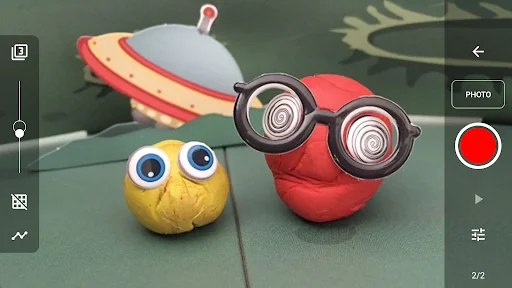
• Overlay mode showing the differences between frames
• Animation guides to position animated objects more easily
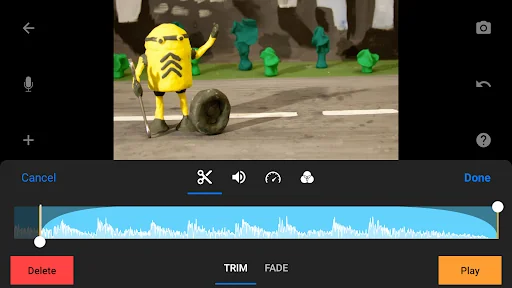
• Copy, paste, cut, and insert frames at any position
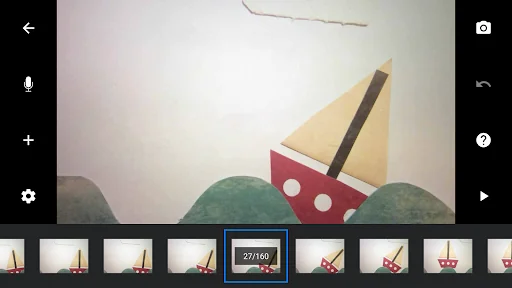
• Interactive timeline so you never get lost, even if you have hundreds of frames
Create beautiful movies:
• Choose from a whole lot of unique titles, credits, and text cards, or create your very own with the built-in editor
• Give your movie the perfect look with different video filters
• Enhance your movie with different foregrounds, backgrounds, aspect ratios, and fade effects
• Create a soundtrack using built-in music, sound effects, songs from your music library, or your narration
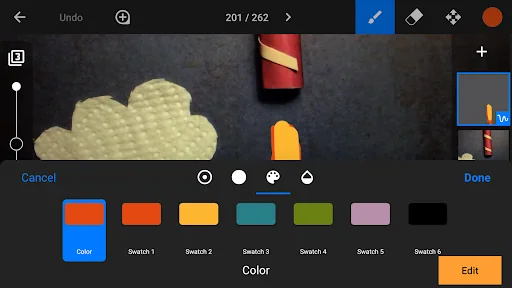
• Rotoscoping: Import video clips and create stunning animations by drawing over them.
• Green Screen: Change the background of your scene to make the figures you capture fly or appear anywhere you can imagine.
• Animation Guides: Use the animation guides editor to add gridlines, draw a marker or set up a movement path.
• Import Media: Import photos from your photo library into your movie.
• Connect a keyboard and use simple shortcuts to edit movies quickly
Capture like a pro:
• Capture with an adjustable time interval feature
• Full camera control with automatic or manual white balance, focus and exposure, ISO, and shutter speed
• Use a second device as a remote camera
Powerful, built-in layer-based image editor:
• Add text and speech bubbles or create titles
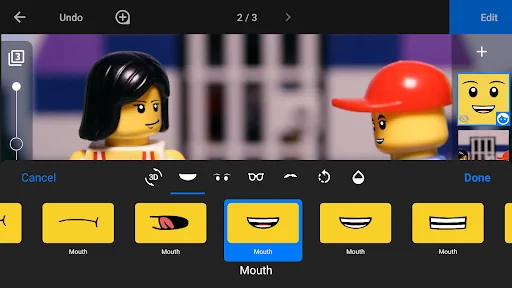
• Add facial expressions to figures
• Touch up and enhance images, sketch, and paint
• Wipe away unwanted objects with the eraser tool
• Merge frames to simulate fast movement
Share with friends and family:
• Save to your photo library or share to YouTube in 4K or 1080p
• Save as animated GIF
• Save all images for further processing
• Easily transfer projects between devices using Dropbox or Google Drive
• Start creating on your mobile device and continue right where you left off on your desktop computer
Learn to animate:
• Watch the included tutorial videos
• Read the comprehensive manual
• Use the animation tips and tricks provided
* Some features require in-app purchases. All features are included in the Pro version.
With its easy-to-use interface, Stop Motion Studio lets you create beautiful movies like Wallace and Gromit or those groovy Lego shorts on YouTube. It's simple to use, deceptively powerful, and insanely fun to play with.
Stop Motion Studio is a powerful, full-featured movie editor with a whole host of features:
• A simplistic, easy-to-use interface
• Overlay mode showing the differences between frames
• Animation guides to position animated objects more easily
• Copy, paste, cut, and insert frames at any position
• Interactive timeline so you never get lost, even if you have hundreds of frames
Create beautiful movies:
• Choose from a whole lot of unique titles, credits, and text cards, or create your very own with the built-in editor
• Give your movie the perfect look with different video filters
• Enhance your movie with different foregrounds, backgrounds, aspect ratios, and fade effects
• Create a soundtrack using built-in music, sound effects, songs from your music library, or your narration
• Rotoscoping: Import video clips and create stunning animations by drawing over them.
• Green Screen: Change the background of your scene to make the figures you capture fly or appear anywhere you can imagine.
• Animation Guides: Use the animation guides editor to add gridlines, draw a marker or set up a movement path.
• Import Media: Import photos from your photo library into your movie.
• Connect a keyboard and use simple shortcuts to edit movies quickly
Capture like a pro:
• Capture with an adjustable time interval feature
• Full camera control with automatic or manual white balance, focus and exposure, ISO, and shutter speed
• Use a second device as a remote camera
Powerful, built-in layer-based image editor:
• Add text and speech bubbles or create titles
• Add facial expressions to figures
• Touch up and enhance images, sketch, and paint
• Wipe away unwanted objects with the eraser tool
• Merge frames to simulate fast movement
Share with friends and family:
• Save to your photo library or share to YouTube in 4K or 1080p
• Save as animated GIF
• Save all images for further processing
• Easily transfer projects between devices using Dropbox or Google Drive
• Start creating on your mobile device and continue right where you left off on your desktop computer
Learn to animate:
• Watch the included tutorial videos
• Read the comprehensive manual
• Use the animation tips and tricks provided
* Some features require in-app purchases. All features are included in the Pro version.
Profile & Insights
Everything we know — and don't — about this app and its company.
Identification
- App name
- Stop Motion Studio
- Developer
- Cateater
- Bundle ID
- com.cateater.stopmotionstudio
- App Store URL
- Open in App Store
- Category
- Photography
- Content rating
- Not found
- Languages
- Not found
Company
- Website
- Not found
- Tagline
- Not found
- Description
- Not found
- Founded
- Not found
- HQ / Address
- Not found
- Employees
- Not found
- Logo
- Not found
Revenue
- Verified revenue / mo
- Not found
- AI revenue estimate / mo
- Not found
- AI annual estimate
- Not found
- ML model estimate / mo
- $2.4K/mo
- Top-grossing rank
- Not found
- All-time revenue
- Not found
- Pricing
- Not found
Founder
- Name
- Not found
- X / Twitter
- Not found
- Not found
- GitHub
- Not found
- X followers
- Not found
- Public statements
- Not found
Funding
- Total raised
- Not found
- Last round
- Not found
- Investors
- Not found
- Crunchbase
- Not found
- AngelList
- Not found
Press & Links
- Articles found
- Not found
- Listed on
- Not found
- Blog
- Not found
- Press / News
- Not found
Contacts & Socials
- Socials
- Not found
- Not found
- Phone
- Not found
- Contact page
- Not found
- About page
- Not found
Profile is built from iTunes Lookup + developer site scrape + ML revenue model. Empty fields show "Not found" — additional sources (Crunchbase, X, IndieHackers, Acquire.com) coming.
More Photography
Google Photos
★ 4.4 · 53,544,116 reviews
Video Editor & Maker - InShot
★ 4.8 · 24,090,534 reviews
Picsart AI Photo Editor, Video
★ 4.0 · 12,205,523 reviews
B612 AI Photo&Video Editor
★ 4.1 · 7,265,225 reviews
Photo Lab Picture Editor & Art
★ 4.5 · 6,569,016 reviews
Retrica
★ 3.8 · 5,928,297 reviews
Remini - AI Photo Enhancer
★ 4.1 · 5,771,084 reviews
FaceApp: Perfect Face Editor
★ 4.3 · 5,344,978 reviews
Browse BU Analytics
📚 All 55,000+ Books
🜍 Alchemy & Hermeticism
🔮 Magic & Ritual
🌙 Witchcraft & Paganism
⭐ Astrology & Cosmology
🃏 Divination & Tarot
📜 Photography
✡️ Kabbalah & Jewish Mysticism
🕉️ Mysticism & Contemplation
🕊️ Theosophy & Anthroposophy
🏛️ Freemasonry & Secret Societies
👻 Spiritualism & Afterlife
📖 Sacred Texts & Gnosticism
👁️ Supernatural & Occult Fiction
🧘 Spiritual Development
📚 Esoteric History & Biography
Info
About BU Analytics